
In this Areopa webinar, Tobias Fenster (Managing Partner at 4PS Germany, Microsoft Regional Director and dual MVP) and Markus Lippert (Engineer at COSMO CONSULT and technical lead for Cosmo Alpaca) explain how to containerize the build agents and runners behind your CI/CD pipelines. Moderated by Luc van Vugt, the session covers why self-hosted, containerized agents make sense, how to build the container images yourself, and how both presenters run this in production for Azure DevOps and GitHub.
What Are Build Agents and Runners?
Every CI/CD pipeline needs something to actually run the code: downloading source, compiling the app, running automated tests, and pushing artifacts to storage. That “something” is the build agent (Azure DevOps terminology) or runner (GitHub terminology). Azure Pipelines and GitHub Actions (also called workflows) both provide standard, cloud-hosted agents, but you can also run your own.
A pipeline run is triggered by an event in the repository — a push, a pull request, a tag, or a schedule — and an agent with the right capabilities picks up the job. The agent needs to include whatever tools, frameworks, and SDKs the pipeline requires: for Business Central that typically means an AL compiler and possibly BcContainerHelper, while a .NET build needs the .NET SDK.
Why Self-Hosted Agents and Runners?
Fenster outlined the main reasons to move away from the standard cloud-hosted agents:
- Full control over installed tools, versions, resources, and performance (and therefore cost).
- Caching — a self-hosted agent that is reused can keep downloaded artifacts and dependencies in place between runs.
- Parallelism — you decide how many builds run at the same time, for example building the current, next major, and next minor release of an AppSource app in parallel.
Pricing was also compared: Azure DevOps includes one Microsoft-hosted parallel job (1,800 minutes/month) plus one self-hosted job with unlimited minutes per organization, with extra parallel jobs billed per month, while GitHub Actions is free for public repositories and self-hosted runners, with a metered allowance for private repositories. Neither presenter recommended one platform over the other on cost alone — it depends on your Visual Studio subscriptions, build volume, and parallelism needs.
📖 Docs: Azure Pipelines agents — Microsoft’s reference on self-hosted vs. Microsoft-hosted agents, supported operating systems, and installation paths.
Why Containerize Your Agents?
Self-hosted agents running on a VM or bare metal accumulate side effects over hundreds or thousands of builds — leftover files, configuration drift, mismatched tool versions — until pipelines start behaving inconsistently. Running the agent in a container avoids that:
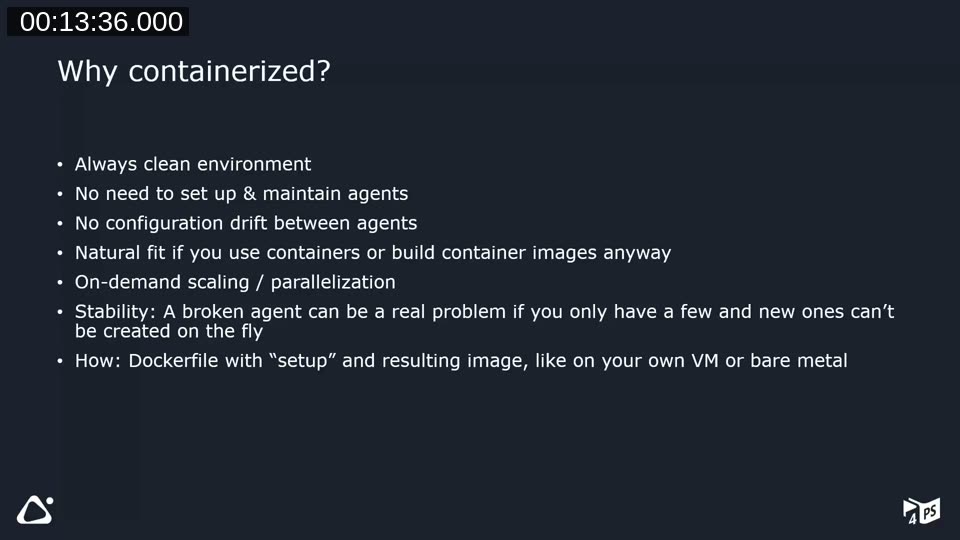
- Every new container starts from a clean, known image.
- There is almost no setup or maintenance beyond building the image — spinning up a new container replaces manual agent configuration.
- No configuration drift between agents, since every container is created from the same Dockerfile.
- It’s a natural fit if you already use containers, for example with BcContainerHelper to spin up Business Central containers for testing.
- On-demand scaling and parallelization become straightforward — start more containers when you need more agents.
- Recovering from a broken agent is a matter of creating a new container instead of repairing a VM under pressure.
On-Demand vs. Pre-Created Agents
The presenters distinguished two ways to run containerized agents:
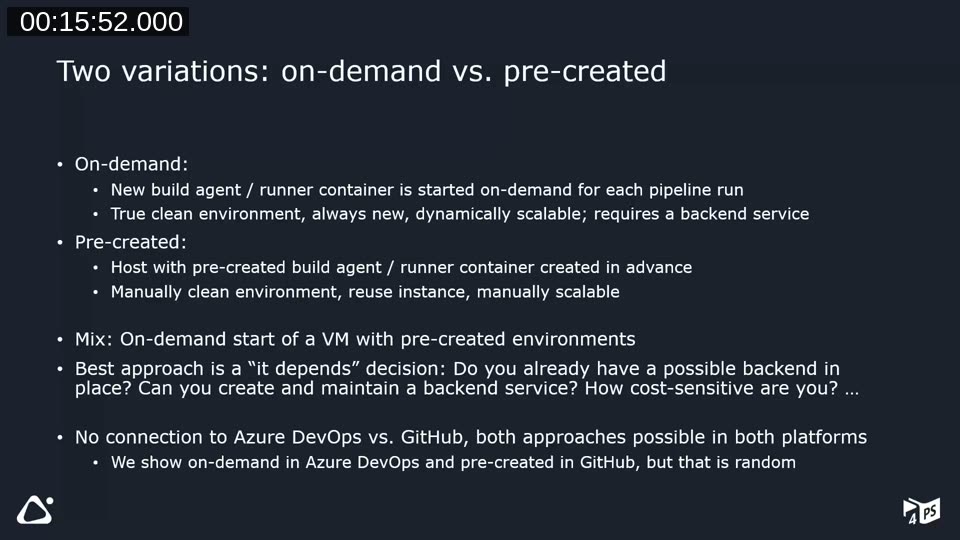
- On-demand: a new build agent or runner container is started for every pipeline run. This gives a truly clean, dynamically scalable environment, but requires a backend service that can create and remove containers on request.
- Pre-created: a host VM or bare-metal machine has a build agent or runner container created in advance and reused across runs. The environment is only manually cleaned (by recreating the container) and manually scaled, but there is no need for a backend orchestration service.
A mix is also possible: starting a VM on demand that already has pre-created containers on it. Which approach fits best depends on whether you already have (or can build) a backend service, how cost-sensitive you are, and whether the VM can run all the time. The choice is independent of platform — both approaches work on Azure DevOps and on GitHub. The webinar demonstrates on-demand agents on Azure DevOps and pre-created runners on GitHub, but that split is arbitrary and reflects what each presenter already had running.
Building an Azure DevOps Build Agent Container
Lippert walked through the Dockerfile used at COSMO CONSULT to build the Azure DevOps agent image:
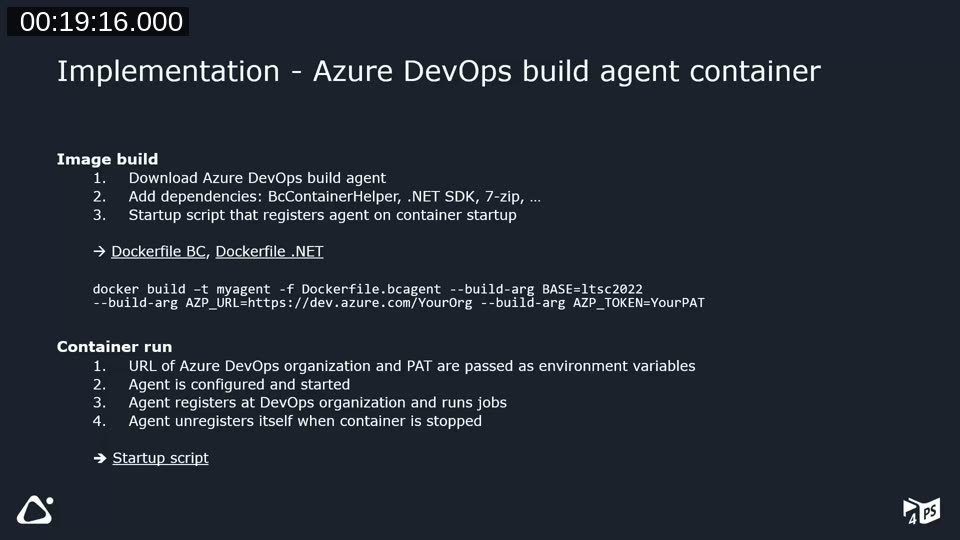
- Download the Azure DevOps build agent binaries from the organization, authenticating with a personal access token (PAT).
- Add dependencies — for Business Central builds, BcContainerHelper, 7-Zip, and Docker CLI; for .NET builds, the .NET SDK.
- Add a startup script that registers the agent with the organization when the container starts, and unregisters it when the container stops.
The image is built with a standard docker build command, passing the base image, organization URL, and PAT as build arguments:
docker build -t myagent -f Dockerfile.bcagent --build-arg BASE=ltsc2022 `
  --build-arg AZP_URL=https://dev.azure.com/YourOrg --build-arg AZP_TOKEN=YourPAT
At container startup, the organization URL and PAT are passed as environment variables. The startup script calls the agent’s configuration script to register the agent with a name and agent pool, starts it so it can pick up jobs, and — in a finally block — unregisters the agent again when the container is stopped or removed.
Real-Life Example: On-Demand Agents in Cosmo Alpaca
COSMO CONSULT uses on-demand agents extensively in Cosmo Alpaca, running around 600 pipelines a day. The architecture adds a container API in front of the existing container infrastructure that already runs Business Central and Alpaca containers:
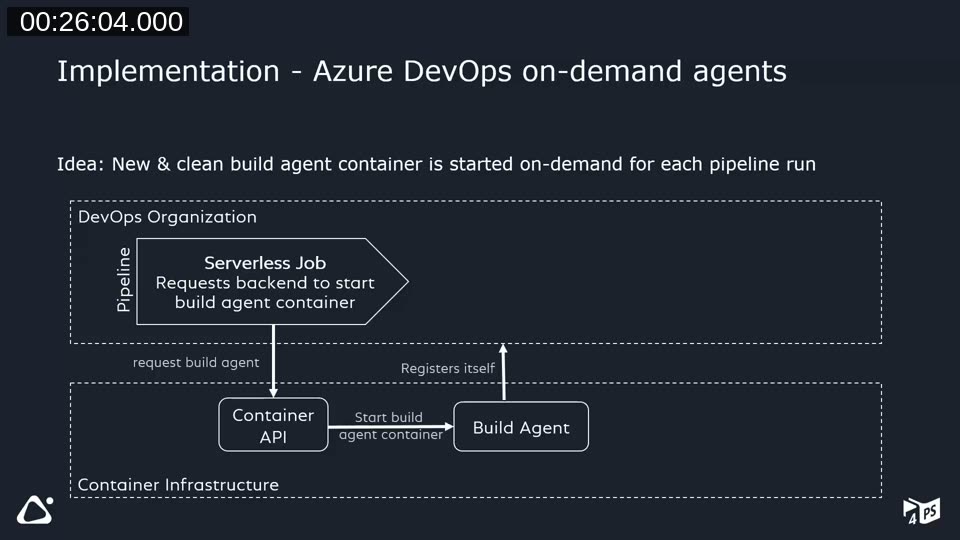
A serverless job at the start of the pipeline calls the container API to request a build agent container; the container API starts it, and the container registers itself with the organization through the same startup script. The pipeline then runs its normal build steps against that agent. A second serverless job at the end of the pipeline calls the container API again to remove the agent container.
Lippert demonstrated this live against a real Azure DevOps pipeline and Portainer instance, showing the “Start Agent Container” and “Stop Agent Container” jobs bracketing the actual build job, and the resulting container’s environment variables (agent name, pool, and URL) in Portainer:
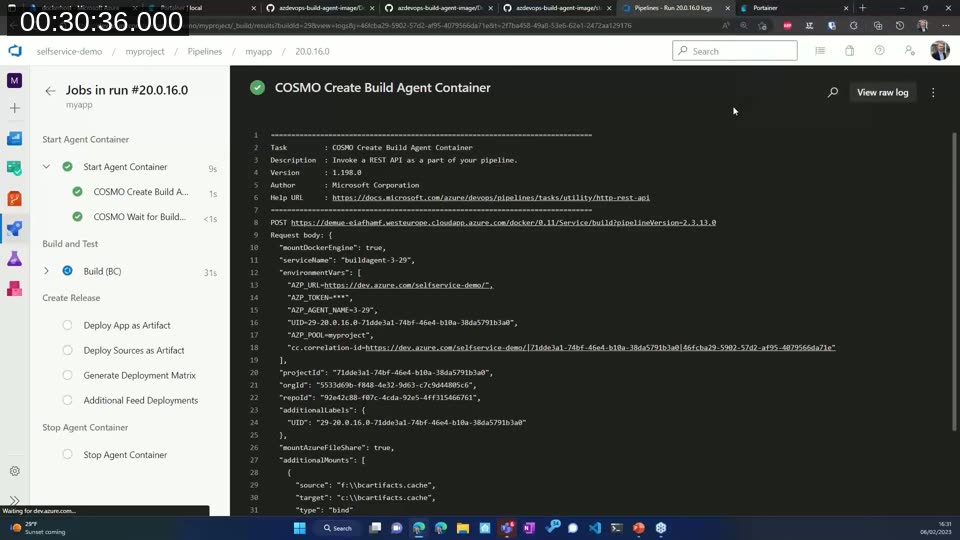
Running an agent on demand does add overhead compared to a warm, reused agent — Fenster estimated at least a couple of minutes for a plain setup, and at least 15 minutes if the pipeline also spins up a Business Central container for the build. Cosmo Alpaca mitigates this by mounting a shared cache directory (for example for BC artifacts) from the host into every new container, so a “clean” agent still reuses previously downloaded content.
Building a GitHub Runner Container
Fenster’s GitHub-side Dockerfile follows the same pattern in a different order — dependencies first, then the runner download:
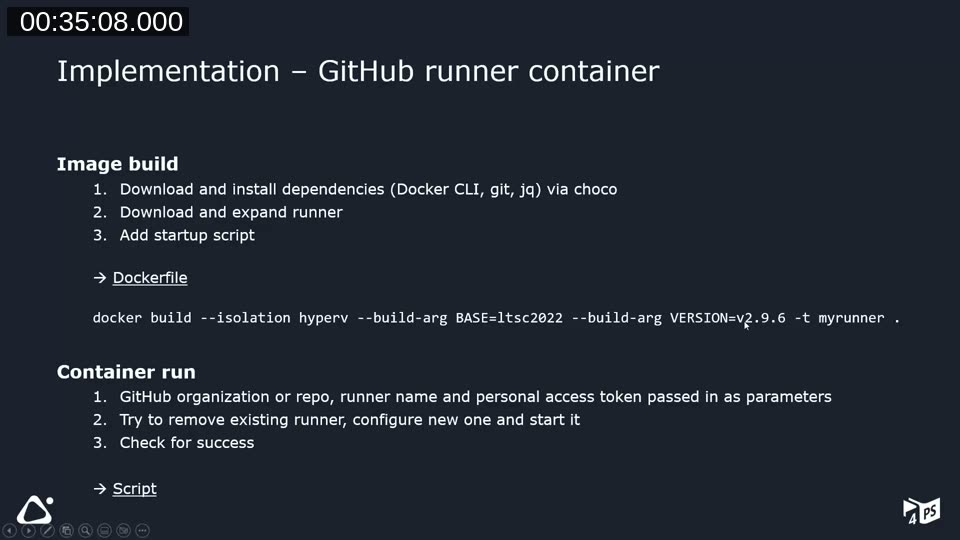
- Install dependencies via Chocolatey: the Docker CLI (to build Docker images), Git (to check out sources), and
jq(for string parsing in the startup script). - Download and expand the GitHub Actions runner binaries for a configurable runner version.
- Add a startup script,
cmd.ps1, that registers the runner on container start.
docker build --isolation hyperv --build-arg BASE=ltsc2022 --build-arg VERSION=v2.9.6 -t myrunner .The startup script first tries to remove any existing runner registration, then configures and starts a new one, checking that the Runner.Listener process is actually running before continuing. Because it’s not always possible to shut down cleanly (Fenster’s VM is stopped automatically at night, effectively “pulling the plug”), the script cleans up any leftover registration from the previous run on startup instead of relying on a graceful shutdown. Registering and removing a runner each use a different token, requested separately from the GitHub API.
📖 Docs: Self-hosted runners for GitHub Actions — GitHub’s documentation on deploying, registering, and managing your own runners.
Setting Up the VM Infrastructure
For the pre-created GitHub scenario, Fenster runs a Windows VM with Docker, Portainer (a graphical container management tool), and Traefik (a reverse proxy) pre-installed. This VM is provisioned from an Azure Quickstart Template rather than set up by hand:
📖 Template: Windows Docker Host with Portainer and Traefik pre-installed — an Azure Quickstart Template that provisions a Windows Server VM with Docker, Portainer, and Traefik ready to go.
Runner containers can then be deployed two ways in Portainer: as a Docker Compose-style stack, or through a custom app template that presents a simple form (repository, personal access token, runner name) in the Portainer UI:
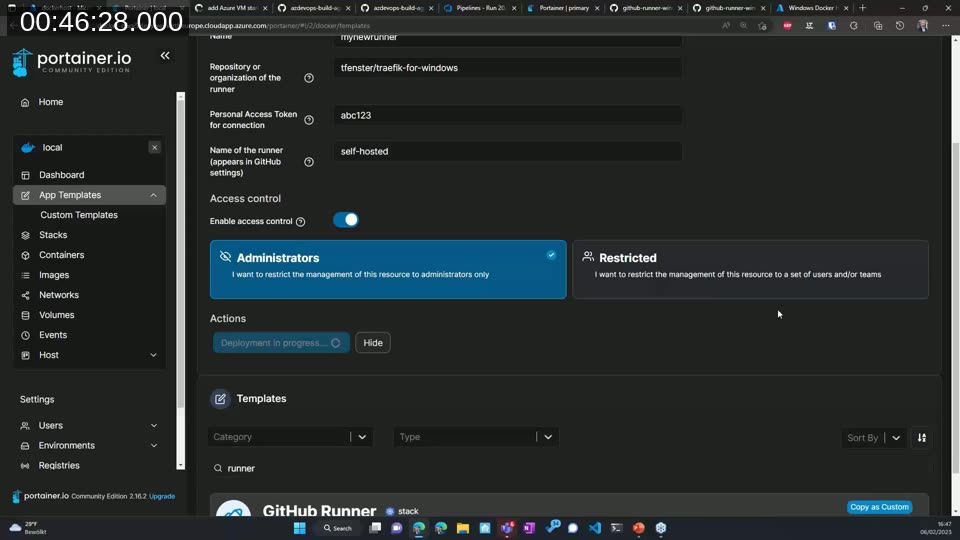
The app templates come from a custom template JSON file (rather than Portainer’s default set), which Fenster publishes and points Portainer to under Settings.
📖 Docs: Build and host your own app templates — Portainer’s guide to creating a custom template catalog like the one used here for GitHub runners.
Pre-Created Runners: How the Pieces Fit Together
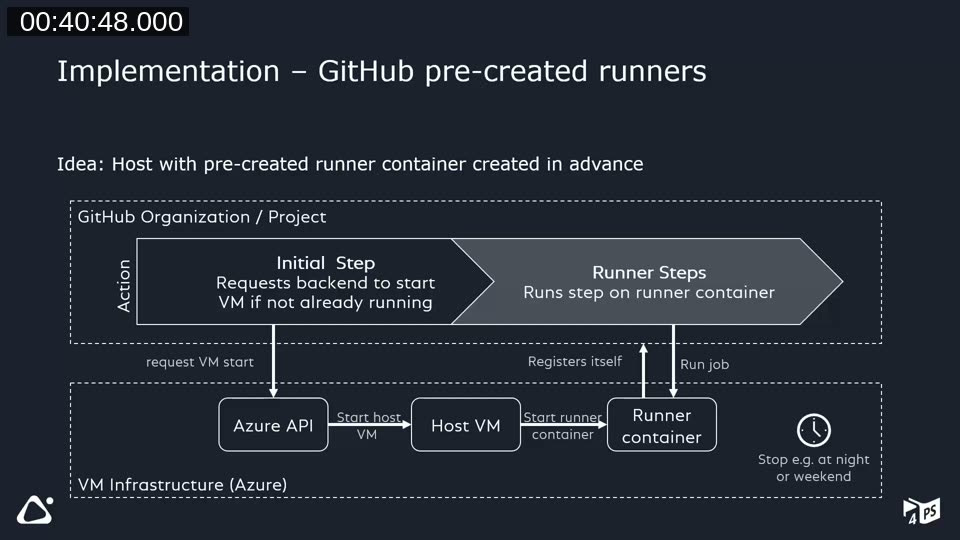
In this setup, the GitHub Actions workflow’s first step calls the Azure API to start the host VM if it isn’t already running. Because the runner container is configured to always restart, starting the VM automatically starts the container, which registers itself with the GitHub organization or repository. The workflow’s remaining steps then run on that runner. There’s no automated cleanup step in this scenario — instead, the VM is set to shut down automatically at a scheduled time (for example, 3 AM), which stops the container along with it and saves on cost.
Real-Life Example: GitHub Runners for the Traefik Image
Fenster’s production use case is building the Traefik-for-Windows container image, which benefits heavily from Docker layer caching — using a cloud-hosted runner would mean rebuilding every layer from scratch each time. Because this pipeline only runs when a new upstream Traefik release appears (every few weeks to a couple of months), a pre-created runner with a nightly shutdown is a good fit: no on-demand orchestration is needed, and the VM is only “on” for a few hours around each build.
The demo showed the GitHub Actions run for that image: an az login step, an az vm start step that starts the VM (or is a no-op if it’s already running), and the actual Docker build-and-push step. The Azure Portal’s “Auto-shutdown” setting for the VM was also shown, configured to stop the VM at 3 AM Berlin time with an optional email warning 30 minutes beforehand.
Wrap-Up
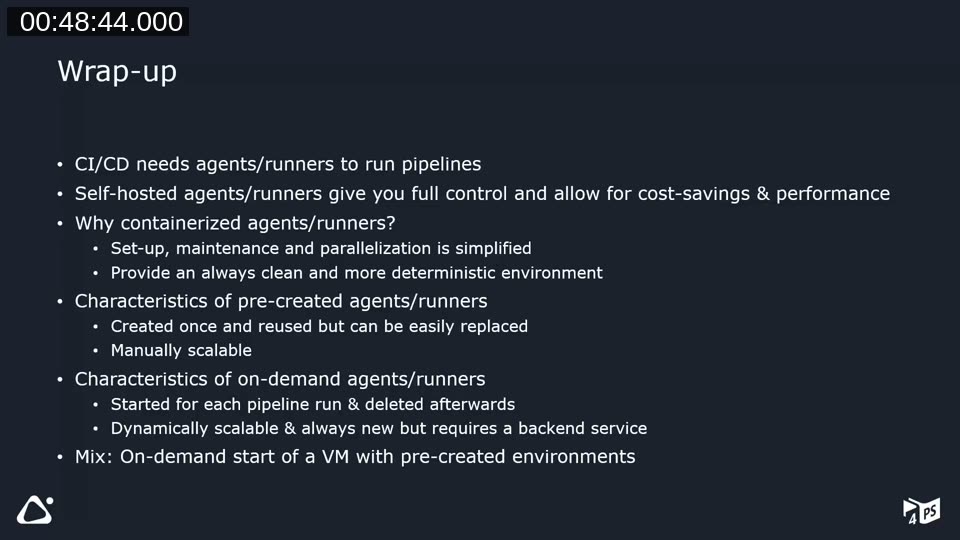
Lippert summarized the session: CI/CD needs agents or runners to execute pipelines; self-hosting gives full control and can save on cost and improve performance; containerizing those agents simplifies setup, maintenance, and parallelization while keeping the environment clean and deterministic. Pre-created agents are created once, reused, and manually scaled; on-demand agents are created and deleted per pipeline run, are dynamically scalable, but need a backend service to manage them. A mix of both — an on-demand VM with pre-created containers on it — is also a valid option.
Q&A: Overhead and Caching
During Q&A, van Vugt asked how much overhead an on-the-fly agent adds compared to a reused agent that already has source deltas cached. Fenster explained that a naively implemented on-demand agent behaves like a cloud-hosted agent — a couple of minutes of overhead at minimum, and at least 15 minutes extra if the pipeline also spins up a Business Central container. Cosmo Alpaca avoids most of that overhead by mounting a cache directory (for example for BC artifacts) from the host machine into every new container, so a freshly created, “clean” agent still benefits from previously cached downloads without needing to be a genuinely persistent instance.
Resources
The presenters shared the following links at the end of the session:
- cosmoconsult/azdevops-build-agent-image — the Azure DevOps build agent container image.
- cosmoconsult/github-runner-windows — the GitHub Actions runner container image for Windows.
- Azure Quickstart Template: Windows Docker Host with Portainer and Traefik — provisions the VM infrastructure used in the demos.
- tfenster/templates (templates-2.0.json) — the custom Portainer app template catalog, including the GitHub Runner template.
This post was drafted with AI assistance based on the webinar transcript and video content.