
In this Areopa Academy webinar — moderated by Luc van Vugt — Bert Verbeek (Technical Solution Architect at 4PS and Microsoft MVP) demonstrates how to move large volumes of Business Central data into Microsoft Fabric using the open-source bc2adls extension. The session covers what Microsoft Fabric actually is, how the export pipeline works end-to-end, two approaches for shaping data inside Fabric (Power Query dataflows and notebooks with Data Wrangler), how to chain Business Central job queues with Fabric notebook runs, and a real-life F2 deployment refreshing roughly 20 million records every 50 minutes.
The Problem: Exporting Large Datasets from Business Central
Customers running Business Central online with their analytics in the Microsoft cloud quickly hit limits when they try to keep an external data warehouse in sync over OData/REST APIs. Bert lists the typical pain points he sees:
- Databases above ~80 GB struggle with full API extracts.
- Deleted records are hard to detect — subscription-based change notifications exist but cap out at 200 entities.
- Refresh rates of two hours or worse are common, which is not acceptable for operational reporting.
Docs: Extract data from Business Central – Microsoft Learn — Microsoft’s overview of supported ETL options, including the explicit reference to the (unsupported) bc2adls code sample used in this webinar.
What Is Microsoft Fabric?
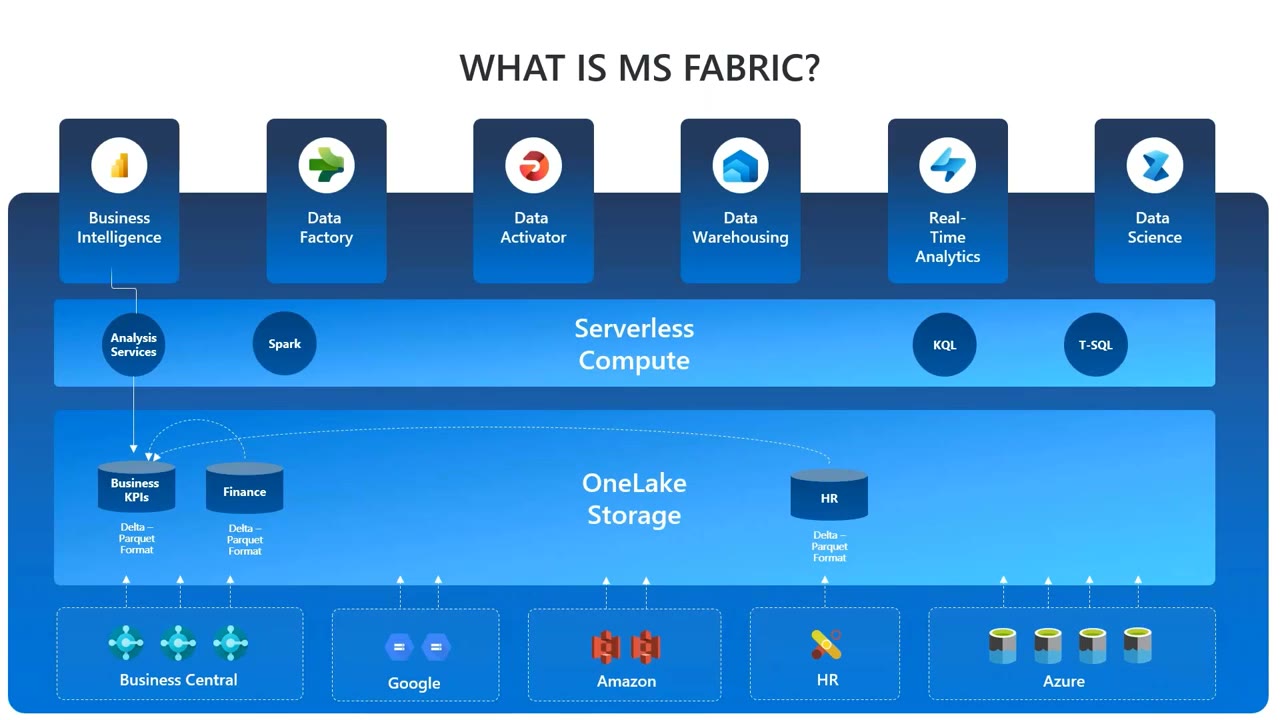
Bert positions Fabric as Microsoft’s answer to the “chief integration officer” problem: every app a customer adopts has its own vendor and its own integration to a central data warehouse, which is fragile and expensive to maintain. Fabric collapses that landscape by providing a low-code/no-code data platform built around OneLake — a single, logical data lake that every Fabric workload reads from and writes to.
Inside OneLake, data is organised into Lakehouses (for unstructured and structured data, accessed primarily through Spark) and Warehouses (relational, with a SQL endpoint). On top of that sits the serverless compute layer (Spark, KQL, T-SQL) and the experience-specific workloads: Data Factory, Data Activator, Real-Time Analytics, Data Science, Data Warehousing, and Power BI.
Docs: What is a Lakehouse in Microsoft Fabric? – Microsoft Learn — covers Delta Lake storage, the auto-provisioned SQL analytics endpoint, and when to pick a Lakehouse over a Warehouse.
bc2adls: From Experiment to Fabric Connector
The bc2adls extension was originally created about two years ago by Soumya Dutta and Henrik Schilter as an experiment to push Business Central data into Azure Data Lake Storage. The community uptake was significant, and a Microsoft Fabric storage option was added a few months before this webinar. The extension is open source.
The pipeline pushes incremental Delta CSV files from Business Central tables into a Fabric Lakehouse. A small PySpark notebook then cleans those Deltas — handling modified rows, deletes (tracked by an empty SystemCreatedAt against a known SystemId), and duplicates — and merges them into the final Lakehouse table. After the cleanup, the table in OneLake is a faithful representation of the Business Central table and can be consumed directly from Power BI via Direct Lake.
Configuring the Export in Business Central
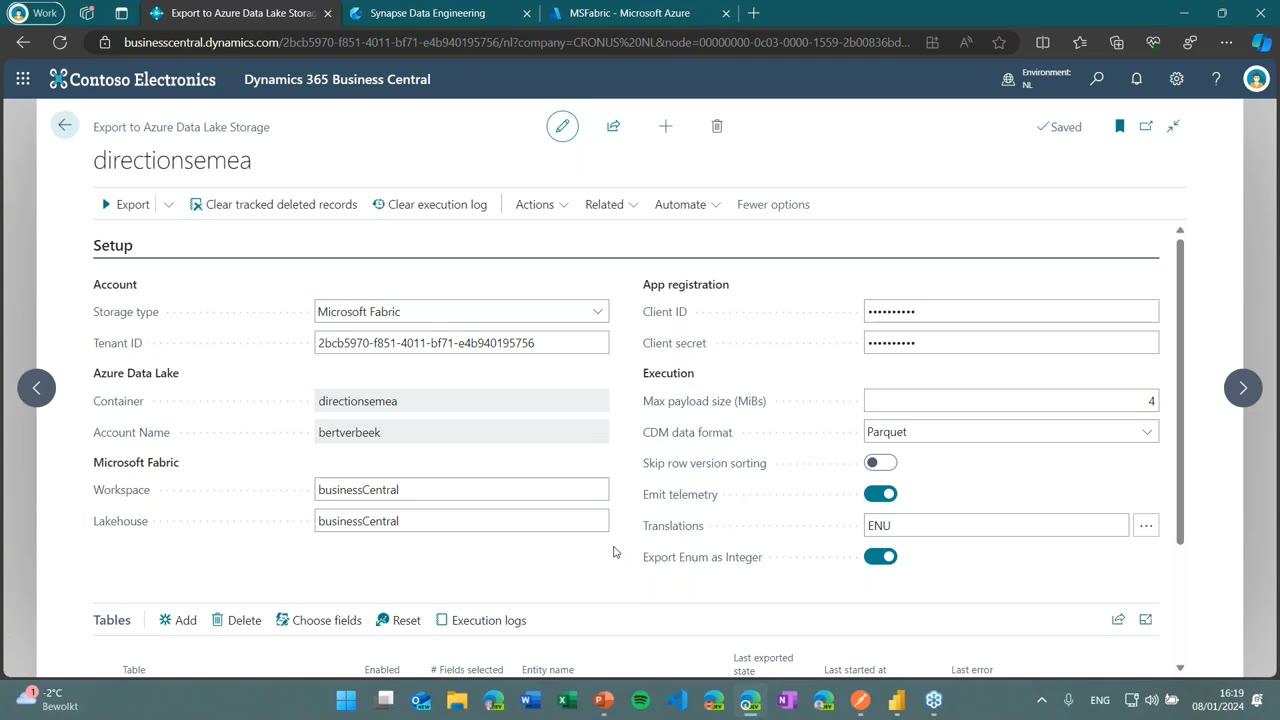
The setup page on the BC side is the standard Export to Azure Data Lake Storage card, with a new Microsoft Fabric storage type. The required fields are minimal:
- Account — Storage type (Microsoft Fabric) and Tenant ID.
- App registration — Client ID and secret for an Entra ID app that has access to the workspace.
- Microsoft Fabric — Workspace name and Lakehouse name.
- Execution — Max payload size, CDM data format (Parquet), translations (e.g. ENU), and “Export Enum as Integer”.
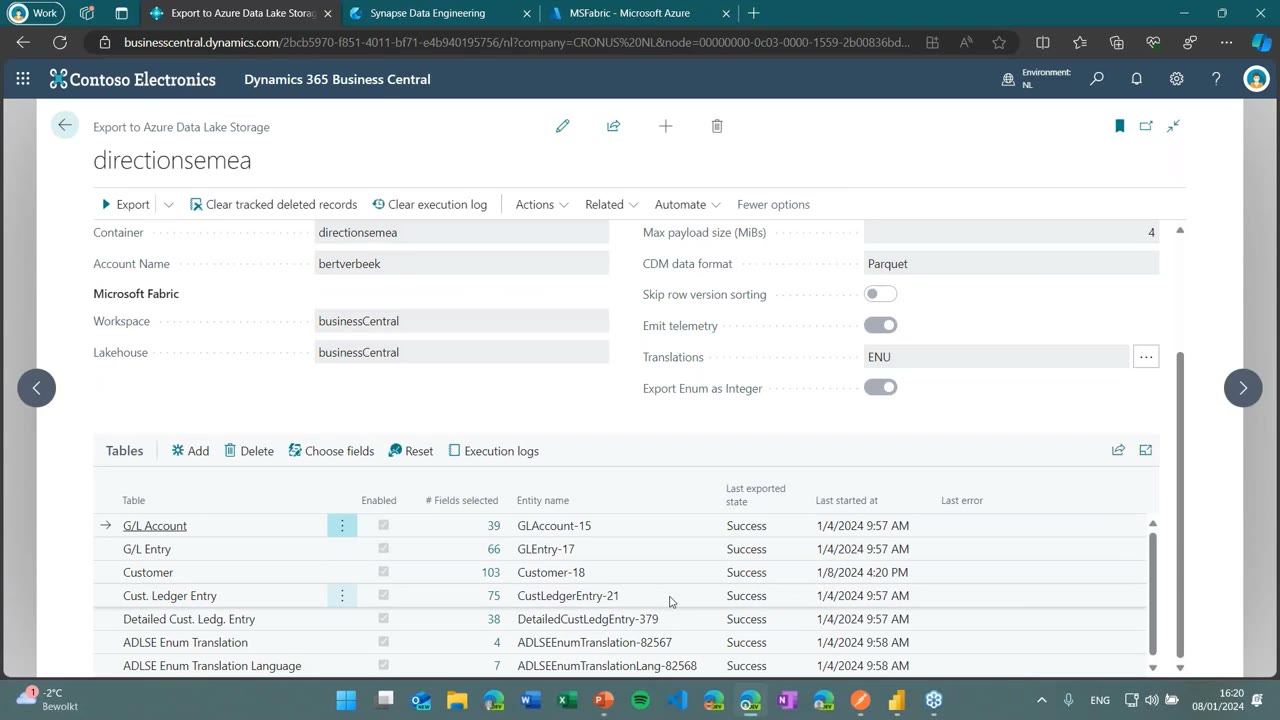
Tables are added one by one. For each table, fields are selected via Choose fields. Filter fields and flow fields are deliberately excluded — only fields that physically carry data can be exported. Enum and option translations can optionally be exported as separate tables so they survive the trip into the Lakehouse.
Deleted records are handled by an event subscription in the extension: when a record is deleted from Business Central, its SystemId is written to a separate tracking table, exported as a Delta, and then resolved by the downstream notebook.
The Demo: One Customer Round-Trip
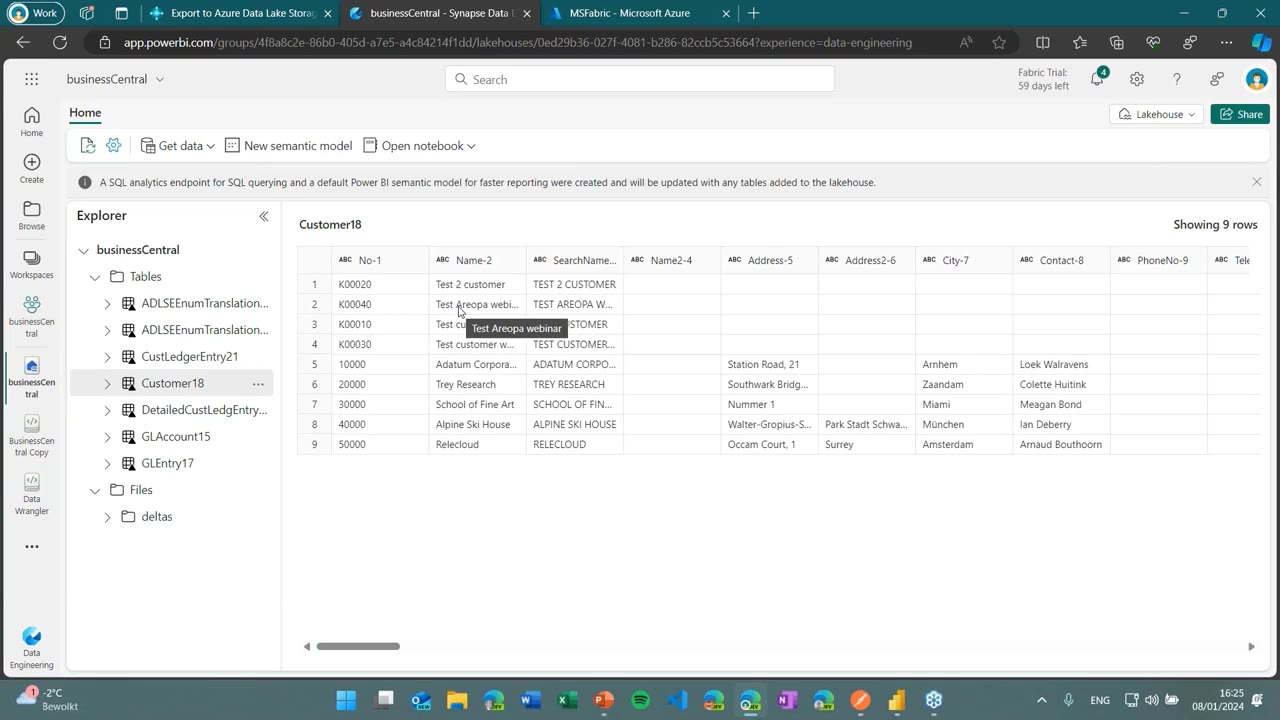
Bert creates a new customer called “Test Areopa webinar” in Business Central and runs the export. The Delta CSV file appears under Files/deltas in the Fabric Lakehouse almost immediately. Querying the Customer18 table at this point still shows the previous state — the Delta has landed but has not yet been merged.
The Cleanup Notebook
The merge step is a PySpark notebook (published in the GitHub repository’s fabric folder). At a high level it:
- Reads every Delta CSV file for the table into a Spark dataframe with the correct column structure.
- Reads the current Lakehouse table into a second dataframe.
- Concatenates the two and removes rows that were marked as deleted (empty
SystemCreatedAtfor a givenSystemId). - Sorts by
SystemModifiedAtdescending and drops duplicates onSystemId, keeping the newest row. - Writes the result back to the Lakehouse table and removes the consumed Delta files.
An optional safety check compares column counts between the incoming files and the existing table and can drop the table if there is a schema mismatch (useful when a column is added or removed in BC).
After running the notebook, the Lakehouse Customer table contains the new “Test Areopa webinar” row and the deltas folder is empty. Bert notes that you may need an F5 in the Fabric UI to see the change.
Docs: Medallion lakehouse architecture in Microsoft Fabric with OneLake – Microsoft Learn — the bronze/silver/gold pattern Bert uses (raw Deltas in one Lakehouse, curated and joined data in a “silver” Lakehouse) is the canonical Fabric design.
Shaping Data: Power Query vs. Notebook + Data Wrangler
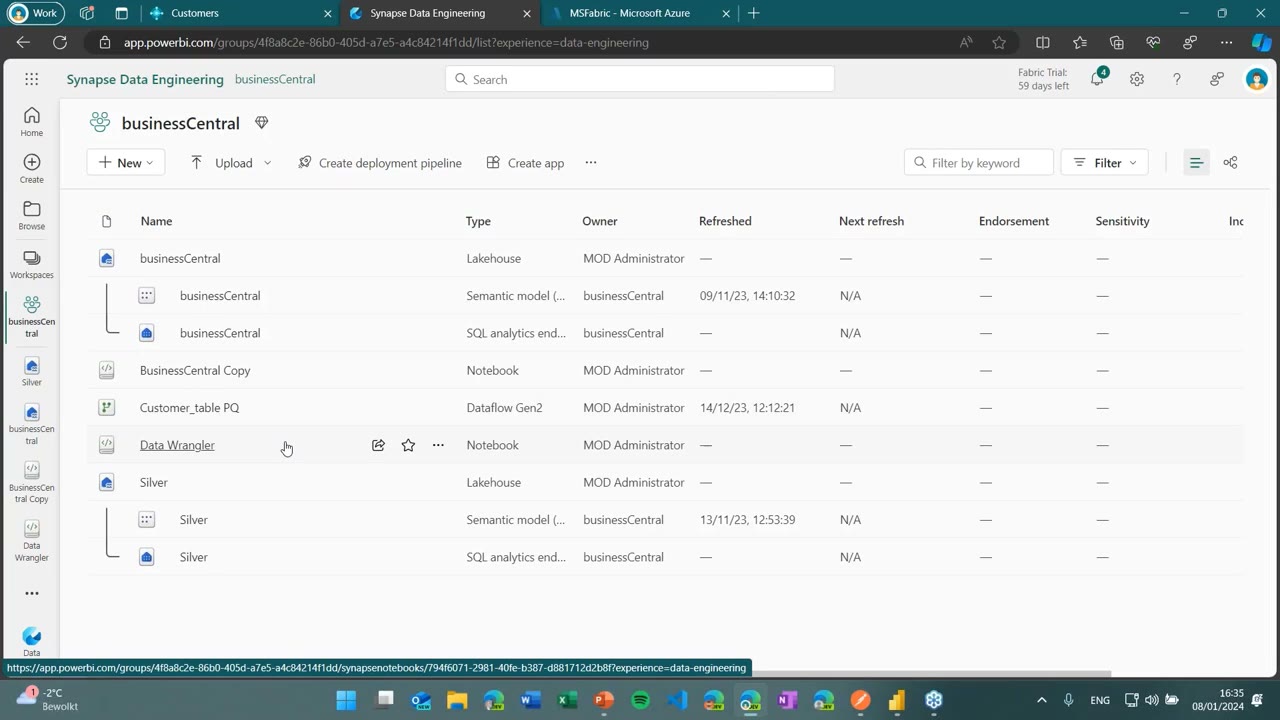
Once data sits in the bronze Lakehouse, you usually want to enrich it — for example, computing flow fields that bc2adls cannot export. Bert demonstrates two approaches that achieve the same result: joining the Customer table with grouped sums from DetailedCustLedgerEntry to materialise a Balance column.
1. Dataflow Gen2 with Power Query
If you are comfortable with Excel-style Power Query, a Dataflow Gen2 lets you connect to a Lakehouse, remove columns, group and aggregate the customer ledger entry table, merge (inner join) it back onto the customer table, and write the result to a separate “silver” Lakehouse. The experience is familiar and visual, but Bert notes that scheduled Power Query runs can be slow at volume.
2. Notebook with Data Wrangler
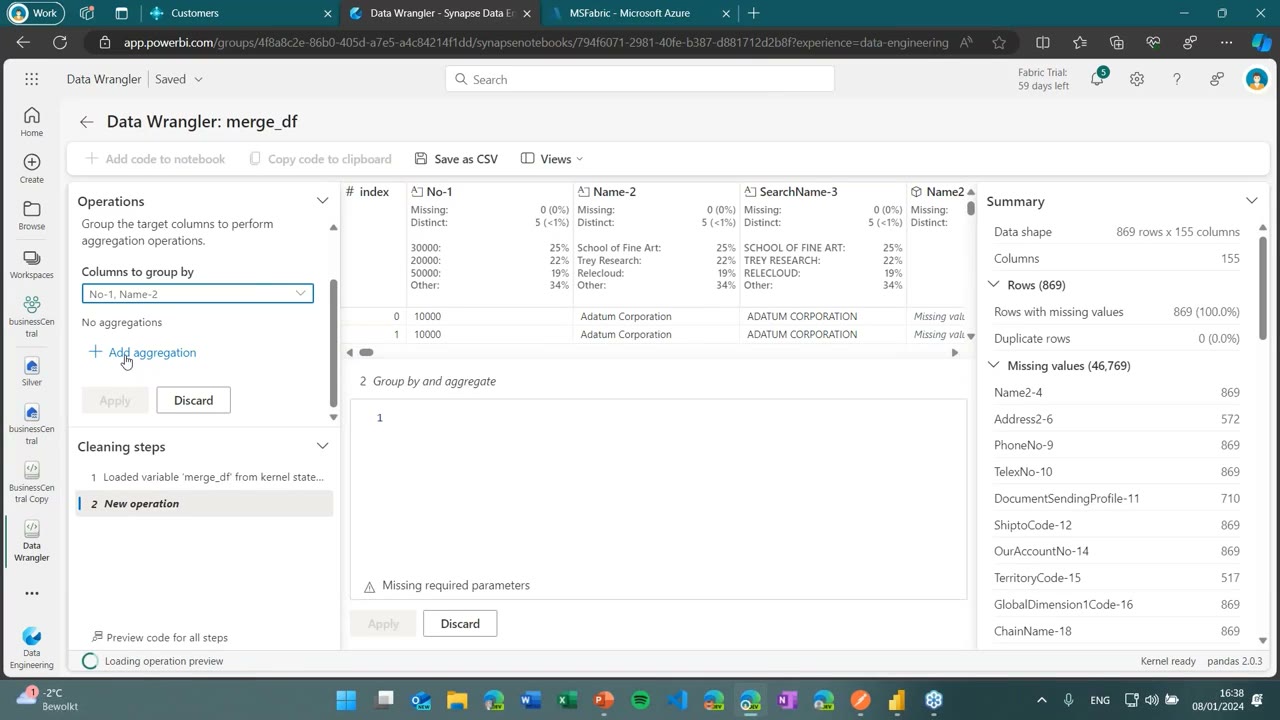
The notebook approach loads both tables into Spark dataframes, converts the merged dataframe to a pandas dataframe (pandas is more flexible for join operations than Spark), then opens it in Data Wrangler. Data Wrangler is a graphical UI on top of pandas that lets you pick “Group by and aggregate”, choose the grouping columns and aggregation functions, and watch the resulting code being written for you. You then convert back to a Spark dataframe and overwrite the table in the silver Lakehouse.
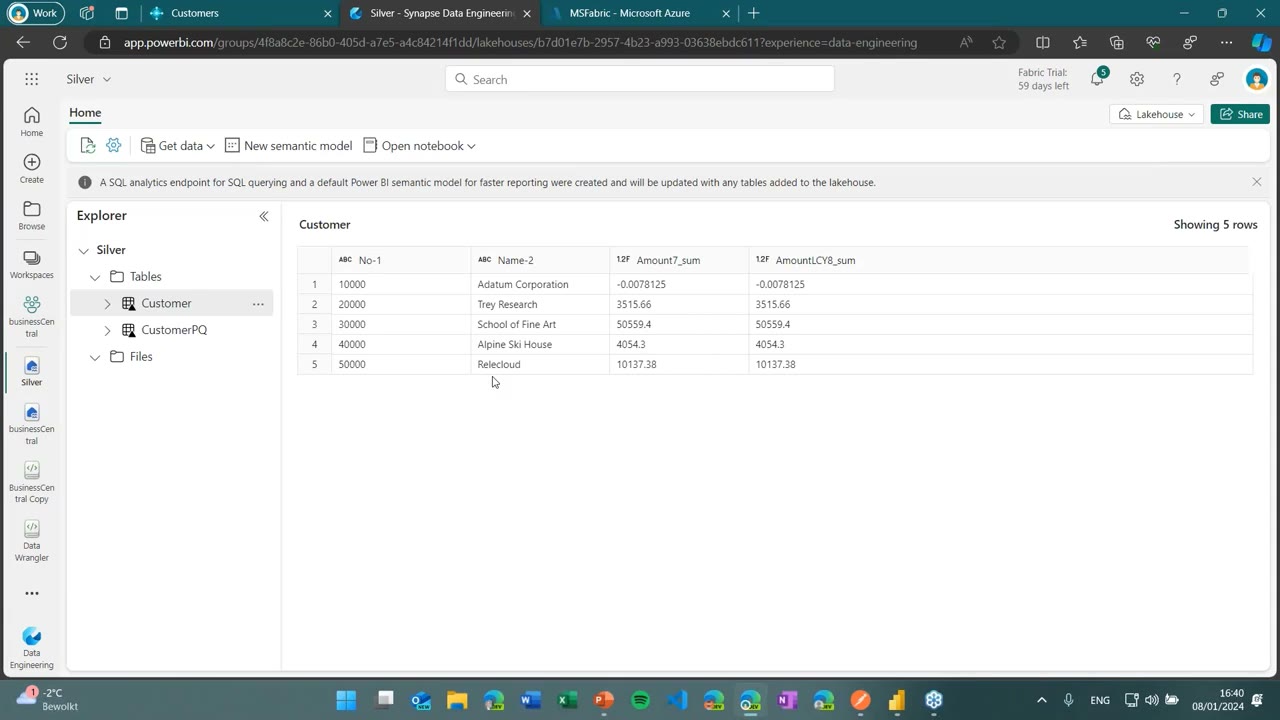
Both routes land identical results in the silver Lakehouse, ready for downstream consumption.
Bert’s recommendation: Power Query has the nicer authoring UI, but for scheduled production loads the notebook+Data Wrangler path is meaningfully faster.
Power BI with Direct Lake
The traditional Power BI pattern for BC data — pulling rows through the REST API into a Power BI dataset and refreshing periodically — is slow and breaks down on large tables. With Fabric, the Power BI connector can talk to the Lakehouse directly, and Direct Lake lets a semantic model read the underlying Delta/Parquet files without import or DirectQuery overhead.
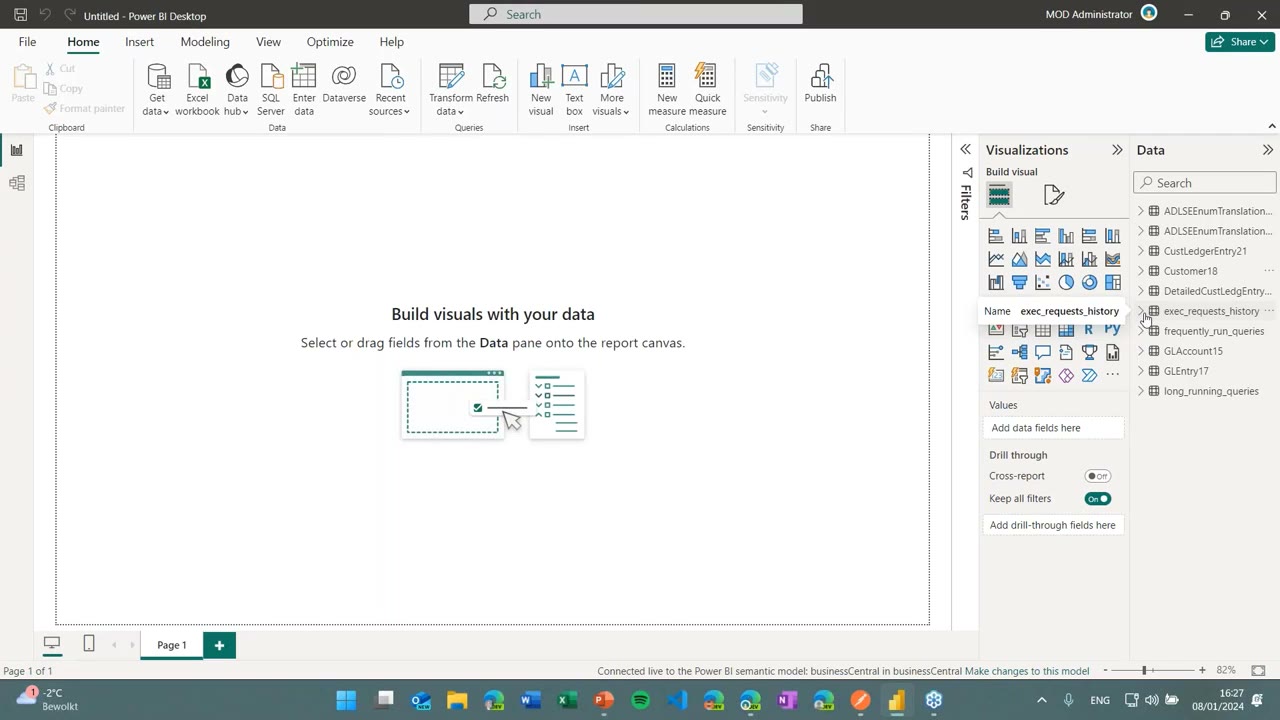
Docs: Direct Lake overview – Microsoft Learn — explains the Fabric capacity requirements and the per-SKU guardrails (parquet files per table, rows per table, max model size) that determine whether Direct Lake is viable for a given workload.
Triggering the Notebook Automatically
A live deployment needs the notebook to run as soon as the BC job queue export finishes. Two ingredients make this straightforward today:
- BC business event “Export is finished” — added shortly before this webinar, fires when the bc2adls scheduled job completes.
- Fabric notebook on-demand REST API — accepts a POST with the workspace ID and notebook ID and returns
202 Acceptedonce the job is queued.
Bert demonstrates this with Postman, posting to the notebook job endpoint and confirming the run shows up under “View all runs” in Fabric.
Docs: Manage and execute notebooks in Fabric with APIs – Microsoft Learn — covers the Job Scheduler endpoints (
Run on demand Item Job,Cancel,Get Item Job Instance), parameterisation, exit values for conditional orchestration, and service-principal authentication for unattended automation.
Real-Life Case: 20 Million Records, Every 50 Minutes, on F2
A partner customer Bert worked with migrated from BC on-premises (where they had been using Jet Reports, Excel and direct SQL access) to BC SaaS. They run a webshop that produces around 200 orders per day with 50–200 lines each, and their data warehouse holds roughly 20 million records across G/L Entry, Item Ledger Entry and the related transactions. The data warehouse must refresh every 50 minutes.
The earlier attempts had problems:
- API-only approach — sales-order deletes were lost, throughput was capped by API limits, refresh stuck at two hours.
- bc2adls into ADLS + Synapse — pipelines were expensive, and starting the Spark pool took roughly half of the total refresh window.
The Fabric solution is much simpler. The customer purchased a Fabric F2 SKU (≈$300/month, the smallest paid SKU, providing 2 Capacity Units). Today the BC export takes about 5 minutes, the notebook is triggered from the BC business event via the Job Scheduler API, end-users have stopped complaining, and the customer is planning to move to F4 only because they want to add more data sources to the same Lakehouse.
An F2 provides roughly 172,800 CU-seconds per day (2 CU × 24 × 3600). Bert recommends installing the Microsoft Fabric Capacity Metrics app to track how much capacity each notebook run consumes and to forecast when an upgrade becomes necessary. For development and acceptance environments, the 60-day Fabric trial gives you an F64 equivalent — more than enough headroom for experimentation.
Docs: Understand Microsoft Fabric licenses – Microsoft Learn — the canonical SKU table (F2 through F2048), Capacity Unit equivalences, and how F SKUs relate to the legacy Power BI Premium P SKUs.
Call to Action: An Open-Source Continuation
The original Microsoft bc2adls repository has been archived since Soumya moved to another team inside Microsoft. Bert agreed with him to continue the project as a community-owned open source effort. The active repository is now bertverbeek4PS/bc2adls on GitHub, containing the AL extension source, the Fabric notebook script, and the installation/configuration documentation. Issues and pull requests are welcome.
Q&A Highlights
Is the first-time load the same process as a Delta export? Yes. The first export simply has no prior export timestamp, so it ships every row as a full load. Subsequent runs are Deltas. A schema change (adding or removing a column) requires a reset of the Deltas so the table can be re-exported with the new structure.
Can the PySpark scripts be used in Azure Databricks instead of Fabric? Likely yes with minor changes — the cleanup logic is generic PySpark; only the source/target paths and file APIs need adjusting.
pandas dataframe vs. Spark dataframe? Both represent a table in memory. Spark dataframes are optimised for large volumes and distributed compute; pandas dataframes are more limited in scale but offer richer join semantics, which is why Bert switches to pandas specifically for the inner join in the silver-layer notebook.
This post was drafted with AI assistance based on the webinar transcript and video content.