
In this Areopa Academy webinar, Arend-Jan Kauffmann — CTO at Lumastreak 65, Microsoft MVP, and the author of the Rest Client module — takes a comprehensive look at the Rest Client module in AL. Moderated by David Singleton, the session covers why the module exists, how its objects fit together, and how to use its full feature set correctly. Whether you are new to the Rest Client or already using it daily, the webinar surfaces details and best practices that are easy to miss.
Why the Rest Client Module Was Created
Calling external web services with AL’s built-in HttpClient data type works, but requires the same error-handling and content-type boilerplate to be repeated in every procedure. A minimal GET that handles both blocked-by-environment and non-success status codes already spans ten or more lines, and adding JSON parsing on top extends it further.
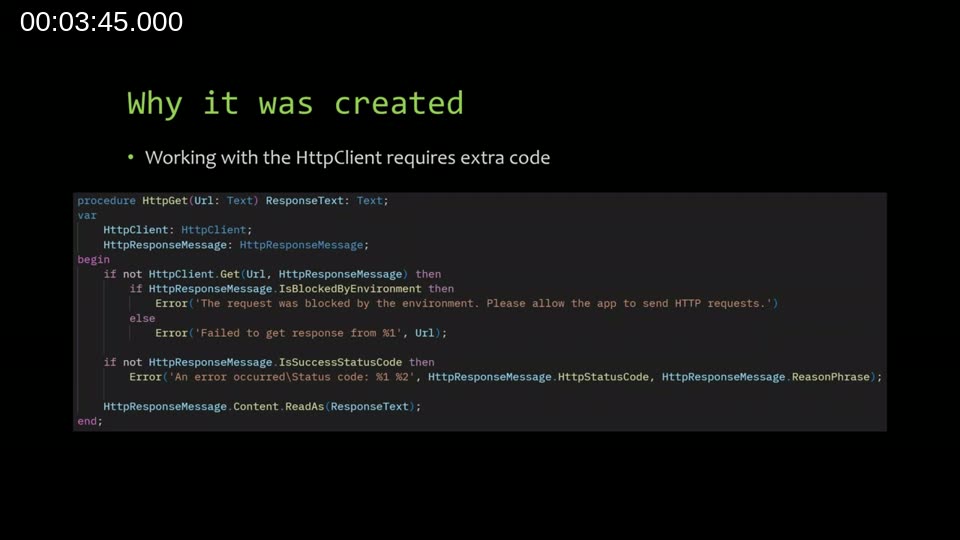
Arend-Jan was inspired by two existing solutions that solve the same problem in other ecosystems: the HttpClient JSON extensions in .NET (methods like GetFromJsonAsync and PostAsJsonAsync), and the third-party RestSharp library for C#. Both take away the plumbing so developers can focus on the business logic. The Rest Client module brings that same philosophy to AL.
📖 Docs: Call external services with the HttpClient data type — Microsoft’s official guide to the underlying HttpClient data type that the Rest Client wraps.
What the Rest Client Module Is
The Rest Client module is a community contribution included in the Business Central System Application, first released in Business Central 2023 wave 2. It is open source — hosted in the BCApps repository on GitHub — and community pull requests have already added features and fixes since its initial release.
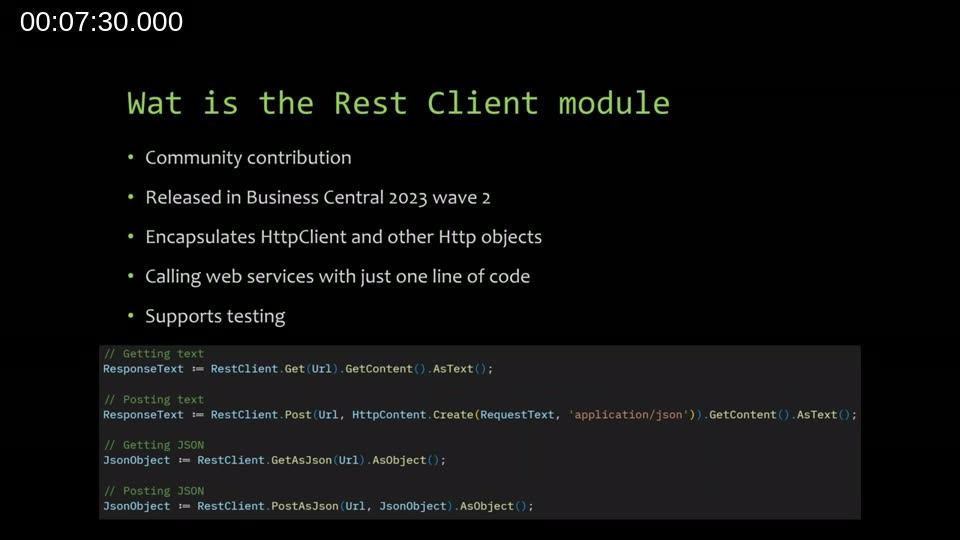
At its core, the module wraps the existing HttpClient, HttpRequestMessage, HttpResponseMessage, and HttpContent AL data types. The aim is to call a web service with as little code as possible — in the simplest case, a single line:
// Getting text
ResponseText := RestClient.Get(Url).GetContent().AsText();

// Posting text
ResponseText := RestClient.Post(Url, HttpContent.Create(RequestText, 'application/json')).GetContent().AsText();

// Getting JSON
JsonObject := RestClient.GetAsJson(Url).AsObject();

// Posting JSON
JsonObject := RestClient.PostAsJson(Url, JsonObject).AsObject();
The module also includes an Http Method enum, an Http Client Handler interface, and an Http Authentication interface. Together these give developers structured extension points rather than raw data types.
The Http Client Handler — and Why It Matters
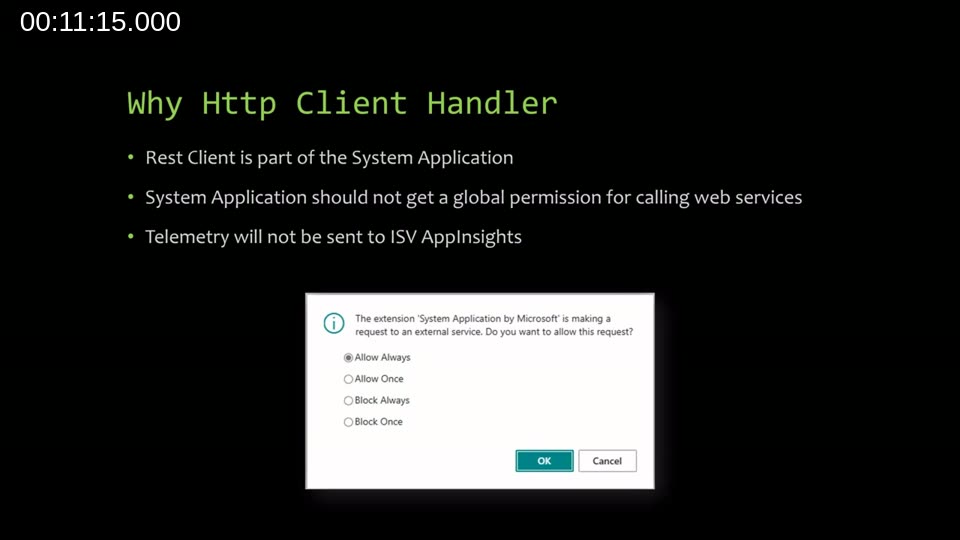
Because the Rest Client is part of the System Application, the outgoing HTTP request is technically made by the System Application — not by your own extension. This creates two practical problems in sandbox environments:
- Permission scope: The BC sandbox shows a dialog asking whether to allow the System Application to make external requests. If a user clicks “Allow Always”, every extension using the Rest Client inherits that permission, which is a broader grant than intended.
- Telemetry routing: Outgoing web service telemetry generated by the System Application flows to Microsoft’s own App Insights endpoint, not to your extension’s telemetry endpoint.
The solution is to create your own implementation of the Http Client Handler interface. This codeunit contains a single Send procedure that executes the actual HTTP call on behalf of your app. Once you pass it to RestClient.Initialize(), the request is attributed to your extension — not the System Application.
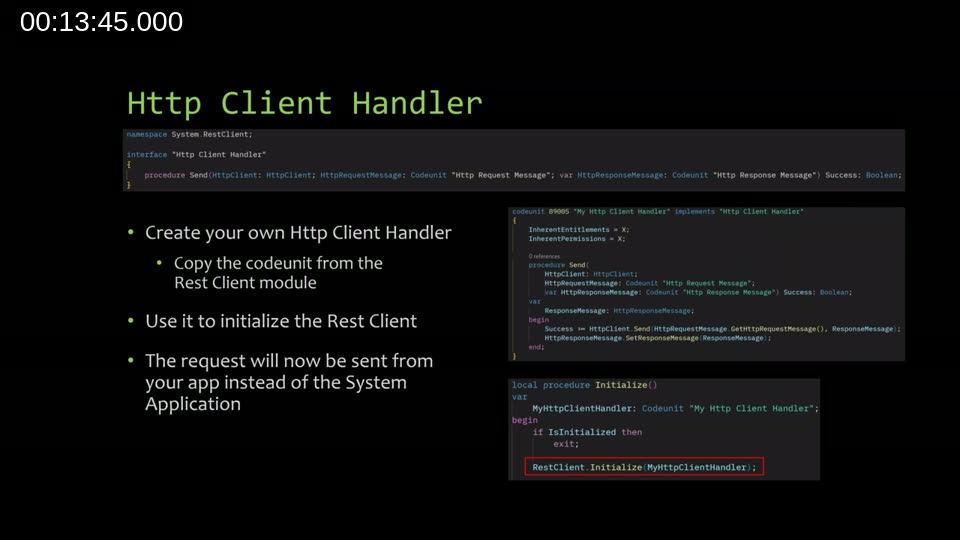
A third benefit is testability: in a test codeunit you can implement the handler to return a fabricated response message (setting any status code, headers, or content you need) without making a real outgoing call. This makes it straightforward to test how your code handles throttling responses, authorization errors, or connection failures.
📖 Docs: HttpClient data type — Telemetry — explains outgoing web service request telemetry and how to query it in Azure Application Insights.
Authentication Support
The Rest Client includes an Http Authentication interface with two procedures: IsAuthenticationRequired() and GetAuthorizationHeaders(). The latter returns a Dictionary of [Text, SecretText], allowing multiple authorization headers when a web service requires them.
Three authentication codeunits ship out of the box:
- Http Authentication Anonymous — the default if no authentication codeunit is passed; returns false to
IsAuthenticationRequired(). - Http Authentication Basic — accepts a username and password and builds the Basic authentication header.
- HttpAuthOAuthClientCredentials — added by a community contributor; supports the OAuth 2.0 client credentials (service-to-service) flow.
You can also implement the interface yourself and pass any custom codeunit to RestClient.Initialize() alongside the client handler.
Initializing the Rest Client
Beyond the client handler and authentication, RestClient.Initialize() accepts several optional configuration properties that apply to every request made with that instance:
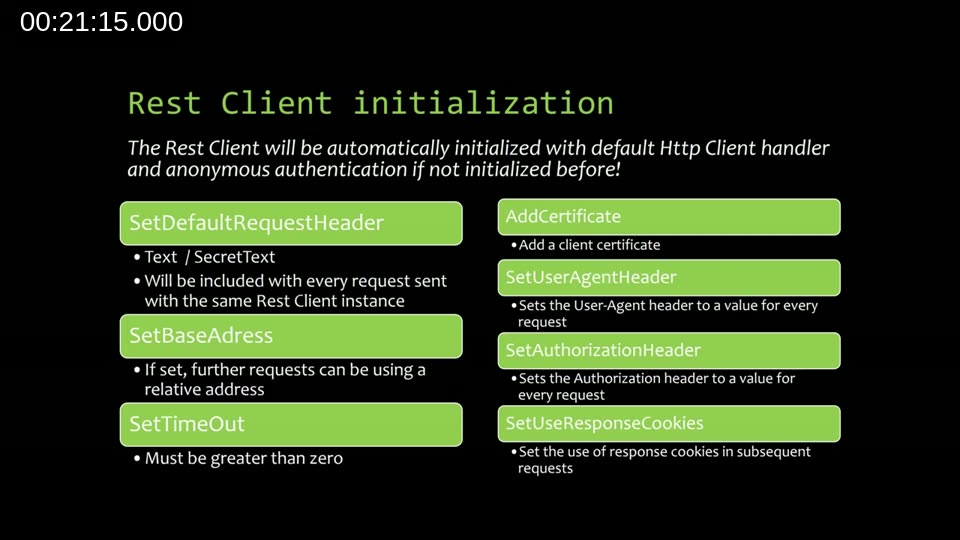
- SetDefaultRequestHeader — adds a header (plain or secret text) to every request.
- SetBaseAddress — once set, subsequent calls can use relative URLs. This works correctly in the Rest Client, unlike the base address feature on the native
HttpClientdata type, which still requires fully qualified URLs. - SetTimeOut — must be greater than zero.
- AddCertificate — for mutual TLS authentication scenarios.
- SetUserAgentHeader — useful when an external service requires a User-Agent string that Business Central does not send by default.
- SetAuthorizationHeader — a shortcut for a static API key without needing a full authentication codeunit.
- SetUseResponseCookies — (upcoming) forwards response cookies to subsequent requests.
Arend-Jan recommends initializing the Rest Client once and reusing the same instance across multiple requests in a codeunit, using it as a global variable. Behind the scenes, Business Central already reuses HttpClient instances, so there is no performance cost to this pattern.
Real-World Usage Pattern
A recommended pattern is to separate initialization into a dedicated builder codeunit that configures the client handler, sets the authentication codeunit, and sets the base address — then returns the configured Rest Client instance. The consuming codeunit holds a global variable for the Rest Client and calls an Initialize() guard procedure that exits early if the client is already built.
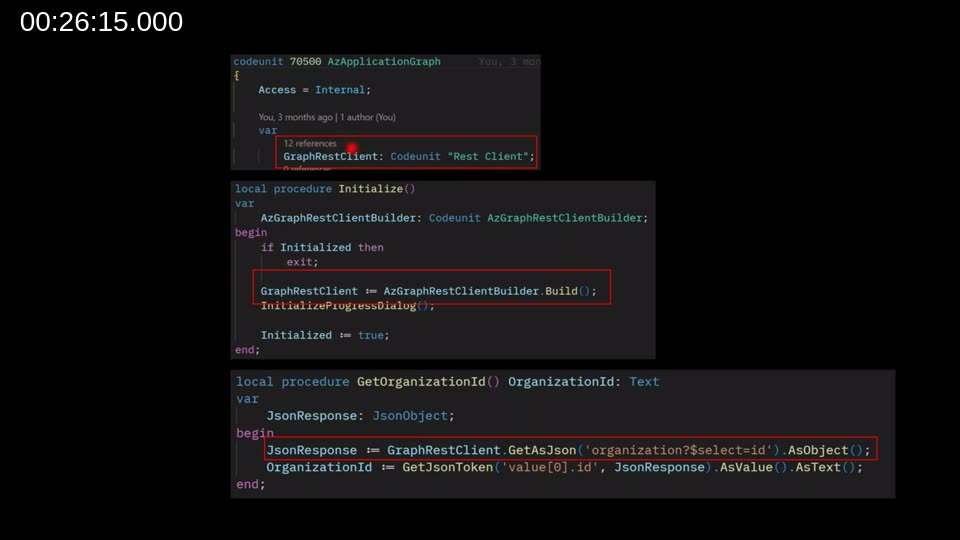
With a base address set, individual API calls use relative paths, which keeps each function concise:
JsonResponse := GraphRestClient.GetAsJson('organization?$select=id').AsObject();Working with HttpContent
The Http Content codeunit in the Rest Client simplifies a common source of confusion: setting the content-type header correctly. Creating content with the native HttpContent data type requires removing the default text/plain header before setting a different type. The Rest Client’s HttpContent.Create() factory method handles this automatically based on what you pass in:
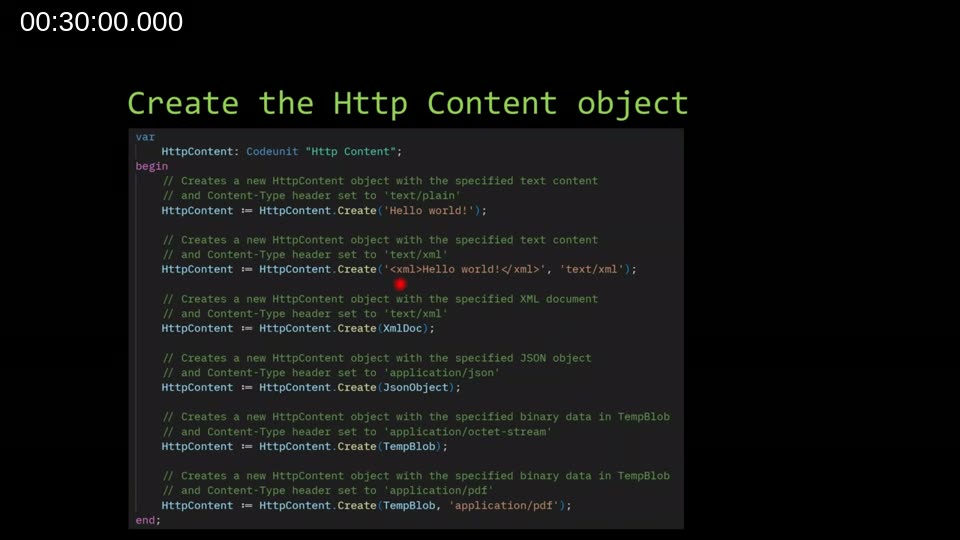
// Text — content-type set to text/plain
HttpContent := HttpContent.Create('Hello world!');

// XML text — content-type set to text/xml
HttpContent := HttpContent.Create('<xml>Hello world!</xml>', 'text/xml');

// XML document — content-type set automatically to text/xml
HttpContent := HttpContent.Create(XmlDoc);

// JSON object — content-type set automatically to application/json
HttpContent := HttpContent.Create(JsonObject);

// TempBlob — content-type set to application/octet-stream
HttpContent := HttpContent.Create(TempBlob);

// TempBlob with explicit MIME type
HttpContent := HttpContent.Create(TempBlob, 'application/pdf');
The content object also provides typed read methods — AsText(), AsSecretText(), AsJson(), AsXmlDocument(), AsInStream(), AsBlob() — so parsing the response requires no manual conversion.
Basic Commands: Get and Post
The Get and Post methods return an Http Response Message codeunit. Both support an inline chaining style:
// GET — explicit variable
HttpResponseMessage := RestClient.Get(Url);
ResponseText := HttpResponseMessage.GetContent().AsText();

// GET — one-liner
ResponseText := RestClient.Get(Url).GetContent().AsText();

// POST — explicit
HttpContent := HttpContent.Create(RequestText, 'application/json');
HttpResponseMessage := RestClient.Post(Url, HttpContent);
ResponseText := HttpResponseMessage.GetContent().AsText();

// POST — one-liner
ResponseText := RestClient.Post(Url, HttpContent.Create(RequestText, 'application/json')).GetContent().AsText();
For advanced scenarios — custom headers per request, cookies, or HTTP methods beyond GET and POST — use the Http Request Message codeunit and the generic Send method. Internally, Get and Post are already building a request message and calling Send.
Error Handling
Understanding how the Rest Client surfaces errors is important for writing correct code. There are two distinct failure modes:
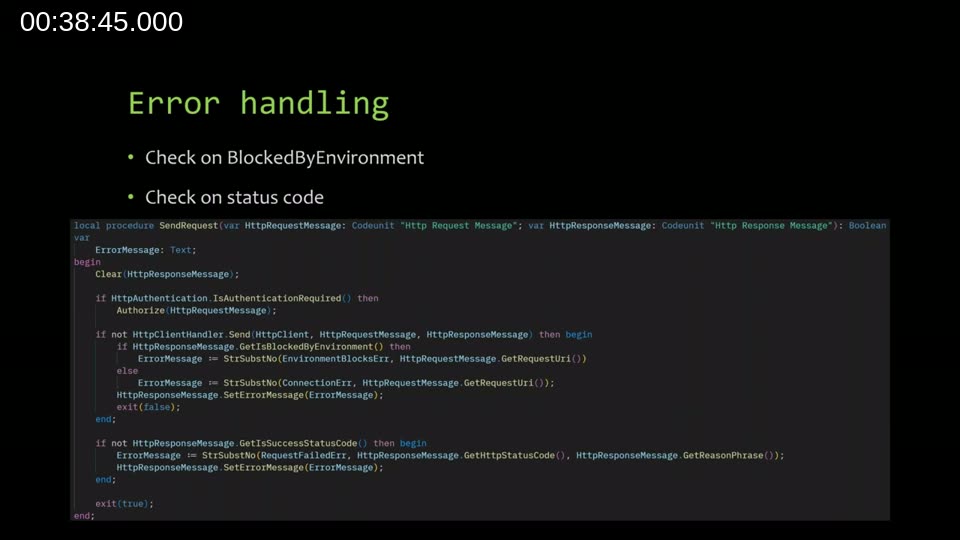
- No response received —
SendRequestreturnsfalseand sets an error message on the response. Causes include a blocked-by-environment condition, no internet connectivity, DNS failure, or an unresponsive server. The client handler raises the error as a message on the response object rather than throwing an AL error. - Response received but non-2xx status —
SendRequestreturnstrue, butHttpResponseMessage.GetIsSuccessStatusCode()is false. It is the caller’s responsibility to check this and react accordingly (log the error, show a message, retry, etc.).
This distinction is intentional. The Rest Client does not judge the meaning of a response — a 401, 429, or 500 are all “responses” and your code may need to handle each differently.
Get vs. GetAsJson — a Key Difference
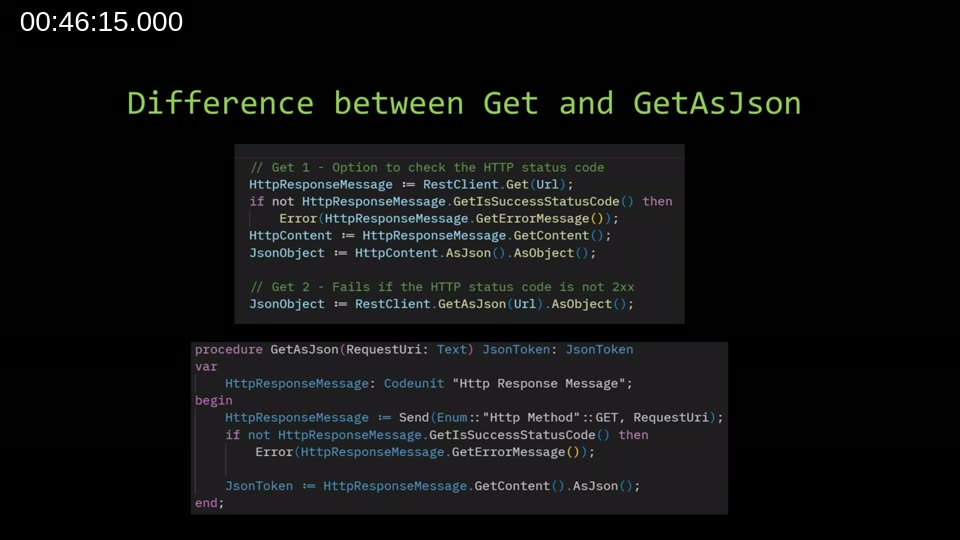
The convenience method GetAsJson() (and its counterpart PostAsJson()) calls GetIsSuccessStatusCode() internally and raises an AL error if the check fails. This means:
- Using
GetAsJson()is concise but gives up control over non-success responses — the error is raised automatically. - Using
Get()and checking the status code yourself gives you full control over every response scenario.
Arend-Jan’s advice: use GetAsJson() when you trust the external service and do not need nuanced error handling; use Get() when you need to distinguish between different HTTP status codes or when you want to log or retry on failure.
Known Issues
At the time of the webinar, two known issues were being addressed:
- Secret headers: The native
HttpRequestMessagestores regular headers and secret headers in separate internal lists. The Rest Client functions that work with headers were written without this distinction in mind and do not handle secret headers correctly. A fix was already prepared and expected as a PR in the near term. - Cookies: Cookie support was added to Business Central in 2024 wave 1, but had not yet been incorporated into the Rest Client. Arend-Jan noted the implementation was ready and would be submitted as a PR, with a request to Microsoft to backport it to version 25.
Upcoming Improvements
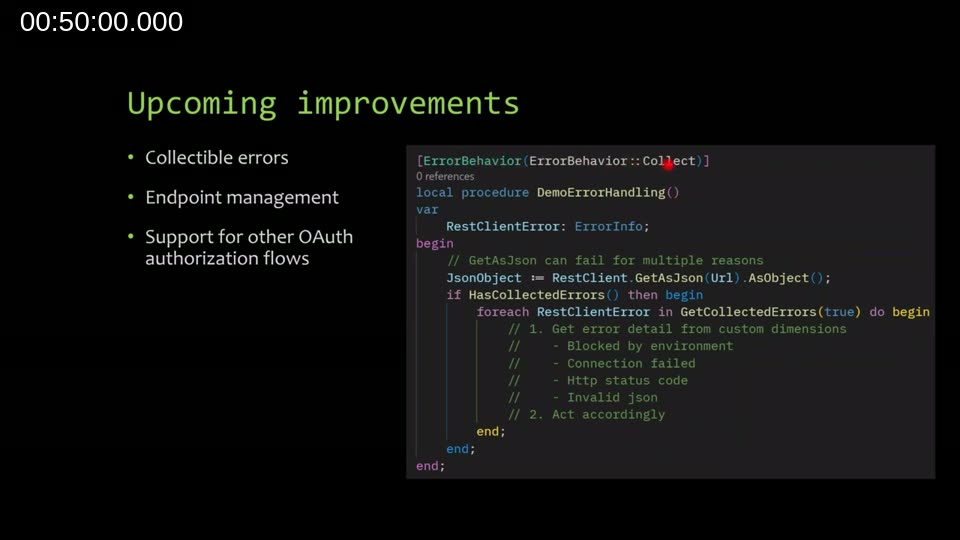
Three planned enhancements were discussed:
-
Collectible errors — Rather than immediately raising an AL error on failure, the Rest Client would raise a collectible error. Callers that mark their procedure with
[ErrorBehavior(ErrorBehavior::Collect)]can then inspect collected errors after the call and branch on the error type (blocked by environment, connection failed, HTTP status code, invalid JSON). This is similar to try/catch in C#. Callers that do not opt in to error collection will see the existing behaviour unchanged. - Endpoint management — A small companion module where end users or administrators can configure API endpoint URLs, authentication types, and credentials through the UI, allowing the Rest Client to be initialized from stored settings rather than hardcoded values.
- Additional OAuth flows — Support for the authorization code flow and device code flow. Arend-Jan noted the code was ready but required discussion with Microsoft because it uses techniques not currently available in Business Central.
📖 Docs: Overview of the System Application — describes how the System Application is structured into modules in the BCApps repository, including how to contribute.
📖 Docs: Access REST services from within Dynamics 365 Business Central — Microsoft Learn module covering the underlying HTTP data types, JSON handling, and connecting to external REST services from AL.
Q&A Highlights
During the Q&A session, several practical questions were raised:
- Does it work with XML/SOAP? Yes for XML — the module handles XML content directly. For SOAP, you would need to compose the SOAP envelope and headers manually; the Rest Client can send the request but does not have SOAP-specific helpers.
- Does header order matter? No. Headers can be set in any order, but remember that content-type headers belong on the
Http Contentcodeunit and request headers belong on the request message — the same separation as in C#. - Multipart form data? Not currently supported as a first-class feature. Building multipart content requires manual boundary and disposition handling. Arend-Jan noted this would be a useful addition and added it to the backlog.
- Performance of global vs. local variables? Business Central already reuses
HttpClientinstances internally, so the difference between a global and a local Rest Client variable is minimal in practice. If results suggest otherwise, sharing a reproducible scenario with Arend-Jan is the best path forward.
Where to Find the Module and Get in Touch
The Rest Client module source code lives in the microsoft/BCApps repository on GitHub under the System Application folder. Contributions — bug fixes, new features, or documentation improvements — are welcome via pull request. To reach Arend-Jan directly, visit his blog at kauffmann.nl or connect on LinkedIn or Discord.
This post was drafted with AI assistance based on the webinar transcript and video content.