
This webinar is a follow-up to an earlier Areopa session on real-life test automation experiences with James Pearson. In this edition, Peter Conijn, a developer at DYSEL, joins host Luc van Vugt to share a problem he ran into a few weeks before the session: while building a credit management app, he needed an install codeunit that updates existing customer and vendor ledger entries with a new field. That raised an immediate question — should install code, which normally only runs once per installation, be covered by automated tests at all? Peter walks through three iterations of exposing that code for testing, then shows how to lock the final version down so only the install process and the test app can reach it.
Should You Test Install Code?
Peter’s team requires an automated test for every change request, so the question of whether to test a given piece of code comes up constantly. His rule of thumb for install code: if this had been regular code, would you have demanded a test for it? If yes, the same applies to the install codeunit. Install code is often the first real interaction a customer has with an app, especially on AppSource, and an inadvertent change to it can silently corrupt data that isn’t discovered until much later.
The complication is that testing install code means exposing it, and once code is exposed it can be called by more than just your test — other codeunits, reports, or even an unrelated extension. Peter summarized the dilemma as needing your test app to be able to reach the code, while also keeping that same code secure from anything else that might call it.
The Baseline: A Regular Install Codeunit
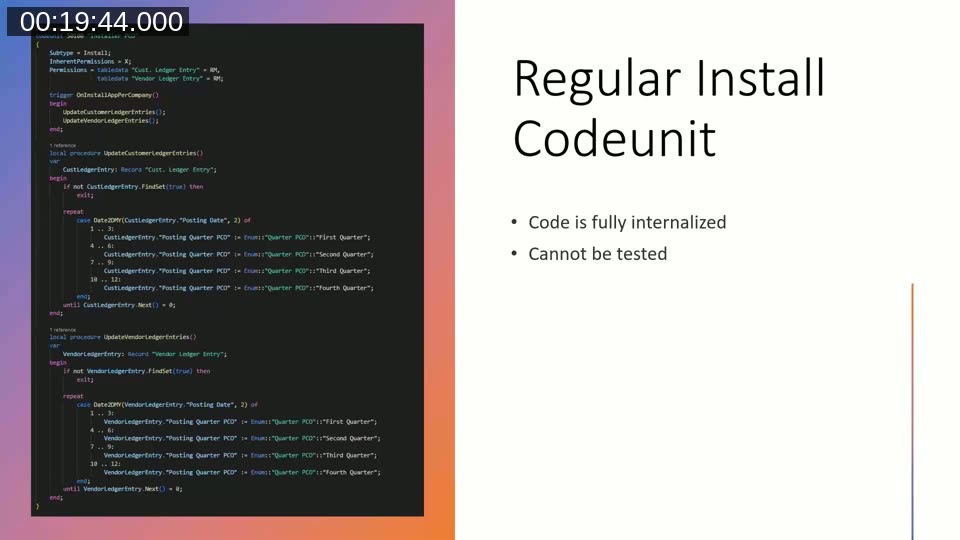
The starting point is a standard install codeunit with Subtype = Install, inherent permissions on the ledger entry tables it needs to update, and the actual logic in local procedures called from OnInstallAppPerCompany. As written, this codeunit cannot be tested: the OnInstallAppPerCompany trigger can’t be invoked directly, and the procedures it calls are local.
First Try: Just Call OnRun
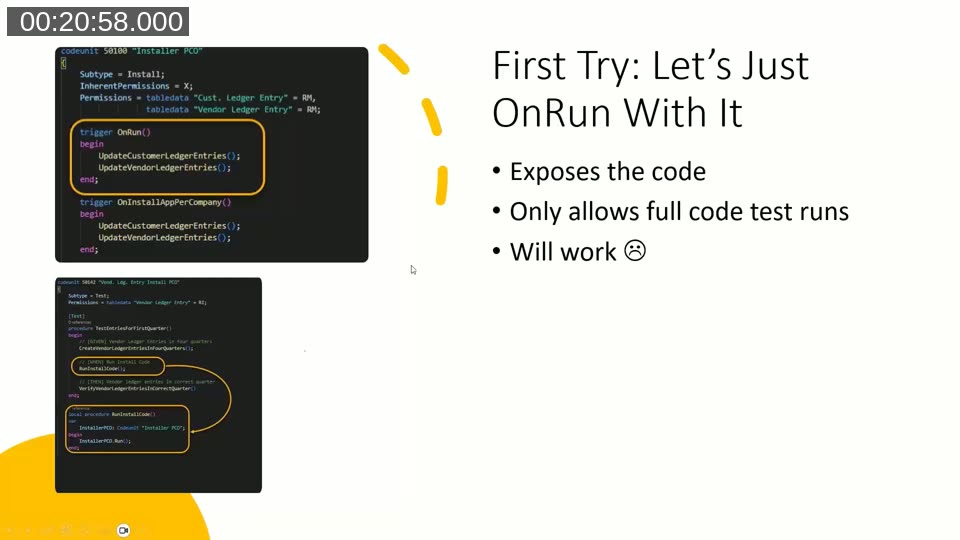
Every codeunit has an OnRun trigger, including install codeunits, and AL does not stop you from calling it directly. Moving the update logic into OnRun makes the codeunit callable — and testable — from a test codeunit. Peter demonstrated that it works, but rejected the approach for two reasons: it exposes the codeunit to be called by anything, not just your test (including PowerShell wrappers or job queue entries in an on-premises setup), and it only lets you test the entire trigger at once. With multiple procedures in a single install codeunit, every test has to run the whole thing, which slows down the build. His team currently runs about a thousand of their own tests, on top of Microsoft’s base app tests, so keeping individual test runs fast matters.
Second Try: Mark the Procedures Internal
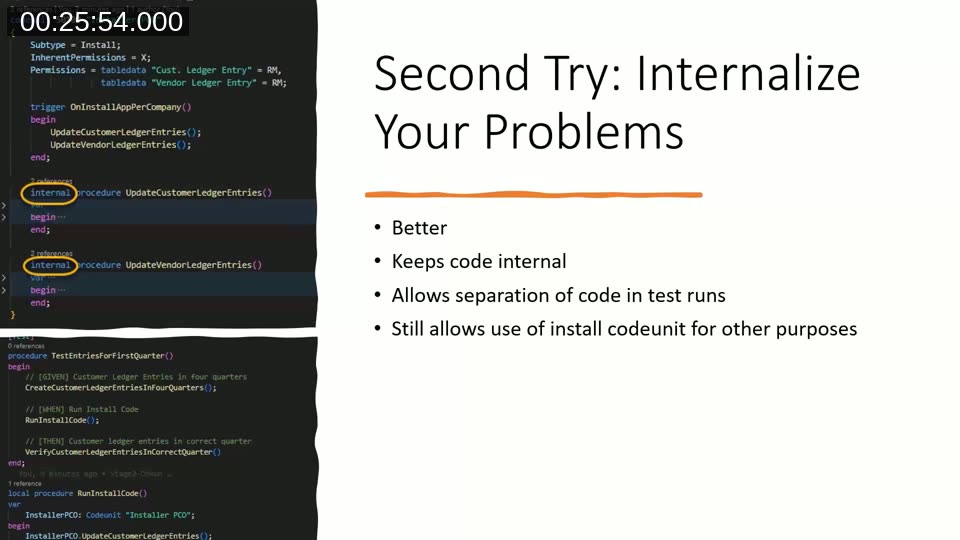
The next iteration keeps the logic in local-turned-internal procedures on the same install codeunit. This is technically sound — the code stays internal to the app, so no external extension can reach it — but Peter still wouldn’t approve it in a code review. His reasoning is about intent: an install codeunit exists to run installation code, and calling its procedures directly from test code, even internally, misuses the codeunit for something it wasn’t designed to do.
Third Try: The Facade Pattern
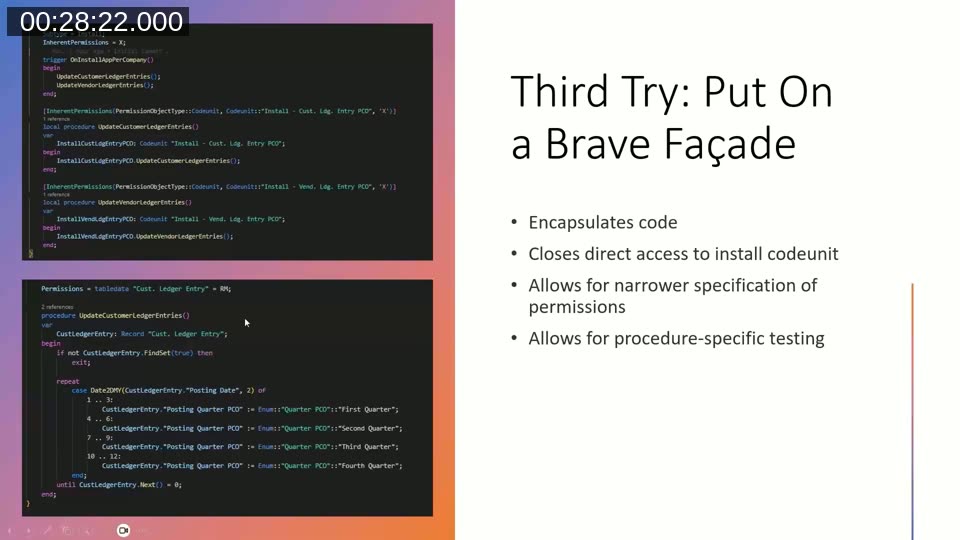
The approach Peter settled on wraps the install codeunit in a facade. The install codeunit itself keeps only the calls to dedicated implementation codeunits (for example one that updates customer ledger entries, another for vendor ledger entries), and each implementation codeunit carries its own narrowly scoped inherent permissions instead of one broad permission set on the install codeunit. This has two concrete benefits beyond testability: permissions can be limited to exactly what each procedure needs (the vendor ledger entry update no longer needs permission on the customer ledger entry table, and vice versa), and the inherent permission itself can be placed on the calling procedure rather than the codeunit, so the elevated permission only applies while the install code is actually running it.
📖 Docs: Inherent permissions in AL — how to grant a codeunit or procedure permissions independent of the calling user’s own permission set.
Locking It Down: Execution Context and Caller Module
The facade pattern still leaves the implementation codeunits internal and therefore reachable from any app with access to the internals. Peter showed two ways to restrict execution further so that, ideally, only the install process and the test app can trigger the code.
The first is NavApp.GetExecutionContext(), which returns whether the current session is running as Normal, Install, Upgrade, or Uninstall. Guarding a procedure with a check for ExecutionContext::Install and exiting otherwise blocks it from running during day-to-day use, but it also blocks the test app, since a test isn’t running in an install context.
📖 Docs: Session.GetExecutionContext() Method — returns the ExecutionContext (Normal, Install, Upgrade, Uninstall) that the current session is running in.
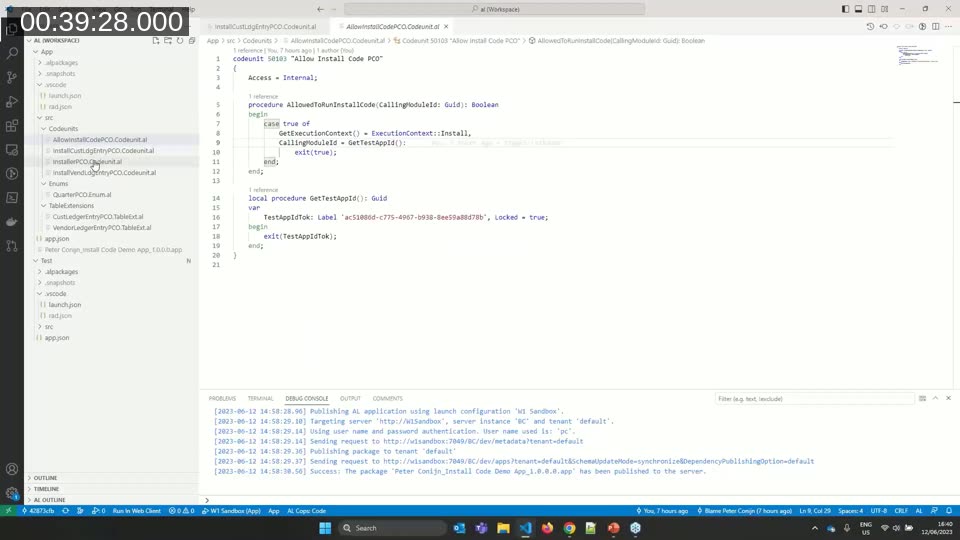
To let the test app in as well, Peter combined the execution-context check with NavApp.GetCallerModuleInfo(), which returns information about the extension that called the currently running procedure. Comparing the caller’s app ID against a hardcoded test app ID lets the procedure allow two, and only two, callers: the install process itself, or the specific test app.
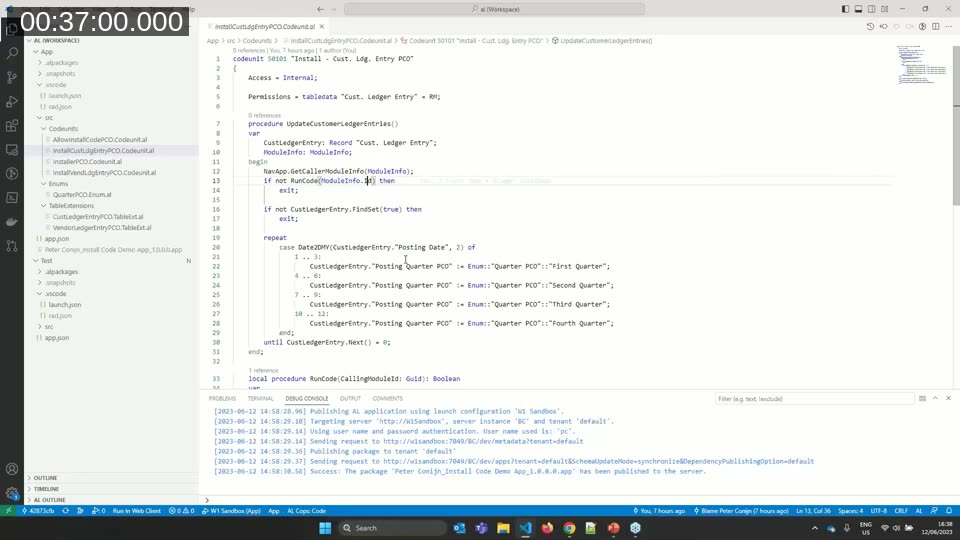
📖 Docs: NavApp.GetCallerModuleInfo(var ModuleInfo) Method — retrieves a ModuleInfo record describing the extension that called the currently executing method.
Peter encapsulated this check in its own small codeunit (which he called a “method codeunit”) so the install codeunit and its implementation codeunits stay focused on install logic, and the access check lives in one dedicated place.
Keeping internalsVisibleTo Out of the Release
Even with execution context and caller module checks in place, the test app still needs to see the install app’s internal objects at compile time. That access is granted through the internalsVisibleTo property in app.json, listing the test app’s ID, name, and publisher. Peter was direct about the risk here: this property should never ship in a release build. It exposes every internal table, procedure, and codeunit to the listed app, which is a potential data leak and a compliance risk under GDPR and similar privacy regulations. AppSource validation also flags its presence, and extracting information from a compiled app — even without the source — is easier than most developers assume, something Peter had seen firsthand at a Microsoft “capture the flag” session on Business Central security.
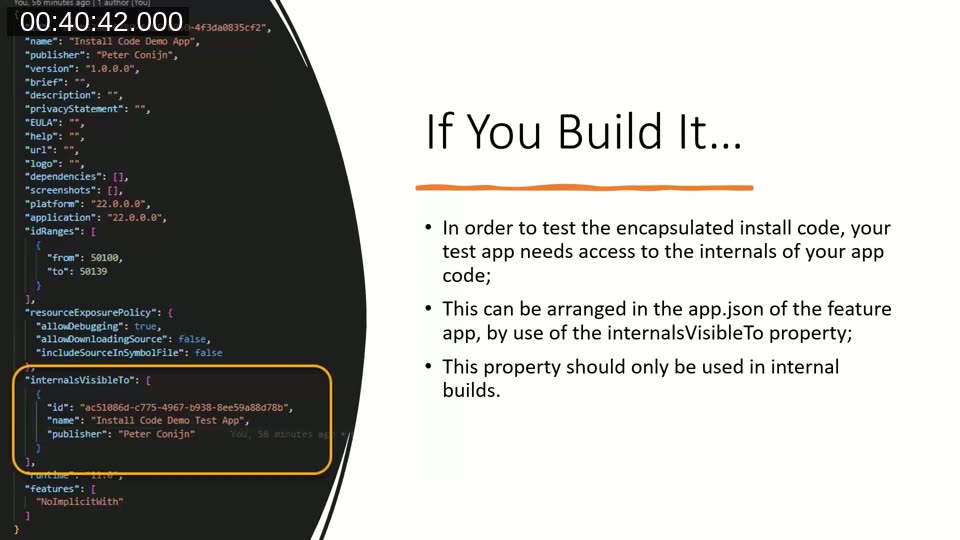
📖 Docs: JSON files in AL projects — covers the app.json properties, including internalsVisibleTo, used to expose internal objects to a specific dependent app.
Wiring It Into the Build Pipeline
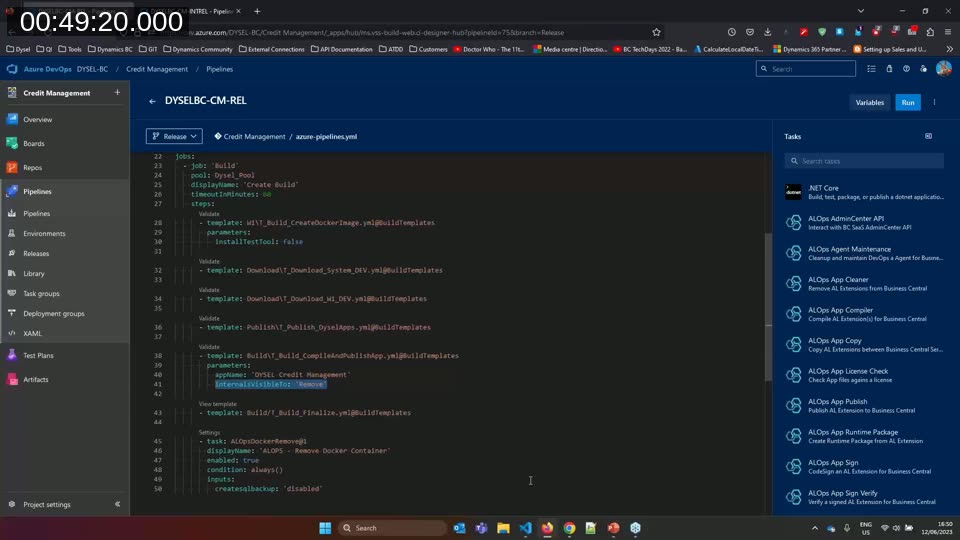
The practical fix is to keep internalsVisibleTo in place for internal builds, where tests still need to run, and strip it out of whatever build produces the release that goes to AppSource or on-premises customers. If you build manually, that means adding an explicit step to your release checklist. If you use CI/CD pipelines, Peter recommends checking whether your pipeline tooling already supports removing the property automatically.
Peter’s team builds with Azure DevOps and the ALOps pipeline templates. He showed their setup: an internal-release pipeline that compiles and runs the full test suite, and a separate release pipeline where the ALOps app-compile task takes an internalsVisibleTo: Remove parameter, stripping the property from the app.json before the customer-facing package is built.
📖 Docs: AL-Go for GitHub — Microsoft’s free, maintained DevOps template for Business Central projects on GitHub, mentioned as an alternative to Azure DevOps-based pipelines.
Q&A Highlights
During the Q&A, Peter expanded on how testing has changed his team’s coding style more broadly: logic that used to sit buried inside large, multi-purpose codeunits has moved into small, single-purpose method codeunits, purely so it can be isolated and tested independently of the rest of the flow. Asked how to test that install code correctly handles being run more than once (since install code can rerun on certain extension operations), Peter described writing a test that runs the install code, mutates the data to simulate real-world changes since installation, runs the install code a second time, and verifies that user-made overrides survive the second run while the intended defaults still apply where nothing was overridden.
This post was drafted with AI assistance based on the webinar transcript and video content.