
Good demo data takes days to prepare, goes stale with the next update, and often ends up mixed with real customer data. In this webinar, Simon Fischer (senior developer at 4PS) looks at why that happens and at how Microsoft’s Contoso Coffee framework changes the picture. He then presents an open-source tool that generates a Contoso Coffee-style AL extension from data that already exists in Business Central. Tobias Fenster hosts and moderates.
The session covers the problem, the structure of Contoso Coffee, a live demo of the generator, and the roughly 20% of work that still needs people.
The Pain With Demo Data
Simon opens with what most BC teams know: days of preparation for a two-hour demo, the same chart of accounts and posting group setup repeated for every implementation, and data that breaks after an update. Teams cope by running several environments, sometimes four for one end-to-end process, and switching between them mid-demo. Production data in demos adds compliance risk and confuses the audience.
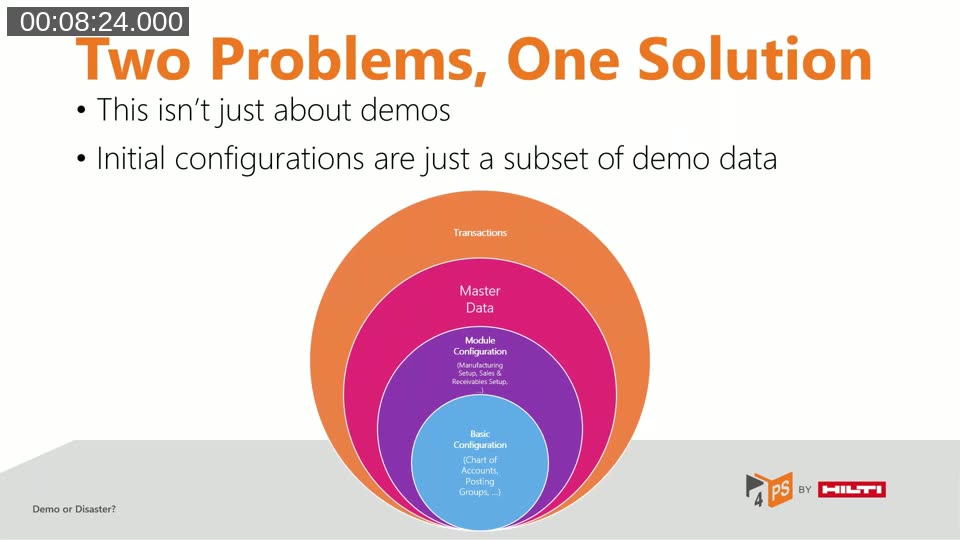
He also makes the point that this is not only a pre-sales issue. Initial configuration for a new customer is a subset of demo data: the same chart of accounts, posting groups and module setup sit in the inner layers, with master data and transactions on top.
From RapidStart to Contoso Coffee
RapidStart configuration packages were the standard way to bring data into a company. Simon lists their limits: mostly raw data with little logic, fragile when the schema changes, not a real option for AppSource apps, and hard to review or version-control because a package is a file, not code. Microsoft has also deprecated many of the related functions.
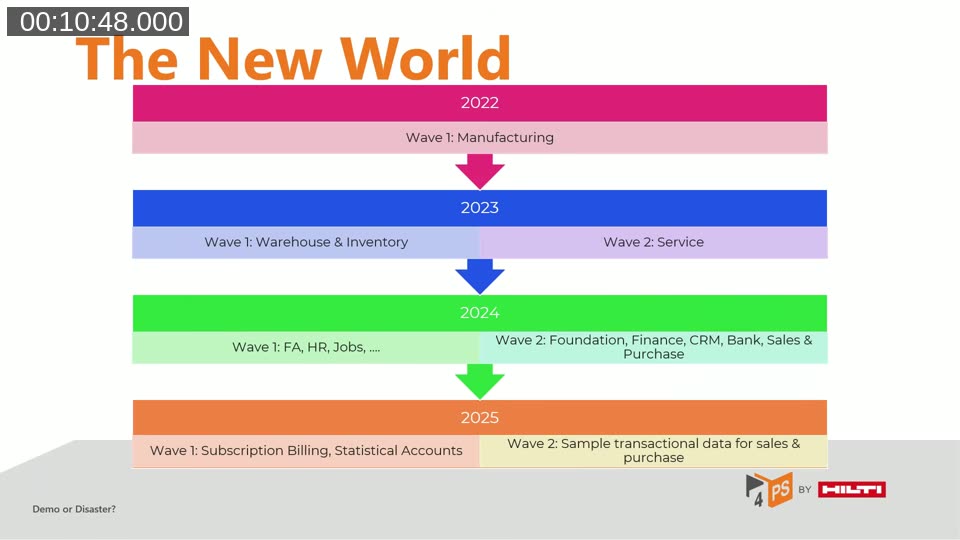
Microsoft’s answer is the Contoso Coffee demo data framework. It started in 2022 with manufacturing and has grown release by release into warehouse, service, fixed assets, HR, jobs, finance, CRM, bank, purchasing and sales. The 2025 release waves added subscription billing, statistical accounts and sample transactional data for sales and purchase.
📖 Docs: Introduction to Contoso Coffee Demo Data — Microsoft Learn describes the two Contoso Coffee apps and how to configure and generate modules from the Contoso Demo Tool page.
How a Contoso Coffee Module Is Built
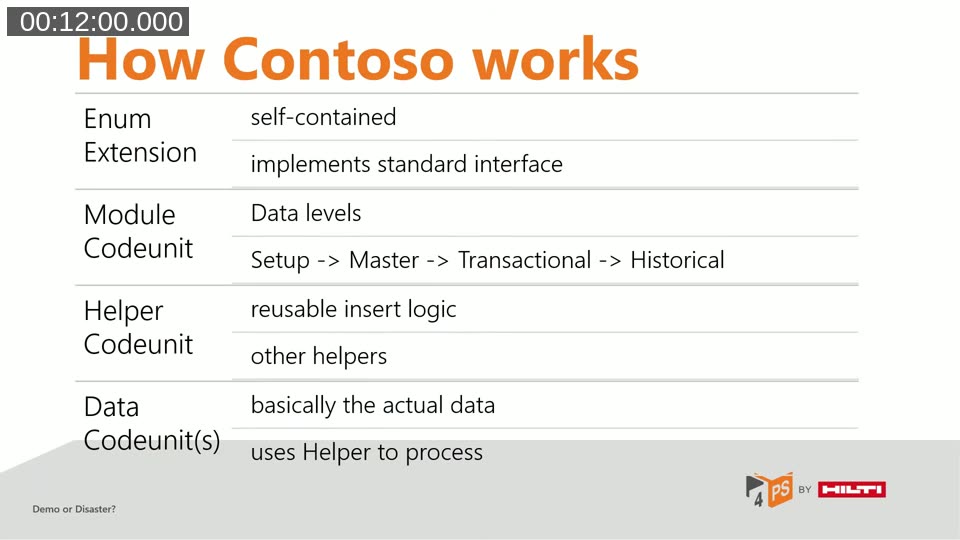
Every module follows the same pattern. An enum extension registers the module with the framework. A module codeunit implements the standard interface with four entry points: create setup data, master data, transactional data and historical data. Helper codeunits hold the reusable insert logic, and data codeunits, usually one per table, hold the actual values.
Simon walks through Microsoft’s bank module in VS Code. The helper checks whether a record exists, respects an override flag, validates each field, and then inserts or modifies. Data codeunits avoid literals: values are returned from procedures and text values are labels, so they can be translated and reused. He also notes the framework is consistent enough that writing it by hand is mostly repetitive boilerplate.
The Demo Data Generator
This is where the gap for partners sits. Contoso Coffee covers the standard product, but not a partner’s own modules or an ISV vertical. The Demo Data Generator runs inside Business Central, reads existing data, and produces a complete AL extension with module codeunit, helper codeunits, data codeunits and enum extension. Simon estimates it removes about 80% of the mechanical effort.
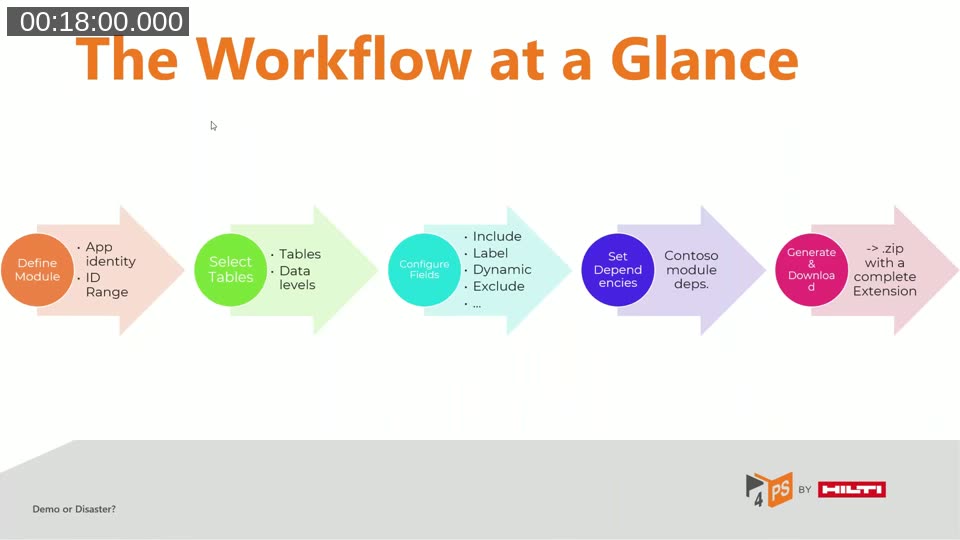
The workflow has five steps:
- Define the module: name, description, publisher, app ID, namespace, ID range and apps to exclude.
- Select the tables and assign each a data level: setup, master or transactional.
- Configure the fields. Each field can be a literal, a label, a dynamic value, a reference to another entity, or excluded.
- Declare dependencies on standard Contoso modules.
- Generate and download a zip file with the extension.
📖 Docs: SimonOfHH/DemoDataGenerator — the MIT-licensed GitHub repository, described as a generator of Contoso-compatible demo data modules from live Business Central data.
Live Demo: Generating a Bank Module
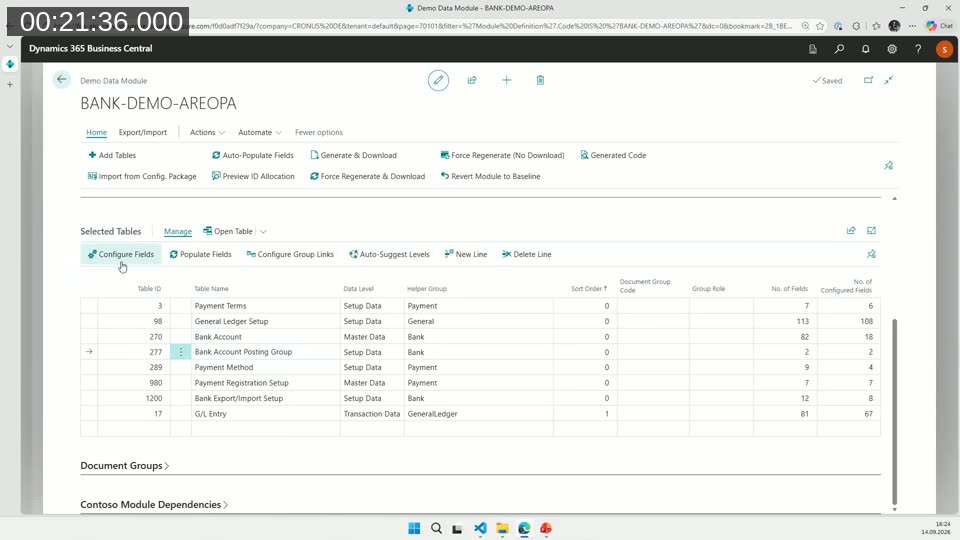
For the demo, Simon uses a prepared Demo Data Module that covers the bank area: payment terms, general ledger setup, bank accounts, bank account posting groups, payment methods, bank export/import setup and a sample of G/L entries. A bank account posting group is simple: only the code and the G/L account number, stored as a reference to the bank account table and its first field. The bank account itself has many fields, some excluded, some included as labels.
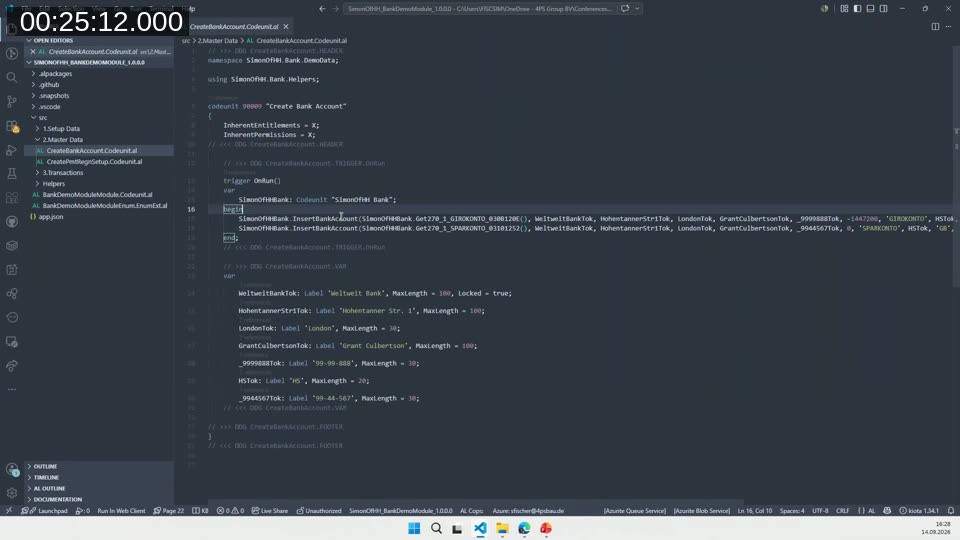
After Generate & Download, he opens the zip in VS Code. The module codeunit has the four entry points and an optional configuration page hook. The generated Create Bank Account codeunit calls a helper codeunit with the values configured earlier. The helper follows the same exists, validate, write pattern as Microsoft’s code. Procedure names are generated from table ID, field ID and primary key, which makes them unique but not readable.
The Remaining 20%
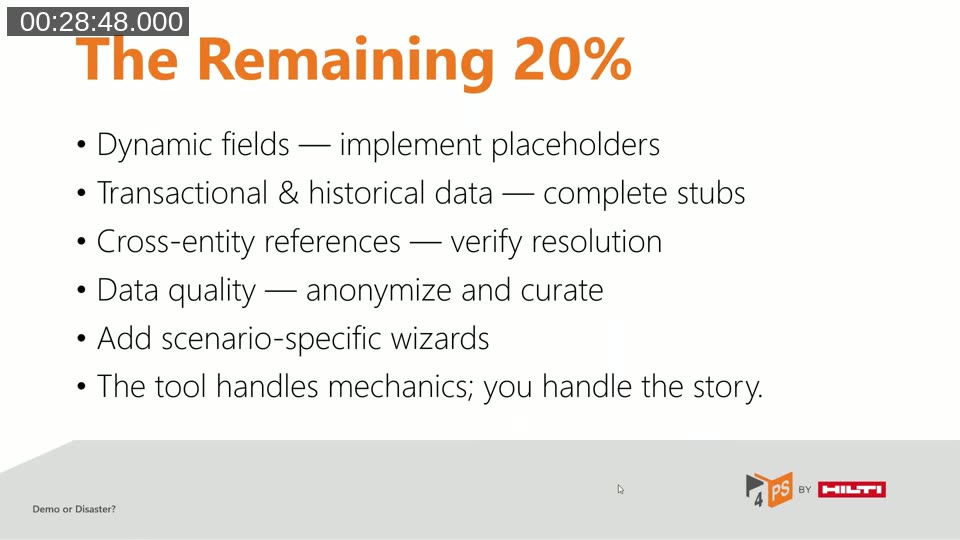
Some work cannot be generated. Simon lists what stays with people:
- Dynamic fields — where the tool cannot confidently set a value, it creates a placeholder procedure to implement.
- Transactional and historical data — the tool creates stubs, but a meaningful order or posted invoice needs domain knowledge.
- Cross-entity references — the tool wires them up, but they should be checked for the target scenario.
- Data quality — live data may contain real customer names, internal codes or test records, so it must be cleaned or anonymized.
- Scenario-specific wizards — added by hand.
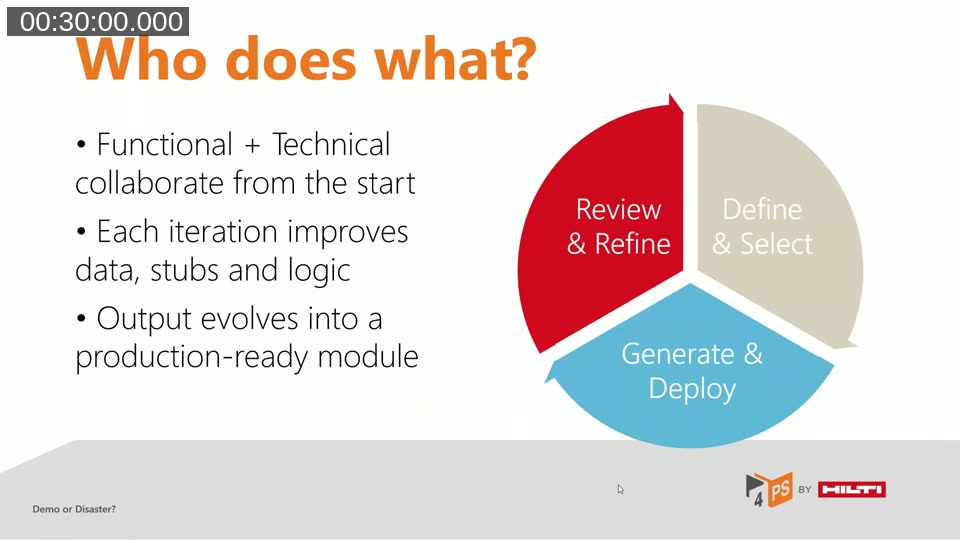
His suggested process is a loop between a functional expert and a developer. The functional expert explains the module and the data story, the developer selects tables and fields, generates and deploys a first version, and the functional expert creates a company, runs the initialization and reports what is missing or wrong. A few iterations usually produce something solid, and Simon says the feedback loop can be done within hours instead of days.
AI Prompts and Polishing Without Losing Changes
The generated project includes two prompts for an AI agent. One makes the generated procedure and label names human readable. The other helps recreate unposted sales or purchase documents from the posted data, using a generated JSON file of exported records. Simon says this works best when the agent has access to the Contoso Coffee repository or the team’s own demo libraries, and that results without those symbols will probably not be meaningful. He also says automatically creating documents from historical data is hard and he has no complete solution.
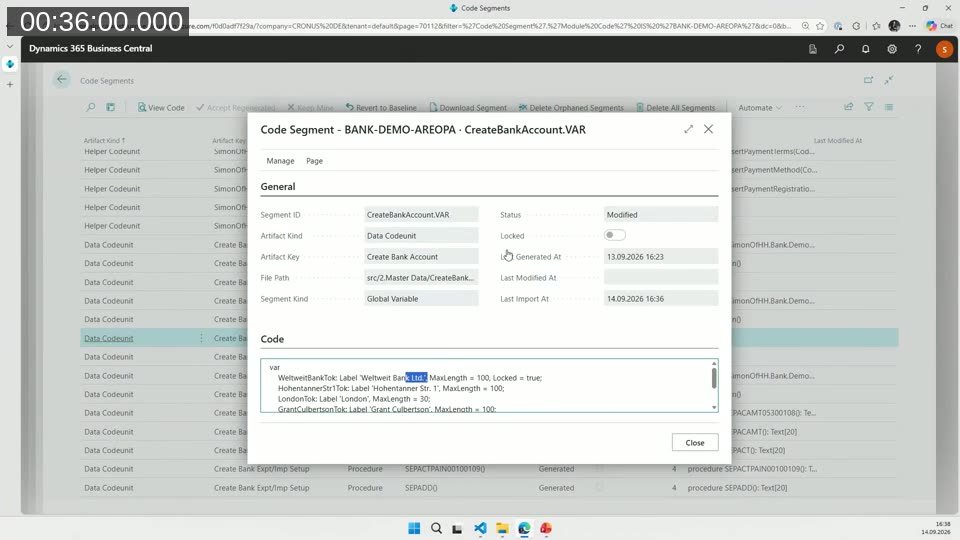
The more practical feature is code segments. Each generated piece of code is tracked as a segment. In the demo, Simon changes a bank name label to “Worldwide Bank Limited” and sets a negative value to zero, then imports the edited source files. The tool reports two modified segments and 90 unchanged. When he regenerates, his two edits are kept. A segment can be reverted to baseline, or everything can be force-regenerated. Custom local procedures can go in a footer section and survive regeneration.
One more feature: Import from Config. Package reads an existing RapidStart configuration package, including its tables, fields and filters, into a new module. Simon credits Natalie Karolak for the idea after she tested an early version when Simon first showed the tool in April.
Key Takeaways
- Demo data affects whether prospects buy, so it is worth investing in.
- Contoso Coffee is the direction Microsoft has chosen. Align with its pattern rather than building a parallel one.
- The pattern is mechanical enough to automate.
- The Demo Data Generator targets partners and ISVs. It reduces effort but does not replace expertise.
- It is open source, and Simon invites contributions, especially ideas for generating transactional data from historical data.
Q&A
What is expected for Microsoft’s demo data foundation? Simon has heard nothing recent. The framework keeps growing from release to release. He adds that people who find weak defaults, for example in the German data sets, should report them to Microsoft on GitHub so the fix benefits everyone.
How can AI help close the last 20%? The default prompts cover the repetitive polishing. At 4PS, many separate apps each need the same cleanup, so defining a prompt once and letting agents apply it saves work. Simon also says the code segment feature was what made this practical, because polished code survives regeneration.
Resources
- Demo Data Generator on GitHub: SimonOfHH/DemoDataGenerator
- Simon’s blog: SimonOfHH.tech (shown on the final slide)
This post was drafted with AI assistance based on the webinar transcript and video content.