
In this Areopa Academy webinar — the 101st in the series — Tine Starič, architect at Companial and Microsoft MVP, walks through a practical framework for writing reliable AI prompts in Business Central. Hosted by Bert Verbeek, the session draws on Tine’s experience building AI-powered features and explains why prompts designed for ChatGPT are not suitable for production AI features in BC.
Why Prompt Engineering Matters in Business Central
Tine opened by sharing the origin of this session: an internal hackathon at Companial where the team tried to build a backlog management helper. The idea was to upload a requirements document and have AI extract user stories in JSON format for Azure DevOps. After 10 hours of work, all the plumbing was in place — blob storage, Azure Functions, OpenAI calls — but the prompt was just three poor sentences, and the results were too inconsistent to be useful.
That experience led Tine to study prompt engineering in depth, and the session distils those learnings into three goals: building a good prompt, turning a good prompt into a great one, and keeping a great prompt great through testing.
LLMs Are Probability Machines, Not Smart Assistants
Before diving into techniques, Tine demonstrated in the OpenAI Playground (completions view) how language models actually work. Given the sentence “Today is a good day, let’s go to a…”, the model selects the next word by calculating probabilities — not by understanding the question.
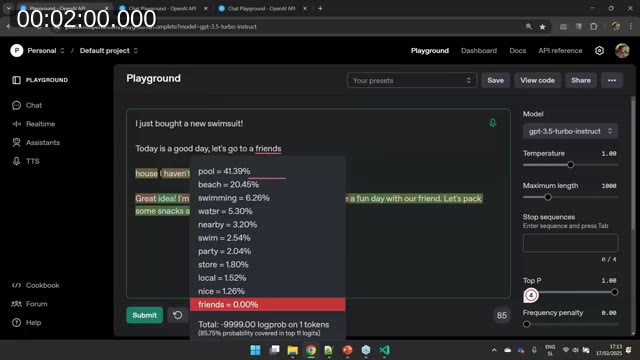
When the sentence was prefixed with “I just bought a new swimsuit!”, the probability distribution shifted: “pool”, “beach”, and “swimming” moved to the top. The model didn’t understand the context — it recalculated probabilities based on the new tokens. Temperature controls how willing the model is to pick lower-probability words. At temperature 0 the output is deterministic; at temperature 2 it becomes incoherent.
The key takeaway: if your prompt is vague, the model fills in gaps with whatever word is statistically likely — which may not be what your feature needs. A well-structured prompt shifts the probability distribution toward the outputs you actually want.
📖 Docs: Prompt engineering techniques — Azure OpenAI / Microsoft Foundry — official guidance on temperature, system messages, and output shaping.
The Five-Component Framework
Tine’s core message is that a reliable prompt has five components:
- Instructions — what the model should do
- Steps — how to think through the task
- Format Requirements — the expected output format (e.g. JSON schema)
- Examples — sample inputs and outputs
- Notes — reminders and rules to anchor the model’s behaviour
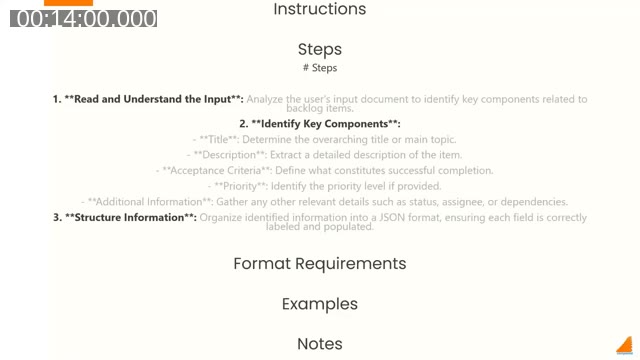
Three well-known prompting techniques map directly onto these five components.
Few-Shot Learning (Examples)
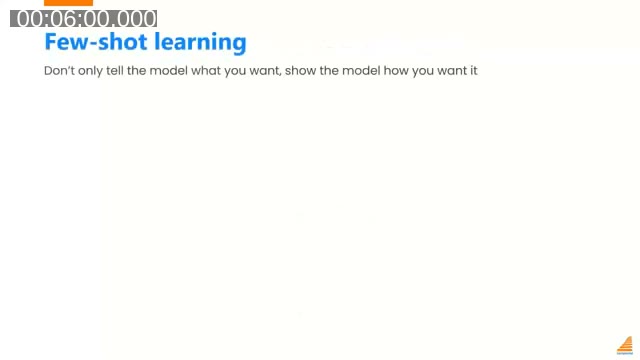
Few-shot learning means showing the model what you want, not just telling it. For a purchase order line extraction feature, a naive prompt might say: “Extract items and return them in JSON.” Few-shot learning adds concrete examples:
# Examples

Input: "Please add 30 units of item X, 10 units of item Y, 5 units of item Z"
Output:
{
  "items": [
    { "item": "X", "quantity": 30 },
    { "item": "Y", "quantity": 10 },
    { "item": "Z", "quantity": 5 }
  ]
}

Input: "Include 15 units of part A, 20 units of part B"
Output:
{
  "items": [
    { "item": "A", "quantity": 15 },
    { "item": "B", "quantity": 20 }
  ]
}
Chain of Thought (Steps)
Chain of Thought gives the model explicit reasoning steps rather than asking it to jump straight to an answer. For a discount approval feature, the prompt includes both the business rules and the steps to apply them:
# Steps

1. **Identify the Order Value:** Check the order value provided.
2. **Determine the Discount Threshold:** Based on the order value, decide the maximum allowable discount.
   - Value > 10k → max discount 15%
   - 5k < value <= 10k → max discount 10%
   - Value < 5k → max discount 5%
3. **Compare Discount with Threshold:** Check if the requested discount is within the allowable limit.
4. **Make a Decision:** Approve or Reject.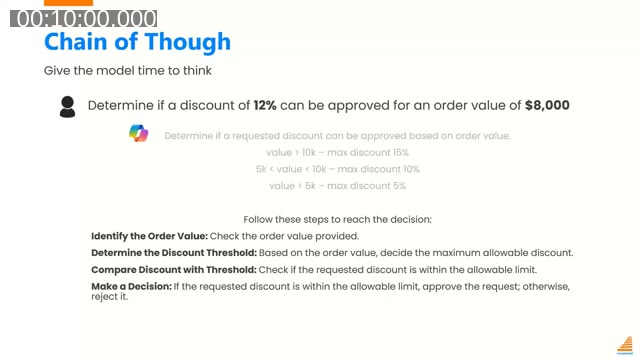
Without steps, a simple discount matrix prompt may work 60% of the time in testing but fail unpredictably at scale. Chain of Thought reliably pushes that figure into the 80–100% range.
Prompt Reinforcement / Anchoring (Notes)
After instructions, steps, format requirements, and examples, a Notes section reminds the model of the most critical rules. Tine drew an analogy to code review: just as you’d highlight the key things a junior developer must not miss, you use Notes to anchor the model’s attention on what matters most.
# Notes

- **Ensure that the requested discount is compared** with the maximum allowable discount for the specified order range.
- **Follow each rule carefully** and evaluate both the order value and requested discount before making a decision.
- Provide a clear final decision as either **'Approve' or 'Reject'**.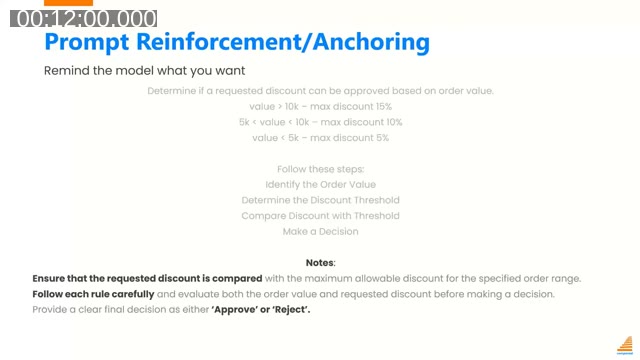
Shortcut: Generate a Starting Prompt in OpenAI Playground
The OpenAI Playground Chat view has a “Generate” button that takes a one-sentence description and produces a structured system prompt following the five components. Tine demonstrated this live: entering “Parse user stories or bugs from a requirements document and turn it into JSON format so it can be used to send API requests to Azure DevOps” generated a prompt with Instructions, Steps, Format Requirements, Examples, and Notes already in place. It won’t be perfect out of the box, but it provides a strong starting point.
Making a Good Prompt Great: Model Capabilities
JSON Mode
Before JSON Mode was available in the BC AI Toolkit, developers had to beg the model in the prompt itself to return valid JSON — and it sometimes added preamble text or produced malformed output anyway. JSON Mode is a single property on the AI request that instructs the model it may only return valid, parseable JSON. No extra prompt text needed, and no more bracket mismatches.
📖 Docs: Build the Copilot capability in AL — Business Central — covers the AI toolkit API including JSON mode and function/tool calling support.
Tool Calling
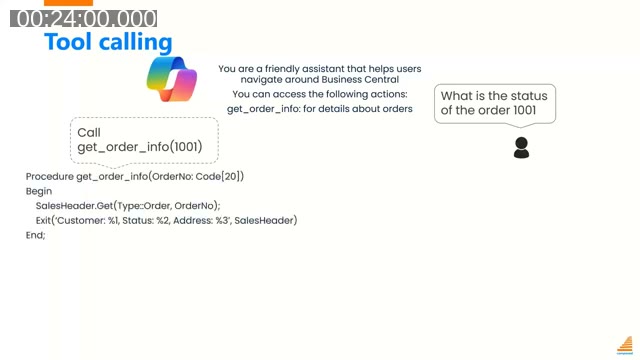
Tool calling (also known as function calling) allows the language model to request data from Business Central rather than hallucinating it. The model’s system prompt lists available actions with their signatures. When a user asks “What is the status of order 1001?”, the model recognises it needs live data and responds with a structured call to get_order_info(1001) rather than guessing.
On the AL side, a procedure handles that call — retrieving the sales header and returning customer, status, and address details. The model then uses that grounded data to compose its final response.
A second example showed tool calling for bulk data changes: “Update credit limits for customers in North America by 15% and change payment terms to Net 45” triggers two tool calls — update_credit_limit(area, NA, 15%) and update_payment_terms(area, NA, NET45). Tine’s framing here is instructive: AI is not magic, it is a different interface to logic that Business Central could already execute. The value is that users no longer need to navigate menus or remember field names — they can describe what they want in natural language.
📖 Docs: How to use function calling with Azure OpenAI — Microsoft Foundry — explains how to define functions, how the model decides when to call them, and how to handle the response.
Prompt Guides
Even a well-crafted prompt can fail if users don’t know how to invoke the feature correctly. Prompt Guides in Business Central let developers add predefined prompt templates to a PromptDialog page. When a user opens the AI feature, they see options like “Create new number series” or “Modify existing number series” — clicking one pastes a structured starting prompt that the user can then adjust.
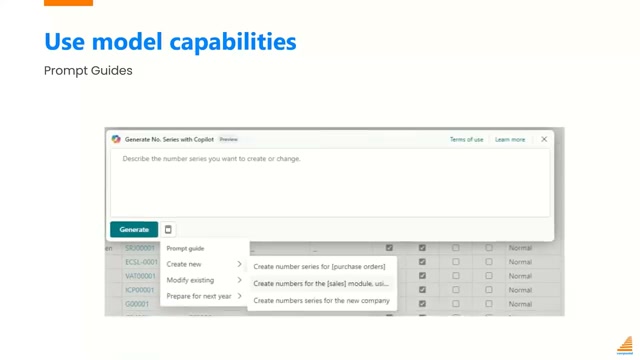
📖 Docs: Prompting Using a Prompt Guide — Business Central — shows how to add a PromptGuide action area to a PromptDialog page with predefined prompt text for each action.
Keeping a Great Prompt Great: Testing
Tine gave three concrete reasons why testing AI features is more important than testing traditional code:
- Developers can break prompts. Unlike removing a line of AL code — which has a clear, visible effect — removing a line from a system prompt may silently degrade accuracy. Without test coverage, you won’t know until users complain.
- OpenAI can break prompts. The model behind a Business Central AI feature is not static. “GPT-4o” has been updated multiple times (May, August, and other vintages), and each version behaves slightly differently. Tests let you verify that a model update hasn’t broken your feature.
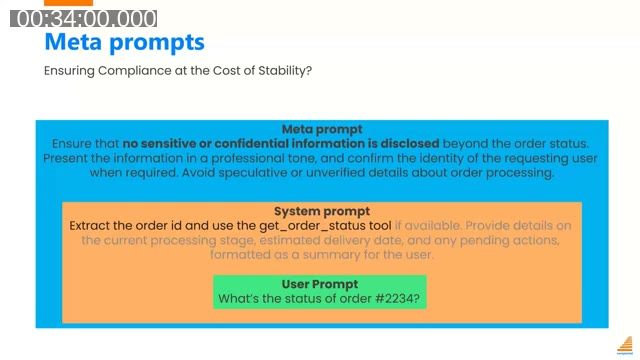
- Meta prompts can break prompts. Every request sent through the BC AI Toolkit passes through a hidden meta prompt added by Microsoft — responsible for responsible-AI guardrails such as preventing disclosure of sensitive information. The content and timing of meta prompt changes is not publicly documented. If the meta prompt changes, it may interact unexpectedly with your system prompt.
How to Build an AI Test Suite
The testing approach Tine described works as follows. For a given AI feature, create a JSON file containing test cases — each with an input (simulating what a user would type) and an expected output:
[
  { "question": "Determine if a discount of 12% can be approved for an order value of $8,000", "expected": "Reject" },
  { "question": "Can I give 7% discount for $6,000 order?", "expected": "Approve" },
  { "question": "Is a discount of 17% allowed for an order of $20,000?", "expected": "Reject" },
  { "question": "Would a 5% discount be allowed on an order value of $3,000?", "expected": "Approve" }
]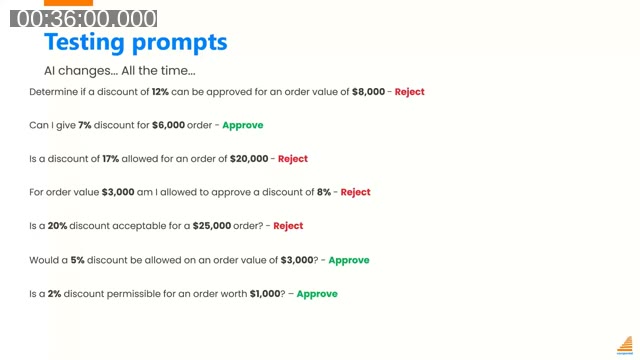
Vary both the numbers and the phrasing. AI can generate additional test cases for you. In AL, a single test procedure iterates over the JSON file: extract the question, run the AI feature with that question, compare the actual response to the expected response.
The BC AI Test Toolkit (now part of the developer tools for Copilot) makes this pattern straightforward. One test procedure replaces what would previously have required 18 separate test codeunits — one per scenario.
Tine also pointed out a practical tip from the Q&A: the BC toolkit exposes two deployment procedures — one for the current GPT-4o version and one for the preview version. Running your test suite against both lets you detect regressions before Microsoft promotes the preview model to the production deployment.
📖 Docs: Test the Copilot Capability in AL — Business Central — full walkthrough of the AI test framework including dataset-driven test procedures and how to compare expected vs actual responses.
Recap: The Three-Part Framework
Tine closed with a concise summary of the three-part framework:
- Build a good prompt — use the five components (Instructions, Steps, Format Requirements, Examples, Notes), or use OpenAI Playground’s Generate button as a starting point.
- Make it great — enable JSON Mode for structured output, use tool calling to ground responses in live BC data, and add Prompt Guides so users know how to invoke the feature effectively.
- Keep it great — write an automated test suite covering varied input phrasings and expected outputs. Run it against both the current and preview model deployments.
The closing reminder: don’t build your prompts the way you talk to ChatGPT. ChatGPT is a general-purpose assistant designed for conversational interaction. The AI features built in Business Central are production software — they need structured, testable prompts that produce consistent results across thousands of executions.
This post was drafted with AI assistance based on the webinar transcript and video content.