
In this Areopa Academy webinar, Niall McGovern – product manager at 4PS – walks through Business Central’s sustainability functionality from first principles. The session is aimed at BC functional consultants who may not yet be familiar with sustainability regulations or terminology. Niall covers the regulatory drivers behind the features, a hands-on tour of what is available today, the additions introduced in 2025 release wave 1, and a look ahead at what is coming next.
Why Sustainability Matters – and Why It Ends Up in an ERP
Niall opens by grounding the topic in the three pillars of ESG: environmental, social, and governance. Reducing carbon footprints and conserving resources are the most visible motivations, but social obligations – fair labour practices, employee welfare – and governance considerations sit alongside them. The practical push for many organisations is regulatory: mandatory reporting frameworks are expanding, and businesses that already have systems in place to capture emissions data will be better positioned to meet those requirements.
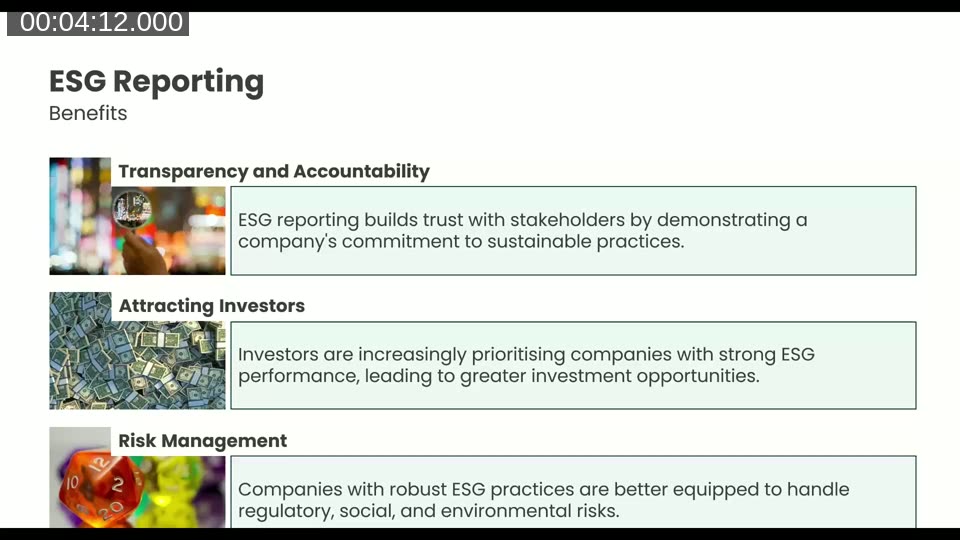
ESG reporting translates those three pillars into measurable data. Niall highlights three benefits of investing in it early: it demonstrates transparency and accountability to stakeholders, it matters increasingly to investors, and it reduces risk by preparing the business for regulatory requirements before they become mandatory.
📖 Docs: Sustainability management overview – Business Central — the starting point for understanding all BC sustainability features, including emission scopes, journals, and the chart of sustainability accounts.
The Regulatory Backdrop
Two reporting frameworks receive particular attention. The EU Corporate Sustainability Reporting Directive (CSRD) is already in effect for large public interest entities, with mandatory scope expanding in 2027 and 2028. February 2025 changes reduced some of the reporting burden, but the direction of travel is clear: more organisations will be drawn into scope over time.
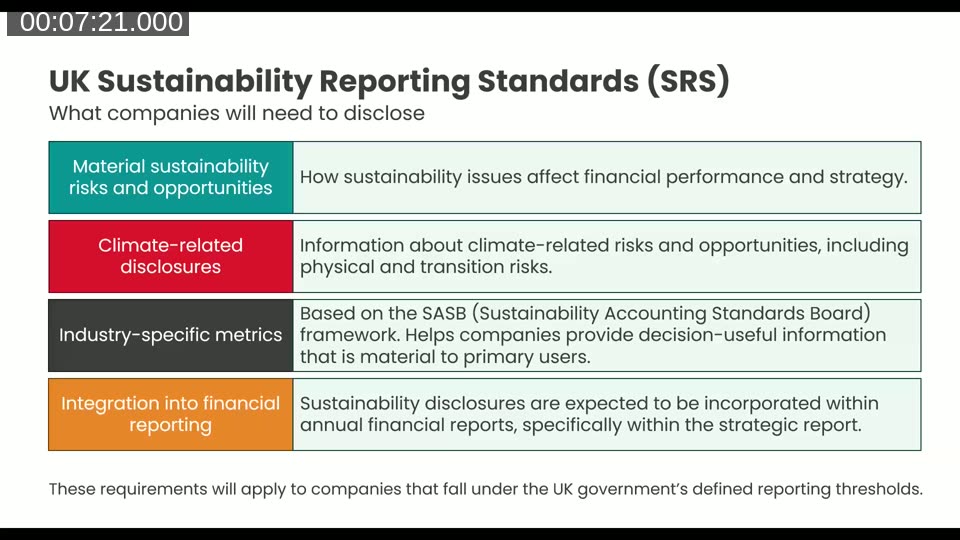
The UK Sustainability Reporting Standards (SRS) follow a similar template. Key disclosure areas include material sustainability risks to financial performance, climate-related disclosures, industry-specific metrics based on the SASB framework, and integration into annual financial reports. Niall notes that UK standards are still being finalised, with mandatory reporting for in-scope businesses expected no earlier than 2026 for data collection, and reporting from 2027.
Greenhouse Gases and Emission Scopes
Business Central tracks three greenhouse gases – carbon dioxide (CO2), methane (CH4), and nitrous oxide (N2O) – in line with the Paris climate protocol. Emissions are categorised into three scopes:
- Scope 1 – direct emissions from a business producing goods or delivering a service.
- Scope 2 – indirect emissions from purchased electricity, steam, heat, or cooling.
- Scope 3 – all upstream and downstream indirect emissions: purchased goods, employee commuting, product disposal, and much more.
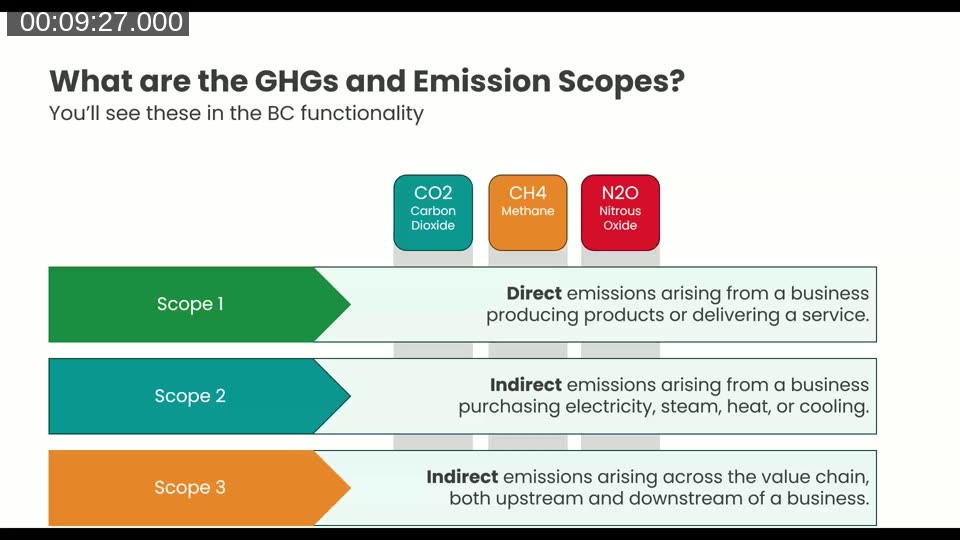
Scope 3 is the broadest and most difficult to pin down. Niall observes that it is often the largest source of emissions and requires data from many sources across the value chain – something Business Central is actively building better support for.
The Foundation: Emissions Accounting in Business Central
At its core, the sustainability module in Business Central is an emissions accounting system that mirrors the familiar structure of financial accounting. Instead of recording monetary values, you record emission quantities. The prerequisite is that the Microsoft Business Central Sustainability app extension is installed. Demo data can be generated from the CRONUS demo tool’s sustainability module, which helps considerably with understanding the setup.
Sustainability Setup
The Sustainability Setup page controls units of measure for emissions, water, and waste; decimal precision; whether country/region and responsibility centre fields are mandatory on journal lines; and several toggles that govern which master data fields are visible. Niall highlights the background error-check setting as a useful safeguard when entering journal data.
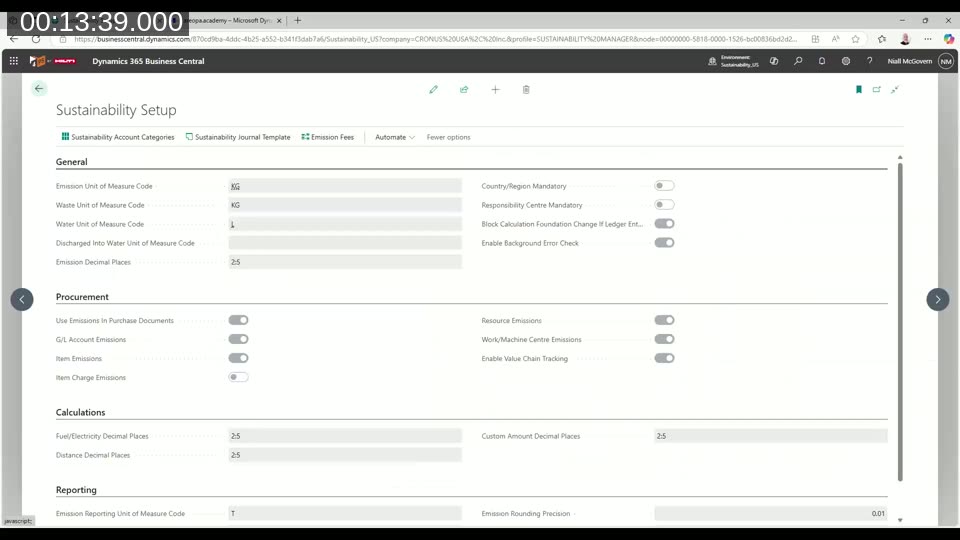
📖 Docs: Sustainability setup – Business Central — covers all configuration options including emission factors, unit of measure codes, and procurement integration toggles.
Account Categories, Subcategories, and the Chart of Sustainability Accounts
Account categories define the top-level types of activity being tracked and map them to a scope (1, 2, or 3). The CRONUS demo data includes categories such as direct combustion (Scope 1), energy sources (Scope 2), and a wide range of Scope 3 activities including company car travel and hotel stays. Account subcategories hold the emission factors – the default values that specify how many kilograms of a given gas are associated with each unit of the activity (for example, kilograms of CO2 per kilometre driven in a large company car).
The Chart of Sustainability Accounts organises these into a structured ledger, similar to a chart of accounts in financial accounting. Each account maps to a category and subcategory, which allows the journal to default the correct emission factor when a line is entered.
Recording Emissions: Journals and Purchase Documents
The Sustainability Journal is the primary data-entry point. Entering a line for a given account, unit of measure, and quantity automatically calculates the resulting emission (for example, 400 km in a large company car yields 59.6 kg of CO2). Posting the journal creates sustainability ledger entries. Purchase documents can also carry sustainability data, which is useful when emissions are embedded in a procurement transaction.
Reporting: Standard Reports and Ad-hoc Analysis
Three Excel-layout standard reports are available: Total Emissions, Emissions Per Facility, and Emissions By Category. These provide a filterable starting point for analysis and are being improved in BC26. Ledger entries can also be analysed using BC’s built-in analysis mode to create pivot views, or Copilot can generate an analysis view on demand. Financial reports (the former Account Schedules) can incorporate sustainability accounts, allowing emissions data to appear alongside or separately from financial figures.
Sustainability APIs
Business Central is unlikely to be the sole source of ESG data in most organisations. IoT telemetry, HR systems, and specialist ESG platforms may all hold relevant data. The REST APIs cover the key tables – account categories, subcategories, accounts, journal lines, and ledger entries – with full CRUD support except for ledger entries (read-only). These enable both inbound data collection and outbound export to other applications.
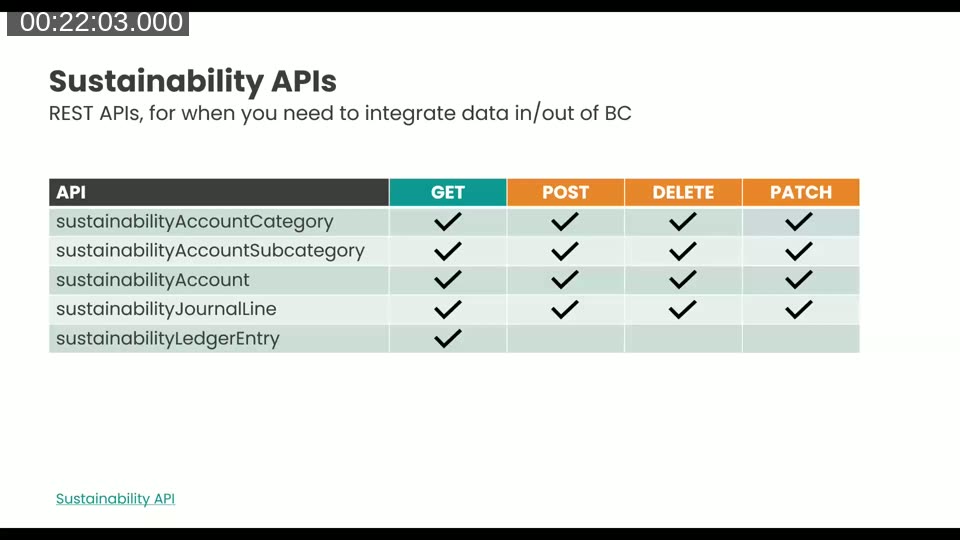
📖 Docs: Sustainability API – Business Central — full API reference for integrating sustainability data with external systems.
The Next Level: Scorecards, Carbon Credits, Fees, and Certificates
Sustainability Manager Role Center
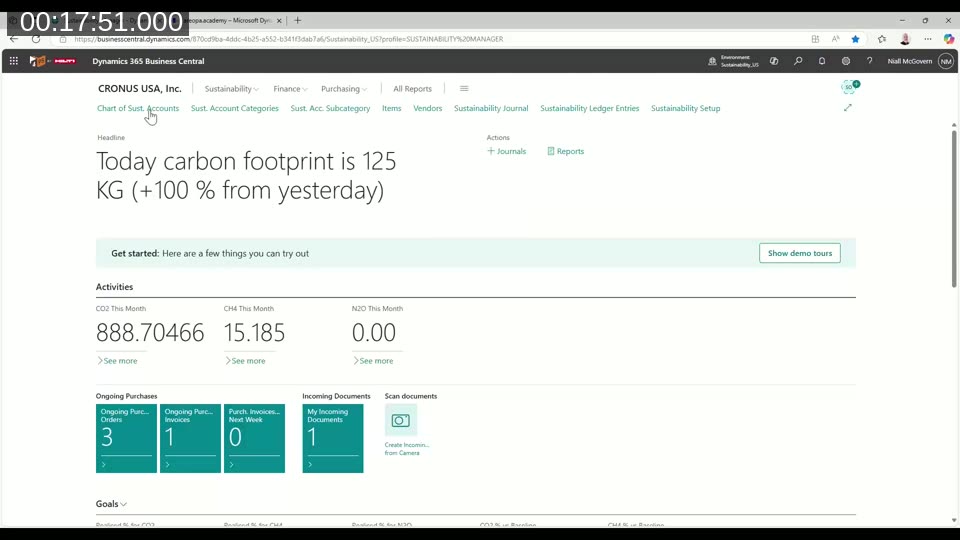
The Sustainability Manager Role Center brings relevant KPIs, cues, and navigation together in one place. It shows today’s total carbon footprint, gas-specific monthly totals, and procurement activity alongside access to all key sustainability pages.
Scorecards and Goals
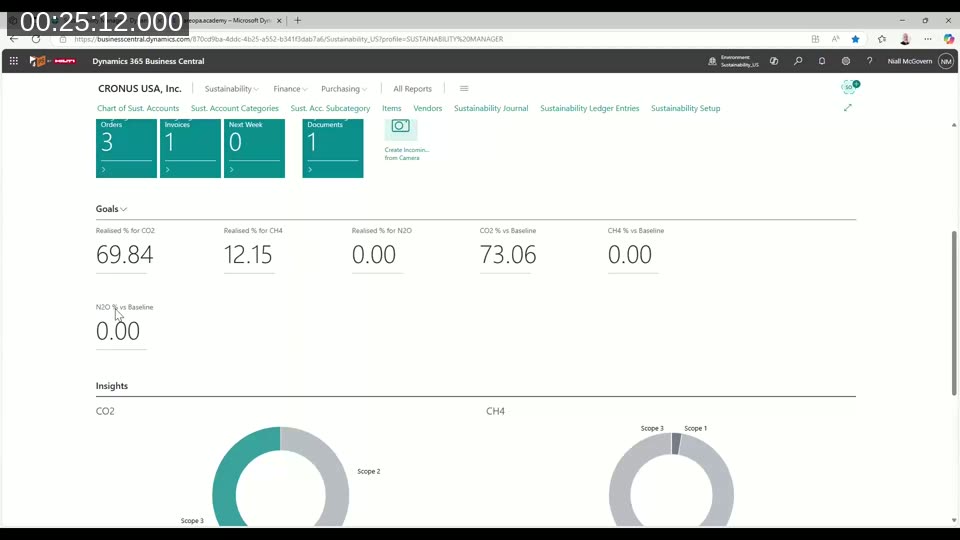
Sustainability scorecards collect goals and KPIs for the business. A goal defines target emission values for a period (for example, not exceeding 2,000 kg of CO2 in a quarter), along with a baseline period for comparison. The goal marked as the main goal appears on the Role Center. Users flagged as Sustainability Manager in user setup are the only ones who can own a scorecard.
Carbon Credits
Carbon credits are purchased to offset emissions. In Business Central, a credit is created as an item with a sustainability section on the item card, where the credit value per unit of measure is specified. When the item is purchased, posting automatically creates a negative emission entry in the sustainability ledger against the selected sustainability account, offsetting the relevant activities.
Internal Carbon Fees and CO2 Equivalents
Internal carbon fees allow businesses to apply internal surcharges to different gas types. More practically, this area holds the CO2 equivalent (CO2e) factor – the conversion rate that translates methane and nitrous oxide quantities into a common carbon equivalent unit. CO2e is the standard reporting currency for emissions and is what regulatory reports ultimately require. Niall advises care with start and end dates in the emission fees setup to avoid unexpected posting errors.
Sustainability Certificates
Vendors and items can each carry a sustainability certificate number (for example, a net zero certification). Niall notes the current limitation: only one certificate can be recorded per vendor or item. Filtering vendors or items by their certification is possible, but the feature may be extended in future releases.
What’s New in 2025 Release Wave 1
Default Sustainability Values for Accounts, Items, and More
One of the most practically useful additions is the ability to set default sustainability accounts and default gas emission values on master data records. Items, resources, work centres, machine centres, and G/L accounts can all carry a default sustainability account. Items, resources, work centres, and machine centres can additionally carry default CO2, CH4, and N2O emission values per unit of measure. When a transaction involving that item is posted, BC automatically calculates and records the emissions to the sustainability ledger – without requiring a separate journal run.
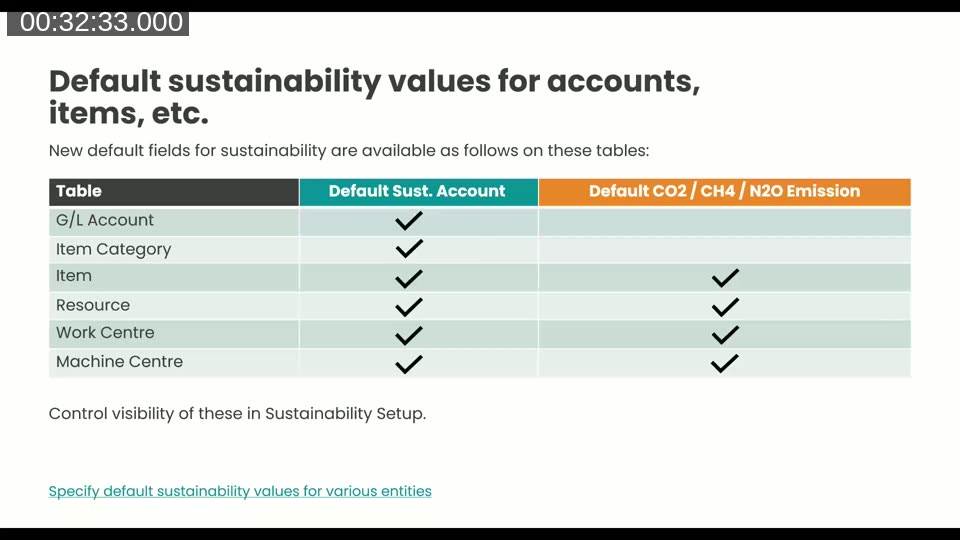
Visibility of these fields is controlled in Sustainability Setup, so businesses that are not yet ready to use them at this level of granularity can keep them hidden.
Water and Waste Management
Business Central now extends beyond greenhouse gases to track water and waste intensity. Water and waste form an additional scope alongside Scope 1, 2, and 3 on the account categories page. Subcategories can be defined within those, and journal lines carry new fields for water intensity type (withdrawn, discharged, consumed, recycled), waste intensity type, and water type (surface water, sea water, ground water). Sustainability goals can also be extended to cover water and waste targets.
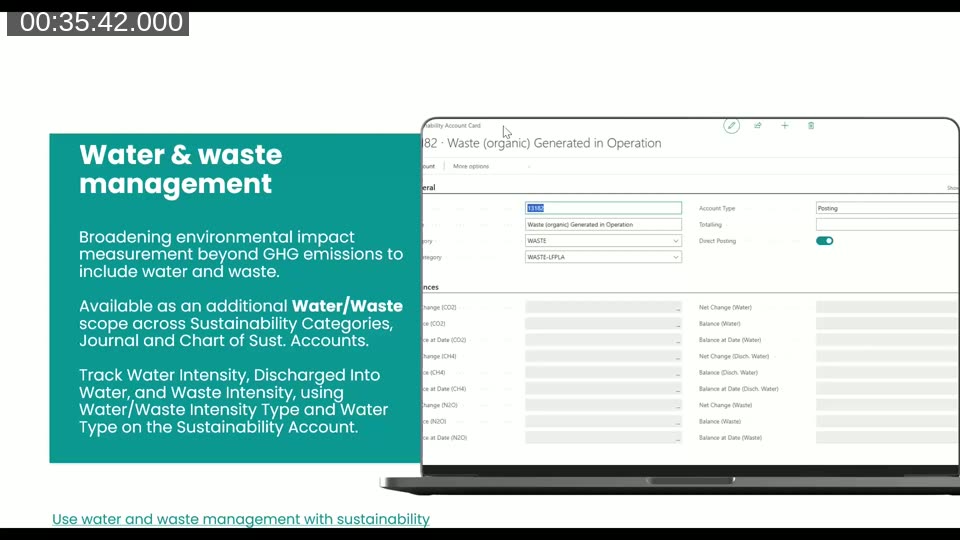
📖 Docs: Use water and waste management with sustainability — release plan entry with feature details and availability dates for the Water/Waste scope additions.
Capturing Sustainability Data in General Journals
It is now possible to add sustainability data directly to a line in the General Journal. When posting a financial entry that also has known emission totals, users can select a sustainability account number and enter the total CO2, CH4, or N2O amounts on the same line. The posting creates both the financial ledger entry and the sustainability ledger entry in one step, without needing to visit the Sustainability Journal separately.
Scope 3 Value Chain Tracking (Public Preview)
This feature, in public preview as of 2025 wave 1 (general availability expected December 2025), introduces the Sustainability Value Entry – a subsidiary table to the sustainability ledger entry. When default emission values are configured on items, posting a purchase invoice for those items automatically creates both a sustainability ledger entry and a sustainability value entry that records the CO2 equivalent amount linked to the item ledger entry. Value entries are created throughout the ERP transaction lifecycle: purchasing, manufacturing, assembling, transferring, and selling.
The sustainability value entry table will serve as the foundation for Scope 3 extraction into regulatory reporting, as CO2e is the common currency for that reporting. Niall demonstrated posting a purchase invoice for ten Amsterdam lamps (with 12 kg CO2 per unit configured) and confirmed the system produced both ledger and value entries as expected.
New “Out of Scope” Emission Category
A new account category called Out of Scope sits alongside Scope 1, 2, 3, Water, and Waste. It is designed for situations where an emission needs to be recorded before its correct scope has been determined, or for carbon credit postings that do not relate to any specific scope. The intention is that postings to Out of Scope are resolved later by reversing and re-posting to the appropriate category.
What’s Next for BC Sustainability
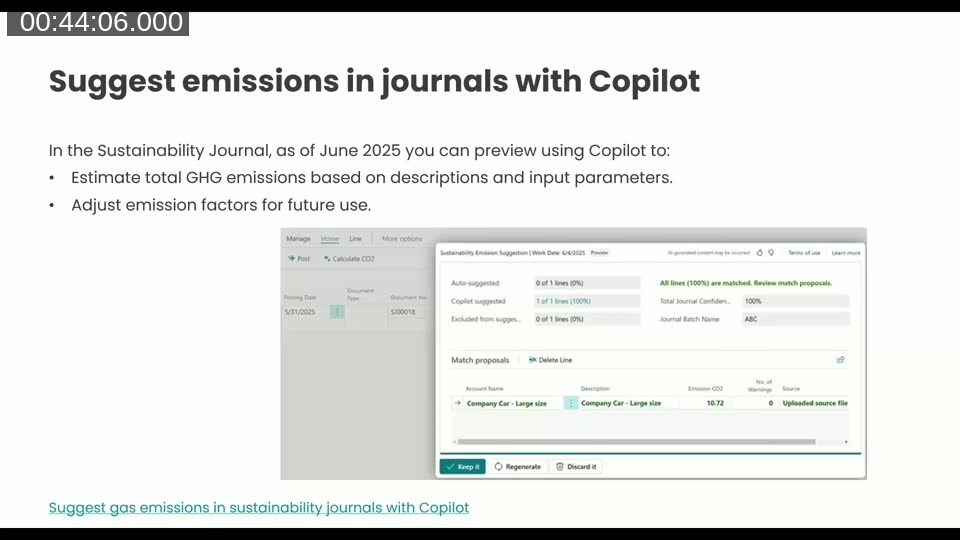
Suggest Emissions in Journals with Copilot
Due in preview in June 2025, this feature brings Copilot into the Sustainability Journal. Given descriptions and input parameters, Copilot estimates total GHG emissions and can adjust emission factors for future use. This is particularly useful when the system does not yet have a defined emission factor for an activity.
Power BI Sustainability App
A new Power BI app for sustainability is expected in June 2025. It starts with greenhouse gas emissions visualisations – emissions by scope, by period, by category, and realised versus target – and extends to CO2e analysis and social metrics such as employee gender mix and training certifications. The app draws directly from Business Central sustainability data.
ESG Reporting Integration with Business Central
Microsoft’s separate Project ESG Reporting app is designed as the portal for producing regulatory-format outputs such as a CSRD assessment. An integration between Business Central and this app is expected in public preview in September 2025. The integration would allow sustainability data to flow from BC into the ESG Reporting app, which can then aggregate data from multiple sources and generate compliant output files. Business Central is positioned as one of several inputs into that reporting workflow, not the primary ESG platform.
ESRS Taxonomy Elements and a CSRD Preparation Report
Also expected in September 2025, taxonomy mapping will allow sustainability categories and subcategories in BC to be tagged against the official data structures required for CSRD and other standards (such as the European Sustainability Reporting Standards, ESRS). Following on from that, a CSRD Preparation Report will use these taxonomies to generate a draft report in the expected format – a preparation document that would still require narrative additions before final submission.
Resources
Niall listed the following resources for further reading, which are also linked in the YouTube comments for this webinar:
- Corporate Sustainability Reporting – European Commission
- UK Sustainability Reporting Standards – GOV.UK
- Sustainability management overview – Microsoft Learn
- What’s new and planned for BC 2025 wave 1 – Microsoft Learn
- BC launch event playlists covering sustainability: 2024 wave 1, 2024 wave 2, 2025 wave 1
This post was drafted with AI assistance based on the webinar transcript and video content.