
In this Areopa Academy webinar — session #17, recorded on 26 May 2020 — Tobias Fenster (CTO at Cosmo Consult, Microsoft MVP) presents the Interface object type that arrived in Business Central with the 2020 release wave 1 (v16). Moderator Luc van Vugt guides a Q&A section covering naming conventions, the difference between interfaces and events, multiple-interface implementation, and switching implementations at runtime. Viewers leave with a clear understanding of when and how to apply interfaces in AL, backed by a full working demo built live in VS Code.
Why Interfaces? Componentization of the Base Application
Tobias opens with the strategic reason Microsoft introduced interfaces: the ongoing effort to break the monolithic base application into components. A component is only meaningful if there is a formal contract that defines what it does — independent of how it is implemented. The interface supplies exactly that contract.
Tobias illustrates the concept with a price calculation component inside the base application. The interface says “this thing can calculate a price, apply discounts, and produce totals” without revealing whether the calculation calls a web service, reads a table, or applies country-specific tax rules. That separation of purpose from implementation enables three things:
- Define a component — describe its purpose, not its internals.
- Replace a component at runtime (e.g. switch from standard to country-specific tax logic) or at design time (remove Microsoft’s implementation and install a custom one).
- Extend a component — add new procedures to the interface; the compiler immediately flags every implementing codeunit that still needs to be updated.
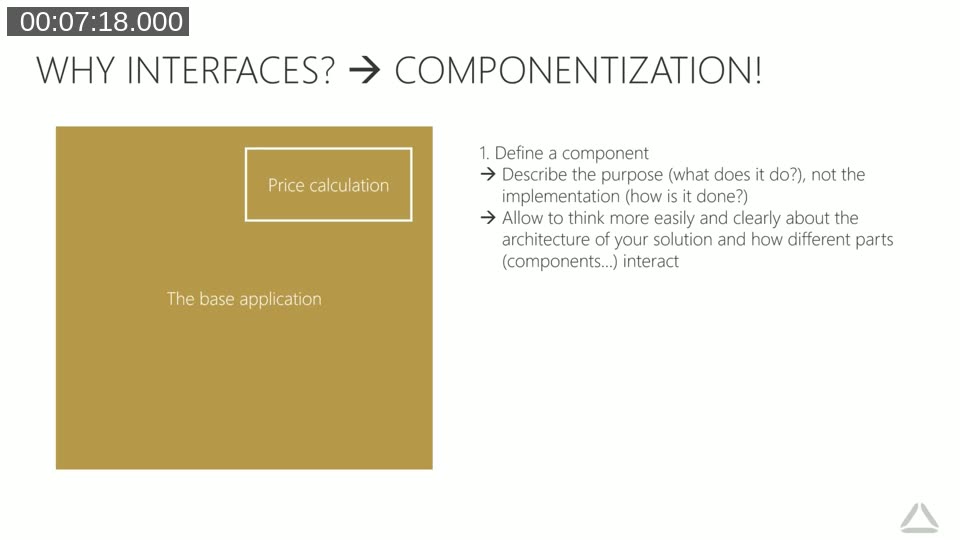
Tobias notes that Microsoft has already applied this pattern to the v16 price calculation logic, shipping both a v15 and a v16 implementation behind the same interface so partners can choose, or replace, either one. More interfaces are expected as componentization of the base application progresses.
Decoupling: Why Direct References Are Fragile
Before showing code, Tobias explains decoupling with a concrete example. A Sports Evaluation Report that references a BasketballCodeunit and a TennisCodeunit directly is tightly coupled: if the tennis codeunit is removed by another extension, the report breaks at runtime with no warning from the compiler.
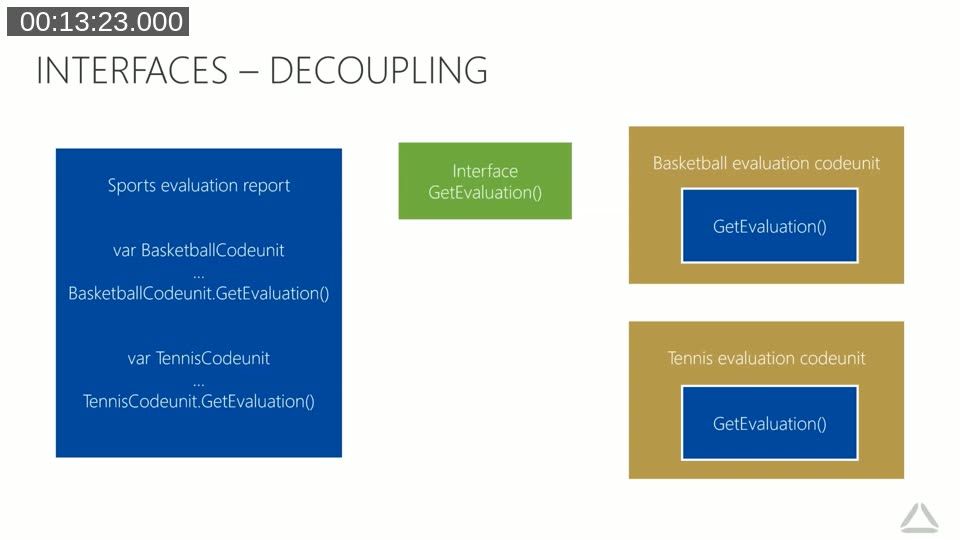
Introducing an interface breaks that direct link. The report now holds a variable typed to the interface and calls GetEvaluation() on that variable. The individual codeunits implement the interface and register themselves in an implementation list (an enum). A small calling mechanism reads the list and resolves the correct codeunit at runtime. The report never holds a direct reference to any concrete codeunit.
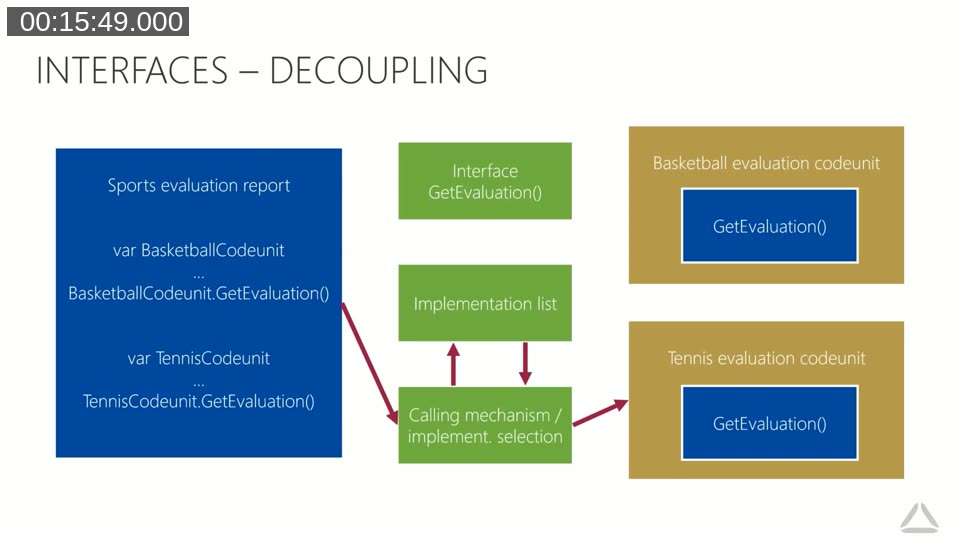
The practical benefits of this indirection:
- Remove an implementation — the rest of the system continues working without compiler or runtime errors.
- Replace an implementation — swap in a new codeunit without touching any code that calls the interface.
- Add a new implementation — register the new codeunit in the enum; no other changes required.
- Extend the interface — add a procedure; the compiler lists every codeunit that needs updating.
Tobias also addresses the question “why not just use events?” Events are optional subscriptions — no compiler guarantee that anyone subscribes, and no guarantee about who subscribes. An interface is a binding contract enforced at compile time.
Demo: Building an Interface from Scratch in VS Code
Tobias switches to VS Code Insiders and builds a complete working example step by step, using AL 16 against a Business Central container running in Azure.
Step 1 — Define the interface
The interface has a single procedure. The snippet shortcut tinterface creates the skeleton:
interface "Sports Evaluation"
{
    procedure GetEvaluation(): Text;
}
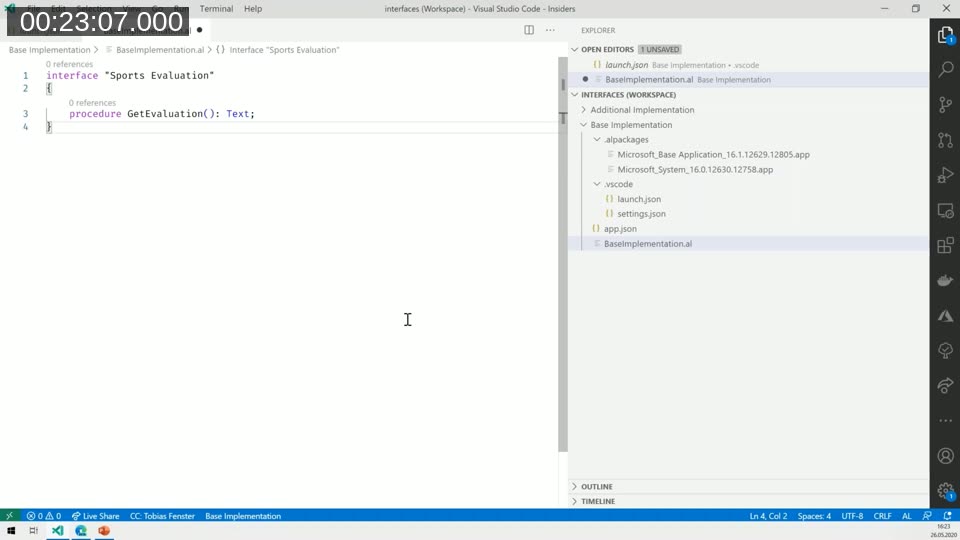
There is no implementation body here — just a signature. The compiler will enforce that any codeunit declaring implements "Sports Evaluation" provides a matching procedure.
Step 2 — Implement the interface in codeunits
Two codeunits implement the interface. Each returns a different text string (in a production scenario this would be arbitrarily complex business logic):
codeunit 50100 "Basketball Evaluation" implements "Sports Evaluation"
{
    procedure GetEvaluation(): Text
    begin
        exit('Basketball is cool');
    end;
}

codeunit 50101 "Tennis Evaluation" implements "Sports Evaluation"
{
    procedure GetEvaluation(): Text
    begin
        exit('Tennis is fun');
    end;
}
As soon as implements "Sports Evaluation" is typed, the compiler immediately warns that the required procedure is missing — a fast feedback loop during development.
Step 3 — Create the implementation list (enum)
An extensible enum serves as the registry of available implementations:
enum 50100 "Sports Evaluation Provider" implements "Sports Evaluation"
{
    Extensible = true;

    value(0; Default)
    {
        Implementation = "Sports Evaluation" = "Basketball Evaluation";
    }
    value(1; Basketball)
    {
        Implementation = "Sports Evaluation" = "Basketball Evaluation";
    }
    value(2; Tennis)
    {
        Implementation = "Sports Evaluation" = "Tennis Evaluation";
    }
}
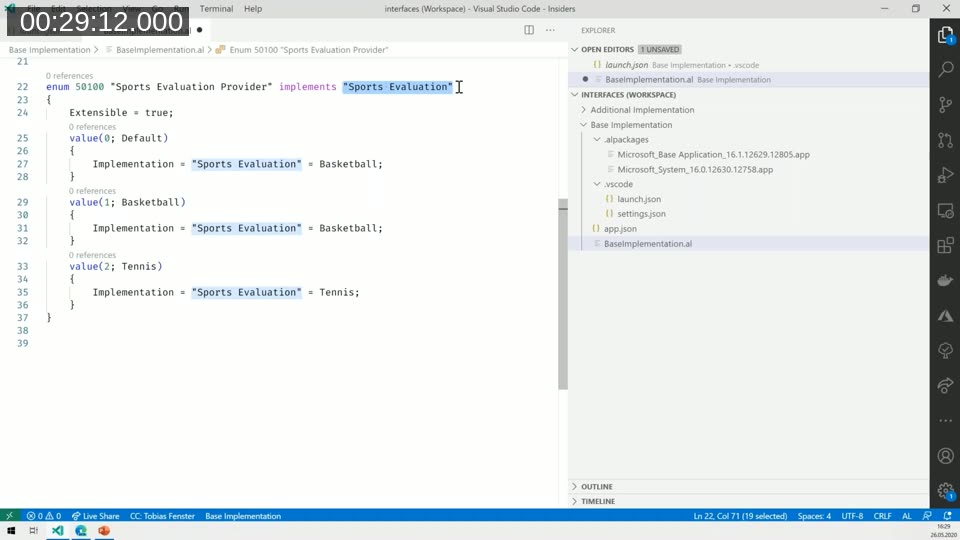
Setting Extensible = true is important: it allows other extensions to add their own enum values and, with them, their own interface implementations — without modifying this app.
Step 4 — Setup table, page, and management codeunit
A simple single-record setup table stores the selected sports handler as the enum type. A card page exposes the field. A management codeunit reads the setup and assigns the correct implementation to an interface variable using VAR (by reference), so the caller receives a fully resolved interface variable:
codeunit 50102 "Evaluation Management"
{
    procedure GetEvaluationHandler(var SportsEvaluation: Interface "Sports Evaluation")
    var
        Setup: Record "Sports Evaluation Setup";
        Provider: Enum "Sports Evaluation Provider";
    begin
        Setup.FindFirst();
        Provider := Setup."Selected Sports Handler";
        SportsEvaluation := Provider;
    end;
}
Step 5 — Use the interface in a page action
A page extension on the Customer List adds a promoted action. The action calls the management codeunit, receives the resolved interface variable, and calls GetEvaluation():
action(SportsEvaluation)
{
    ApplicationArea = All;
    Promoted = true;
    PromotedIsBig = true;

    trigger OnAction()
    var
        SportsEval: Interface "Sports Evaluation";
        Mgmt: Codeunit "Evaluation Management";
    begin
        Mgmt.GetEvaluationHandler(SportsEval);
        Message(SportsEval.GetEvaluation());
    end;
}
With no setup record in place the default kicks in and the message reads “Basketball is cool”. After setting the setup page to Tennis, the same action returns “Tennis is fun” — no source-code change required.
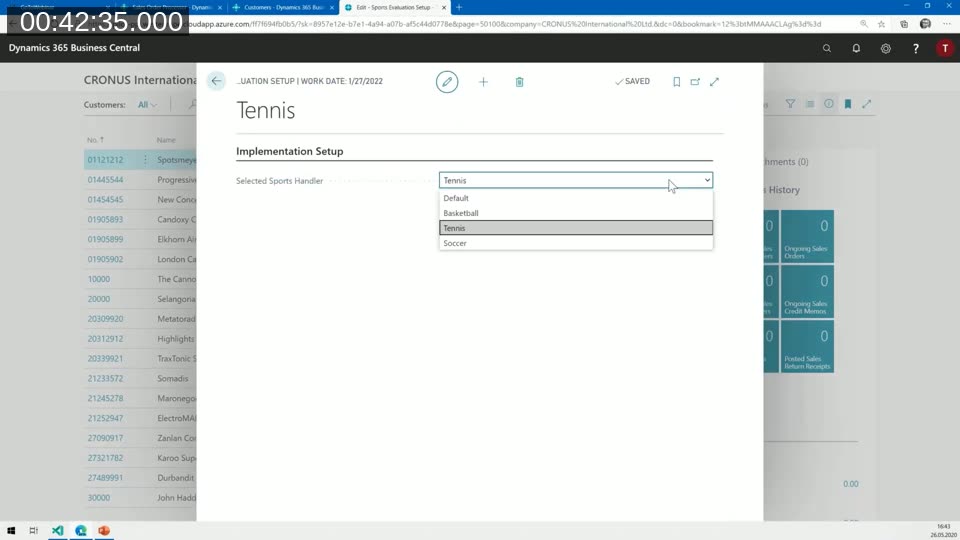
Step 6 — Adding a new implementation from a separate extension
Tobias then switches to a second project (Additional Implementation) that takes a dependency on the base app. It adds a new codeunit and an enum extension:
codeunit 50110 "Soccer Evaluation" implements "Sports Evaluation"
{
    procedure GetEvaluation(): Text
    begin
        exit('Soccer is the best');
    end;
}

enumextension 50110 "Sports Evaluation Provider Ext" extends "Sports Evaluation Provider"
{
    value(3; Soccer)
    {
        Implementation = "Sports Evaluation" = "Soccer Evaluation";
    }
}
After publishing, the setup page now shows Soccer in the dropdown. Selecting it and running the action displays the new text. No changes were needed in the base app. Tobias notes that if a competing partner disagrees with “Soccer is the best”, they can uninstall this extension and publish their own — all without touching any code in the base app.
Recap: Why and How
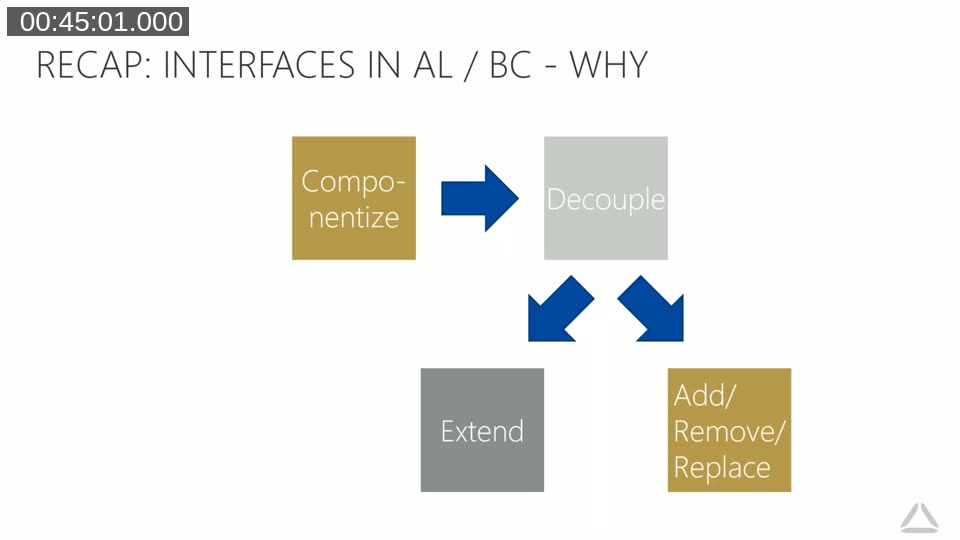
The session closes with two summary slides. The why diagram shows that componentization leads to decoupling, which in turn enables adding, removing, replacing, and extending components — and the cycle runs in both directions. Whether you start from “I want to componentize” or “I need to replace a behaviour”, the answer is interfaces.
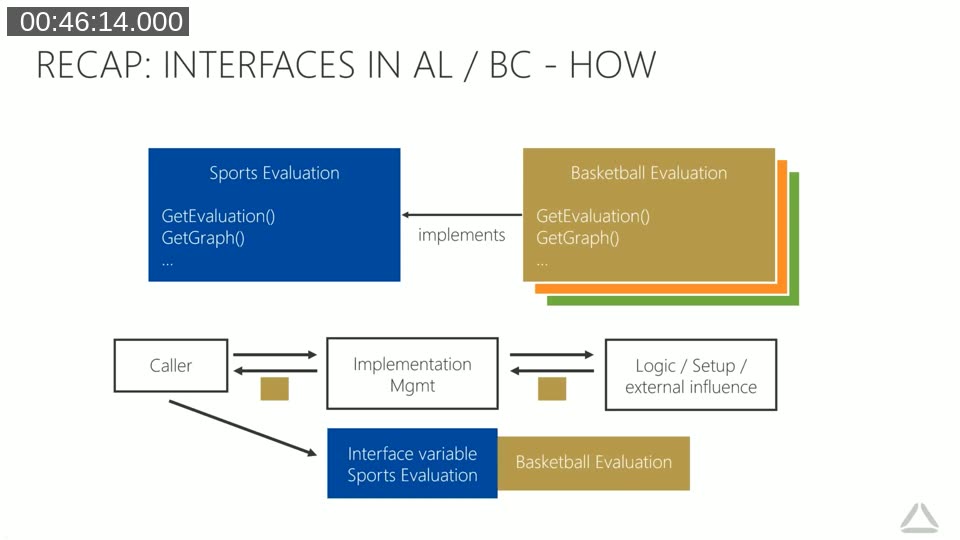
The how summary shows the full structure: the interface defines procedures; multiple codeunits implement those procedures; an enum registers the implementations; an implementation management codeunit resolves the right one; and the caller works exclusively through the interface variable.
Q&A Highlights
- Interfaces vs events — why use an interface?
- Events are optional and unverifiable at compile time. An interface is a binding contract: the compiler enforces that every implementing codeunit provides every declared procedure.
- Naming convention — should interfaces be prefixed with “I”?
- Microsoft decided against the .NET convention of prefixing interface names with
I. The recommended approach is to name the interface after what it does — for example, “Sports Evaluation” rather than “ISports Evaluation”. - Can a codeunit implement multiple interfaces?
- Yes. As Tobias demonstrates live, the
implementskeyword accepts a comma-separated list of interface names. This was confirmed during the session by testing in VS Code. - Can interfaces extend other interfaces?
- At the time of this recording (BC 2020 wave 1), no — an interface could not implement or extend another interface. The
implementskeyword was not supported on interface objects. (Note: interface extension was added later in BC 2024 release wave 2.) - Other ways to switch implementations without changing setup data?
- Yes — install a single extension that registers exactly one implementation; removing it and installing another effectively switches implementations. Alternatively, the management codeunit can use any logic available in a codeunit, such as date-based rules, to select the active implementation.
- Does adding an extra procedure to a codeunit (not declared in the interface) break anything?
- No. The interface only mandates that the declared procedures are present. A codeunit is free to expose additional procedures alongside them.
Microsoft Docs: Interfaces in AL
The official reference page covers the interface syntax, design guidelines, snippet support (tinterface), and a full IAddressProvider example. As of BC 2024 release wave 2, interfaces can also be extended. As of BC 2025 release wave 1, List and Dictionary collections of interfaces are supported.
Microsoft Docs: Extensible Enums
Interfaces in AL rely on extensible enums as the implementation registry. This page explains how to declare an enum with Extensible = true, how to use enumextension to add values from a separate app, and how to reference enum values in code and table fields.
Price Calculation Interface in the Base Application
The first real-world use of interfaces in BC is the price calculation component. The base application ships both a v15 and a v16 implementation, selectable via setup. Partners can register their own implementation by implementing the interface and extending the enum — exactly the pattern demonstrated in this webinar.
learn.microsoft.com — Implementing the Price Calculation Interface
Extending Interfaces in AL (BC 2024 release wave 2)
Since this webinar was recorded, Microsoft added the ability to extend interfaces themselves — allowing new procedures to be appended to an existing interface without modifying the original object. This builds on the same pattern Tobias describes here.
This post was generated with AI assistance from the webinar recording and transcript. The technical content, code examples, and Q&A answers reflect what Tobias Fenster presented. Code has been lightly formatted for readability.