
In this webinar, James Pearson (development lead at Drinks Enterprise, creator of the AL Test Runner extension) and Luc van Vugt (author of Automated Testing in Microsoft Dynamics 365 Business Central, currently working at 4PS) compare notes on how they actually use test automation day to day. The session is an updated replay of a talk they gave at Days of Knowledge UK in Birmingham, and it stays practical throughout: real code, a real test plan spreadsheet, and a real code coverage run, rather than a general pitch for why testing matters.
Why automated testing, in practice
James opens by rejecting the usual justifications for testing — “it’s best practice” or “my team says so.” For him, the value is a mindset shift: writing a test first forces him to define the expected behavior of a change before writing any code. If he can’t phrase a scenario as Given/When/Then, he doesn’t yet understand the requirement well enough to start coding, and that’s a signal to go back to the consultant or customer for clarification.
He also points out a secondary benefit: code written with testability in mind tends to be better separated. Logic that has to be callable from a test can’t be buried inside a page action or a giant local procedure — it naturally gets pulled out into its own method.
Architecture and tooling
James works day to day in a local Docker container, using BCContainerHelper, Visual Studio Code (Insiders build) with the AL language extension, and his own AL Test Runner extension. He keeps production and test app folders side by side in a multi-root workspace as a visual reminder not to neglect the test code.
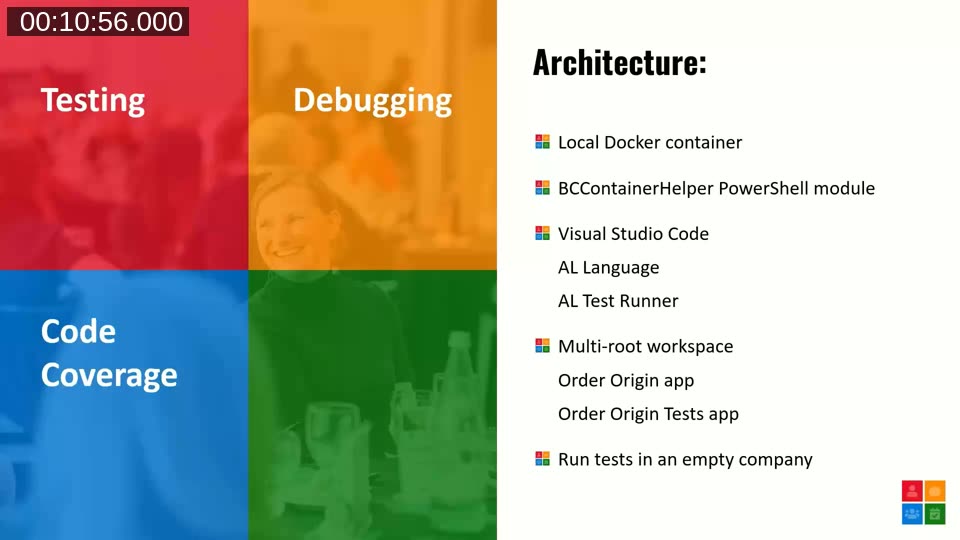
A deliberate choice underpinning all of this: he runs tests against an empty company rather than Cronus demo data or an imported RapidStart package. It’s more setup work per test, but it forces him to understand the standard BC data model — work centers, machine centers, shop floor calendars — well enough to construct it himself, and it removes hidden dependencies on whatever happens to already exist in a demo company.
📖 Extension: AL Test Runner on the VS Code Marketplace — James Pearson’s extension for running and debugging AL tests directly from VS Code, with Test Explorer integration and code coverage highlighting.
Writing a test first: the Order Origin example
James demos a small “Order Origin” app that records where a sales order originated (web, EDI, salesperson) and copies that value from the customer to the sales document. He writes the test procedure first, fills in the Given/When/Then comments, and only then writes the minimum production code needed to make the test compile.
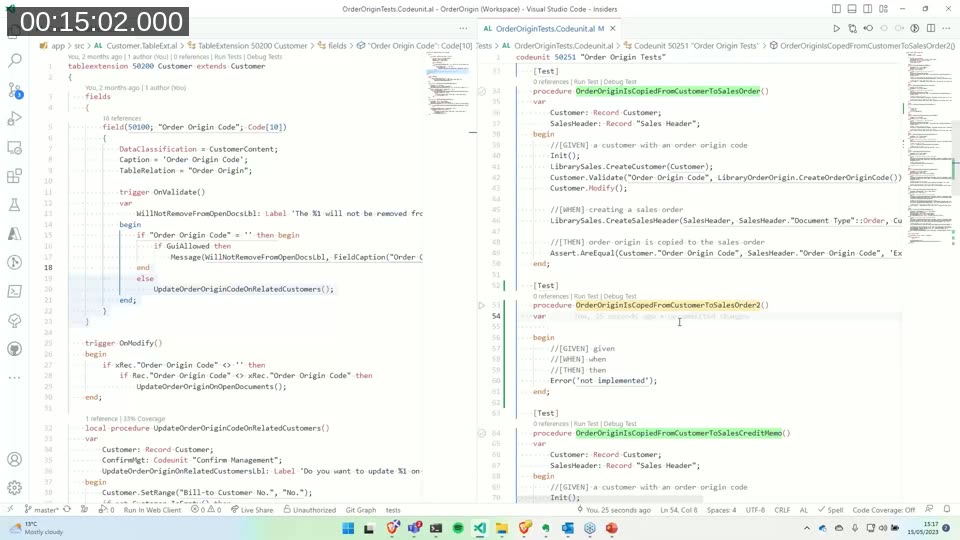
He insists on seeing the test fail first, for the reason he expects it to fail. If a new test passes immediately, that’s a warning sign — it may not actually be exercising the code path it’s supposed to check. Only after confirming the failure does he write the code to make it pass, which he compares to the red-green-refactor cycle of test-driven development. He’s not rigid about writing tests strictly before code, but treats test-first as his default where practical.
📖 Docs: Test codeunits and test methods — Microsoft Learn reference on how AL test codeunits, test methods, and the SubType property fit together.
What not to test
Both presenters draw explicit boundaries around what they keep out of automated tests:
- Code on pages — triggers and actions themselves aren’t tested directly; if an action calls into a codeunit with business logic, that codeunit (or the underlying table methods) gets tested instead. James also avoids test page objects because they run slower than pure code tests and can’t be debugged with his extension.
- Outgoing web service calls — neither tests the HTTP client code itself. Instead, they build a library codeunit that constructs the expected JSON/response shape and pass that directly into the business logic, rather than making a real network call.
- Incoming API calls — both currently test the underlying business logic rather than the API layer, though James notes it isn’t especially hard to do and would probably choose to test the API surface with more time.
- Control add-ins — outside the scope of AL-based automated testing for both of them.
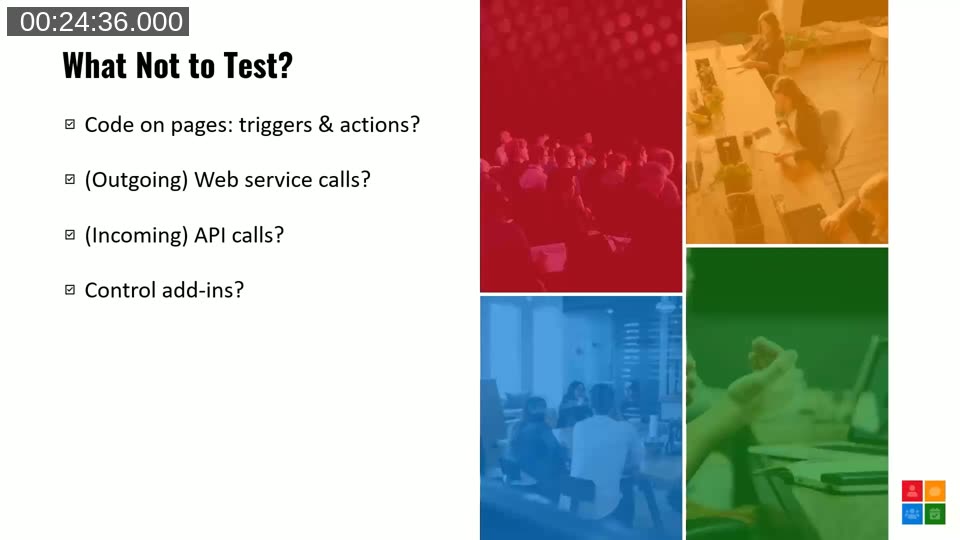
Luc adds a pragmatic cutoff: whatever becomes too difficult to automate in code gets tested manually instead. He also flags a concrete cost of untested web service calls — he found one call in his codebase that quietly took 16 seconds, a cost that would go unnoticed without deliberately looking at it.
Manual testing still has a job to do
Automated testing isn’t meant to remove manual testing. James is direct about what automated tests can’t tell you: whether a page is a pleasant experience, whether field order makes sense, or whether captions are clear. That feedback only comes from a human using the web client the way an end user would.
Luc frames this as two different disciplines: automated tests check that behavior matches expectations (what he calls “automated checking”), while manual testing brings human creativity to try to destabilize the system in ways nobody explicitly designed a check for. As automated coverage grows, manual testers are freed from repeating well-understood checks and can spend their time on the parts of the system that genuinely benefit from human judgment.
Building a test plan before writing any code
Luc’s section, drawn from his work at 4PS, starts a step earlier than James’s: before any code is written, testers and developers agree on a high-level test plan — what set of tests, if they all pass, would tell the team the feature works as expected. He argues this step doubles as requirements review: if you can’t define testable scenarios for a requirement, the requirement probably isn’t clear enough yet.
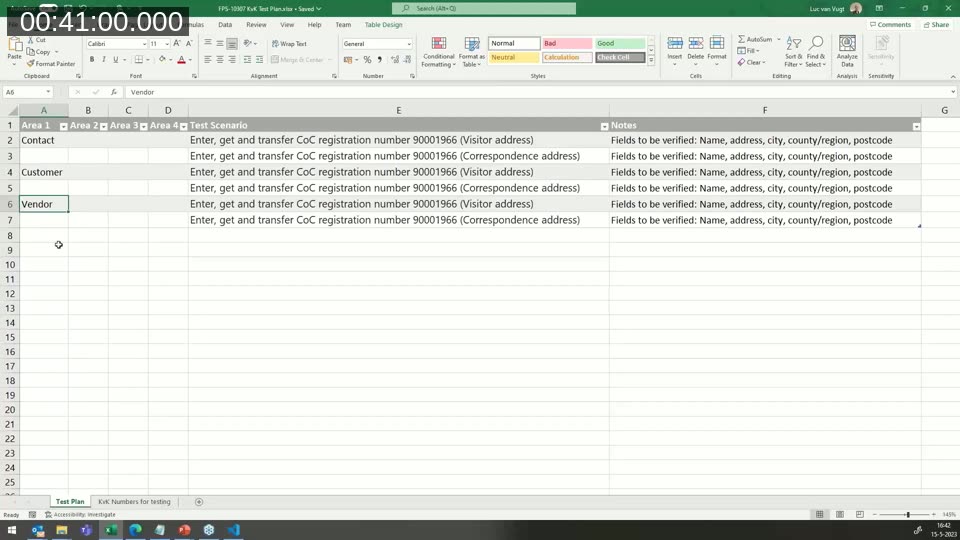
He walks through a small real example: a feature connecting to the Dutch Chamber of Commerce (KvK) registry, where a registration number is used to fetch a company’s address data. The tester and developer worked out six test scenarios up front, grouped by area (contact, customer, vendor) to spot repeatable patterns before any implementation started.
📖 Book: Automated Testing in Microsoft Dynamics 365 Business Central by Luc van Vugt — covers designing and building automated tests, moving from requirements to application and test code, and testing processes with incoming and outgoing calls.
From test plan to test design
The high-level test plan then gets refined into a detailed test design: each scenario is broken into explicit Given/When/Then statements, tagged with a scenario number and an ATDD (acceptance test-driven development) format. This is still a functional document, reviewable by anyone on the team, not yet AL code.
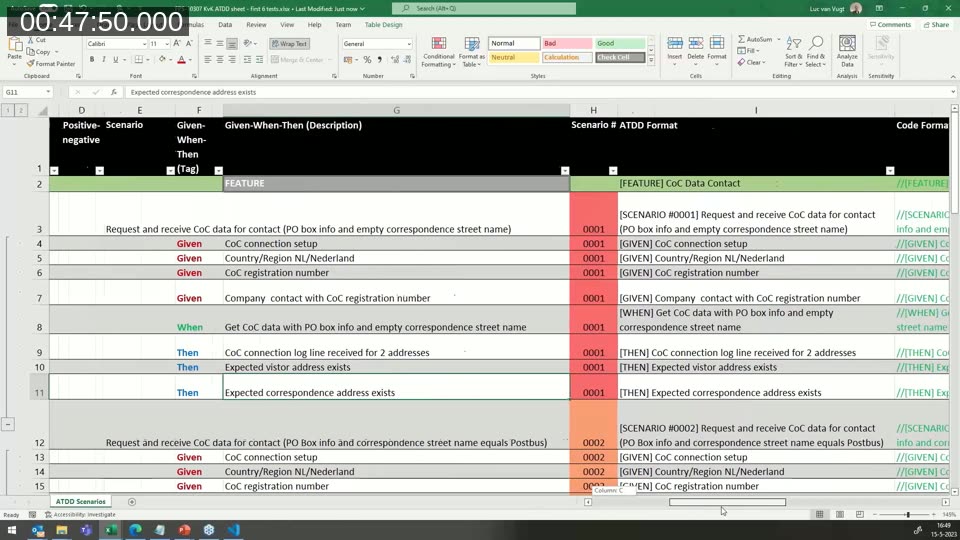
Luc uses a PowerShell-based test scripter to convert this spreadsheet description into the skeleton of an AL test codeunit, giving him a starting structure he can fill in with the real implementation.
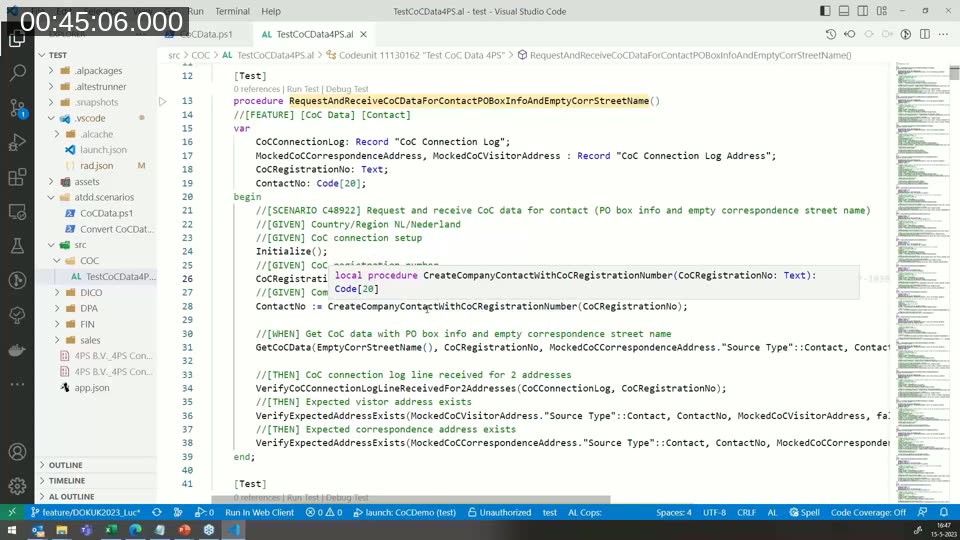
Responding to a question from an attendee about the difference between TDD and ATDD, Luc describes his approach as mostly ATDD: starting from the functional, scenario-driven level rather than the lower-level, component-first TDD style James described. James notes his own approach — working in an empty company — serves a similar purpose of removing hidden assumptions and forcing scope questions (which warehouse features are in scope, for example) to surface before writing test code.
Code coverage: a diagnostic tool, not a target
James closes with a warning against treating code coverage as a KPI: setting a fixed target (say, 80%) incentivizes developers to hit the number — through meaningless tests or artificially condensed code — rather than writing genuinely useful tests. Coverage also says nothing about whether the tests that produced it are any good, and 100% coverage still doesn’t guarantee every decision branch has been exercised.
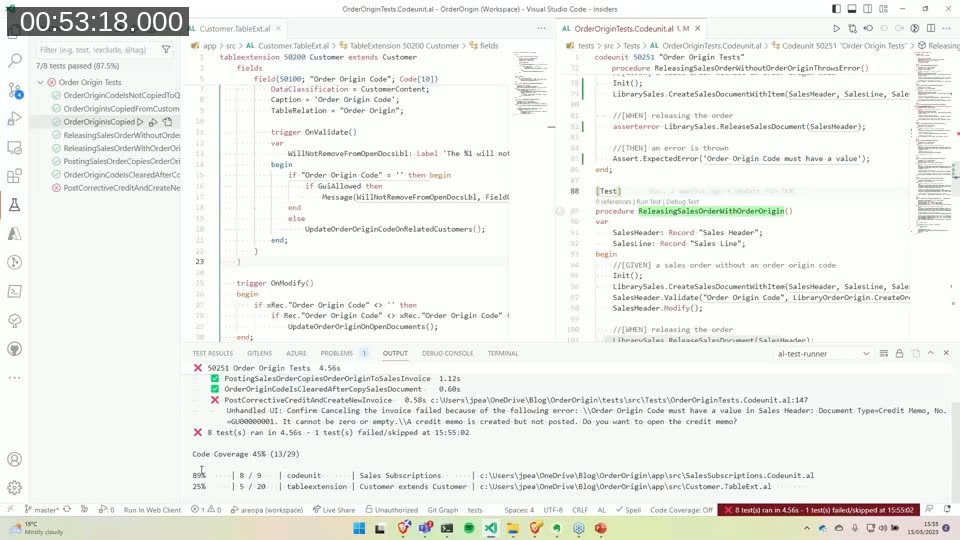
He uses coverage instead as a guide to find gaps worth reviewing: after a test run, he can drill into an object with low coverage and see exactly which lines were never hit, then decide whether that’s a genuine gap or code he’s deliberately chosen not to test (page code, reports, HTTP clients).
📖 Blog: Using Code Coverage in Business Central Development — James Pearson’s walkthrough of enabling and interpreting code coverage with AL Test Runner.
Q&A highlights
A few points from the audience discussion:
- Legacy code coverage: Both presenters push back on the idea of retroactively chasing coverage on old, stable code. James argues automated testing is about confidence — if code has been stable in production for years, the return on writing tests for it now is low compared to covering new work. Luc describes a similar priority at 4PS: focus on new functionality first, with existing functionality covered opportunistically when bugs surface.
- Coverage in pull requests: Both are looking at ways to compare code coverage between pull requests (so a PR can’t silently reduce the covered percentage), but neither has this fully in place yet.
- Performance assertions: A question about failing a test if it runs slower than a threshold (e.g., 500ms) was answered clearly: that’s performance testing, not the goal of this kind of functional test. Timing can be observed in the test output, but it isn’t what determines pass/fail.
This post was drafted with AI assistance based on the webinar transcript and video content.