
In April 2020, Jon Long — Director of Upgrades at ArcherPoint — presented this Areopa Academy webinar on aligning a Dynamics upgrade strategy to where Microsoft is heading. With nearly 20 years and close to 400 upgrades behind him, Jon brings a practical, field-tested perspective on how organisations can move from legacy NAV versions through Business Central 14 and ultimately to the SaaS cloud. Moderator Luc van Vugt (Areopa) joined to field audience questions throughout.
The session covers deployment models, the distinction between an upgrade and a re-implementation, how the extension model changes the upgrade equation, and why Business Central 14 is the recommended staging point for most customers as of spring 2020.
Dynamics 365 Business Central Deployment Options
Jon opened by mapping out the four deployment configurations available in Business Central, noting that many customers conflate them or are unaware of the full range of choices.
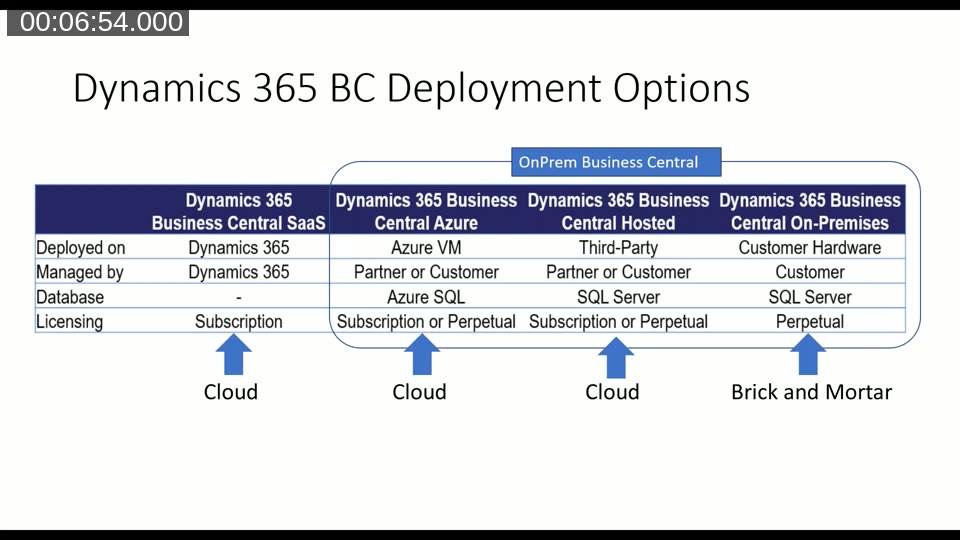
The four options are:
- SaaS (Dynamics 365 Business Central) — fully managed by Microsoft, subscription licensing, no customer-owned database.
- Azure VM — deployed on Azure, managed by partner or customer, Azure SQL, subscription or perpetual licensing.
- Third-Party Hosted — a cloud-hosted server managed by partner or customer, SQL Server, subscription or perpetual.
- On-Premises (Brick and Mortar) — customer hardware, customer-managed SQL Server, perpetual licensing only.
The three non-SaaS options all fall under the “on-premises Business Central” umbrella, even when they sit in the cloud. Only the fully managed SaaS option removes the customer from infrastructure responsibility entirely.
Upgrade Path Options
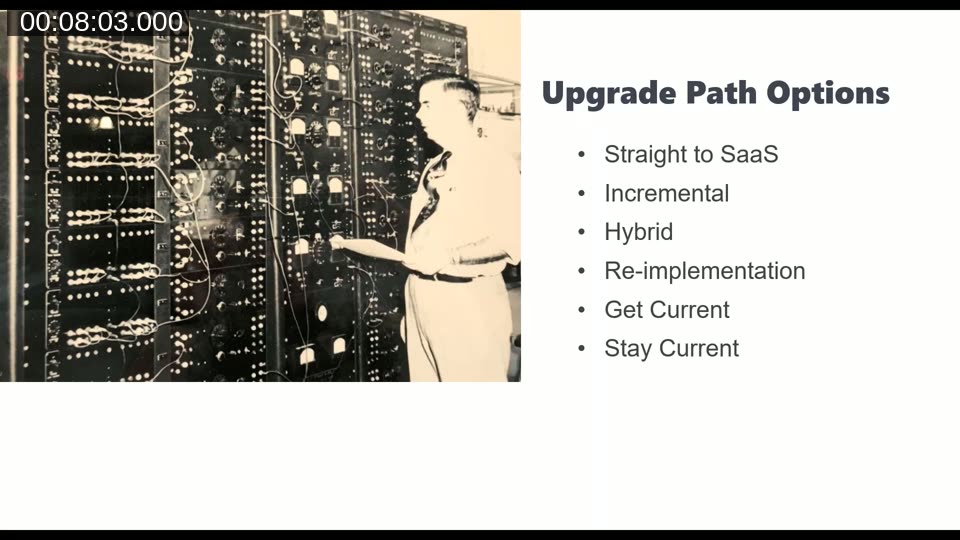
Jon outlined six upgrade path options that organisations face when moving to Business Central:
- Straight to SaaS — the most disruptive but cleanest path if customisations are already extension-ready.
- Incremental upgrade — step through intermediate versions, using BC 14 as a staging point before targeting SaaS.
- Hybrid — mix of on-premises and cloud during the transition, or mixing CAL and AL code.
- Re-implementation — starting fresh in a new database; appropriate when business processes have fundamentally changed.
- Get Current — the active process of moving from a legacy version to a supported, modern version.
- Stay Current — the steady-state goal once code is decoupled and releases become low-friction events.
Upgrade vs Re-implementation: What Is the Difference?
Jon spent time clarifying a distinction that practitioners often blur. The single deciding factor is what happens to the data.
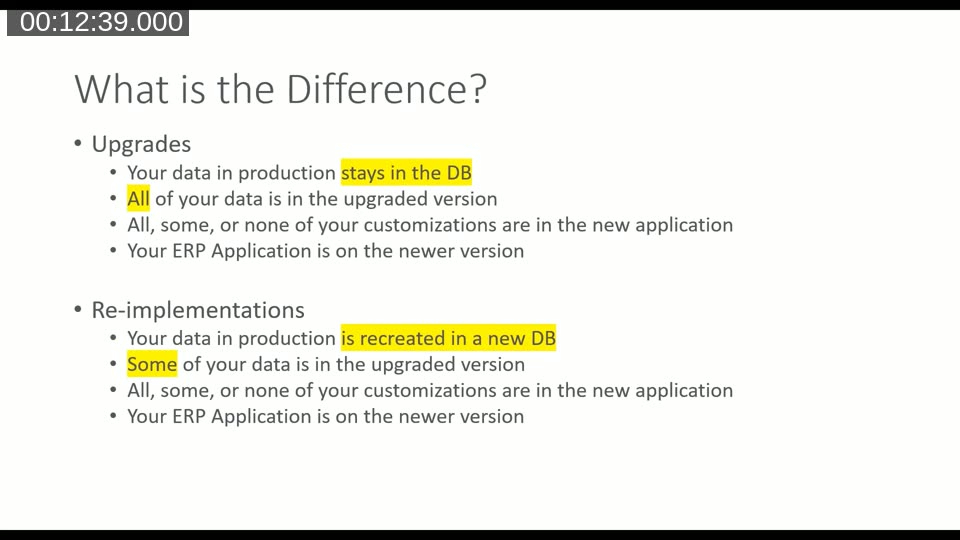
In an upgrade, production data stays in the existing database. Microsoft’s Upgrade Tool Kit handles data migration automatically for every major version and cumulative update. Jon noted that in nearly 400 upgrades over 20 years, he has rarely seen data integrity issues arise from the upgrade toolkit itself. All historical data — ledger entries, balances, change logs — remains in place.
In a re-implementation, production data is recreated in a new database. Opening balances are imported, historical ledgers are typically left behind, and the bulk of the project effort goes into data scripting, validation, and before/after reconciliation. The data risk is substantially higher.
Customisations behave identically in both paths: all, some, or none can be brought forward, and the ERP application ends up on the newer version either way. The only meaningful technical difference is data handling. The decision to re-implement should therefore be driven by changes to business processes, not by database size or code complexity.
“Nobody’s database is too big to upgrade. We’ve done a 3.7-terabyte database coming from a free-dimension rewrite — it took 52 days to recalibrate the dimensions. There are workarounds.”
Jon Long, ArcherPoint
Customisations the Old Way vs. the Extension Model
In legacy NAV, every customisation that touched a base object created a delta — a merged overlap between the partner’s code and Microsoft’s base. When add-ons entered the picture, the overlaps multiplied: customisations modifying base code, add-on code also modifying base code, and customisations modifying add-on code simultaneously. With 15 to 20 add-ons, the merge graph became extremely difficult to manage safely.
Business Central’s extension model resolves this by fully decoupling customisation code from the base.
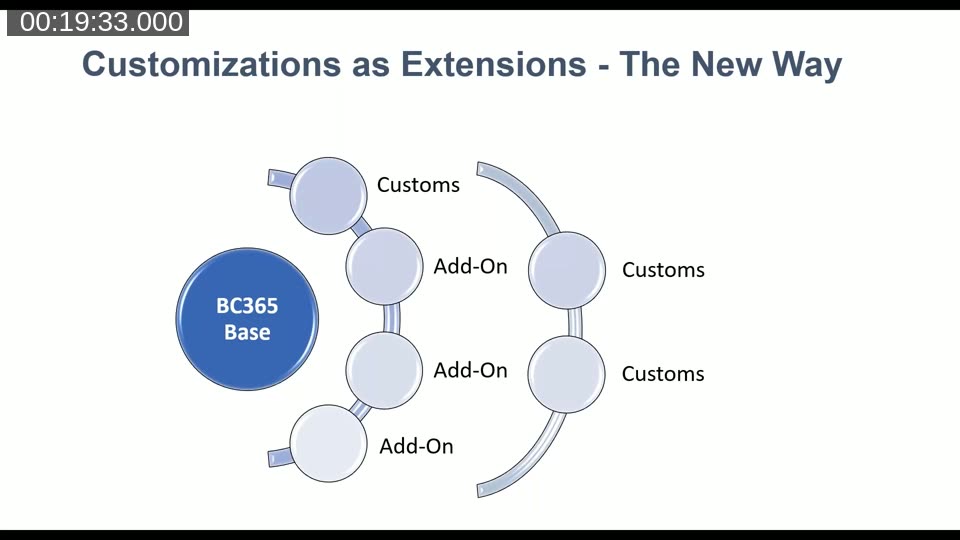
With extensions, each add-on and each customisation sits in its own layer, attached to the BC 365 base through published events and interfaces rather than direct object modification. Customisations on top of add-ons are also possible because ISVs can expose their own events. This is the architecture that makes AppSource possible on SaaS — apps can be installed and removed without any code merging. Jon noted that AppSource is SaaS-only; on-premises users can benefit from decoupled code but cannot use the AppSource marketplace.
The BC 14 “Base Camp” Strategy
Jon used a Mount Everest analogy throughout the session. Business Central SaaS is the summit. Business Central 14 on-premises is Base Camp — the point where climbers acclimatise before attempting higher altitude. Hybrid modes are explicitly allowed while camping at Base Camp.
BC 14 is the last version that supports both AL and CAL (C/AL) simultaneously, making it the ideal staging version for organisations whose ISVs have not yet released extension-ready products.
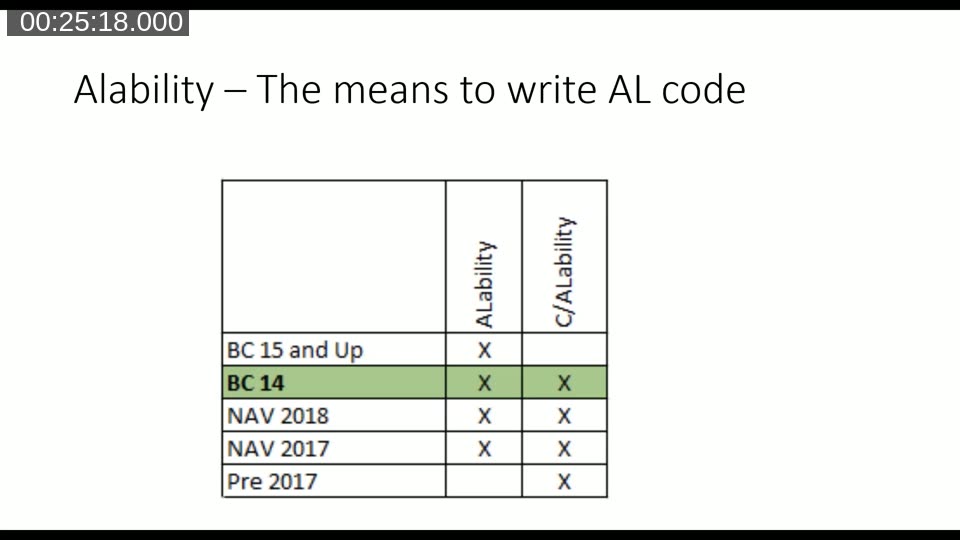
The ALability table shows that AL development becomes available from NAV 2017 onward (extensions v1), and that CAL support ends definitively at BC 14. BC 15 and above are AL-only. Organisations still relying on ISVs who publish in CAL cannot move beyond BC 14 until those ISVs ship an AL extension.
While camped at BC 14, the recommended approach is to begin eventing — refactoring customisations into events and extensions incrementally rather than attempting a full conversion in one project. A typical first upgrade brings customisations to around 50% evented; subsequent releases improve that figure over the three-year BC 14 support window.
Microsoft’s Modern Lifecycle Policy
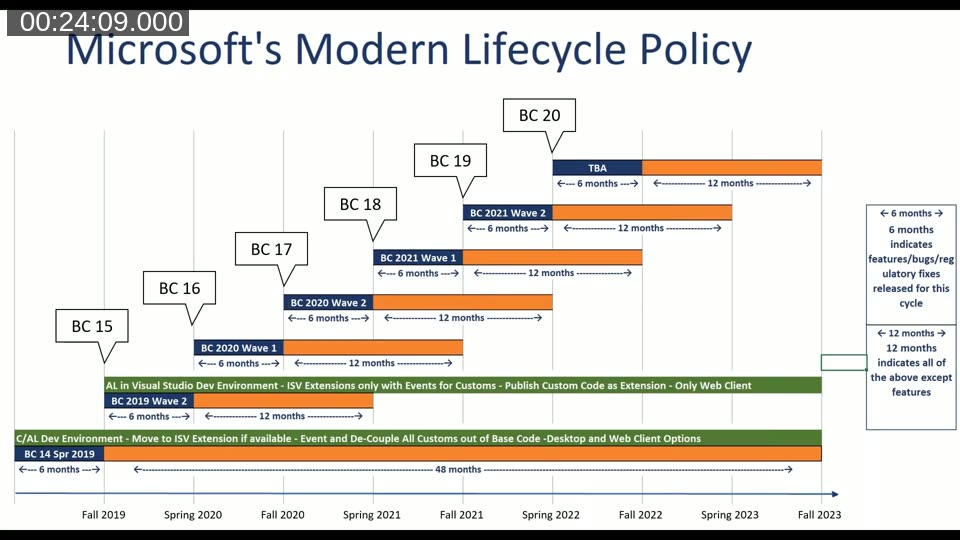
Jon walked through Microsoft’s published lifecycle chart in detail. Key points as of April 2020:
- BC 14 receives cumulative updates through fall 2023, giving it a roughly four-year extended tail — far longer than any subsequent version.
- BC 15 and later each receive only 12 months of version-level support before the next wave supersedes them.
- Cumulative updates for BC 14 include virtually all application fixes shipped in the latest BC version, including event additions and tax/accounting fixes. Staying current on BC 14 CUs keeps the application code nearly equivalent to what ships in newer versions.
- The RTC (Windows) client is removed in BC 15. Customers who still depend on the RTC client have until fall 2023 to plan that transition, as BC 14 CUs keep the RTC client functional throughout the support window.
Jon also flagged Microsoft’s “N minus 2” licensing policy: when BC 17 ships (expected fall 2020), BC 14 will no longer be a valid upgrade target for new end-user licenses. That window — roughly four and a half months from the webinar date — made BC 14 an urgent short-term destination for organisations on NAV 2018 or earlier.
Disruption Now vs. Minimal Disruption When Current
Jon drew a clear contrast between the experience during the “getting current” phase and life once an organisation has reached fully decoupled, extension-based code.
While getting current, teams should expect incremental releases, ongoing hardware and software considerations, a shift toward continuous testing, and training that becomes less disruptive with each release rather than a single large re-training event.
Once current, the picture changes significantly:
- Code is fully decoupled from the base — no merging.
- Testing is minimised because each release is a small delta.
- Releases become continuous improvement events rather than projects.
- Go-lives become non-events — monthly updates that users may not even notice.
The 3-Year Upgrade Journey: Cost, Disruption, and Risk Over Time
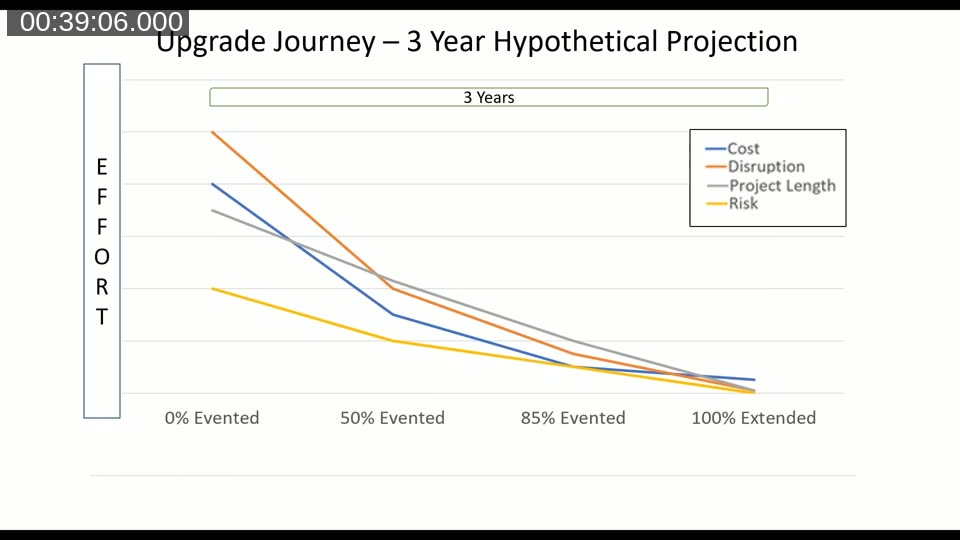
Jon presented a hypothetical projection showing how cost, disruption, project length, and risk all decline as an organisation’s codebase moves from 0% evented to 100% extended over three years at BC 14.
The starting point (0% evented) represents the highest values across all four dimensions — large merge effort, long projects, high risk, maximum disruption. Each subsequent upgrade, as more code is refactored into events and extensions, reduces all four dimensions. By the time the codebase reaches 100% extended, go-live events are routine and low-cost.
Jon’s practice is to refactor only what produces merge conflicts on each upgrade pass. Code that works fine in CAL is left in CAL until there is a specific reason to convert it. This disciplined, incremental approach avoids the cost and risk of a “big bang” CAL-to-AL conversion.
Q&A: Key Takeaways
The extended Q&A session surfaced several practical points:
- Data access from SaaS: Direct SQL Server access is not available in SaaS, but Microsoft can supply a .bak backup file on request (possibly for a fee). Web services and the standard API layer provide the primary integration surfaces.
- Optimal path if BC 17 ships before you reach BC 14: The development team would still use BC 14 internally as a platform for CAL-to-AL conversion, running the update toolkits for BC 15, BC 16, and BC 17 in the background before going live in one step directly to BC 17.
- Platform-only upgrade to BC 14: It is possible to open a NAV 2018 database against the BC 14 platform executables without a full application upgrade. Jon had tested this with add-ons and found it functional, offering another incremental option for organisations not ready for a full application upgrade.
Live Demo: Performance Gain from BC 14 Platform
Luc van Vugt shared a live Excel chart showing test run duration data from his own environment. Running 80,300 automated application tests nightly on NAV 2018 code under a BC 14 platform showed a consistent reduction in test execution time compared to the native NAV 2018 platform.
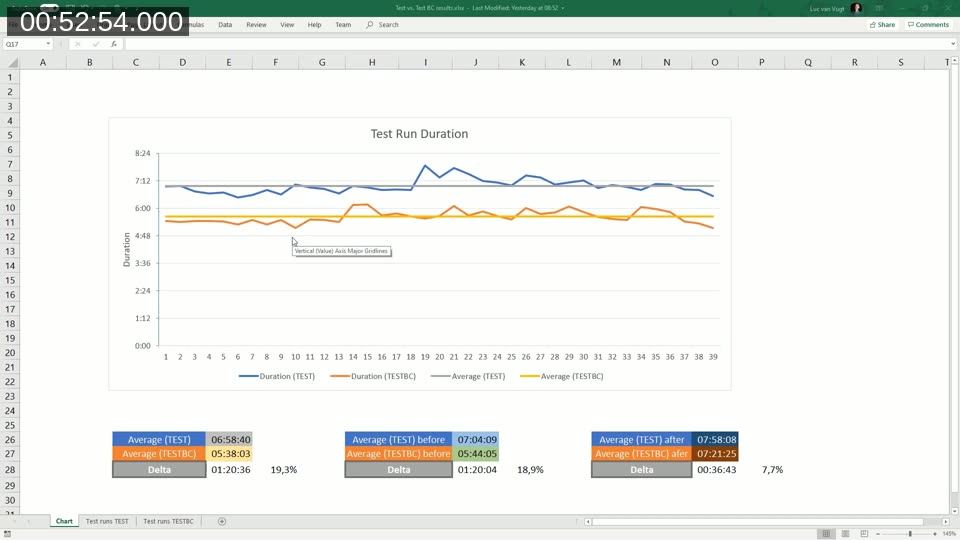
The average test run on NAV 2018 (native platform) took approximately 6 hours 58 minutes. The same test suite running on the BC 14 platform — with the same NAV 2018 application code — averaged around 5 hours 38 minutes, a roughly 19% improvement. This real-world data reinforces the case for a platform-only BC 14 upgrade as an immediate, low-risk step even before the full application upgrade is complete.
This post was generated with AI assistance from the Areopa Academy webinar recording. The content reflects the presentation as delivered in April 2020; licensing details, version support timelines, and Microsoft policies may have changed since the recording date.