
In this webinar, Luc van Vugt, nine-time Microsoft MVP, walks through a concrete workflow for turning written test case definitions into AL test codeunits in Microsoft Dynamics 365 Business Central. Starting from a manual, four-step coding recipe, he then introduces ATDD.TestScriptor — a free, open-source PowerShell module he co-developed with Jan Hoek — that automates the structural part of that recipe and reduces the time a developer spends on scaffolding before they can write real test logic.
The session is grounded in a simple but representative business case: adding a lookup value field to the customer table. That example is used throughout the demo to keep the focus on the technique rather than the functional complexity.
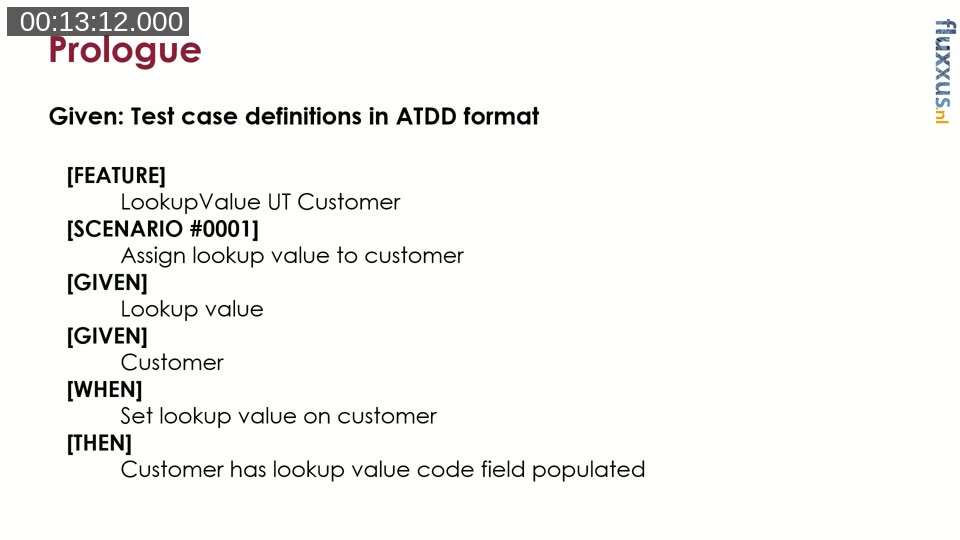
The Starting Point: Test Cases Written in ATDD Format
The whole approach assumes that test cases have already been written before any code is touched. Luc is deliberate about this: a developer should never write test functions unless a formal definition of what to test exists first. Without the written definition, the green structured comment should not be there, and the test function itself should not exist.
The format he uses is ATDD — Acceptance Test-Driven Development. A test case in this format has three parts:
- Given — the context and data setup required before the action is taken.
- When — a single action that is exercised or triggered.
- Then — one or more verifications of the expected outcome.
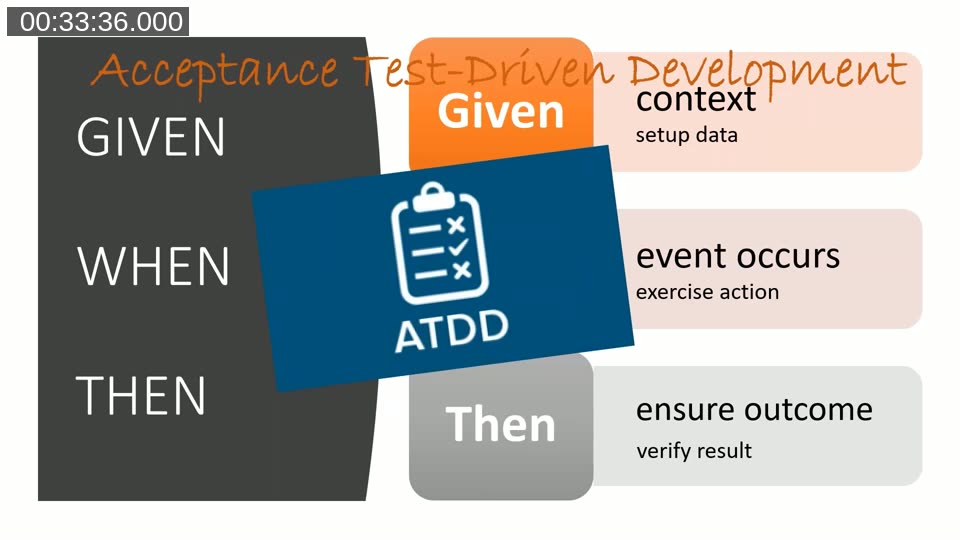
ATDD is closely related to other structured formats such as four-phase testing (Setup, Exercise, Verify, Tear Down). All of them share the same principle: define the test environment, perform one action, check the result, and clean up. The Given/When/Then language keeps tests readable for functional consultants and testers, not just developers.
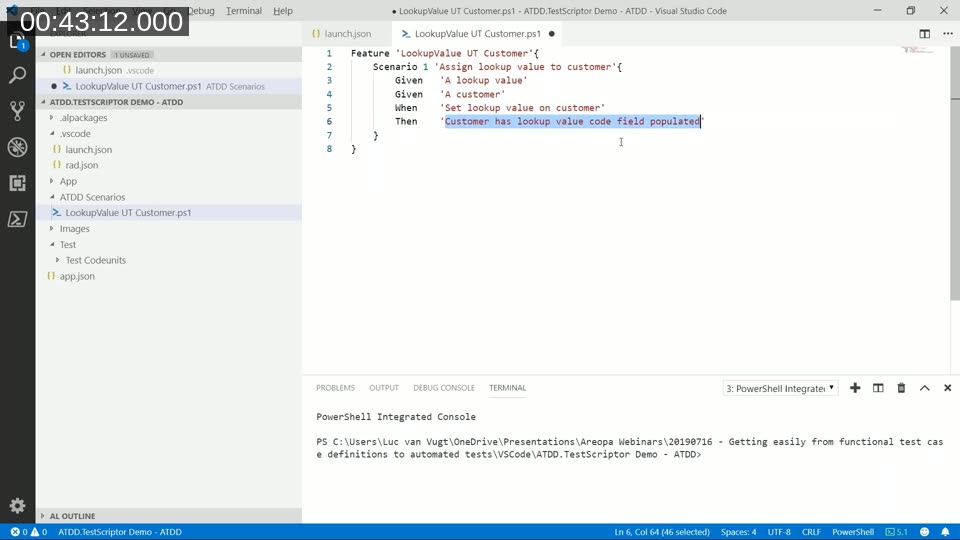
An example test definition for the lookup value scenario looks like this:
[FEATURE] LookupValue UT Customer
[SCENARIO #0001] Assign lookup value to customer
[GIVEN] Lookup value
[GIVEN] Customer
[WHEN] Set lookup value on customer
[THEN] Customer has lookup value code field populated
The Four-Step Manual Recipe
Before introducing any tooling, Luc demonstrates how a developer would implement the above definition manually. He calls this the four-step recipe: Create, Embed, Write, Construct.
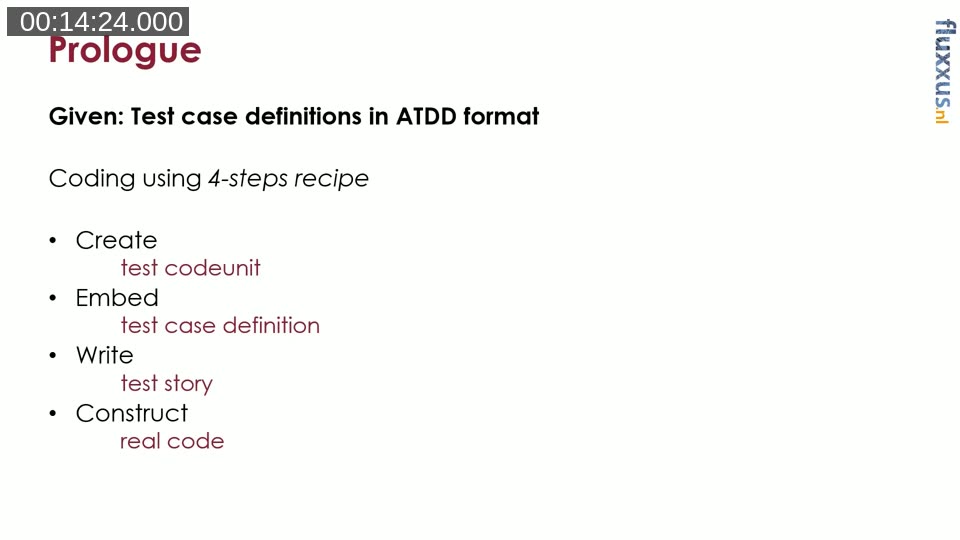
Create means creating a new AL file and defining it as a test codeunit. The codeunit subtype must be set to Test. Using the CRS AL Language Extension, the file is named automatically based on the object name, so the developer does not type the filename manually.
Embed means creating a test function and pasting the ATDD test case definition into it as structured comments. Each line of the definition sits behind double slashes prefixed with the tag in square brackets. This is the ATDD comment convention used throughout Microsoft’s own test suite for Business Central. It preserves the definition verbatim in the code, so any developer reading the test later can see exactly what it was designed to test.
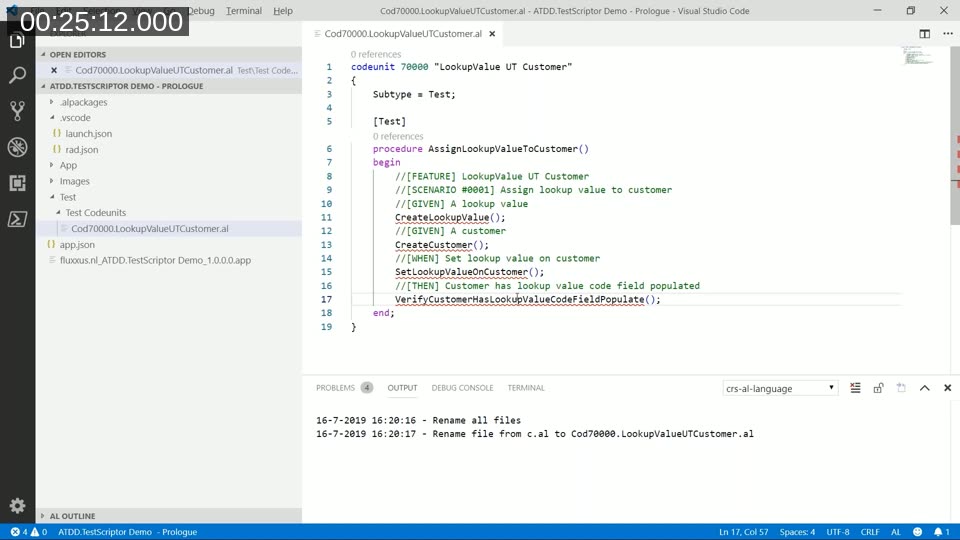
Write means writing the test story — a sequence of function calls that narrates the test in plain language, without yet implementing the functions. A call like CreateLookupValue() reads as a sentence. The idea is that at this level of abstraction, a functional colleague can still follow and confirm that the test matches the intended behaviour. Jumping straight into technical code loses that audience.
Construct means implementing each of the helper functions referenced in the story. For the Given functions, this typically means creating records. For the When function, this means performing the action. For the Then function, this means calling Assert procedures. Reusable functions — such as CreateCustomer() — are drawn from Microsoft’s standard Library – Test Initialize codeunit wherever possible, keeping the custom code minimal.
The result is a fully working test codeunit. Luc builds and deploys it live, opens the Test Tool in Business Central, runs the test, and confirms the green result. He then deliberately introduces a wrong value to show the failure path, confirming the test catches the mismatch.
Docs: Testing the Application in Business Central — Microsoft’s reference covering test codeunits, the Test Runner, and the GIVEN-WHEN-THEN comment convention in AL.
Book: Luc van Vugt’s Automated Testing in Microsoft Dynamics 365 Business Central (Packt, 2019) covers the four-step recipe, the ATDD format, and the lookup value business case in depth. The ATDD.TestScriptor module is referenced on page 145 of the PDF edition.
Why This Is Still Laborious
The manual process works, but Luc is honest about its weaknesses. Copy-pasting definitions is error-prone — he intentionally forgets to paste the Then section during the demo to illustrate this. Naming helper functions consistently across many tests requires discipline. Ensuring that a function like CreateCustomer() is reused rather than duplicated across multiple test codeunits demands attention that is easy to miss under time pressure.
When working with tens or hundreds of test case definitions — which is realistic for any meaningful project — the structural setup work becomes a significant portion of the total time spent, before any actual test logic is written. This is the problem ATDD.TestScriptor addresses.
ATDD.TestScriptor: Automating the Scaffolding
ATDD.TestScriptor is a PowerShell module available on the PowerShell Gallery. It reads ATDD test case definitions written in a PowerShell file and generates a complete AL test codeunit from them in one step.
The workflow is straightforward. The developer creates a .ps1 file in the project under an ATDD Scenarios folder. In that file, they describe the feature and its scenarios using the same ATDD keywords — Feature, Scenario, Given, When, Then — which the PowerShell extension in VS Code recognises and syntax-highlights.
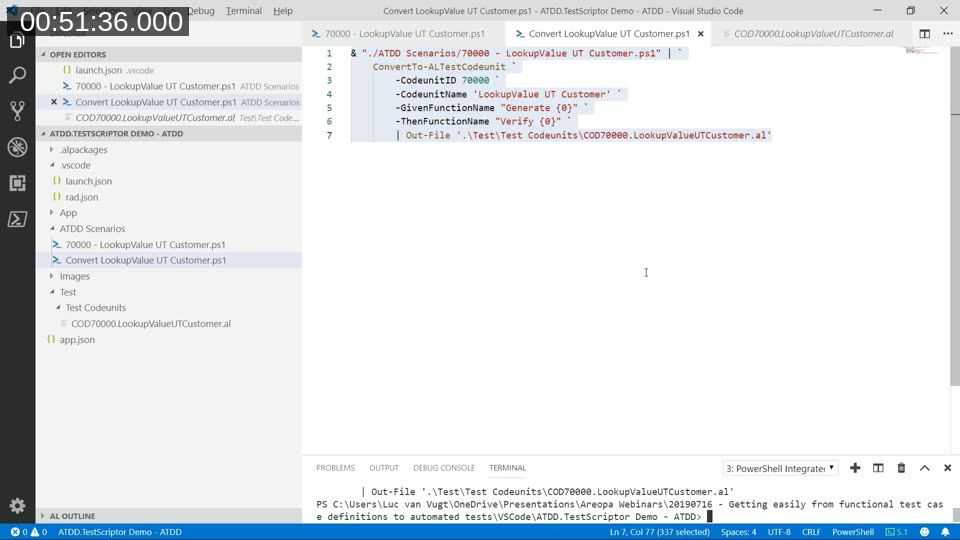
A separate conversion script — also a .ps1 file — calls ConvertTo-ALTestCodeunit with the target codeunit ID, name, and optional parameters. Pressing F8 in VS Code runs the selected script in the PowerShell Integrated Console and writes the generated .al file directly to the Test Codeunits folder.
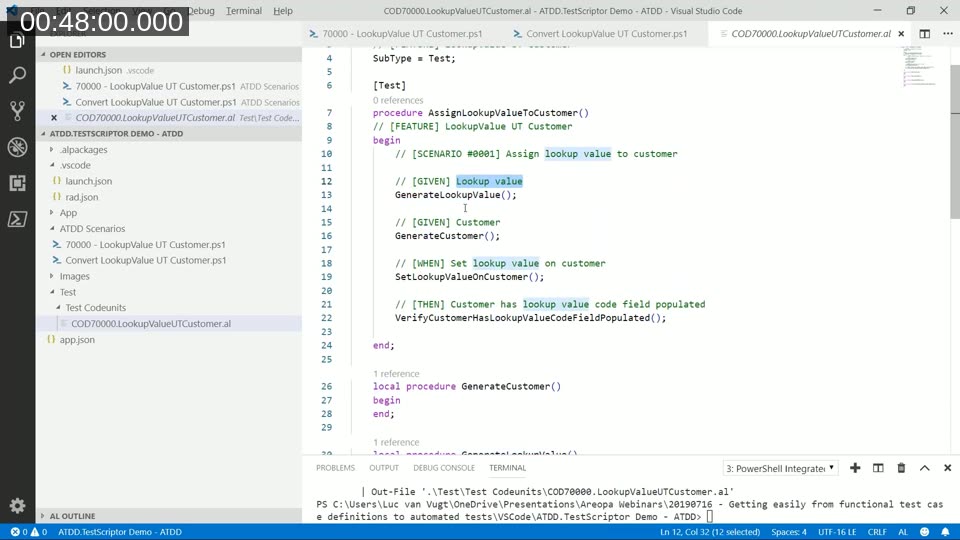
The generated codeunit contains:
- The codeunit declaration with
Subtype = Test. - One test function per scenario, named by removing spaces and capitalising each word from the scenario description.
- The ATDD comments embedded within each test function, preserving the original definition.
- A function call for each Given, When, and Then tag — forming the test story automatically.
- Local helper function stubs — one per unique sentence — ready for the developer to implement.
If two scenarios share a Given sentence such as “A customer”, the module creates only one helper function for it. Both test functions call the same stub, enforcing reuse from the start without the developer needing to notice the duplication.
Controlling the Output
The conversion command supports several parameters that shape the generated code:
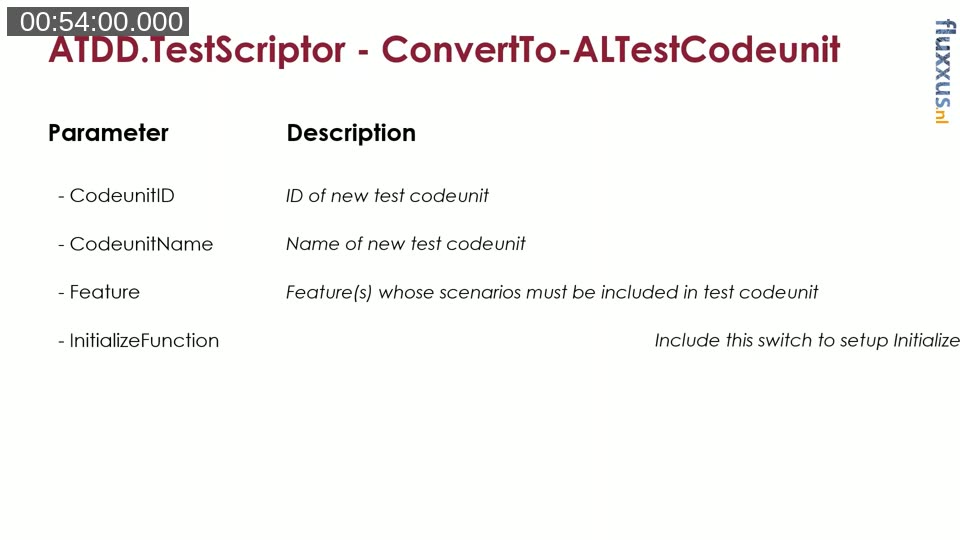
- -CodeunitID — the numeric ID assigned to the generated test codeunit.
- -CodeunitName — the name of the codeunit object.
- -Feature — the feature structure to process. Can be provided inline or read from a file by piping.
- -InitializeFunction — a switch that, when included, adds a standard
Initialize()function with shared-fixture logic using the Library – Test Initialize codeunit. Leaving it out suppresses the function entirely. - -GivenFunctionName — a format string controlling how Given function names are generated. The placeholder
{0}is replaced with the text of the Given sentence. For example,"Generate {0}"producesGenerateLookupValue()instead ofCreateLookupValue(). - -WhenFunctionName and -ThenFunctionName — equivalent format strings for the When and Then sections.
Because the script can be re-run at any time, the developer can refine the scenario wording, adjust parameters, and regenerate the codeunit without losing anything — the source of truth stays in the .ps1 scenario file, and the generated .al file is always reproducible.
Module: ATDD.TestScriptor on PowerShell Gallery — Install with Install-Module ATDD.TestScriptor. Source and open issues are on the GitHub project at fluxxus-nl/ATDD.TestScriptor.
What the Module Does Not Do
ATDD.TestScriptor handles three of the four steps in the manual recipe: Create, Embed, and Write. The fourth step — Construct, meaning the actual implementation inside each helper function — remains the developer’s responsibility. The module generates empty stubs; the developer fills them in.
A question raised during the session was whether the module can update an existing AL codeunit when the scenario file changes. At the time of the webinar, it cannot. The generated file is always written fresh. Luc notes this as a known limitation that surfaced in a real project, where scenario files and codeunits drifted apart as the feature evolved. Work on reverse-engineering existing AL test functions back into ATDD scenario format was planned but not yet complete.
Prerequisites
To use ATDD.TestScriptor, the following are needed:
- PowerShell 5.x or later (PowerShell Core works as well).
- Visual Studio Code with the PowerShell extension installed.
- The ATDD.TestScriptor module installed from the PowerShell Gallery.
The module was at version 0.0.7 at the time of this webinar, with four open issues in the GitHub tracker, including completing the documentation and supporting Pester tests for the module itself.
This post was drafted with AI assistance based on the webinar transcript and video content.