
This Areopa Academy webinar started life as a Twitter conversation about whether Postman or the REST Client extension for VS Code is the better tool for testing APIs. Arend-Jan Kauffmann picked up the challenge and, with Luc van Vugt moderating, spent the session doing exactly what he said he would in the description: no slides, just live demos of both tools against Business Central APIs, so you can see how each one actually behaves rather than reading a feature list.
REST Client for Visual Studio Code
Arend-Jan starts with REST Client, a VS Code extension that, based on its download count, is a clear favorite among developers who work with APIs from inside the editor. It works with plain .http files and can send REST calls, OData calls, and even GraphQL queries — Arend-Jan notes that GraphQL is not itself a REST API, since it works through a single endpoint and a query rather than one URL per resource, but REST Client supports it anyway.
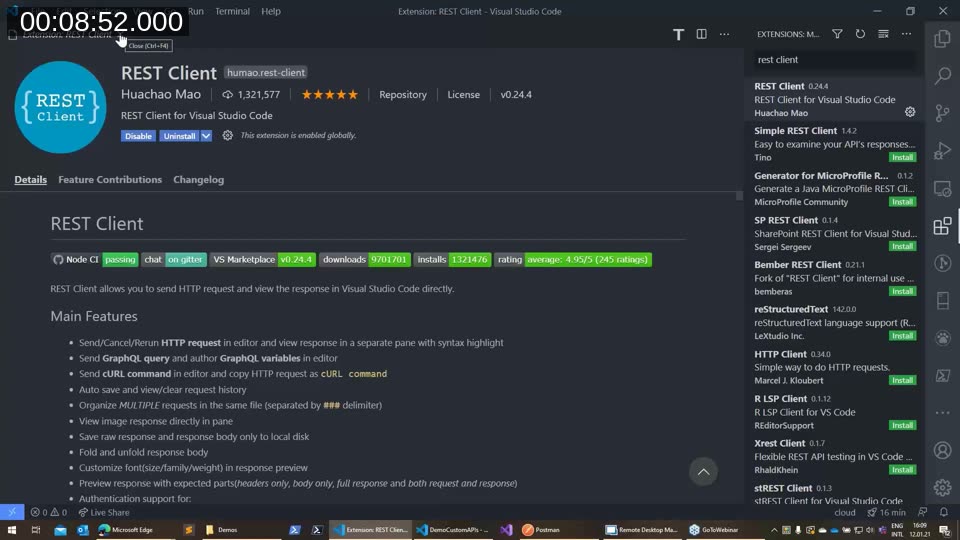
📖 Docs: REST Client on the Visual Studio Code Marketplace — published by Huachao Mao, with the full feature list and a link to the GitHub issues repository for questions and bug reports.
The basics: .http files and Code Lens
A request in REST Client is just a method and a URL typed into a .http file. Once you save the file, the built-in Code Lens feature adds a clickable Send Request link above each request — the same mechanism VS Code uses for “N references” links in AL code. If Code Lens is disabled (common on large codebases, since it can slow the editor down), that link disappears, which is why Arend-Jan uses a small extension called Setting Toggle to flip editor.codeLens on and off quickly instead of digging through Settings every time.
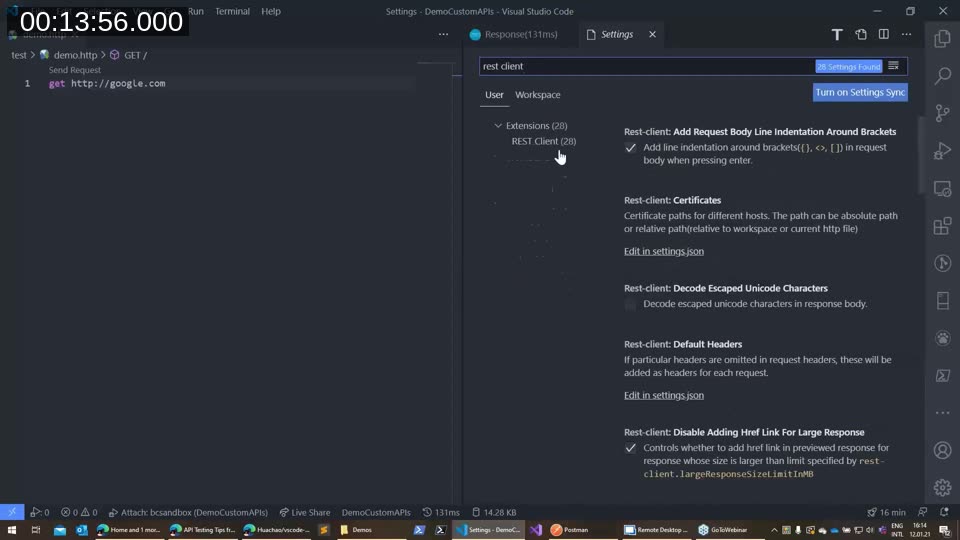
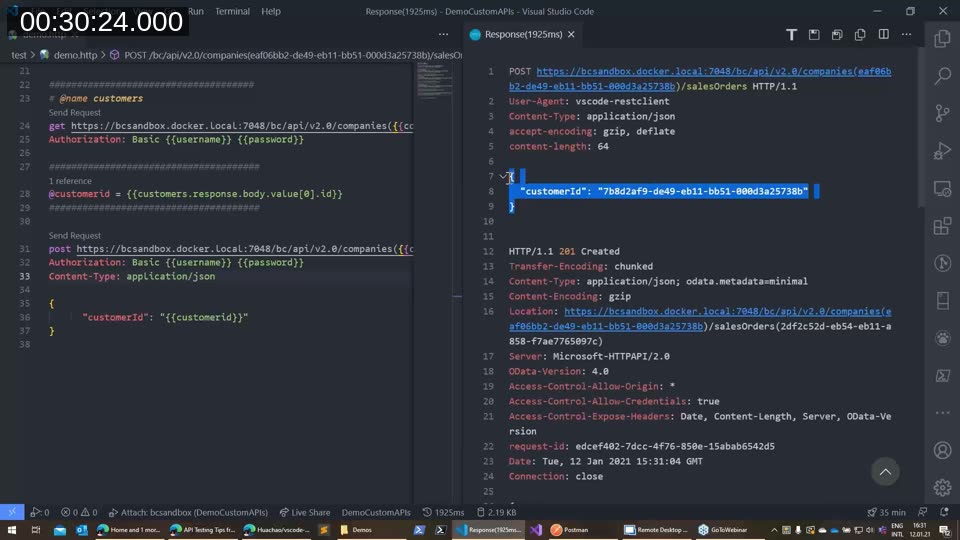
The response opens in a separate pane to the side rather than replacing the request. A rest-client.previewOption setting controls how much of it you see: full (status, headers, and body), headers only, body only, or exchange, which shows both the request that was actually sent and the full response. Arend-Jan keeps this set to exchange, mainly so he can see exactly which variable values went out in the request — not just the values he typed.
Authentication, variables, and building a request chain
Calling a real Business Central API requires an Authorization header. REST Client supports typing a pre-encoded Basic header directly, but it also accepts a plain username:password or username password pair and base64-encodes it automatically — no need for a separate encoding tool. For a cloud environment, the same approach works with a web service access key as the password.
Hard-coding credentials and URLs on every line gets old fast, so REST Client supports file variables declared with @name = value and referenced with double curly braces, like {{username}}. More usefully, a request can be given a name with ### @name companies, and later requests can pull values straight out of its response — for example, {{companies.response.body.$0.id}} to grab the first company’s ID. Arend-Jan builds this up step by step in the demo: naming a companies request, extracting a company ID from it, then an item ID and a customer ID, and finally using the customer ID as the request body when creating a new sales order.
To switch between environments (a local Docker sandbox versus a cloud tenant, for instance) without hand-editing the file, REST Client reads named environments from the workspace settings.json under rest-client.environmentVariables. Each environment holds its own username, password, and base URL, and a status bar item at the bottom of VS Code lets you pick the active one. Because these values live in settings rather than in the .http file itself, they’re easier to keep out of version control and to share separately from the request definitions.
A word on Azure AD authentication
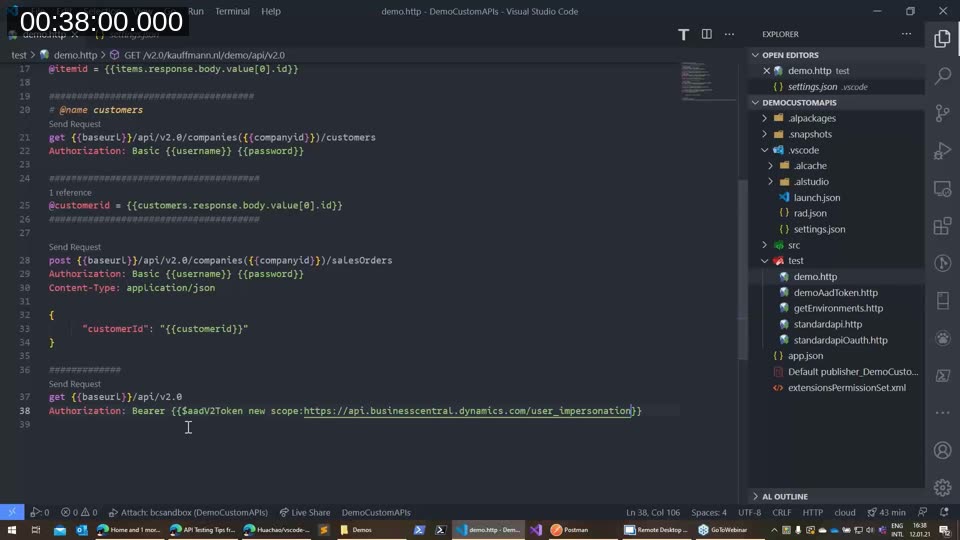
Business Central APIs can also be called with an Azure AD bearer token instead of basic authentication. REST Client has built-in support for requesting one via a {{$aadV2Token}} system variable, but Arend-Jan found that the default scope it requests doesn’t work — you have to explicitly add the scope api.businesscentral.dynamics.com/user_impersonation for the sign-in and token request to succeed. Even with the corrected scope, he ran into an error live in the demo and confirmed it as an open bug in the extension at the time of recording.
📖 Docs: Using OAuth to authenticate Business Central Web Services — Microsoft’s current guidance on Entra ID/OAuth2 authentication for Business Central web services, including user-impersonation versus service-to-service flows. Note that basic authentication (the web service access key approach shown throughout this webinar) has since been deprecated for Business Central online in favor of OAuth2.
Postman
Arend-Jan then switches to Postman, which he describes as a fundamentally different kind of tool — more capable, but also more to take in at first. The same authentication happens through a dedicated Authorization tab instead of typing a header by hand, and every request you build can be saved into a named, organized collection instead of living as a line in a shared file.
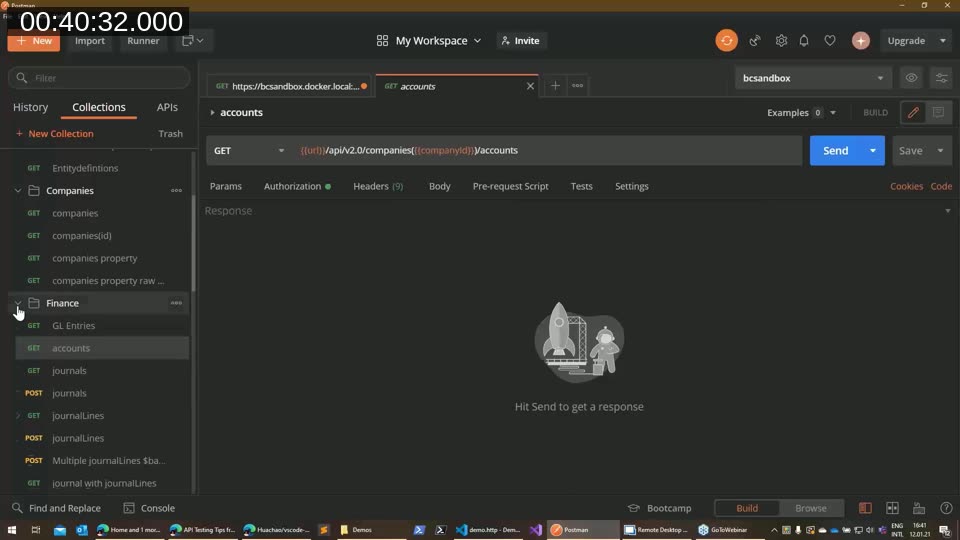
Two things stand out compared to REST Client: every request keeps its own tab, so you can flip back to a previous call and still see its last response without re-running it, and — unlike REST Client — Postman persists variable values between sessions. Close Postman and reopen it, and the values you captured are still there.
Variables and environments
Postman variables exist at multiple levels. Collection variables are available to every request in a collection, set once with an initial value that resets whenever you choose to reset them. Environment variables are a separate concept — effectively a named list of variables you can swap in and out, so switching the active environment changes the base URL, username, and password without touching a single request. Arend-Jan’s recommendation for Business Central: put anything database-specific, like record IDs, in environment variables rather than collection variables, since IDs differ between every company and every environment.
📖 Docs: Using variables — Postman Learning Center — covers all five variable scopes (global, collection, environment, data, and local) and how narrower scopes override broader ones.
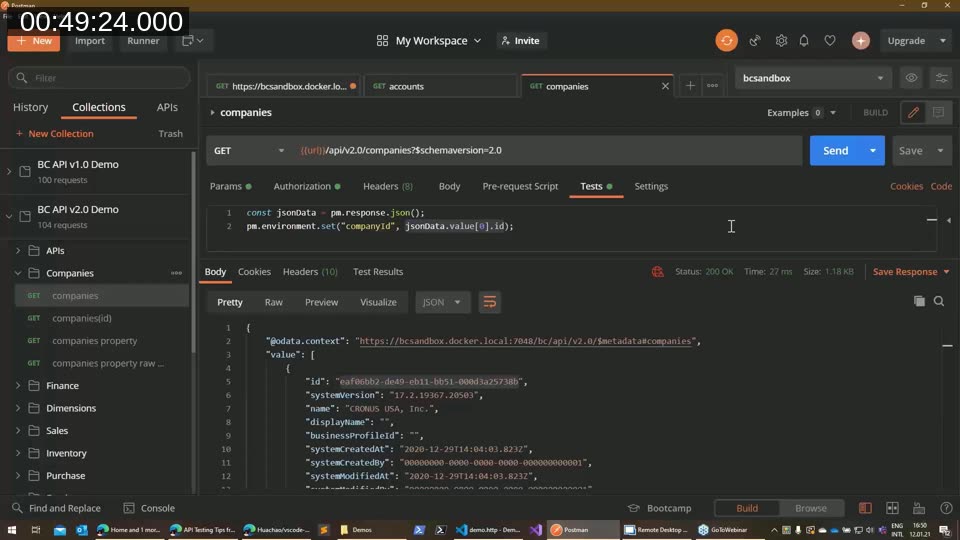
Rather than manually right-clicking a response value and setting it as a variable every time, Postman requests support a Tests tab where a short script runs automatically after the response comes back. Arend-Jan uses this to parse the JSON response and call pm.environment.set(), so the first company’s ID is captured into an environment variable the moment the companies request runs — no manual step required afterward.
Sharing collections and working as a team
Where Postman clearly pulls ahead of REST Client is collaboration. Requests live in workspaces, and a personal workspace can be turned into a team workspace shared with colleagues — useful for splitting API testing work per customer or per project. Postman’s web and desktop clients stay in sync, and a “browser agent” setting even lets the browser-based version reach a local Docker container directly. The free tier supports teams of up to five people; larger teams need a paid plan.
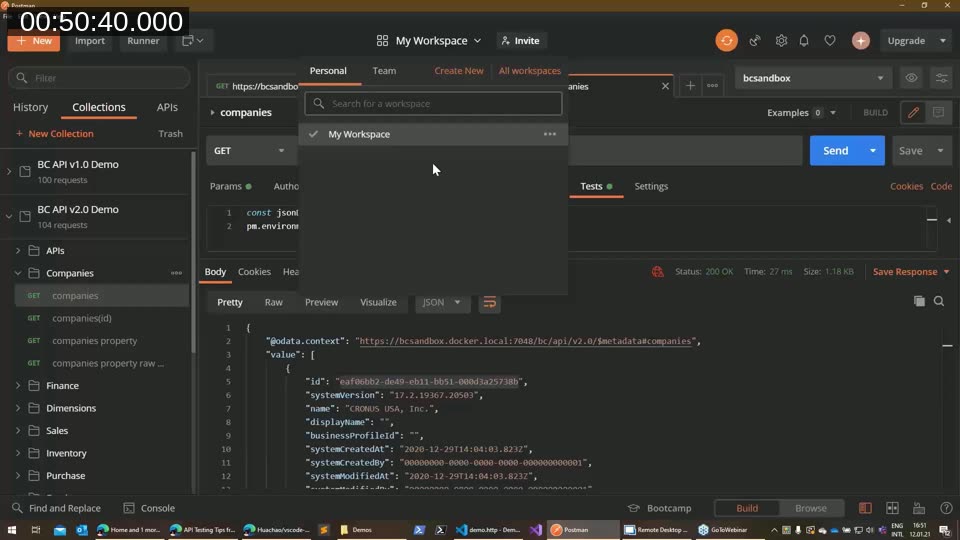
If a shared workspace isn’t the right fit, collections and environments can also be exported as JSON files and imported by someone else — which is exactly how Arend-Jan distributes request collections to students in his own API training.
Automated testing
Beyond capturing variables, the same Tests tab can run real assertions against a response using pm.test() and pm.expect() — checking a status code, confirming a JSON property exists, or verifying a count. Arend-Jan demonstrates a test that expects exactly 48 API endpoints back from a metadata call; when the count comes back as 56 instead, the test fails and shows up clearly under Test Results, with console.log() output available for digging into why.
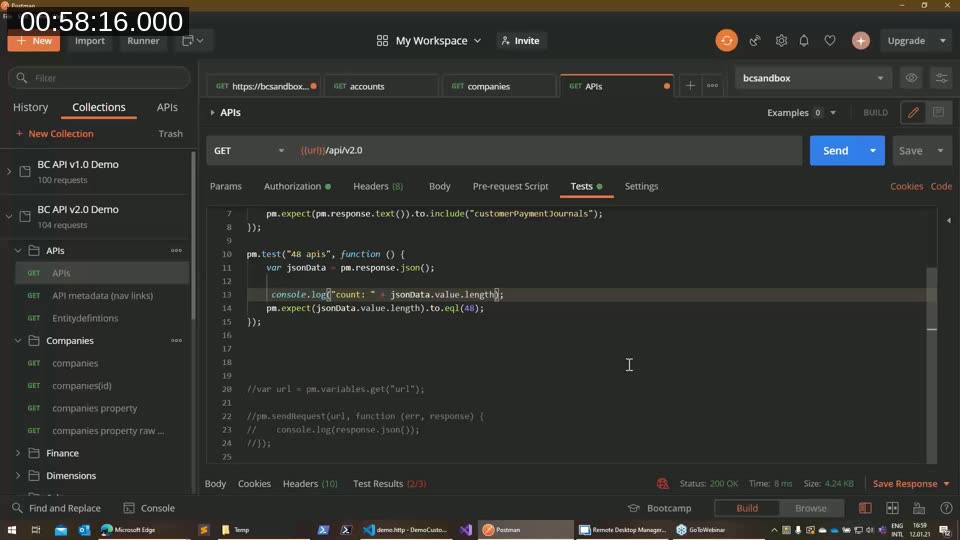
📖 Docs: Write test scripts — Postman Learning Center — the current reference forpm.test, the Chai.js-basedpm.expectassertions, and usingconsole.logto debug a failing test.
Arend-Jan points out that this pattern scales into full API monitoring: chaining assertions across a whole collection to confirm every endpoint is up, returning the right content type, and responding with the expected status codes.
The verdict
Asked directly which tool wins, Arend-Jan is unambiguous: for him, Postman is the daily driver. He still reaches for REST Client for quick, disposable one-off checks, but as soon as he needs to save results, retest later, or work across multiple related API calls, he switches to a Postman collection. He also notes that Postman can do considerably more than what the session covered — publishing APIs and building mock APIs among them — territory he hasn’t personally needed to explore.
Q&A highlights
Two viewer questions came in near the end. First, whether a web service access key can be retrieved through code: no — only the user themselves can view their own web service access key, since it functions as that user’s password. Second, a question about the Web Service Management codeunit not showing source in VS Code: Arend-Jan traces this to the codeunit’s implementation living in the system application layer, which isn’t visible directly — the fix is to look under AL app extensions, find the Web Service Management source there, and the implementation codeunit is visible from that layer.
This post was drafted with AI assistance based on the webinar transcript and video content.