
In this Areopa webinar, Stefan Strube, a Microsoft Business Applications MVP and solution architect, explains what Microsoft Dataverse actually is and why it matters to the Dynamics 365 ERP crowd, including Business Central and Finance and Operations practitioners. Luc van Vugt moderates. Strube traces Dataverse’s history from Dynamics CRM through several rebrandings, walks through its architecture and core features, and closes with a look at licensing and what was coming in the 2021 release wave.
From Dynamics CRM to Microsoft Dataverse: a short history
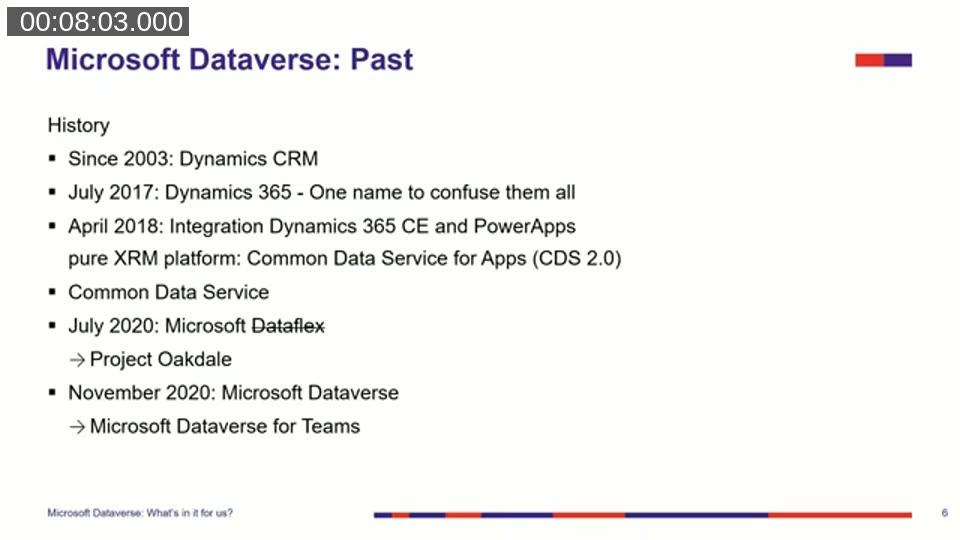
Dataverse has changed names several times, and Strube opens with that history to explain the confusion around the product. Dynamics CRM has existed as an online platform since 2003. In July 2017, Microsoft rebranded its business applications under the single “Dynamics 365” name, which implied more integration than actually existed at the time.
The real integration work started in April 2018, when Dynamics 365 Customer Engagement was integrated with Power Apps. That gave rise to a shared XRM platform called Common Data Service for Apps (CDS 2.0), adopted from the Dynamics CRM platform. In July 2020, Microsoft briefly tried the name “Dataflex” before a trademark dispute forced a reversal within weeks — the platform reverted to Common Data Service, and the Teams-specific version was called Project Oakdale. In November 2020, Microsoft settled on the current name: Microsoft Dataverse, with Microsoft Dataverse for Teams as the Teams-scoped variant.
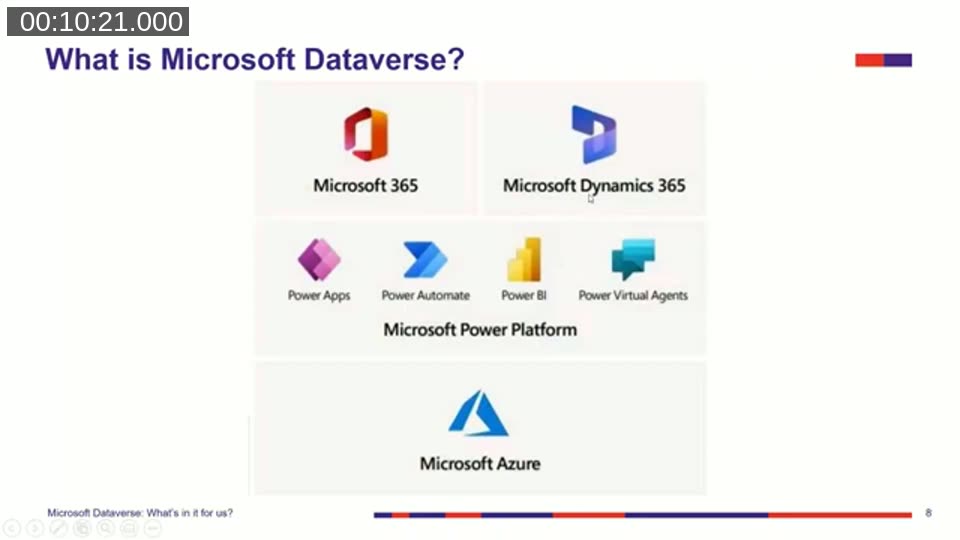
What is Microsoft Dataverse?
Strube places Dataverse in the context of Microsoft’s four cloud pillars: Microsoft 365, Dynamics 365, Power Platform, and Azure. Dataverse sits inside the Power Platform as its data layer — it stores data that Power Apps, Power Automate, and Power BI can read from and write to. That doesn’t mean all of an organization’s data has to live in Dataverse: data can flow in and out via dataflows, Power Query, Excel add-ins, and connectors, and can be replicated out to Azure Data Lake or Azure SQL Database.
Underneath, Dataverse is more than a single database. Relational data is stored in Azure SQL, files in Azure Storage, large binary objects in Cosmos DB, and data is indexed for Cognitive Search. Strube’s diagrams show the platform layered from a core API outward through security, business logic, storage, and integration capabilities — the API layer handles authentication and authorization, the logic layer covers jobs, business rules, plug-ins and validation, and the outer integration layer connects to Event Hub, Service Bus, webhooks, and export targets like SQL and Data Lake.
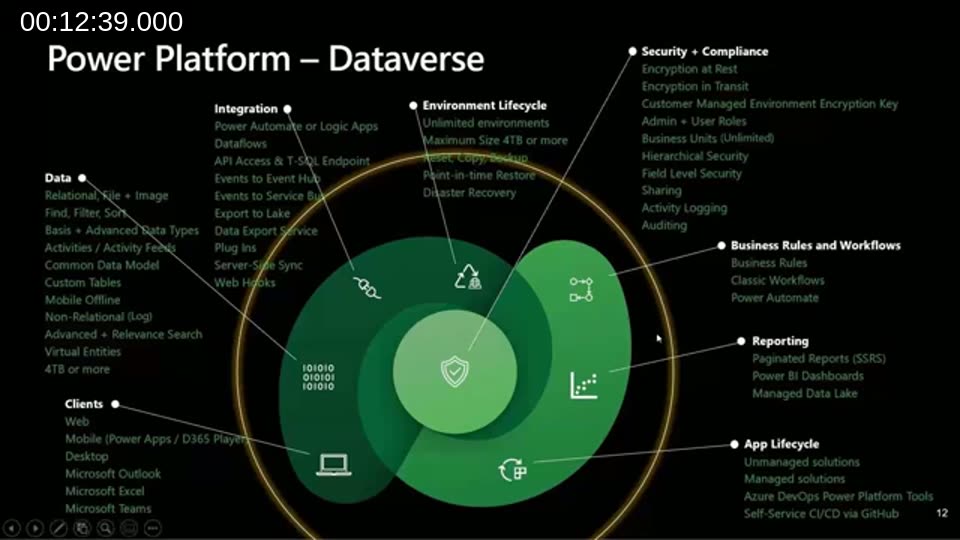
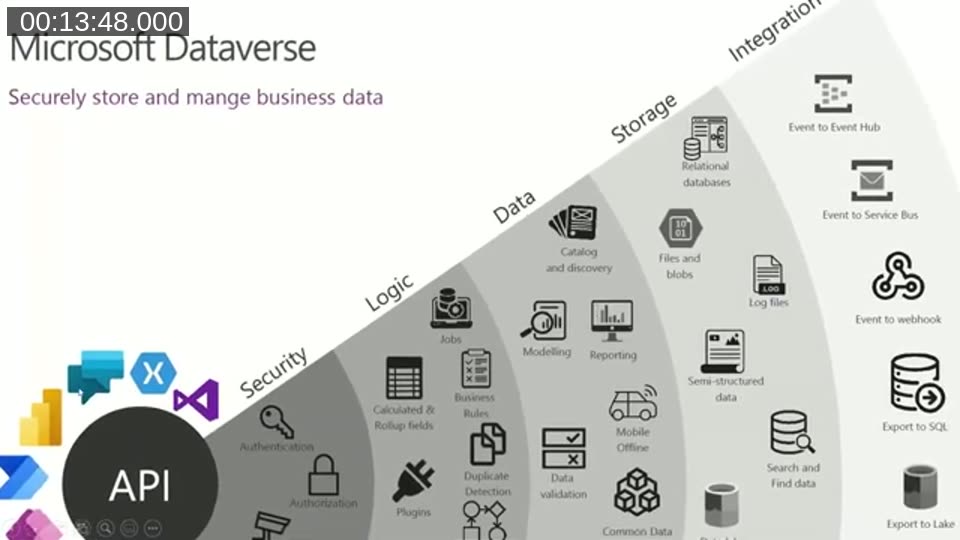
📖 Docs: Microsoft Dataverse overview — the current Microsoft Learn description of Dataverse as a data platform for building apps and automations.
Environments: where Dataverse lives
Dataverse data lives inside Power Platform environments. Strube demonstrates how to check whether Dataverse is enabled in a given environment: trying to create a model-driven app, or looking at the Tables list, will report “no database found” if Dataverse hasn’t been provisioned there.
He walks through the environment types available at the time of recording: default, production, sandbox, trial, developer, Dataverse for Teams, and support (created by Microsoft support engineers on request). Every tenant gets an auto-created default environment where all licensed users are automatically Environment Makers — Strube’s advice is to rename it (for example to “Personal Productivity”) and to create separate production and sandbox environments for real business applications rather than building on the default.
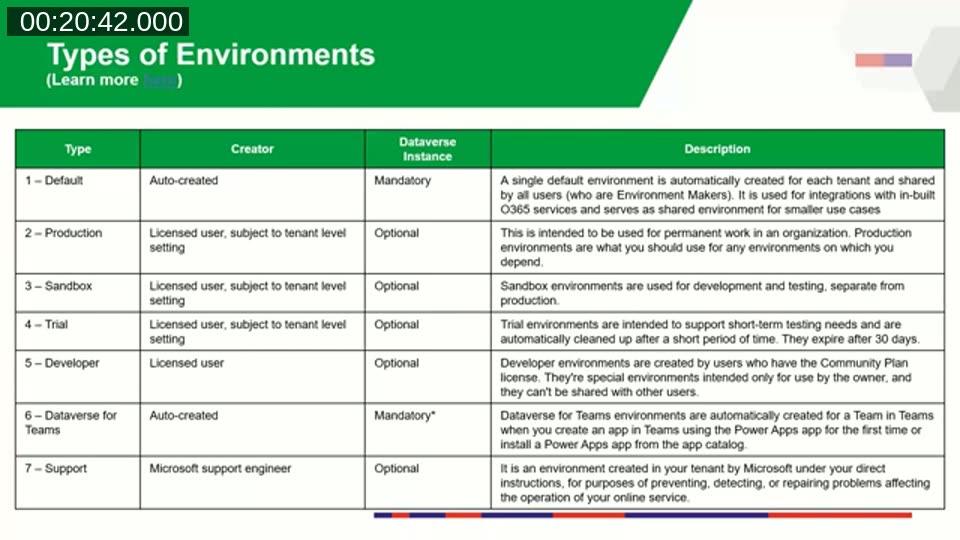
📖 Docs: Power Platform environments overview — the current environment type list has consolidated to Production, Default, Sandbox, Trial, Developer, and Dataverse for Teams. The separate “Support” type from the video is no longer listed as a distinct category, and what was the “Community Plan” developer environment is now provisioned through the Power Apps Developer Plan.
The Common Data Model
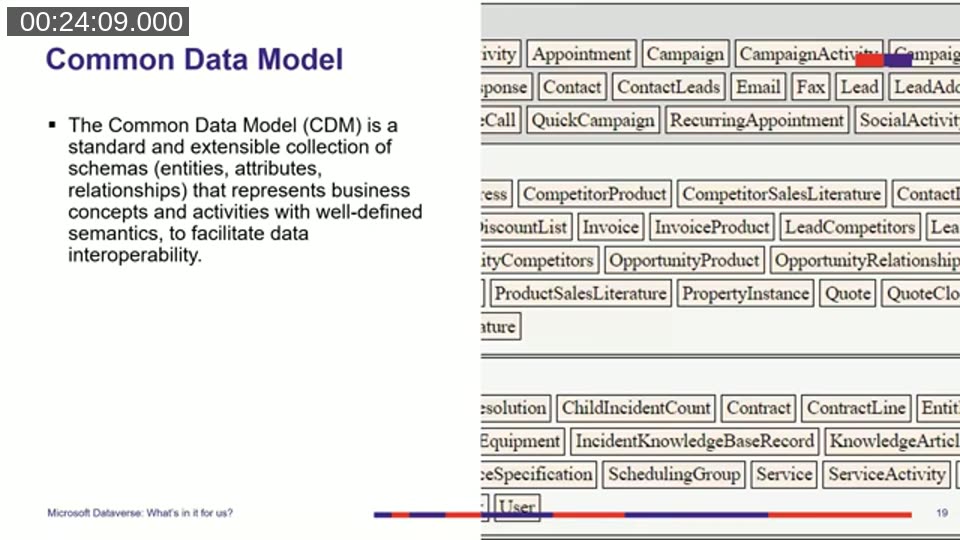
When Strube creates a new Dataverse environment in the demo, it isn’t empty: it comes pre-populated with a set of core tables. Those come from the Common Data Model (CDM), an open-source initiative that defines standard, extensible schemas — entities, attributes, and relationships — for common business concepts such as accounts, contacts, and activities.
Because the same core tables are used across Power BI dataflows and Azure Data Lake Gen2, data that follows the Common Data Model stays structured and metadata-rich wherever it’s replicated, which helps downstream reporting.
📖 Docs: Common Data Model on GitHub — referenced directly in the webinar description as further reading. Note that the CDM Schema Store service the repository once hosted was retired at the end of March 2024; the schema definitions and SDKs (available for .NET, Java, Python, and TypeScript) remain maintained.
Application lifecycle management with solutions
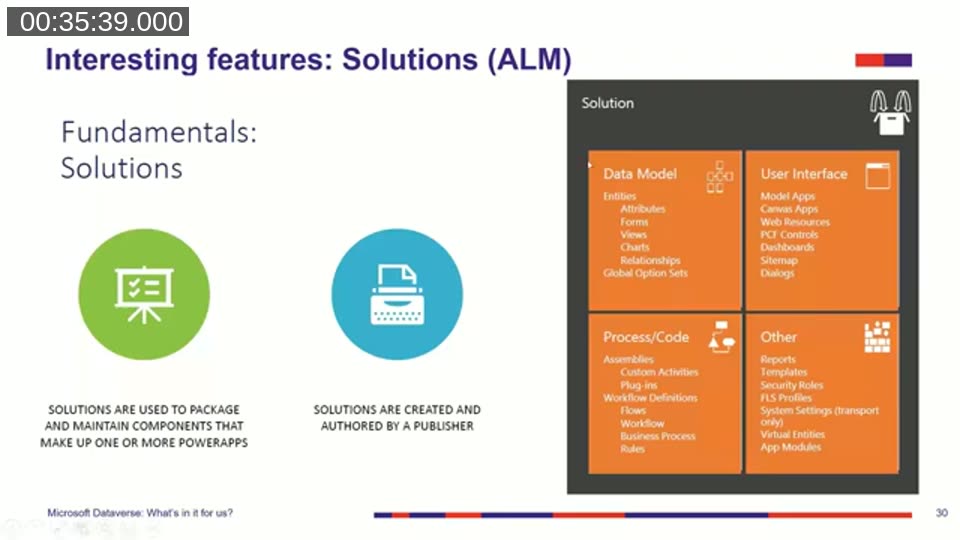
Dataverse borrows its solutions concept from Dynamics CRM to handle application lifecycle management. A solution packages the components that make up one or more apps — tables, forms, views, business rules, workflows, plug-ins, reports, and more — so they can move from a development environment through test or acceptance and into production. Since the 2018 integration of Dynamics 365 Customer Engagement and Power Apps, Microsoft has been making progressively more component types “solution-aware,” meaning they can be added to and shipped inside a solution.
What’s in it for Business Central and Finance and Operations
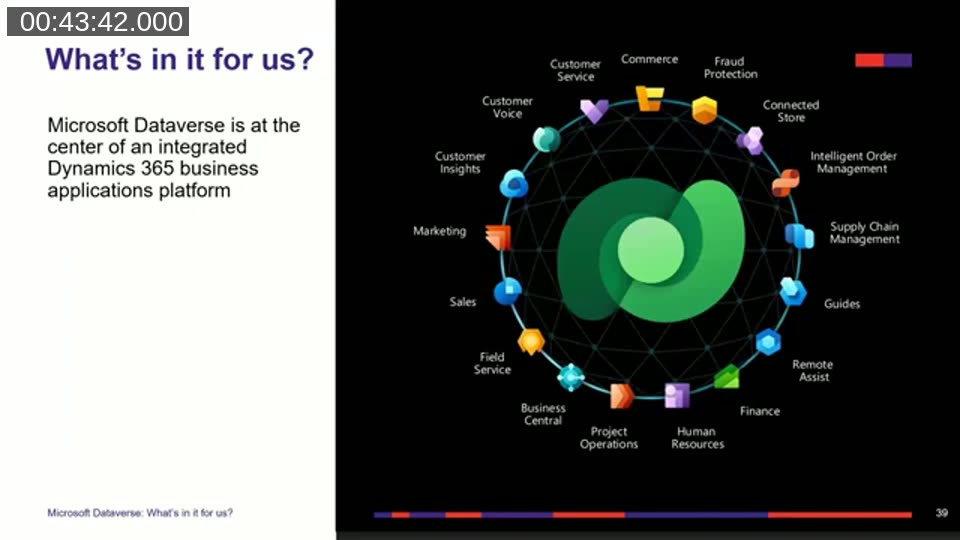
Strube’s core message: Dataverse increasingly sits at the center of an integrated Dynamics 365 platform, and by 2021 it already touched Sales, Customer Service, Marketing, Field Service, Human Resources, and more.
For Business Central specifically, he highlights two scenarios that were still emerging at the time:
- Portals. Business Central lacked a built-in way to expose data to external partners or customers. Once virtual tables for Business Central data in Dataverse reach general availability with full CRUD support, Strube expects it to become possible to build a Power Apps portal on top of Business Central data — similar to the existing customer portal template for Dynamics 365 Supply Chain Management, which is built on the dual-write framework.
- Central CRM with multiple Business Central databases. Organizations running several separate Business Central databases (for example, per country or subsidiary) can use a single Dataverse-based CRM as the hub and synchronize customer and sales data out to each Business Central instance — functionality he notes was demonstrated by André Paulovics in an earlier Areopa session.
For Finance and Operations, the dual-write framework and virtual entities already allowed exposing F&O data through a Power Apps portal, including a template for a Dynamics 365 Supply Chain Management customer portal.
📖 Docs: Power Apps portal for Dynamics 365 Supply Chain Management — linked directly in the webinar description as the reference for the customer portal scenario Strube describes.
Getting started and licensing
Strube outlines two low-commitment ways to try Dataverse: a 30-day Power Apps per-user trial (25 users), and the Power Apps Community Plan — a free, permanent, individual-use development environment that isn’t shareable but gives full functionality to explore Dataverse on your own.
On licensing, capacity is the key concept: database, file, and log storage capacity, on top of per-user or per-app licensing. Some Dataverse functionality is included with select Microsoft 365 licenses (surfaced as a “Dataverse” or “Common Data Service” service plan), but that limited access only covers the default environment and specific first-party scenarios like Microsoft Project — it doesn’t unlock custom app or flow development. Buying at least one Power Apps per-user plan unlocks a tenant-wide default capacity allocation (10 GB database capacity per user, with additional accrued capacity per app or per user).
📖 Docs: Licensing overview for Microsoft Power Platform — the same reference Strube cites on his licensing slide, covering trial plans, the Power Apps Developer Plan (the current name for what was the Community Plan), and default tenant capacity.
What’s next: the 2021 release wave 1 plan
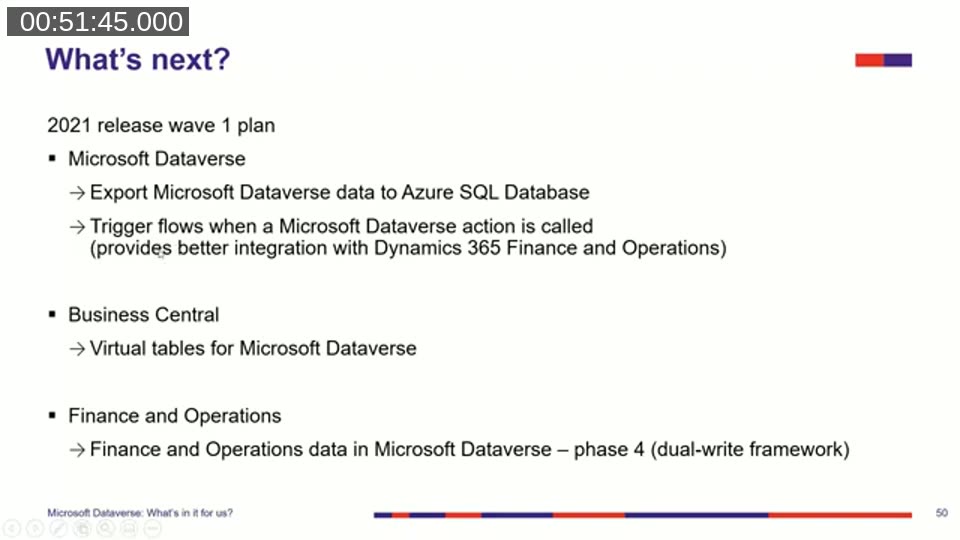
Strube closes with what was on the near-term roadmap at the time: exporting Dataverse data to Azure SQL Database, triggering Power Automate flows directly from Dataverse actions for tighter Finance and Operations integration, virtual tables for Microsoft Dataverse in Business Central, and phase 4 of the dual-write framework for Finance and Operations.
Tooling tip and Q&A
Strube’s closing recommendation for anyone administering or configuring Dataverse environments is XrmToolBox, a free, community-maintained Windows application with dozens of tools for working with Dataverse.
During Q&A, van Vugt confirmed the GitHub repository referenced during the session (the Admin in a Day workshop materials) would be linked from the video description, and Strube clarified that the roadmap items he covered were from release wave 1 of 2021, not wave 2. An attendee, Greg Enns, noted the session made the relationship between CRM, Dataverse, and Power Platform clear — a sentiment echoed in the closing exchange with the moderator.
📖 Resources mentioned in the webinar description:
- Admin in a Day workshop materials — the community-built GitHub repo Strube drew several slides from.
- Common Data Model on GitHub
- Power Apps portal for Dynamics 365 Supply Chain Management
- XrmToolBox
This post was drafted with AI assistance based on the webinar transcript and video content.