
In this webinar, Kamil Sáček (Product Development Manager and Microsoft MVP at Navertica) explains how to correctly version Business Central apps and handle dependencies between them. Luc van Vugt moderates. Kamil covers different versioning systems, why Semantic Versioning matters for AL apps, how Navertica built its own versioning approach around it, and how to use NuGet and Paket to resolve dependency versions reliably in a pipeline.
Version numbering systems
A version number is usually made up of four parts separated by dots. The first two — major and minor — are always clearly defined, but the third and fourth parts get different names depending on the vendor: build, revision, or patch. Kamil points out that it doesn’t matter much what you call them, but you do need to think deliberately about what each number represents, because that decision affects how dependencies can be resolved later.
He distinguishes two broad approaches to assigning the major/minor part of an app’s version:
- Independent versioning — the vendor controls the version freely, starting at something like 1.0 and incrementing however they like. The downside: nothing in the version number tells you which Business Central version the app is compatible with. You have to look that up elsewhere (AppSource listing, documentation, or metadata).
- BC-dependent versioning — the app’s major (and optionally minor) version is tied to the BC major/minor version it targets. Seeing app version 21.3 tells you immediately it’s built for BC 21. The trade-off is that you lose a number to work with, since major and minor are already spoken for by the BC version.
Kamil raises a practical question for BC-dependent versioning: if an app has no functional changes but a new BC major version is released, do you have to bump the app version anyway just to reflect compatibility? Doing so for every cumulative update becomes a maintenance burden — something to weigh before committing to this approach.
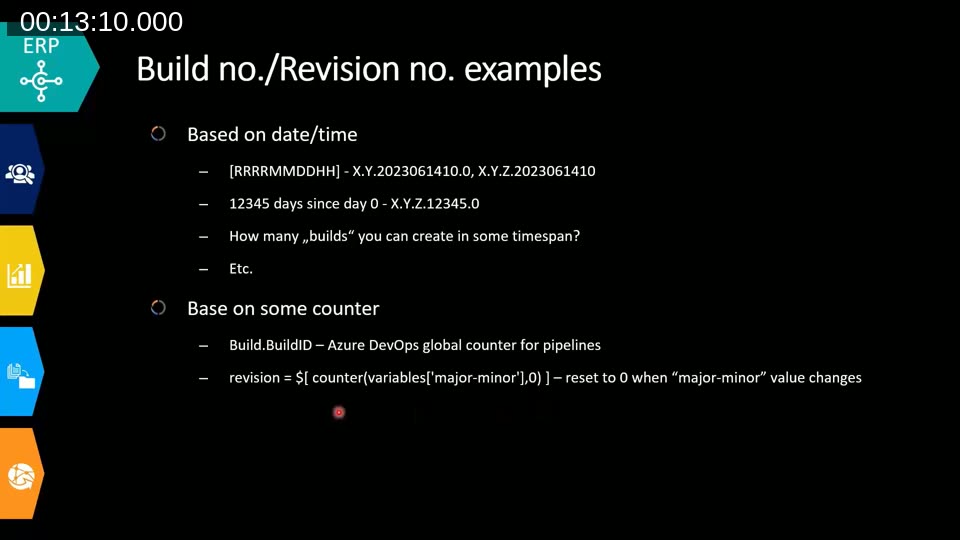
For the build/revision number, he lists the common patterns he’s seen:
- Date/time-based, e.g.
YYYYMMDDHHor a day-count since a fixed reference date — note that a date/hour-based number limits you to one release per hour. - A counter, such as Azure DevOps’ global
Build.BuildId, or a scoped counter that resets when a related variable (e.g. major.minor) changes.
Semantic Versioning (SemVer)
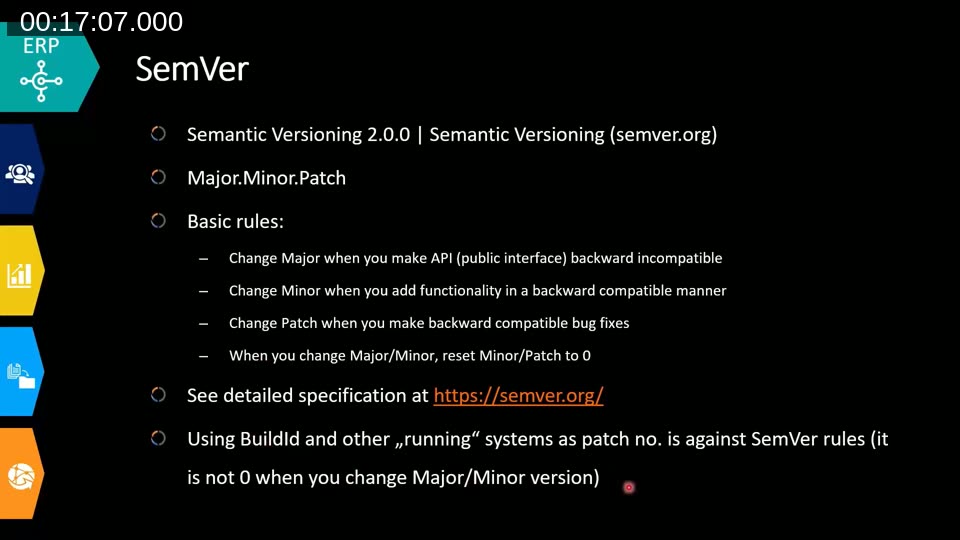
Kamil recommends Semantic Versioning 2.0.0 as the standard to build on. SemVer uses three numbers — major.minor.patch — with simple, well-known rules:
- Increment major when you make a backward-incompatible change to the public interface (a breaking change).
- Increment minor when you add functionality in a backward-compatible way.
- Increment patch when you ship a backward-compatible bug fix.
- Whenever you increment a number, reset every number to its right back to zero.
He flags one common pitfall directly: using a continuously incrementing build ID (like Azure DevOps’ global counter) as the patch number breaks the “reset to zero” rule, because that number never resets when major or minor changes. It still works as a numbering scheme, he notes — it’s just no longer SemVer-compliant.
📖 Docs: Semantic Versioning 2.0.0 specification — the full rule set Kamil references, including pre-release and build metadata syntax.
“NaVer” — Navertica’s own versioning scheme
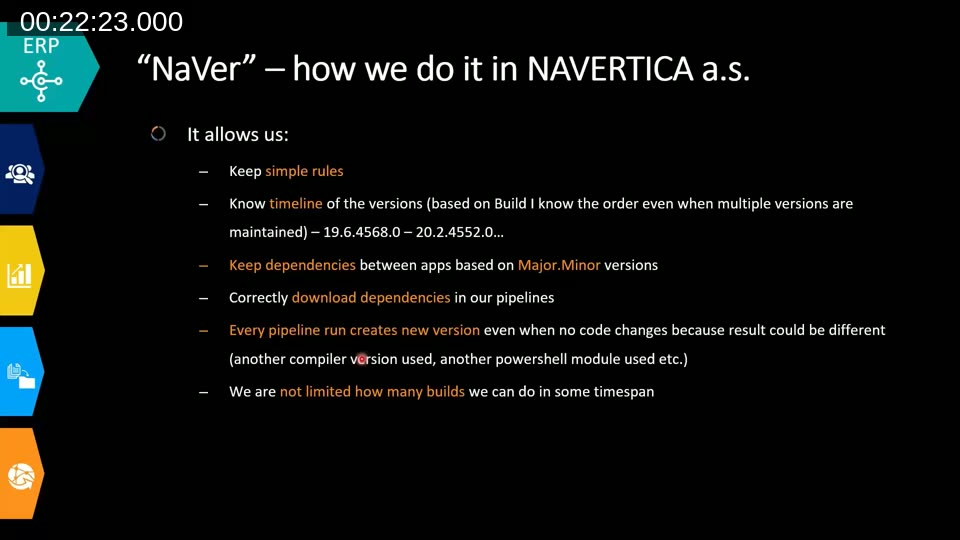
Kamil walks through the scheme Navertica settled on internally, which he calls “NaVer.” It combines BC-dependent major versioning with SemVer discipline:
- Major = the BC major version the app targets (e.g. 21 for BC21, 22 for BC22). This only changes during a compatibility upgrade — up to twice a year, in line with Microsoft’s major releases.
- Minor = incremented manually by the developer whenever the app’s public interface changes (a new public procedure, field, table, or object). Set in app.json and committed with the change.
- Build = the Azure DevOps global build counter, set automatically. Every finished release pipeline produces a new version, even with no code changes, because the toolchain itself (compiler, BC container helper, etc.) could change what actually gets built.
- Patch = reserved for exceptional firefighting only, when a hotfix needs to go straight to an environment without waiting for the full pipeline.
This gives the team a predictable timeline of versions even when multiple releases are maintained in parallel, keeps dependency handling based on major.minor, and — importantly — keeps the rules simple enough that developers actually follow them. Kamil is explicit about that last point: complex versioning rules don’t get followed.
What to choose
Kamil’s recommendation is to prefer a versioning system built around three numbers, since packaging tools like NuGet only support major.minor.patch. He also stresses thinking through the upgrade process up front: with Navertica’s scheme, an app compatible with both BC21 and BC22 keeps major version 21 — a new major version is only created once the app is no longer compatible with the current major, so version history itself communicates compatibility gaps without extra bookkeeping.
Versioning and pipelines: lowest vs. highest dependency resolution
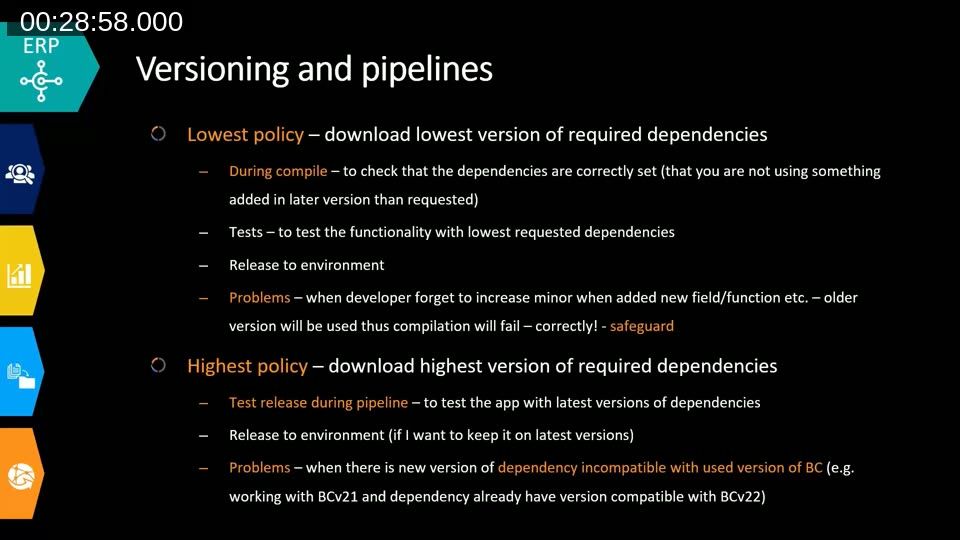
This is the core problem of the webinar. When your pipeline resolves a dependency declared in app.json, there are two policies for picking which version of that dependency to actually download:
- Lowest policy — download the lowest version that still satisfies the declared dependency range. Useful during compile and test, because it verifies your declared dependency version is actually correct — if you’re using a function that was only added in a later version than you declared, the build fails and tells you so.
- Highest policy — always download the newest available version. Useful for testing against the latest dependency versions before release, but it can mask an incorrect dependency declaration, and it can pull in a dependency version that has already moved on to a newer, incompatible BC version.
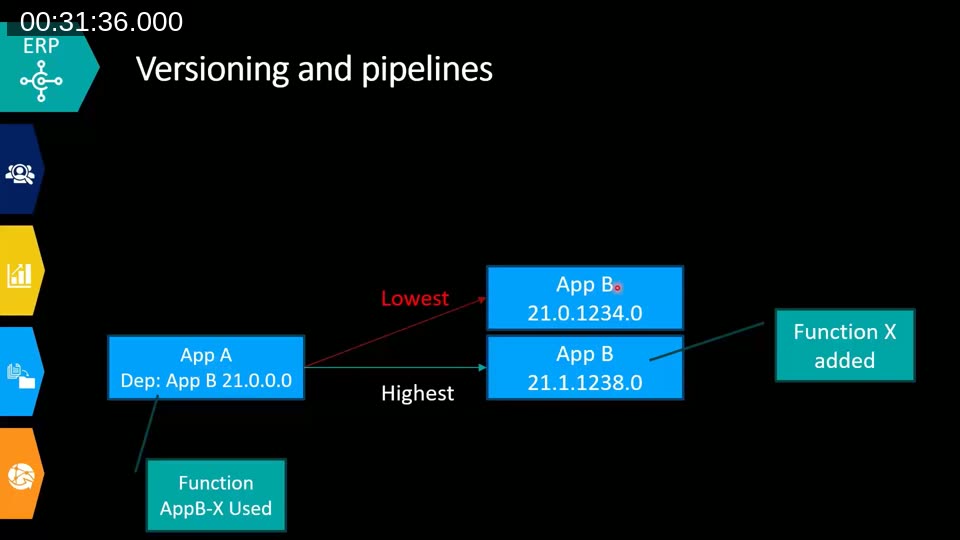
Kamil walks through this with an example: App A depends on App B version 21.0.0.0. App B then ships a new minor version (21.1) that adds a new public function. Recompiling App A without any code change resolves to different versions under each policy — but the build still succeeds either way, since nothing calls the new function yet.
The problem shows up once a developer actually starts using the new function from App B 21.1, but forgets to bump the declared dependency in App A’s app.json. Now:
- Lowest policy fails at compile time — correctly — because it resolves to 21.0, which doesn’t have the function yet. This is the safeguard: it forces the developer to fix the dependency declaration.
- Highest policy still compiles, because it happily grabs 21.1 regardless of what’s declared. The build looks fine until the app is deployed to an environment that still has the older App B 21.0 installed — where it fails, seemingly out of nowhere.
Kamil adds a second failure mode for the highest policy: if App B later ships a version that’s only compatible with a newer BC major version, highest-policy resolution can pull in that incompatible version while you’re still compiling for the older BC target.
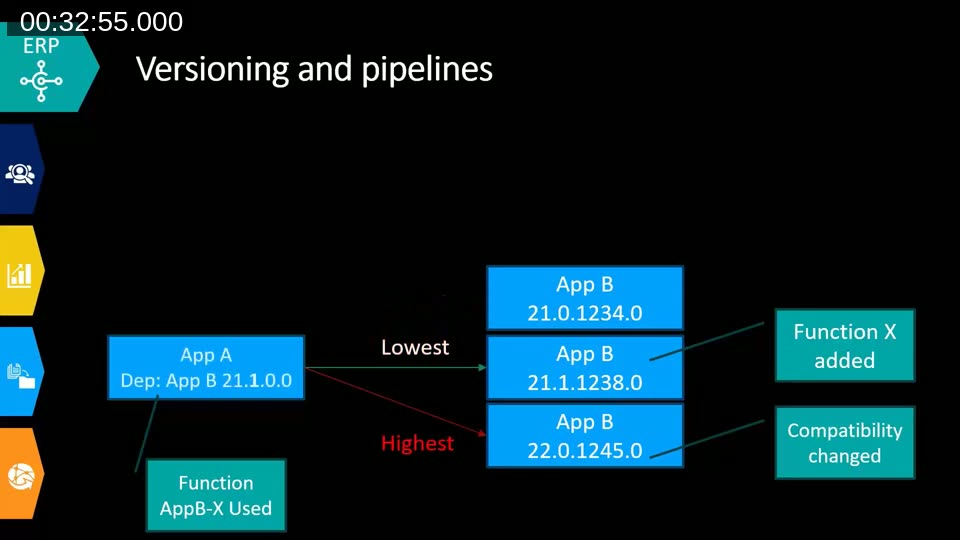
His recommendation: run both policies in the pipeline. Lowest catches incorrect dependency declarations during compile and test. Highest verifies compatibility with the newest available dependency versions before release. Skipping the lowest-policy check is, in his words, exactly the mistake Navertica made before fixing their own pipelines — and when they switched to lowest, a number of existing app dependencies turned out to be wrong, even though nothing had changed in the code.
📖 Docs: FAQ about library and dependency apps in Business Central — background on how AL resolves and requires dependency apps.
NuGet and Paket
To automate dependency resolution, Kamil recommends distributing BC apps as NuGet packages. NuGet was built by Microsoft for sharing .NET code, but for BC purposes only a subset of its functionality is needed: a NuGet package is just a ZIP file (.nupkg) containing the app file plus a manifest describing metadata and direct dependencies only — each package only lists its own direct dependencies, and the resolver walks the chain from there.
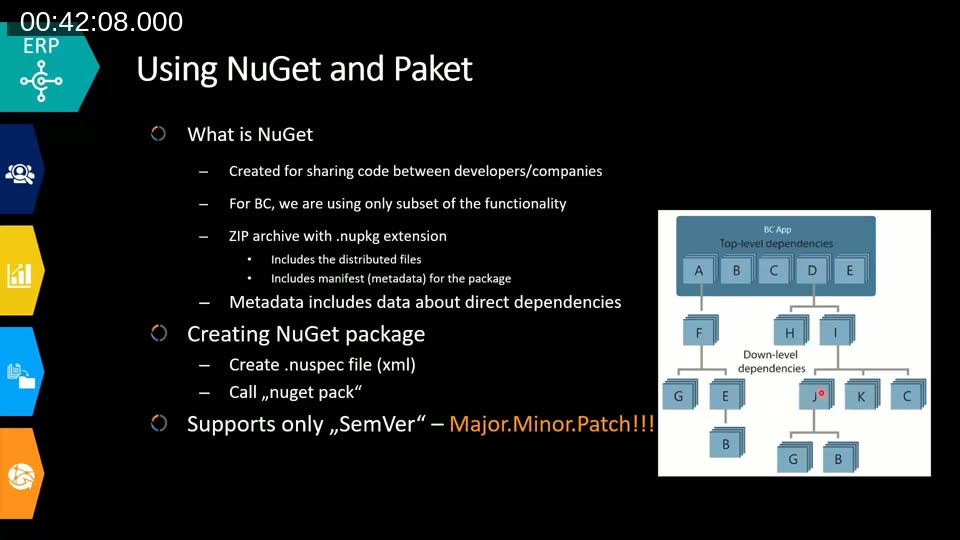
Creating a package is straightforward: write a .nuspec XML file describing the package (author, name, ID, dependencies) and run nuget pack. One hard constraint: NuGet only supports SemVer’s three numbers, which is another reason to design your own app versioning around major.minor.patch rather than four numbers.
Kamil recommends a naming convention of vendor_appname (replacing special characters with underscores) so that pipelines can predictably derive a package name from app.json and automatically resolve dependencies — something he notes AL-Go currently does differently (naming packages by AL-Go and app ID), which makes it harder to build a single automated convention across vendors that don’t all use the same tooling.
📖 Docs: RFC: BcNuGet package format (microsoft/AL-Go discussion #301) — the ongoing discussion on standardizing how BC apps are packaged and named as NuGet packages.
He also recommends adding a dependency on the Microsoft base application to your NuGet package metadata. Since your app.json already declares an application dependency on the Microsoft base app, carrying that into the NuGet package lets you filter dependency resolution to only versions compatible with a specific BC version. Because Microsoft doesn’t currently publish a feed of base-app packages, Kamil’s workaround is to create an empty placeholder package with just the right name and version.
For the actual dependency resolution, Kamil prefers Paket over the standard NuGet CLI. Paket is a package manager (not limited to NuGet) that gives more control over graph resolution — critically, the ability to limit resolution to versions compatible with a specific Microsoft application version, which plain NuGet can’t do.
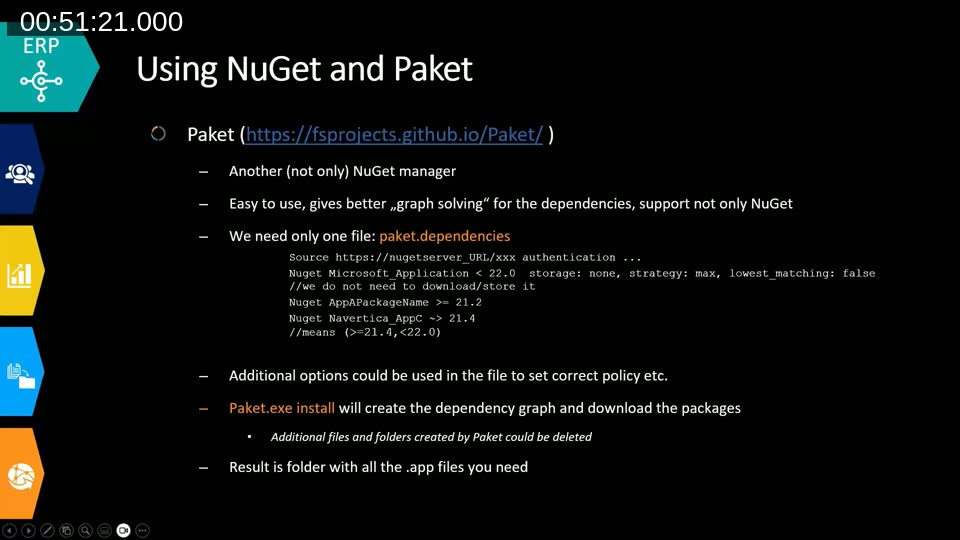
Paket needs a single paket.dependencies file listing the source feed and each required package, with optional version constraints, e.g. restricting a package to >=21.4, <22.0. Running paket.exe install resolves the full dependency graph and downloads everything into a folder — Paket creates some additional files/folders you can delete afterward, leaving just the .app files you need. The strategy (lowest or highest) can be set per line or globally for the whole file. Kamil reports using Paket in production for six months at the time of the talk, without the highest-policy failures they used to see with plain NuGet.
📖 Docs: Paket documentation — official docs for the dependency manager, including the paket.dependencies file syntax and resolution strategies.
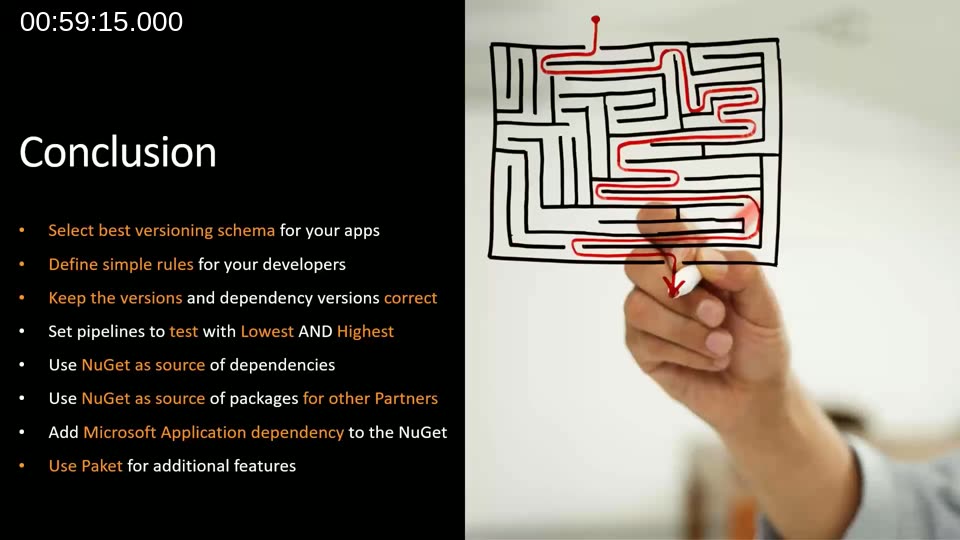
Conclusions
Kamil closes with a practical checklist for teams setting up (or fixing) their versioning and dependency handling:
- Select the best versioning scheme for your apps — it can differ by company, product, or whether you’re an ISV or a VAR.
- Define simple rules for developers about when to bump which version number.
- Keep app versions and dependency versions correct and in sync.
- Set pipelines to test with both lowest and highest resolution policies.
- Use NuGet as a source for consuming dependencies.
- Publish your own apps as NuGet packages so other partners can consume them.
- Add a Microsoft Application dependency to your NuGet package metadata to limit resolution by BC compatibility.
- Use Paket for the additional resolution features NuGet’s CLI doesn’t offer.
Q&A highlights
A few points came up during the live Q&A:
- Diamond dependencies — asked how to handle a case where two dependencies in the graph require different versions of a shared transitive dependency, Kamil explained that NuGet tends to prioritize the version requested by the direct dependency, while Paket resolves more deliberately and will take the higher of the two requested versions if the packages remain backward compatible. He noted this is documented behavior for Paket, but he wasn’t fully certain of NuGet’s exact resolution logic.
- Do SaaS environments only need the highest policy, since they’re always on the latest version? Not necessarily — a new app version being released doesn’t mean a specific tenant has installed it yet. If a dependency assumes functionality from a newer release that a given environment hasn’t upgraded to, deployment can still fail even though the dependency chain looked fine on paper.
This post was drafted with AI assistance based on the webinar transcript and video content.