
In this Areopa Academy Season 6 opening session, AJ Ansari — COO & Partner at DSWi, Microsoft MVP, and VP Americas at IAMCP — walks Microsoft partners through everything they need to know to sell Copilot for Microsoft 365 with confidence. Moderated by Gert Hector, the session covers customer readiness, the Copilot product landscape, security, licensing, adoption planning, and extensibility through Copilot Studio.
Note: This webinar was recorded on September 2, 2024, shortly after Microsoft’s January 2024 commercial availability announcement. Specific pricing figures, eligible SKUs, and licensing terms mentioned here may have changed. Always verify current details at partner.microsoft.com or microsoft.com/copilot/pricing.
Start with the AI Conversation, Not the Product
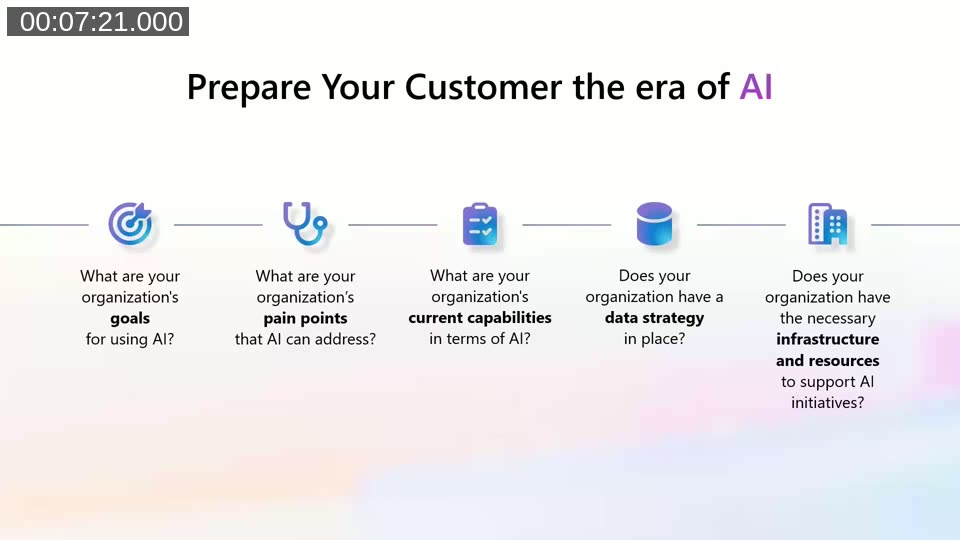
AJ opens with a core message for partners: before pitching Copilot licenses, have the AI conversation first. That means understanding what the customer’s goals for AI are, what pain points they want to address, and whether the organization has a data strategy in place.
He frames this around the concept of BYOAI — “Bring Your Own AI.” Even if a business hasn’t officially adopted AI tools, employees are likely already using consumer-grade tools like ChatGPT with company data. Partners who can articulate this risk, and position Copilot as the governed, enterprise-grade alternative, will have a stronger opening conversation.
📖 Docs: Configure a secure and governed foundation for Microsoft 365 Copilot — Microsoft’s guidance on establishing data governance before deploying Copilot in an organization.
Copilot Is Not One Thing
A recurring theme is that “Copilot” is a marketing umbrella for many distinct products, similar to how “Dynamics 365” covers multiple separate applications. AJ breaks the landscape into four categories: Copilots for every employee, Copilots for functional business roles (such as Microsoft Sales Copilot and Dynamics 365 Copilot), Copilots for security and IT professionals, and Copilots for developers and data professionals.
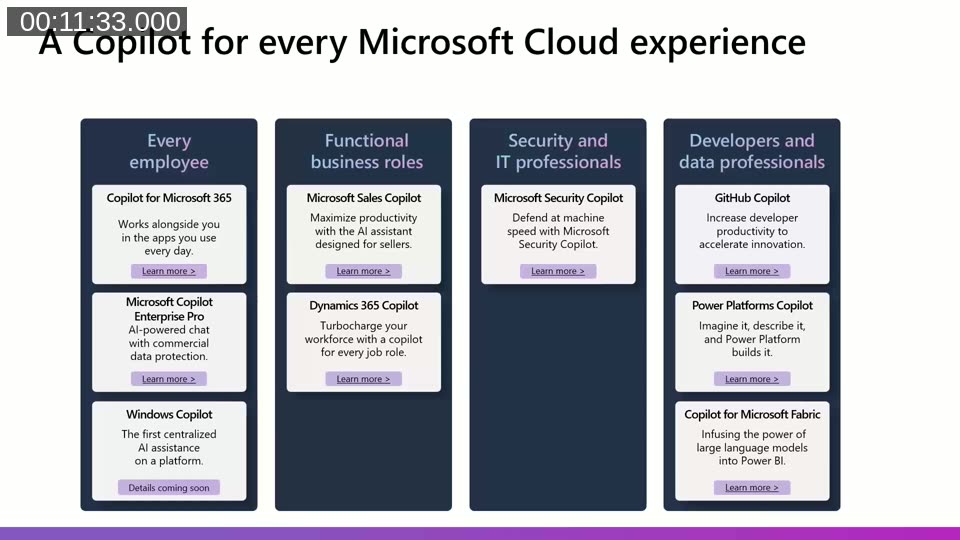
He also distinguishes between Copilot for something (a separately licensed add-on, such as Copilot for Microsoft 365) and Copilot in something (AI features built into an existing product, such as bank reconciliation assistance in Business Central). This distinction helps partners set accurate expectations with customers and avoid confusion during sales conversations.
How Copilot for Microsoft 365 Works
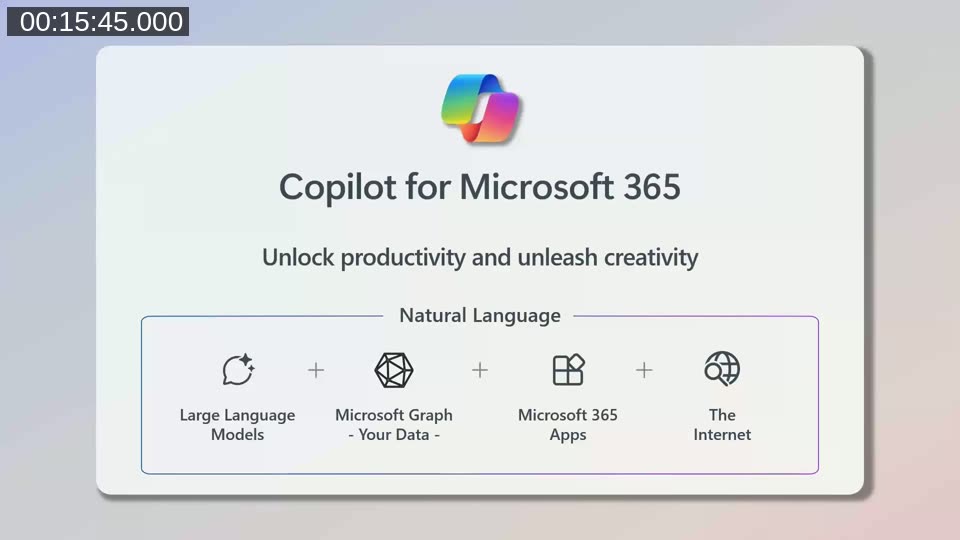
Copilot for Microsoft 365 combines three elements: a large language model (GPT-4o at the time of the webinar), data from the Microsoft Graph (SharePoint, OneDrive, Teams, email), and the Microsoft 365 app layer. Users can create, edit, ask questions, catch up on missed content, and deepen their understanding — all within the tools they already use.
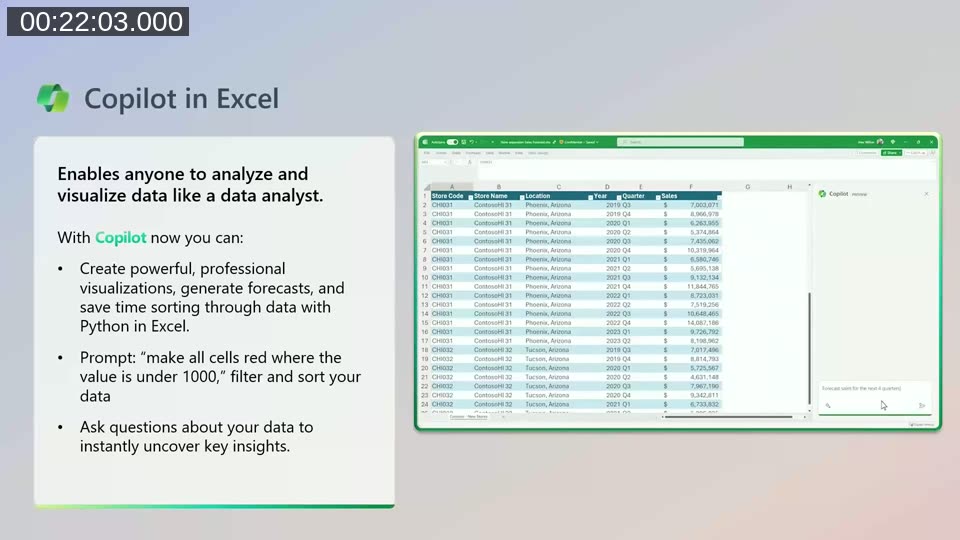
AJ briefly covers in-app experiences across Teams (meeting recaps and action items), Outlook (email drafting and summarization), Word (writing and rewriting), Excel (data analysis and forecasting), PowerPoint, and OneNote. He highlights prompt engineering as a potential billable service for partners: customers who understand how to write effective prompts will get meaningfully better results from the tool.
📖 Docs: App and network requirements for Microsoft 365 Copilot — Technical prerequisites covering supported apps, network configuration, and OneDrive requirements for a successful deployment.
Security: Copilot Respects What You’ve Already Set Up
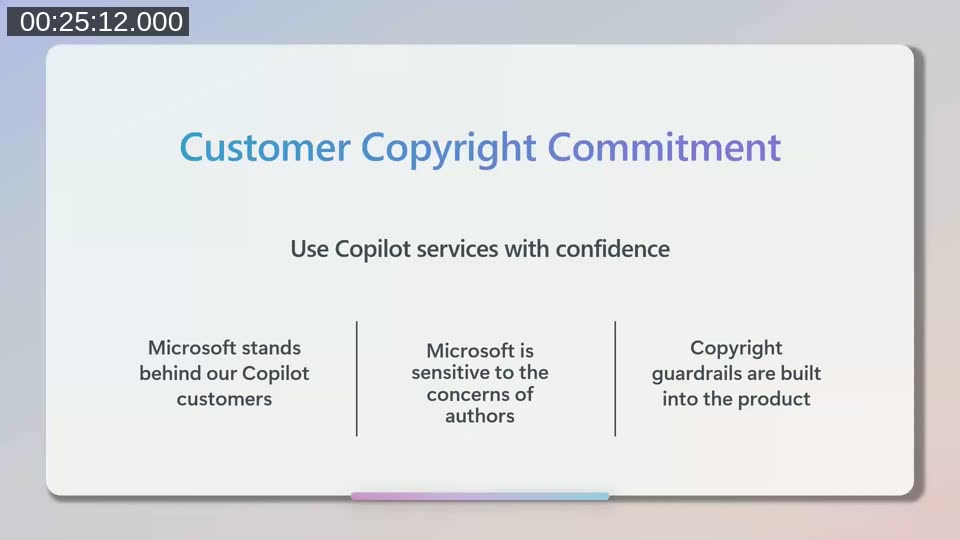
AJ is direct about security: Copilot does not add an extra layer of protection — it respects and surfaces whatever permissions are already in place. If a customer has been relying on “security by obscurity” (hiding sensitive files in deeply nested folders), Copilot will expose that content to anyone with access.
The practical advice: before deploying, partners should ensure SharePoint sites, libraries, Teams channels, and shared links are properly permissioned. Microsoft Purview is recommended for data classification and sensitivity labeling, and it is included in most Microsoft 365 subscriptions.
📖 Docs: Use Microsoft Purview to manage data security and compliance for Microsoft 365 Copilot — Covers sensitivity labels, DLP policies, insider risk management, and how Purview integrates with Copilot to enforce access controls.
Assessing Customer Readiness
AJ recommends starting every Copilot engagement with an assessment rather than jumping straight to licensing. Microsoft offers an Excel-based readiness tool available through the Microsoft partner portal. It covers four categories: user readiness, organizational readiness, productivity tool readiness, and data security readiness.
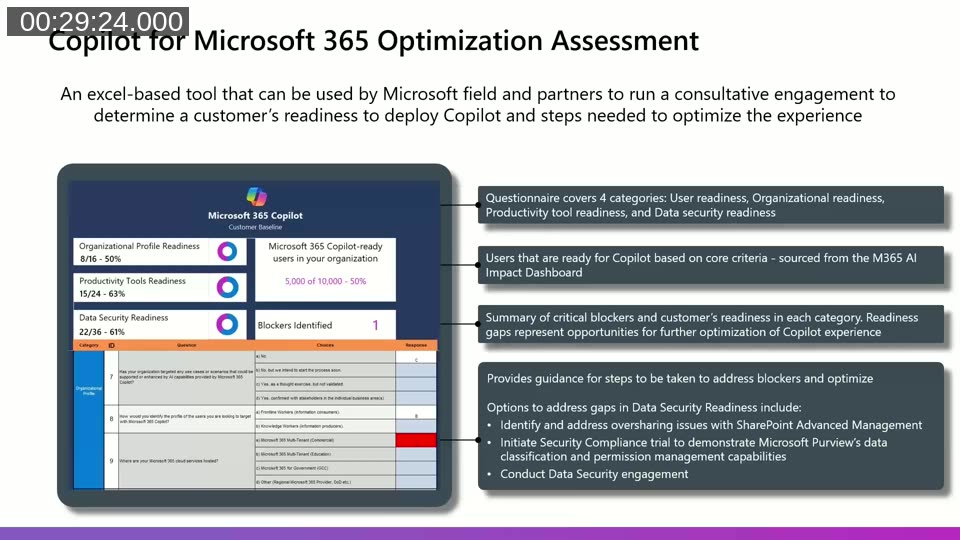
He also points to a Copilot onboarding wizard in the Microsoft 365 admin center, which walks administrators through data privacy, security, compliance steps, and license assignment. The assessment creates a natural opportunity for partners to offer a paid readiness engagement before any licenses are issued.
A key readiness signal is the customer’s existing Microsoft 365 SKU. Customers on M365 E3, E5, or Business Premium are generally in a stronger position to move directly to Copilot deployment. Customers on M365 E1 or Business Standard may require a broader conversation about securing their productivity environment first.
Adoption Planning
Deploying licenses is not the same as driving adoption. AJ cites Microsoft research on the activities that predict successful product adoption: defining a clear vision for how Copilot will be used, obtaining proactive support from senior leadership and key business decision makers, enabling internal champions with short on-demand training (not hour-long videos), and raising awareness through launch events.
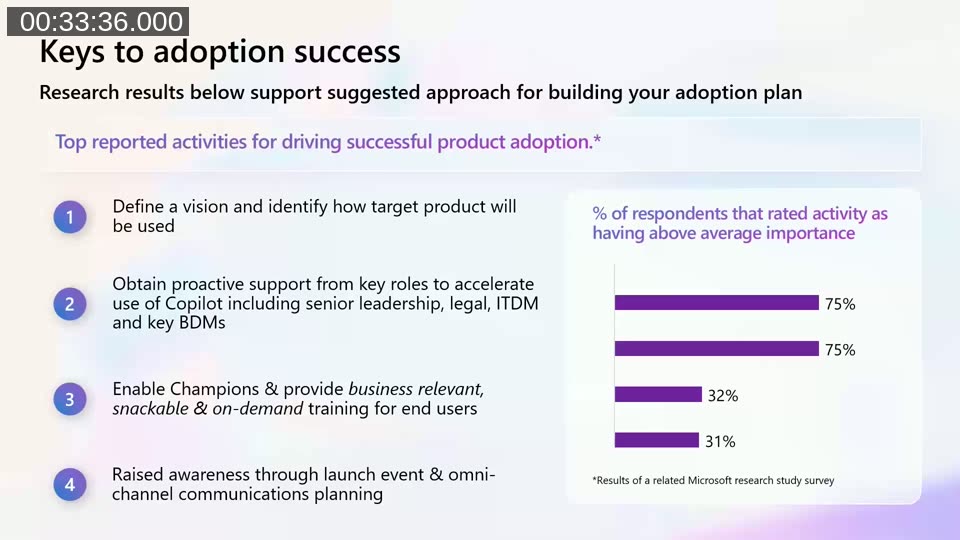
He encourages partners to tailor adoption plans by persona: finance teams benefit most from Excel and data analysis features, while sales teams may get the most value from Word-based document drafting and meeting summaries in Teams. Identifying and quantifying pain points before the engagement creates a foundation for a structured adoption plan — and often surfaces additional billable work.
Licensing: What Partners Need to Know
AJ dedicates a section to the mechanics of Copilot for Microsoft 365 licensing. At the time of the webinar, the list price was $30 per user per month, but only available on an annual subscription paid annually upfront ($360 per user per year). This means a customer cannot reduce their license count during the subscription term after the first seven days.
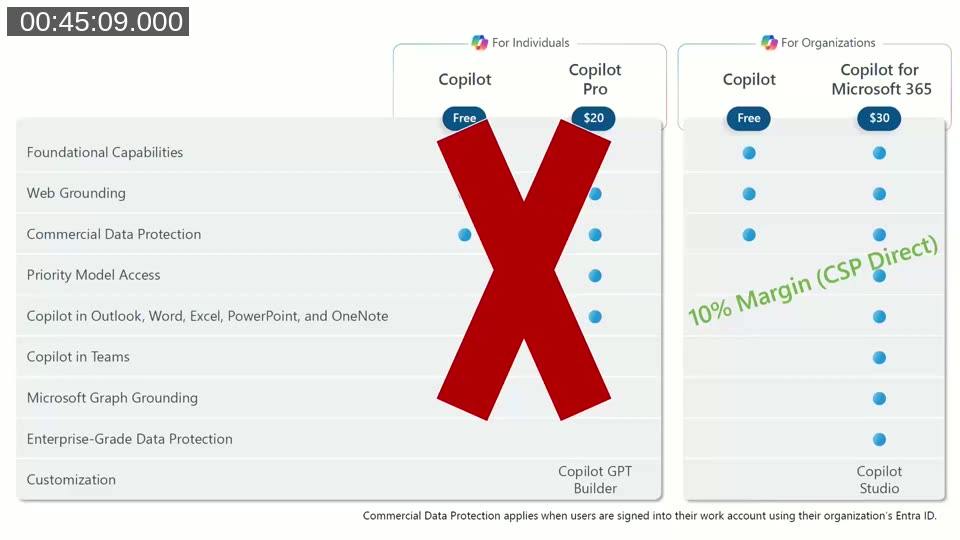
He also clarifies that Copilot Pro and the Copilot GPT Builder are consumer-facing products sold directly by Microsoft to individuals — partners cannot resell these. Partners should focus on the commercial, education, and charitable licensing options. CSP Direct partners receive a 10% margin on Copilot for Microsoft 365 at the time of this webinar.
Eligible base plans at the time of recording included M365 E3, E5, Business Standard, Business Premium, and the equivalent Office 365 and education SKUs.
📖 Docs: License options for Microsoft 365 Copilot — Current eligible base plans and add-on licensing details updated for 2025.
Extending Copilot with Copilot Studio
When customers want experiences beyond what Copilot for Microsoft 365 provides out of the box, Copilot Studio is the extension mechanism. AJ outlines two distinct licensing paths.
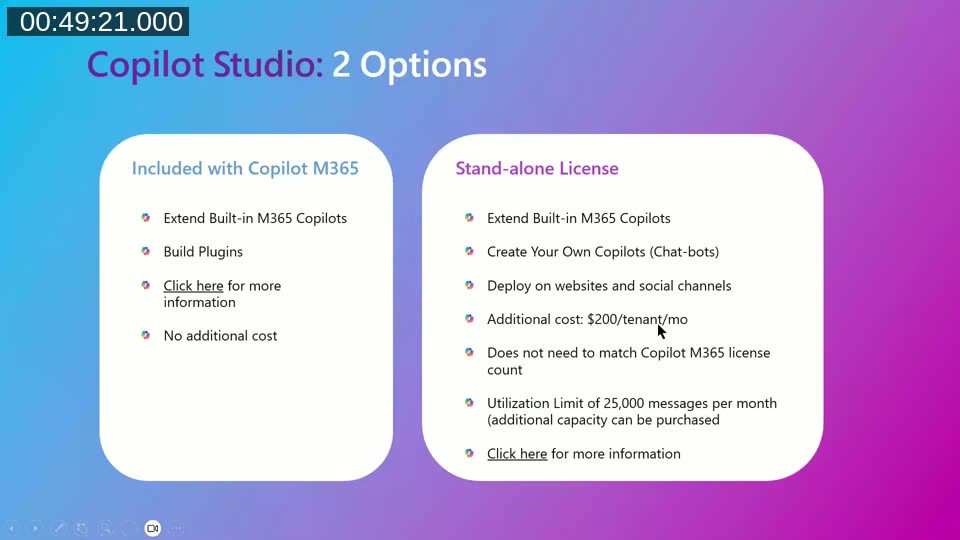
The first is included with a Copilot for Microsoft 365 license at no additional cost. It allows partners and customers to extend the built-in Copilot experiences with plugins — adding data from external sources such as a line-of-business system or a secured knowledge base into the existing Teams, Outlook, or Edge Copilot experience.
The second is a standalone license (priced at $200 per tenant per month at the time of the webinar, corrected during the Q&A from an initial per-user reference). This standalone option allows partners to build fully custom chatbots and deploy them on websites, social channels, or Microsoft Teams — even for customers who do not have Copilot for Microsoft 365 licenses. It includes a utilization limit of 25,000 messages per month, with additional capacity available for purchase.
AJ notes that Microsoft provides a free Copilot Studio community developer license, which allows partners to build and test custom agents before incurring any cost. This is the recommended starting point for partners building a Copilot Studio practice.
Plugin types supported include Teams Message Extensions, Power Platform Connectors, and Open AI Plugins — allowing partners to reuse existing integrations or build new ones using familiar tools.
Resources Mentioned
- DSWi — AJ Ansari’s Microsoft partner firm, specializing in Business Central, Power BI, Power Automate, and Copilot
- IAMCP — International Association of Microsoft Channel Partners, a network of 16,000 Microsoft partners globally
- Microsoft Partner Center — Pricing for Copilot and other Microsoft cloud products in your local currency
This post was drafted with AI assistance based on the webinar transcript and video content.