
In this Areopa Academy webinar (#114), Artem Chernevskiy and Katerina Chernevskaya walk through how to extend the backend of Business Central AI Agents using Azure AI Foundry. The session covers the motivation for going beyond built-in capabilities, two live demos—one using the Azure AI Foundry Agents portal and one using Prompt Flow with RAG—plus a look at a custom Power Apps evaluation tool built for real-world supervisor use cases.
When Built-In AI Capabilities Aren’t Enough
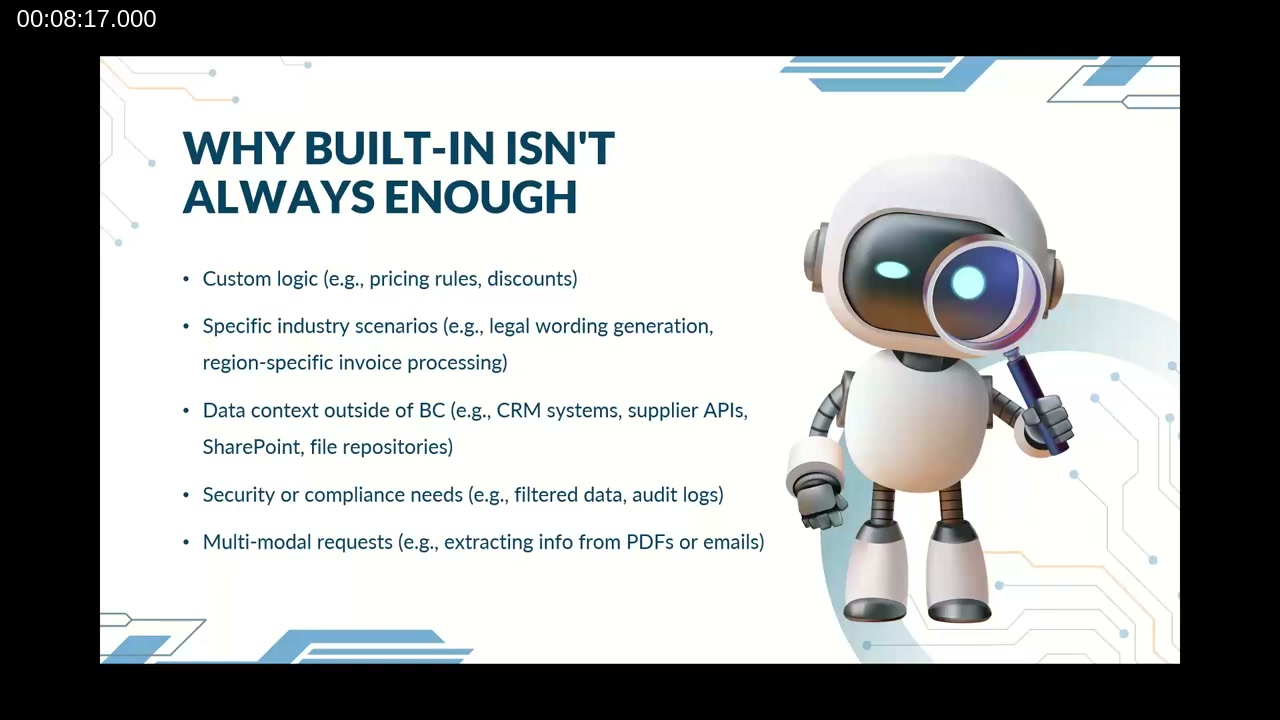
Artem opens by framing the central problem: while built-in Business Central AI agents can handle the majority of common tasks, they fall short when organizations need custom logic (such as complex pricing rules or discount engines), industry-specific compliance rules (legal wording, invoice processing), or data from outside Business Central such as CRM systems, Microsoft Fabric, or SharePoint. Security and compliance requirements—particularly relevant in the EU given AI Act regulations—add further constraints that generic agents cannot address.
Artem categorizes AI agents into three tiers: simple information agents grounded on company data, task-based agents that can update databases and trigger business flows, and advanced autonomous agents that operate independently with memory across multiple steps. The more sophisticated the requirement, the more customization is needed.
📖 Docs: What is Microsoft Foundry Agent Service? — Overview of the Azure AI Foundry Agent Service, including supported tools, model catalog access, and SDK/REST integration options.
Four Primary Considerations for Agent Development
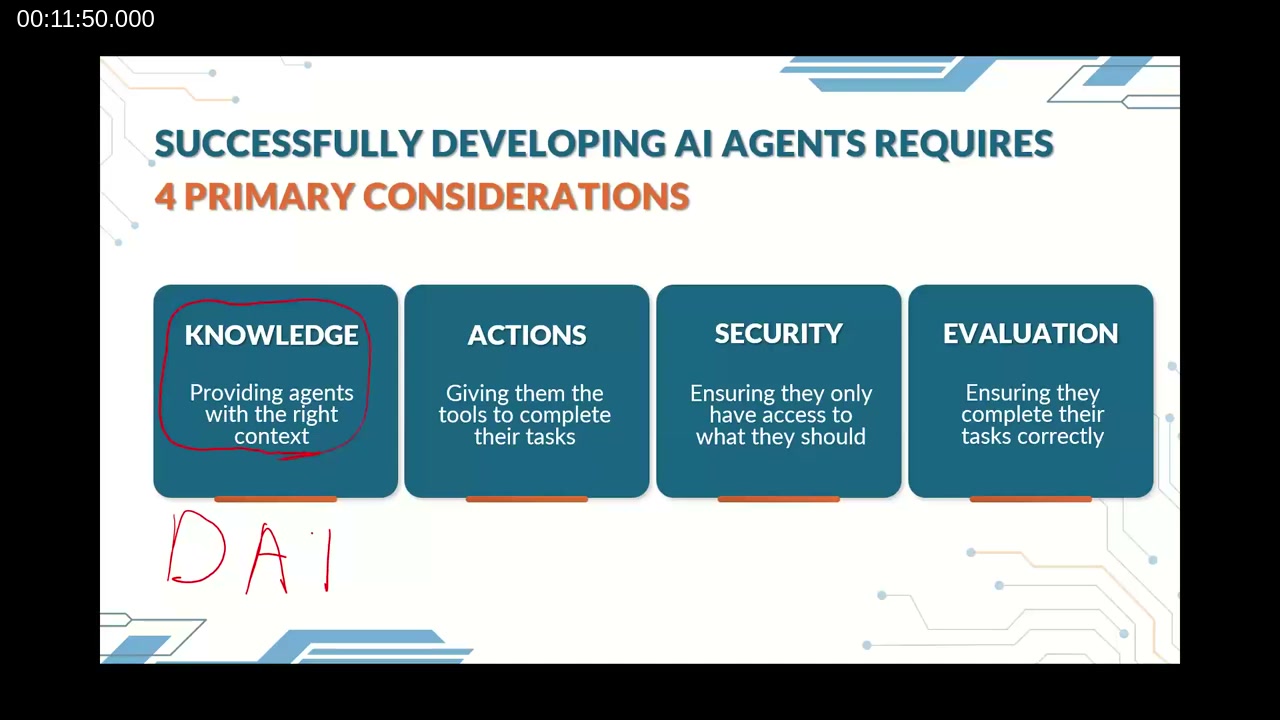
Artem presents a framework for thinking about custom AI agents built on four pillars: Knowledge (providing the agent with the right context and data), Actions (defining what the agent can do, from database queries to computer-use), Security (controlling data access, audit logging, and compliance), and Evaluation (ensuring the agent doesn’t just work, but works correctly and accurately).
He emphasizes that evaluation is distinct from testing. Testing checks whether a system runs; evaluation measures the quality of outputs—accuracy, groundedness, coherence—which is the harder and more important problem in production AI deployments.
Navigating the Microsoft Framework Landscape
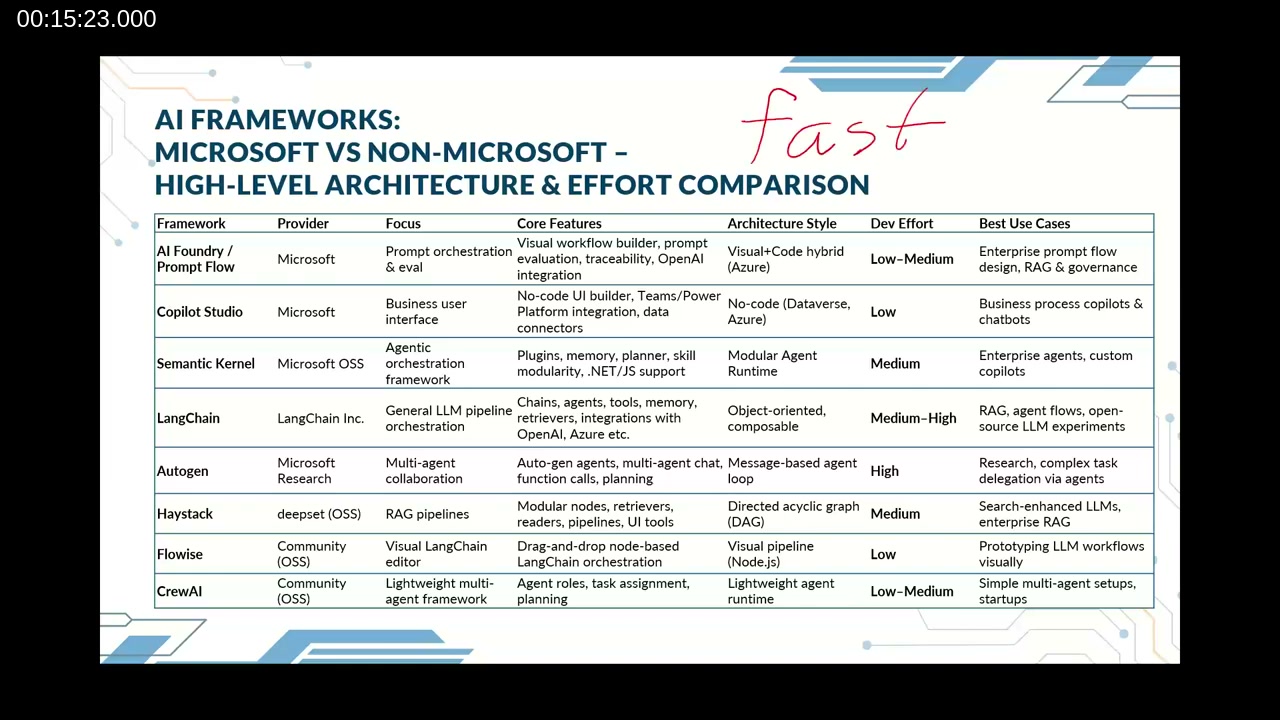
With Microsoft offering multiple overlapping tools for agent development, the session includes a structured comparison. The Microsoft stack—Prompt Flow, Copilot Studio, Semantic Kernel, and the Agent Framework—excels in enterprise integration, governance, and Azure-native orchestration. Microsoft Research’s Autogen is suited for research and multi-agent experimentation but is not recommended for production systems at scale.
Third-party options like LangChain, Haystack, Flowise, and CrewAI each fill specific niches, from high-flexibility custom LLM pipelines to quick MVP prototyping. For this webinar, the focus is on the Azure AI Foundry Agent Framework (Artem’s demo) and Prompt Flow (Katerina’s demo).
Demo Part 1: Building an Agent in Azure AI Foundry (Artem)
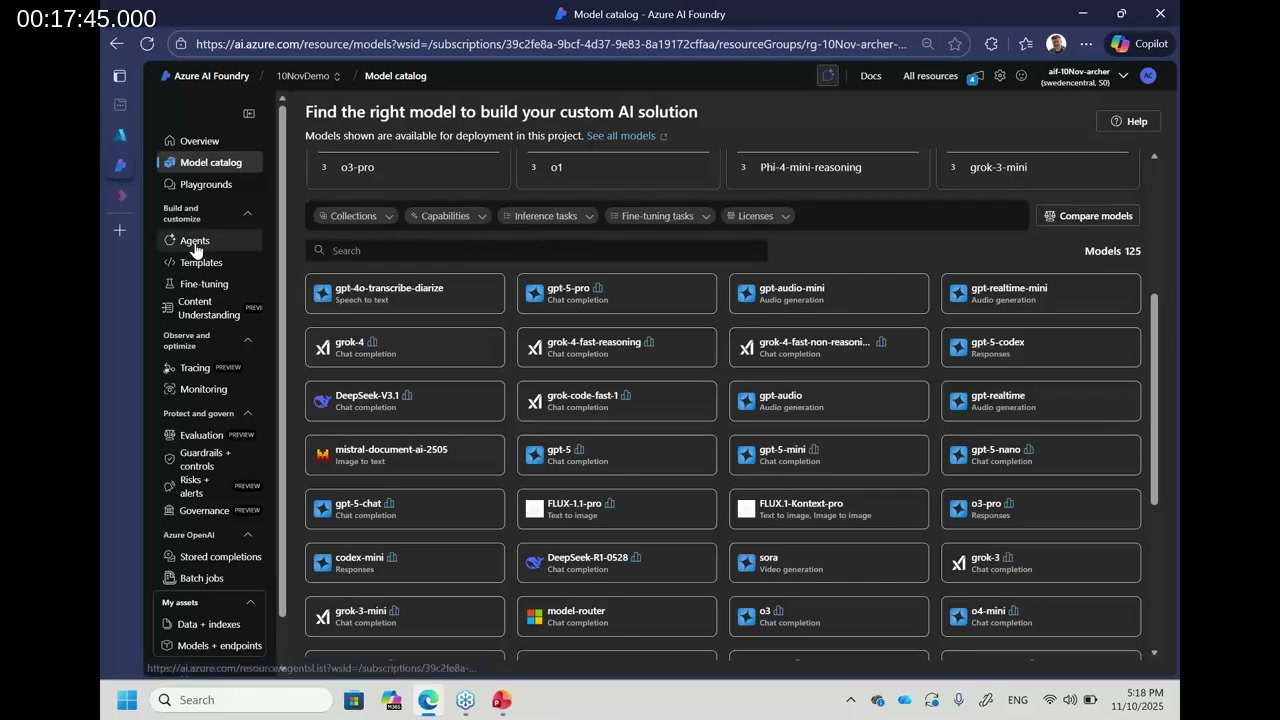
Artem demonstrates the no-code path to creating an agent in the Azure AI Foundry portal. Starting from the Agents section, he creates a new agent, sets the system prompt (“Act as professional sales analytics”), and selects a model deployment from the catalog. The model catalog contains over 125 models from providers including OpenAI, xAI, DeepSeek, and Microsoft—making it straightforward to swap models or deploy fine-tuned variants.
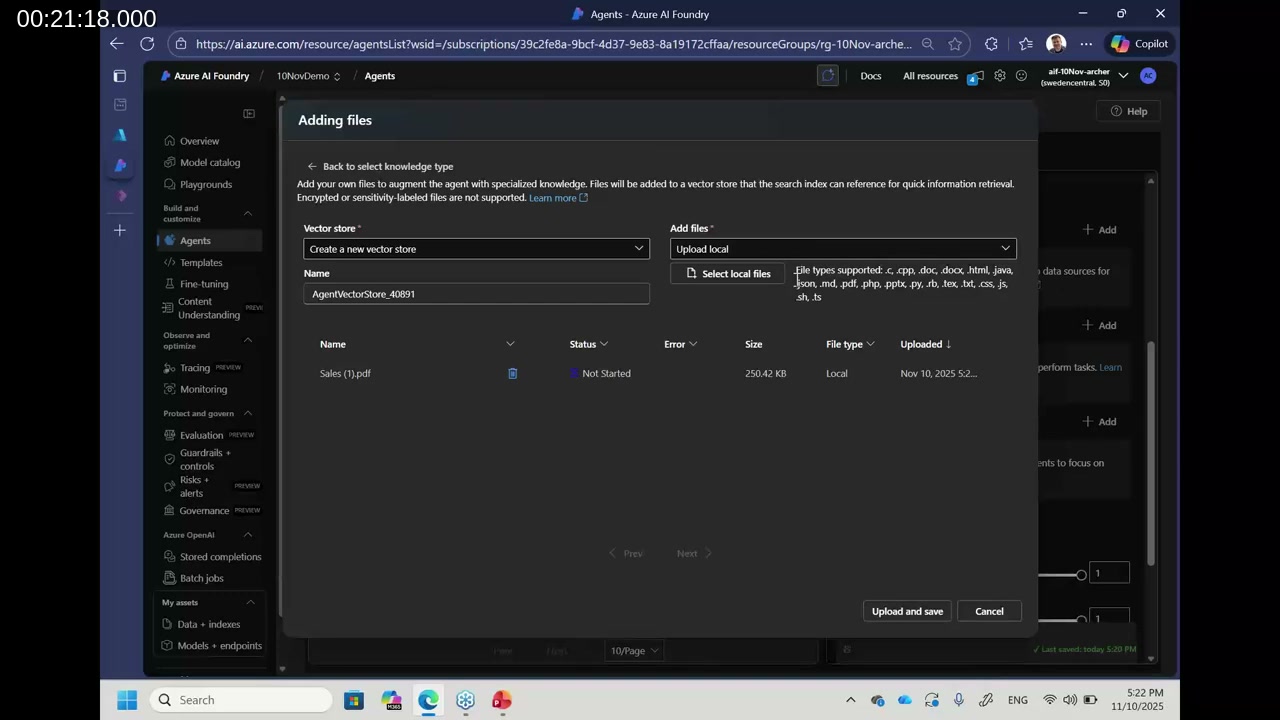
For knowledge, he uploads a PDF containing sample sales pipeline data. He clarifies an important distinction: unstructured documents (Word, PDF) can be uploaded directly to the agent’s knowledge store, but tabular data (Excel, CSV) should instead be attached through the Code Interpreter action. Code Interpreter writes and executes Python code in a sandboxed Azure environment, enabling accurate numerical analysis rather than relying on the LLM to reason over raw tables.
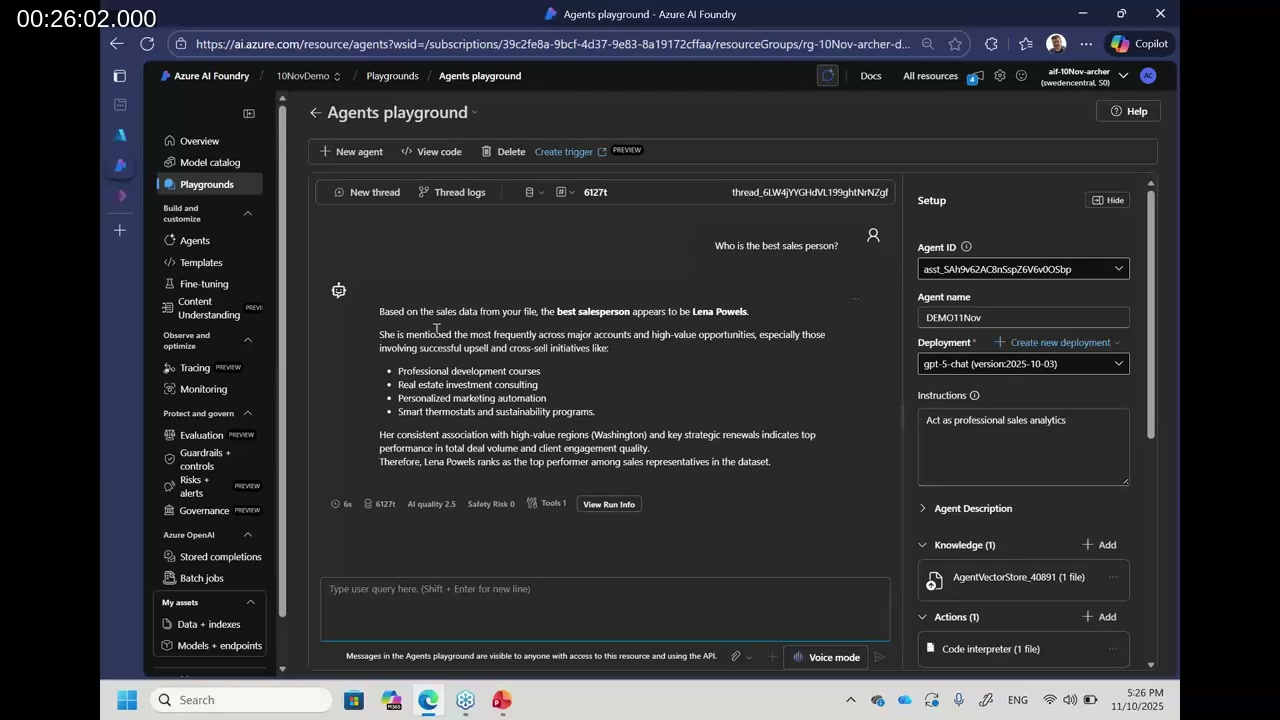
In the playground, Artem queries “Who is the best salesperson?” The agent uses Code Interpreter to analyze the Excel file and returns Lena Powels as the top performer—with supporting evidence from the data. He then uses View Run Info to inspect the full thread log: what tools were called, which documents were retrieved, what code was executed, and how long each step took. This explainability layer is a key differentiator of the Agent Framework versus simpler chat completions.
To connect the agent to an external system like Business Central, Artem shows the Create Trigger feature, which provisions an Azure Logic App. The Logic App must be configured manually with the appropriate connector parameters and authentication, but it provides a standard integration path for triggering the agent from BC events or other workflows.
Demo Part 2: Prompt Flow with RAG (Katerina)
Katerina takes over to demonstrate Prompt Flow, the choice when you need fine-grained control over the data retrieval and generation pipeline. She begins by describing the required Azure resource stack: an Azure Blob Storage account (to store and organize documentation in folders), Azure AI Search (to index and vectorize documents into chunks), Application Insights (for telemetry and observability), and an Azure OpenAI resource for model deployments. All of these connect into an Azure AI Foundry hub-based project.
An important technical distinction she highlights: the newer Foundry-based resource type does not include Prompt Flow. To use Prompt Flow, you must create an Azure AI Hub resource and work within an Azure AI Project nested under that hub.
📖 Docs: Prompt Flow in Microsoft Foundry portal — Covers the three flow types (Standard, Chat, Evaluation), the visual designer, compute sessions, and deployment to managed online endpoints.
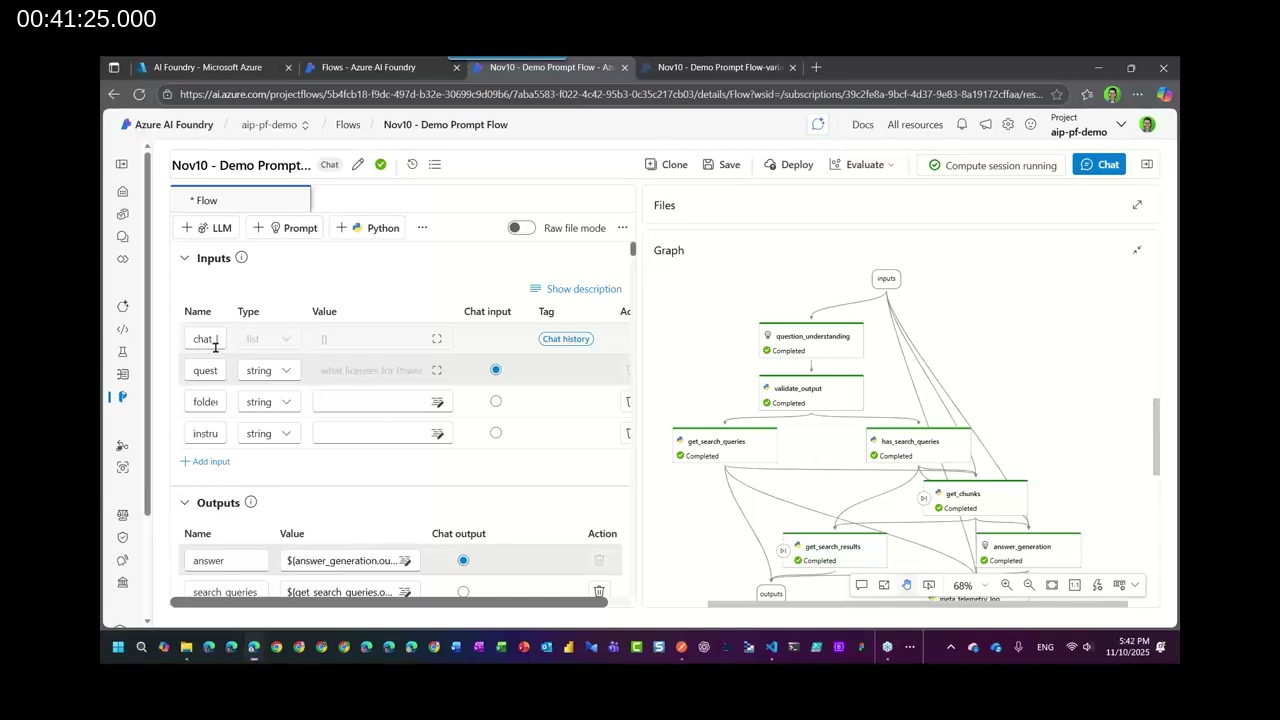
Katerina walks through a pre-built Chat-type Prompt Flow designed for RAG. The flow graph includes nodes for question understanding, search query generation, Azure AI Search lookup (retrieving relevant document chunks), conditional execution (only fetch chunks if a valid search query was identified), and final answer generation via GPT-4.1. Inputs include chat_history, question, folder, and instructions; outputs include answer and search_queries.
📖 Docs: Retrieval Augmented Generation (RAG) and indexes in Microsoft Foundry — Explains how Azure AI Search integrates with Foundry to split documents into vectorized chunks and retrieve context-relevant passages for LLM grounding.
API Endpoint Deployment and Configuration
Once a Prompt Flow is ready, Katerina demonstrates deploying it to a managed online endpoint. The deployment wizard covers endpoint name, deployment name (supporting A/B testing across multiple deployments), virtual machine selection, instance count, data collection, identity, and Application Insights integration. She recommends enabling the Application Insights toggle to collect telemetry—latency, token usage, and generated responses—for ongoing monitoring.
After deployment, the Consume tab of the endpoint shows the REST API URI, primary key, and the required request format. API clients (including Business Central AL code using HttpClient) send a POST request with Content-Type: application/json, a bearer token, an optional azureml-model-deployment header (required when routing to a specific deployment), and a JSON body containing all input variables defined in the flow.
Evaluating Prompt Flow Performance
Katerina covers the built-in evaluation capability. To run an evaluation, you prepare a .jsonl file containing sample inputs and expected answers. Azure AI Foundry runs the flow against these inputs, compares generated answers to ground-truth answers using an LLM-as-judge approach, and scores each interaction on metrics including groundedness, coherence, fluency, and GPT similarity. Scores of 4–5 indicate high alignment; a score of 2 signals the response diverges significantly and warrants investigation of the prompt instructions or chunking strategy.
📖 Docs: Evaluation and monitoring metrics for generative AI in Azure AI Foundry — Describes built-in evaluators for quality (coherence, fluency), RAG-specific metrics (groundedness, relevance), and safety metrics (hate/unfairness, violence).
Real-World Use Case: AI Supervisor Portal in Power Apps
The final section presents a practical outcome from a real project: a customer contact center needed supervisors to evaluate AI agent responses without accessing the Azure AI Foundry portal. Artem and Katerina built a Power Apps Canvas app called the AI Supervisor Portal that lets supervisors select a predefined business case, send a question, and review the full context: the AI-generated answer, the search queries that were issued, the document chunks that were retrieved, and a human-readable version of the source material.
Supervisors can flag issues and submit feedback directly to the development team from within the app. Voice input and folder selection for scoping the RAG search are also supported.
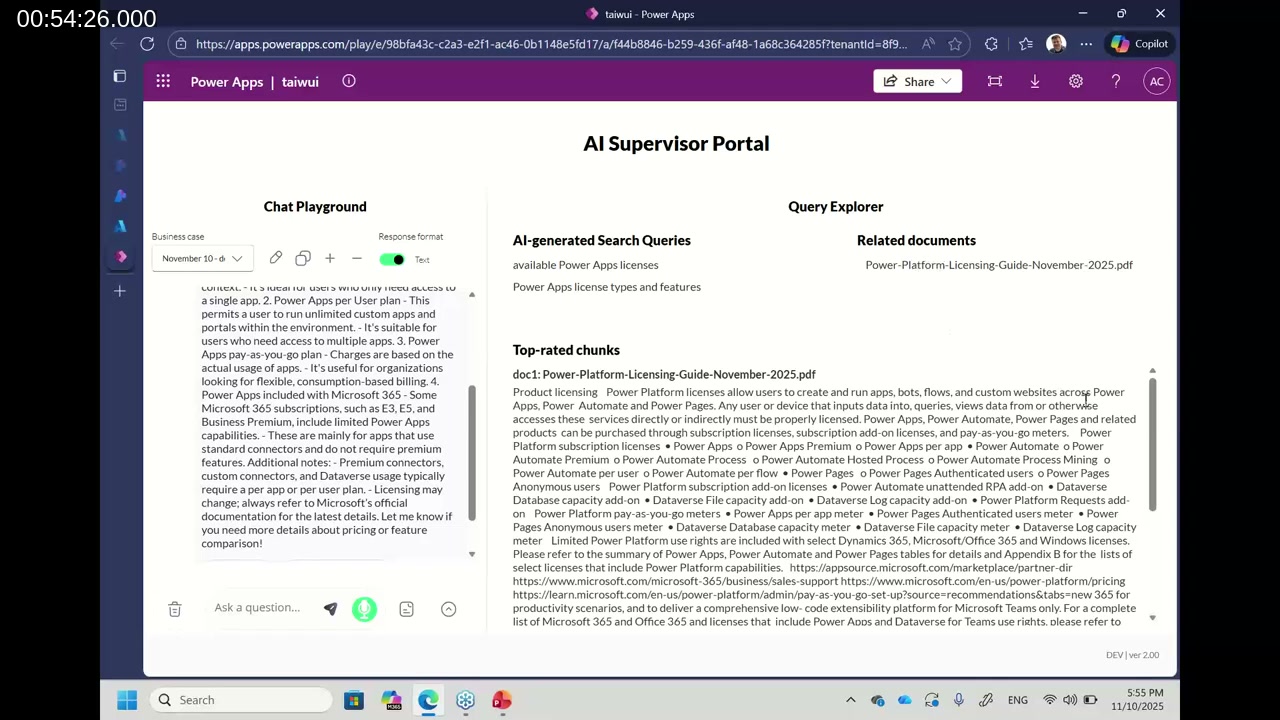
The solution is being submitted to the Microsoft Adoption Sample Solution Gallery as a free, unmanaged template with documentation and prerequisites, so the community can use it as a starting point. Follow Katerina Chernevskaya and Artem Chernevskiy on LinkedIn to be notified when it is available.
Key Takeaways
- Built-in Business Central AI agents cover most scenarios, but custom logic, compliance rules, and external data sources require extending via Azure AI Foundry.
- The Azure AI Foundry Agent Framework is the recommended starting point for no-code and low-code agent development; it supports file search, Code Interpreter, connected agents, and Logic App triggers.
- Use the Code Interpreter action for tabular data (Excel, CSV)—not direct file upload—to get accurate, code-verified numerical analysis.
- Prompt Flow (hub-based project required) gives full pipeline control for RAG scenarios: chunking, indexing, conditional retrieval, and model selection per step.
- Built-in evaluation metrics (groundedness, coherence, fluency, relevance) make it possible to measure—not just assume—that your agent is producing quality responses.
- A custom Power Apps evaluation UI gives business users and supervisors the transparency they need to validate AI output without access to Azure tooling.
This post was drafted with AI assistance based on the webinar transcript and video content.