
In this webinar from Areopa Academy’s season 7, waldo and Tine Starič — both coming from the Business Central world — examine Power Platform not to argue for or against it, but to explain honestly what BC developers encounter when they try to adopt it. Moderator Gert Hector guides the Q&A. The session was originally presented at Days of Central Knowledge 2025.
Software Development Challenges: The Common Ground
waldo opens by framing three universal challenges every software partner faces regardless of platform: repeatability (building products that can be delivered efficiently to multiple customers), maintainability (CI/CD pipelines, automated testing, environment management, telemetry), and customisation (customers are never fully satisfied with out-of-the-box software). These challenges apply equally to Business Central and Power Platform — a point the session keeps returning to.
Business Central’s Extensibility Model
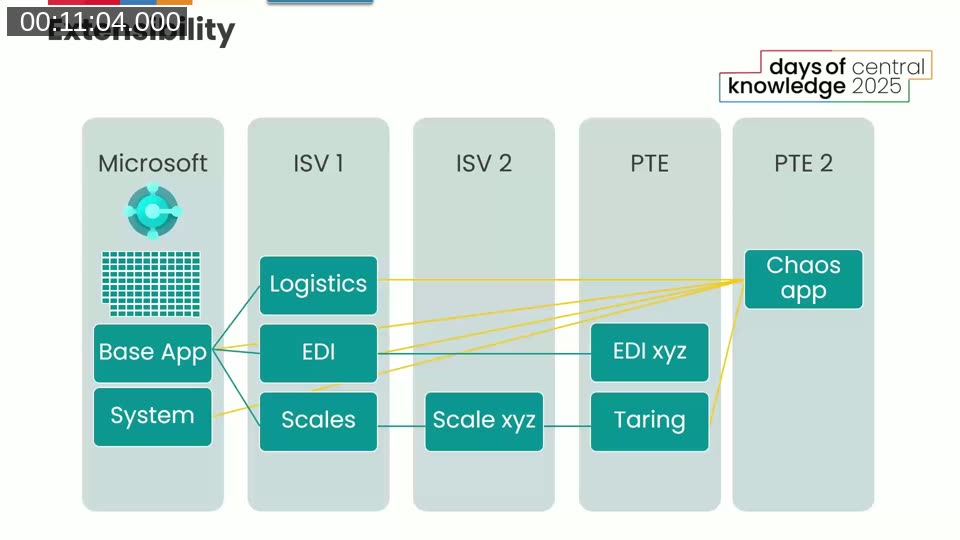
Business Central’s extensibility story is well established. Partners can extend the Microsoft base app and system, stack ISV apps on top of each other, and build per-tenant extensions that layer over all of the above. waldo describes the layered architecture: Microsoft → ISV 1 → ISV 2 → PTE → PTE 2, where even a “chaos app” that depends on everything is maintainable if built carefully.
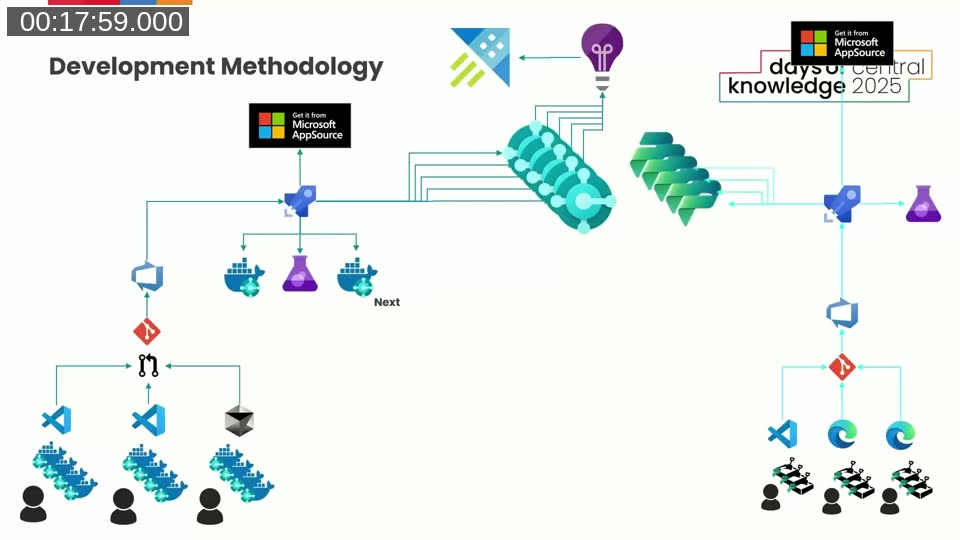
The development methodology for BC has matured significantly — away from shipping FOB files directly to production and toward multiple developer environments, Docker containers, Git, CI/CD pipelines, automated tests, telemetry, and AppSource.
📖 Docs: Application lifecycle management (ALM) basics with Microsoft Power Platform — Microsoft’s overview of ALM practices, covering how pipelines and source control apply to Power Platform projects.
Power Platform as BC Developers See It
Tine Starič takes a practical approach to defining Power Platform. From a BC partner’s perspective, the relevant subset is not the full “no-code to pro-code” umbrella Microsoft markets. It is canvas apps, Power Automate, Power Pages, and Dataverse — with Power BI largely excluded because BC partners already use it without friction, and model-driven apps excluded because anything a model-driven app could do is usually done faster in AL by a BC developer who already knows the language.
Development Methodology in Power Platform
Tine makes the point that Power Platform has a full development methodology — sandboxes, version control, pipelines, automated testing, telemetry — but it is a different methodology from the BC one. The icons on the slides look the same, but the tooling underneath is not. This does not make Power Platform’s approach inferior, but it does mean that partners need to invest time in learning it before adopting it, rather than assuming “low code” means no methodology required.
📖 Docs: Overview of pipelines in Power Platform — Covers how Power Platform pipelines work for deploying solutions across environments, with setup options for both makers and admins.
Extensibility: Where the Story Differs
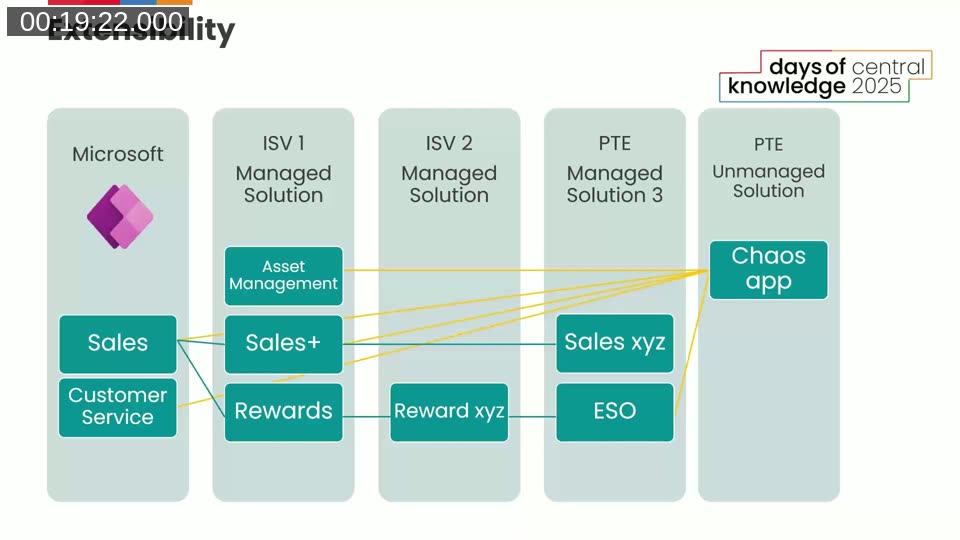
The layered extensibility model that BC developers know well exists in Power Platform too — but only for model-driven apps, which BC partners do not typically use. Canvas apps, the type BC partners actually build, have no formal extensibility model. You either take an AppSource canvas app as-is, or you clone it and lose upgradability. Tine’s recommendation: treat customisations as configurable features, building them as configuration options upfront rather than per-customer clones.
Citizen Developers: A Pattern BC Partners Moved Away From
When Power Platform introduced the idea that business users could build their own solutions, BC developers reacted with some scepticism — because BC had already travelled that road with NAV consultants modifying codebases, and deliberately moved away from it by separating consultant and developer roles. Tine illustrates the risk with a personal story:
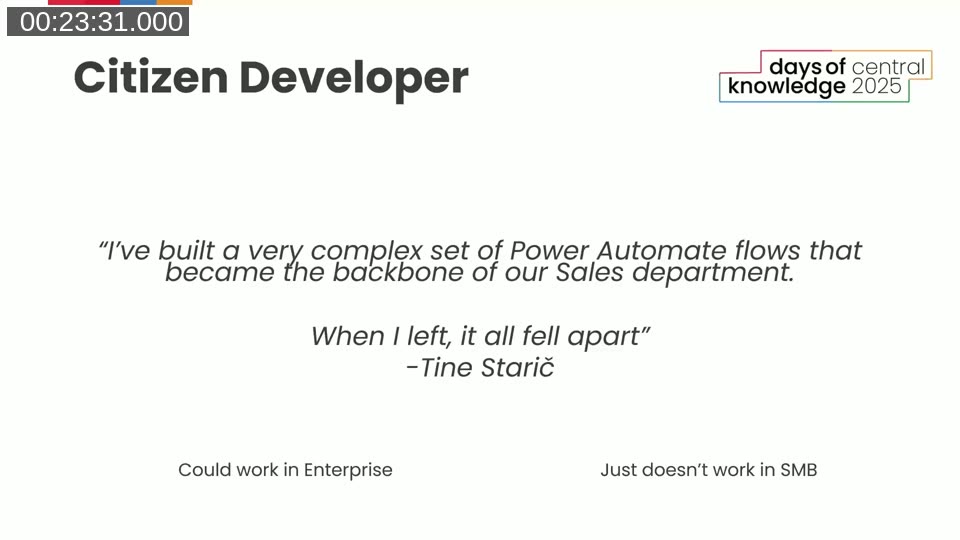
Tine had built a complex set of Power Automate flows that ran under his own named account and became critical to a sales department. When he left, those flows stopped working. He notes that citizen developers may work in enterprise environments where IT departments and Centres of Excellence can supervise them — but in the SMB space where BC partners operate, neither the customer nor the partner can realistically take on that governance responsibility.
Combining BC and Power Platform: The Friction Points
Deployment
There is no combined installation mechanism for a solution that includes both a BC app and a Power Platform solution. They must be deployed separately, in sequence, with no built-in dependency management or joint rollback. BC cannot install a previous version at all; Power Platform rollback is possible but cumbersome. The practical answer is thorough pipeline automation and testing in a shared integration environment before any production deployment.
Validation
Both platforms have automated testing capabilities — BC has its own test framework, Power Platform has Canvas Test Studio — but there are no out-of-the-box tools to test the integration between them. Partners need to build integration tests that run both sides together in a shared sandbox as part of the pipeline.
Licensing: Multiplexing and GDAP
Tine covers two licensing topics that catch BC partners off guard. The first is multiplexing: any user who accesses Business Central data through a Power App must hold a Business Central license, regardless of whether the integration goes through the native Dataverse sync, virtual tables, APIs, or Power Automate. BC Essential and Premium licenses do include limited Power Apps usage rights in return, so those users typically do not need an additional Power Platform license.
The second topic is GDAP (Granular Delegated Admin Permissions). With BC, a partner can service a customer’s environment under GDAP without buying a BC license for each developer. With Power Platform, GDAP only covers admin centre actions. To edit a canvas app or a Power Automate flow inside a customer tenant, partner developers need a full Power Platform maker license paid by the customer. At roughly $20 per person, it is rarely a blocker, but it needs to be disclosed early in the engagement.
📖 Docs: Power Platform licensing FAQs — Covers multiplexing rules, included usage rights, and per-user licensing for Power Apps and Power Automate.
Development Environments
BC developers typically work with a combination of Docker-based local environments and online sandboxes. Once Power Platform is in scope, Docker is no longer an option for the integration work — everything must run against an online BC sandbox. Power Platform developers, by contrast, can create an almost unlimited number of environments. The constraint runs in the opposite direction: it is the finite number of BC sandboxes that limits parallel development across features. The practical answer is to assign one developer to own the integration tracks while others continue work that does not require a live Power Platform connection.
Dataverse Integration
Business Central runs on SQL Server, not Dataverse. Any integration between them requires an explicit setup. waldo describes a recommended hierarchy: prefer the native BC–Dataverse data sync where possible (stable, bidirectional, built-in). If the data sync cannot cover the requirement, use virtual tables backed by BC APIs. Only fall back to custom connectors when nothing else fits. He also sets expectations for customers: synchronisation has a delay of around ten minutes, not seconds, and asynchronous processing should be the default assumption for most integration scenarios.
📖 Docs: Integrate with Microsoft Dataverse via data sync — Business Central — Setup and configuration guide for the native BC–Dataverse synchronisation, including table mapping and virtual tables.
Where Power Platform Really Shines for BC Partners
Power Automate
Power Automate’s strongest contribution is its trigger library. BC has no built-in way to react to events outside itself — an incoming email, a form submission, a row updated in Dataverse. Power Automate can hook into all of those. For non-critical integrations (for example, posting a Teams channel message when something changes in BC), Power Automate reduces what would be many lines of AL code — setup tables, OAuth token handling, HTTP requests — down to two blocks. For critical integrations, Tine recommends AL code or Azure Logic Apps instead, citing a Directions session titled “It’s Power Automate, not Power Integrate.”
Canvas Apps for Field Workers
BC’s mobile app requires navigating many menus and does not work offline. Canvas apps address both problems: they expose only the fields a specific role needs to see, and they support an offline-first mode where data is collected locally and synced back to BC when connectivity is restored.
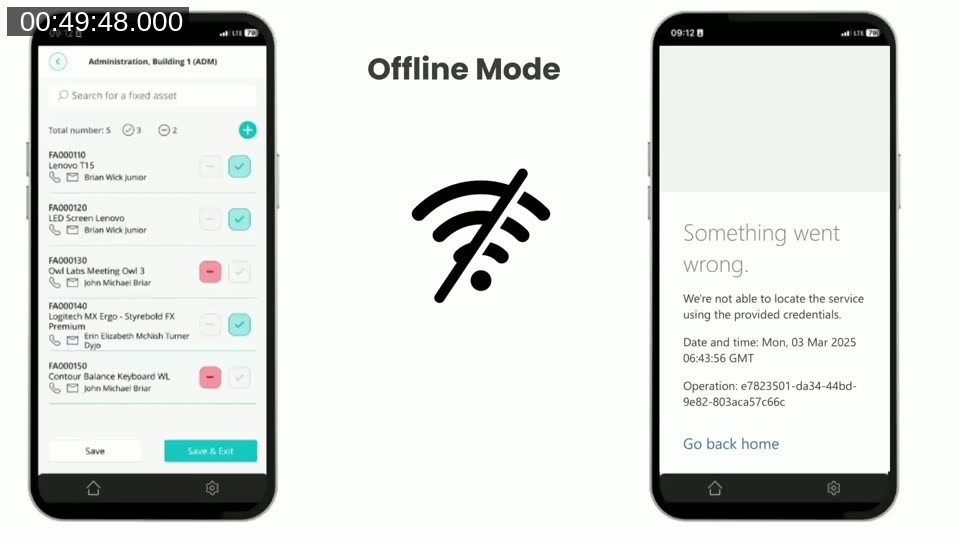
Tine gives three real-world examples from partners he has worked with: a fisheries app where fishermen photograph lobsters at sea and sync inventory to BC when they return to shore; a proof-of-delivery app that captures GPS coordinates and a photo when a package is delivered; and a vacation rental cleaning app that lets cleaning staff report property readiness directly, eliminating paper-based check-in processes.
📖 Docs: Develop offline-capable canvas apps — Explains offline-first design, the LoadData/SaveData functions, and Dataverse-backed offline sync for canvas apps running on Power Apps Mobile.
Power Pages
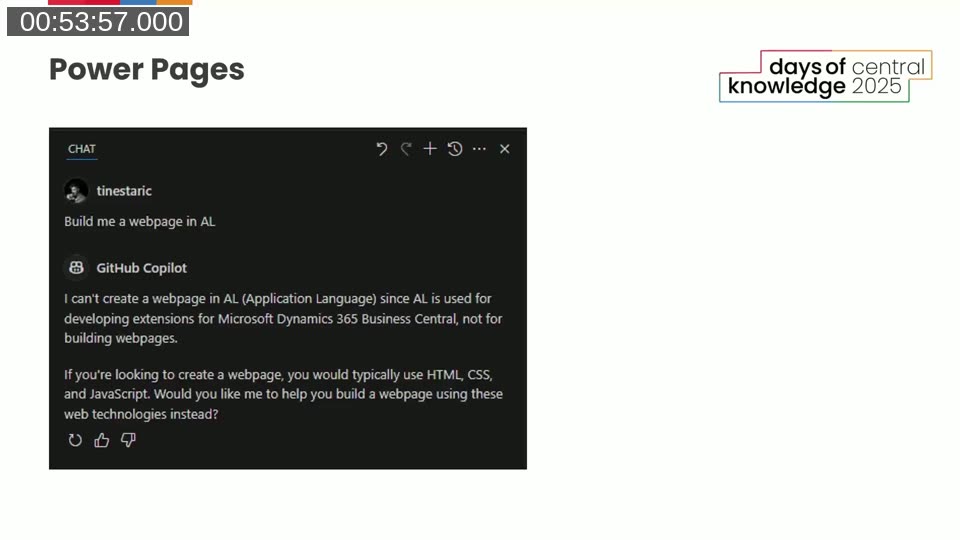
AL cannot create external-facing websites — that is simply outside what it is designed for. Power Pages provides a low-code way to build customer portals on top of BC data: order placement portals, item catalogues, billing information forms. Tine demonstrates this by showing a GitHub Copilot conversation where asking it to “build a webpage in AL” produces a polite refusal explaining what AL is actually for.
The Real Reason to Use Power Platform: Data Collection
Tine argues that the strongest case for Power Platform is not that it enables things AL “can’t do.” The real case is data collection. BC has historically been optimised for people sitting at a desk entering data into journals. Power Platform extends the reach of BC to everyone else in the business — field workers, warehouse staff, delivery drivers, customers placing orders — and brings their data back into BC automatically.
Key Takeaways
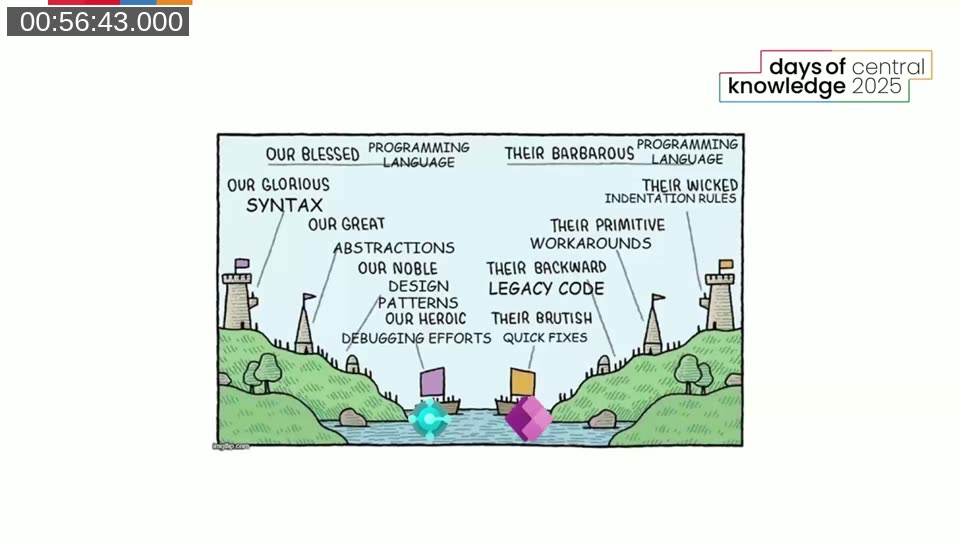
The first takeaway is to stop treating BC and Power Platform as opposing camps. Each serves a different purpose, and BC developers who dismiss Power Platform as “power fluff” are missing the mirror image: Power Platform developers sometimes hold the same view of BC. Neither is more correct.
The second takeaway, summarised by an AI-generated one-liner that waldo and Tine fed the whole presentation into: “Bringing Power Platform and BC together — plan it, pipeline it, or prepare for pain.” Pipelines are central to making a combined solution work reliably.
The third takeaway is that adopting Power Platform requires investing in its development methodology — source control, pipelines, automated testing — in the same way that BC partners spent years building out their own methodology. “Low code” does not mean no methodology. You don’t just “do Power Platform” without making a mess, and the session is clear that the same is true of Business Central.
Finally, Power Platform is not here to replace AL. Its role is to expand where and how data is collected, and to open scenarios — field workers, external portals, non-critical automations — that would be impractical to build in AL alone.
This post was drafted with AI assistance based on the webinar transcript and video content.