
Recurring revenue in Business Central used to mean workarounds: recurring journals, recurring sales lines, or a third-party app. Subscription Billing is now part of standard Business Central and covers the chain from sales agreement to automated recurring invoice. In this webinar, Magdalena Dygas (Senior Business Central Consultant, Columbus) walks through the module live. Bert Verbeek moderates.
The session covers why the module exists, how it evolved across Microsoft releases, the required setups, and four scenarios you can reproduce in a sandbox with the Contoso demo tool.
Why Subscription Billing Exists
Before October 2024, Business Central had no native module for contract-based recurring billing. Teams combined recurring journals, recurring standard sales lines, and service contracts. Each had a gap: sales lines were not tied to a contract, and service contracts did not fit SaaS licenses or usage-based pricing. Covering everything usually meant an AppSource add-on.
Subscription Billing invoices contractually agreed services on a recurring basis, for customers and for vendors. Magdalena groups what it offers into four areas:
- Flexible billing — individual and automated billing periods, billing templates, and a preview of upcoming invoices.
- Contract terms — what was agreed with the customer, including cancellation period, timeline, amounts, and when to invoice.
- Finance control — deferrals let you invoice in advance but release the revenue or cost into the correct month.
- Standard functionality — it is not an add-on and falls under the existing license.
📖 Docs: Welcome to subscription billing — Microsoft Learn overview of the module, its terms, and its billing models.
How the Pieces Fit Together
Setup defines what can be sold, selling creates subscriptions, and contracts decide what gets billed together. In order:
- Create packages, package line templates, and items, and assign packages to items.
- Selling an item creates a subscription for the customer.
- A subscription holds subscription lines with quantity, billing period, amount, and whether the partner is a customer or a vendor.
- Subscription lines are assigned to a customer or vendor subscription contract, which is the unit that gets billed.
Release Timeline and Renames
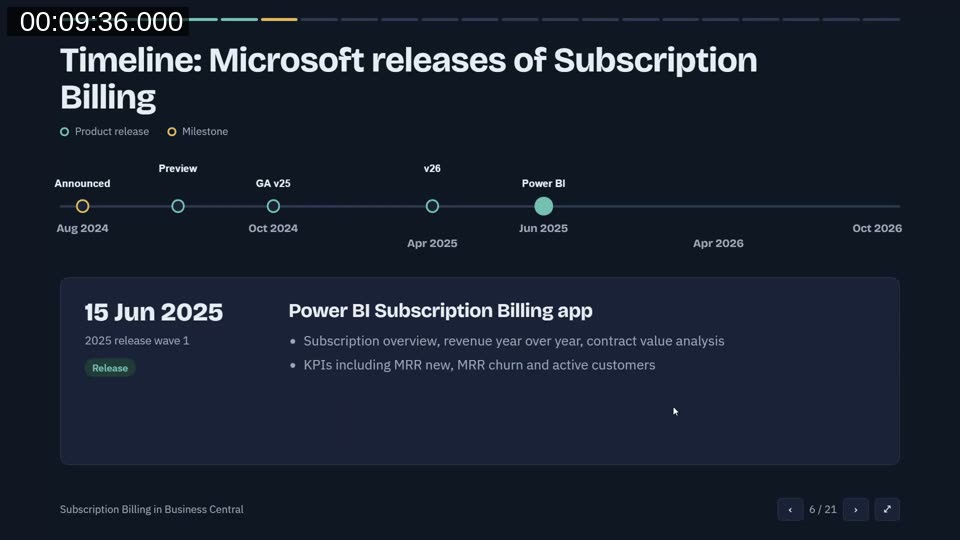
Microsoft announced the feature in August 2024 and shipped a first preview. General availability followed in October 2024 as an app called Subscription and Recurring Billing. In April 2025, after six months of feedback, Microsoft renamed objects, for example the former service object is now a subscription, and added Contoso demo data. The Power BI Subscription Billing app arrived in June 2025. In April 2026, contract processing gained more automation and job queues, and the Power BI app gained reports.
Magdalena points out that older videos on YouTube may show the first version with the old names. She notes that nothing further appears in the current release plans.
The Role Center and the Contoso Demo Data
The Subscription Billing role center shows queues for open customer and vendor contract documents, subscription lines without a contract, and overdue or not-yet-invoiced subscription lines. It also shows revenue and cost figures and any errors from automated processing.
The module does not create demo data on its own. To follow along in a sandbox, generate it with the Contoso Demo Tool.
Setups
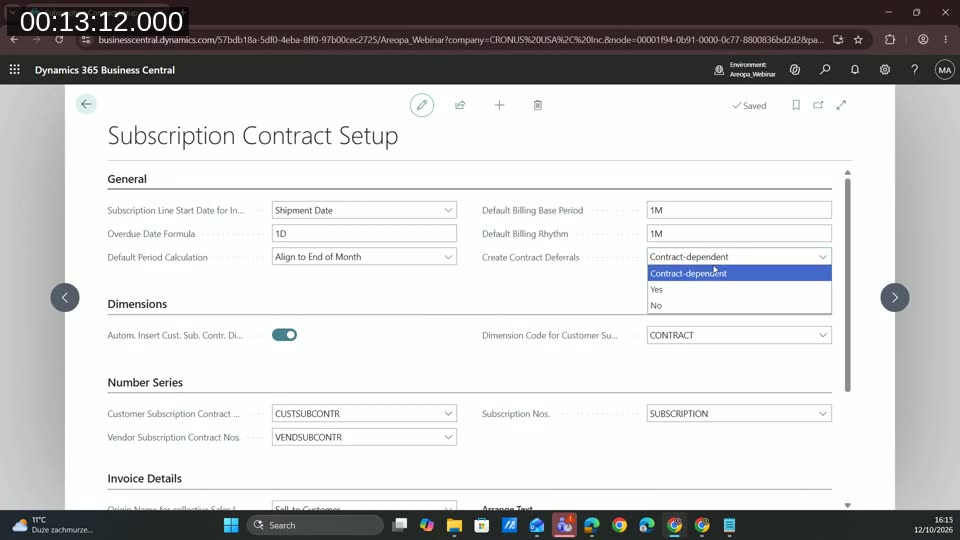
The first setup is Subscription Contract Setup. Key choices are:
- Whether a subscription line starts at the shipment date or the posting date. For sales orders, the line is created when the order is shipped.
- The default billing base period and billing rhythm.
- Whether contract deferrals are always created, never created, or decided per contract.
- Automatic dimension insertion, so each contract creates its own dimension value and every related transaction carries it.
- Number series for customer contracts, vendor contracts, and subscriptions, plus the text printed on invoices.
Next, the general posting setup needs accounts for customer and vendor subscription contracts. With deferrals, these are the accrual accounts that hold the amount until it is released to revenue or cost.
Contract types classify contracts, for example maintenance, support, or usage data. A contract type also controls whether the contract uses harmonized billing, creates deferrals, and allows different currencies. Harmonized billing suits a case such as adding licenses mid-year to a 12-month contract: the new lines end with the contract instead of running for a further 12 months.
Packages, Line Templates, and Items
A package is assigned to an item so that selling the item creates the subscription lines automatically. Lines are built from templates, so they do not need to be entered again for each package.
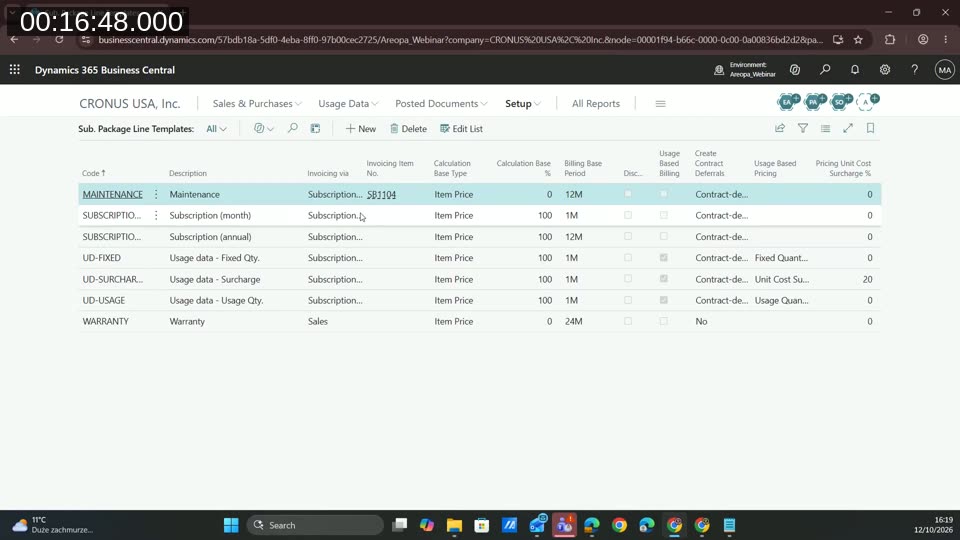
On each package line, the setup includes:
- Partner — customer, vendor, or both. A package can create both sides at once when you buy a service to resell it.
- Invoicing via — contract, or sales. A sales line creates no invoice and only records information, such as a 12-month warranty already included in a purchase price.
- Invoicing item and calculation base type — the price can be based on the item price, the document price, or price and discount, with a percentage.
- Billing base period and billing rhythm — explained below.
- Initial term, subsequent term, and notice period — how long the subscription runs, how long it can be extended after the end date, and how much notice the customer must give.
- Deferral settings, cost percentage, and surcharge — used mainly for usage-based billing.
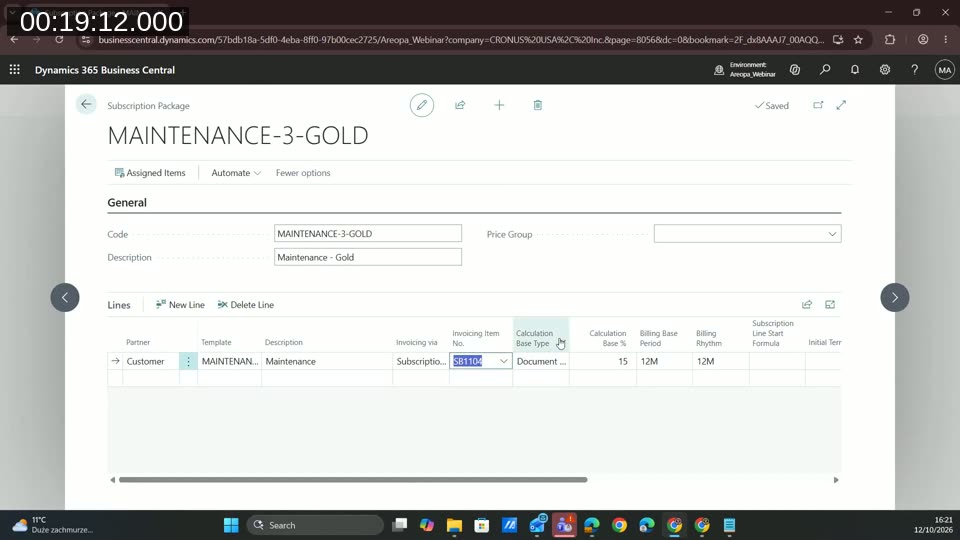
The billing base period is the period the price covers. The billing rhythm is how often an invoice is created. With a 12-month base period and a monthly rhythm, the system splits the price into twelve monthly invoices. With a 12-month base period and a yearly rhythm, it creates one invoice for the whole year.
📖 Docs: Subscription packages and subscription lines — Microsoft Learn reference for packages, line templates, and the fields on subscription lines.
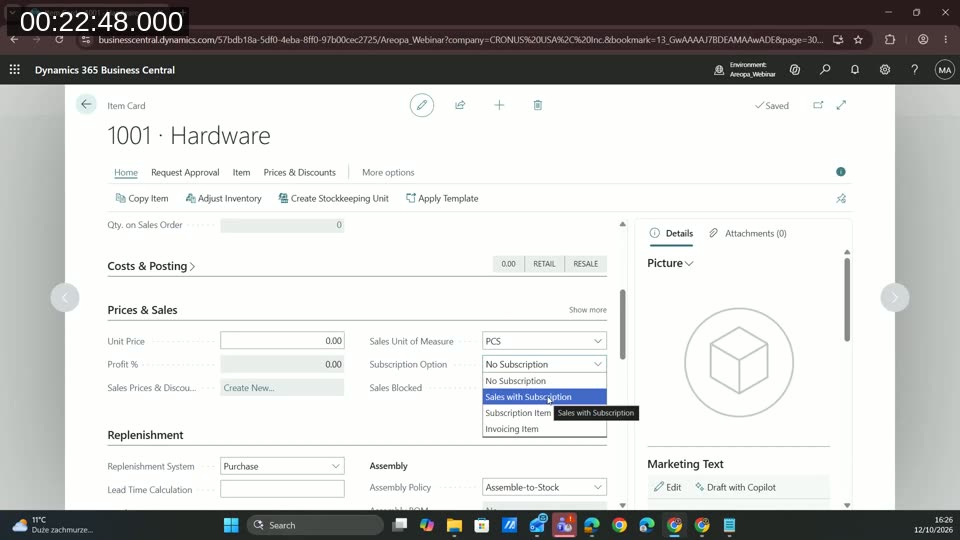
On the item card, the Subscription Option field has four values:
- No Subscription — a standard item.
- Sales with Subscription — a product sold together with a service, such as hardware with maintenance. Assign a standard package, or let the salesperson pick one such as bronze, silver, or gold on the sales line.
- Subscription Item — the service itself, such as support, sold without a product.
- Invoicing Item — the item shown on the contract line.
Scenario 1: Hardware Sold with a Maintenance Subscription
On a sales order for the hardware item, Business Central asks which subscription package to assign. A report layout named Sales Order Confirmation for Subscription Billing prints the attached maintenance service, which the standard layout does not show.
Shipping the order creates the subscription line, so the order does not need to be invoiced first. The subscription card shows the customer, the item, and the subscription lines with price, period, and rhythm. Subscription attributes are available on the card, separate from item attributes.
The new line appears in the role center as a subscription line without a contract. Magdalena creates a customer subscription contract for the same customer, picks the maintenance contract type, and uses Get Subscription Lines to assign the line. A contract can hold several subscription lines.
The simplest way to bill is contract by contract with Create Billing Documents. The resulting invoice takes its data from the setup shown earlier and can be posted. When a contract ends, Magdalena creates a contract renewal quote, converts it to a sales order, and extends the contract dates. The contract card also links to posted documents and deferrals.
Scenario 2: A Support Subscription Without a Sales Order
A subscription can be created directly when a service has no sales order, such as a monthly support contract. Magdalena creates a subscription from a Subscription Item, sets quantity, unit of measure, start date, and customer, and decides whether prices come from the sales price list. She then assigns the line to a new contract of type support.
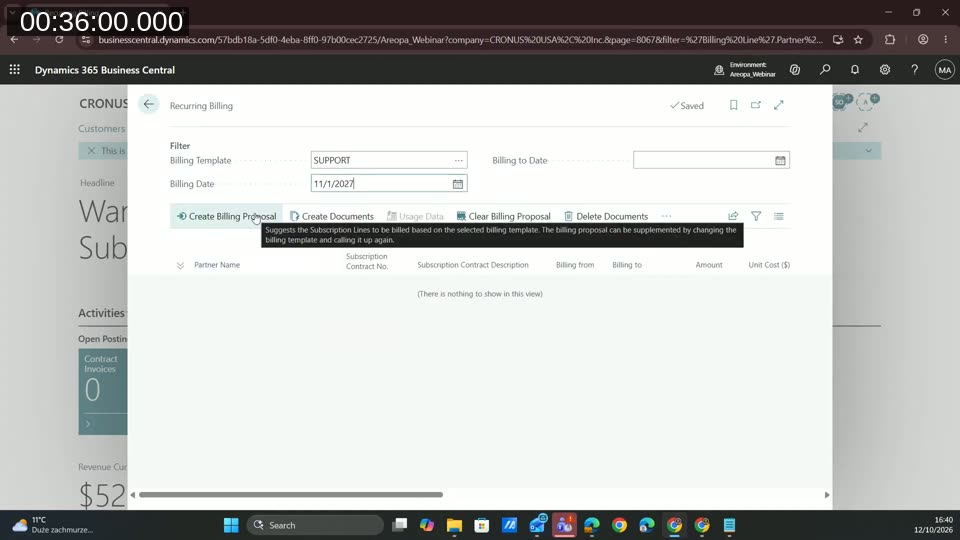
Recurring billing handles many contracts at once. Choose a billing template, which can filter by contract type, user, or billing partner, and set a billing date. Create Billing Proposal lists everything due, including anything missed in earlier months.
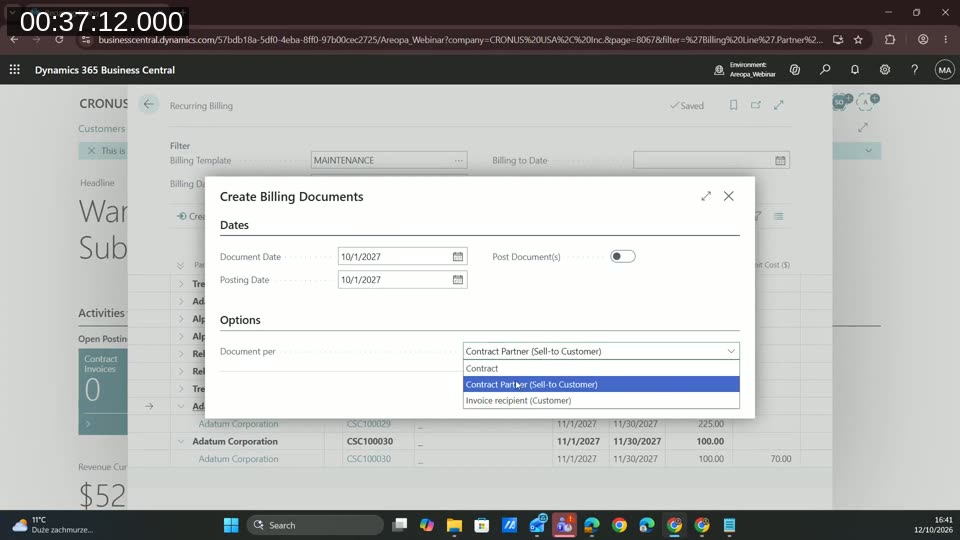
When creating documents, the Document per option decides whether lines are merged. Grouping by contract partner produces one invoice per customer. Grouping by contract produces one invoice per contract. Documents can also be posted directly.
Invoices cannot be edited after creation. To fix a problem, delete the documents, which removes all open invoices created for the proposal. Then clear the proposal, correct the contract, and start again. Depending on the problem, you can change the billing date or refresh the proposal.
Scenario 4: Deferring a Yearly Vendor Invoice
The demo covers a digital newspaper bought from a vendor and paid for a year up front. The cost belongs in the months it covers, so the subscription line uses a 12-month billing base period and a yearly rhythm. It is assigned to a vendor subscription contract with deferrals enabled.
After posting the vendor invoice, the vendor subscription contract deferrals page shows the amount split into twelve monthly entries of 1,000. The same applies to the revenue side when a customer pays quarterly or yearly in advance.
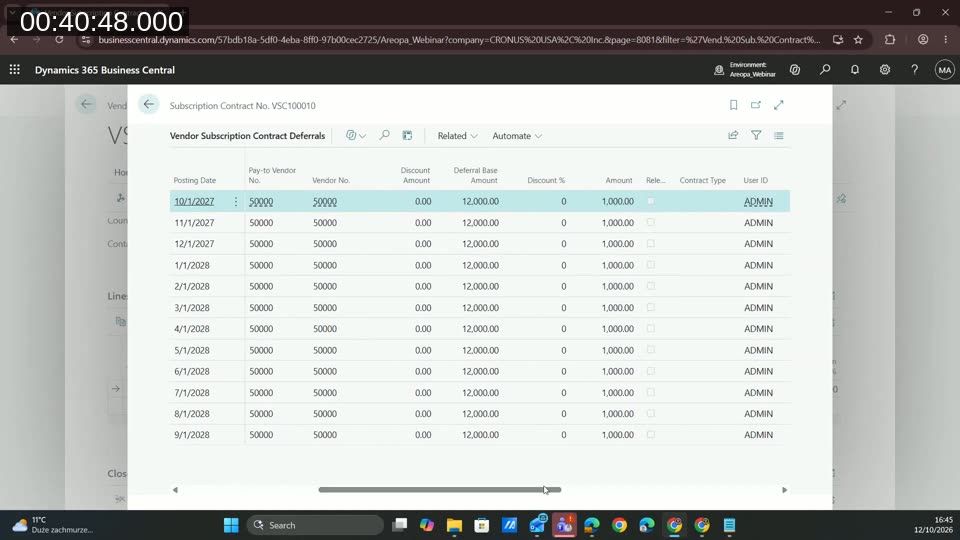
At month end, the Contract Deferrals Release function moves the month’s amount from the deferral account to cost or revenue. Magdalena notes that the function gives no confirmation message. To check, open the contract’s deferrals and look at the release date, or find the entries in the general ledger.
She prefers this to standard Business Central deferrals. Standard deferrals post every future period up front. Here, future amounts stay in the deferral account and appear in the books only when released.
📖 Docs: Examples for subscription billing — Microsoft Learn walkthrough that includes a digital newspaper subscription and deferred revenue tracking.
Scenario 3: Usage-Based Billing
Usage-based billing creates invoices from a file received from a supplier, for example a Microsoft license invoice. Customers are charged for the licenses used and the supplier is invoiced in the same flow. The standard generic import uses a data exchange definition. Business Central ships a US-format definition, and Magdalena created a European-format copy by changing the date and number formats. The import can also be connected through an API instead of files.
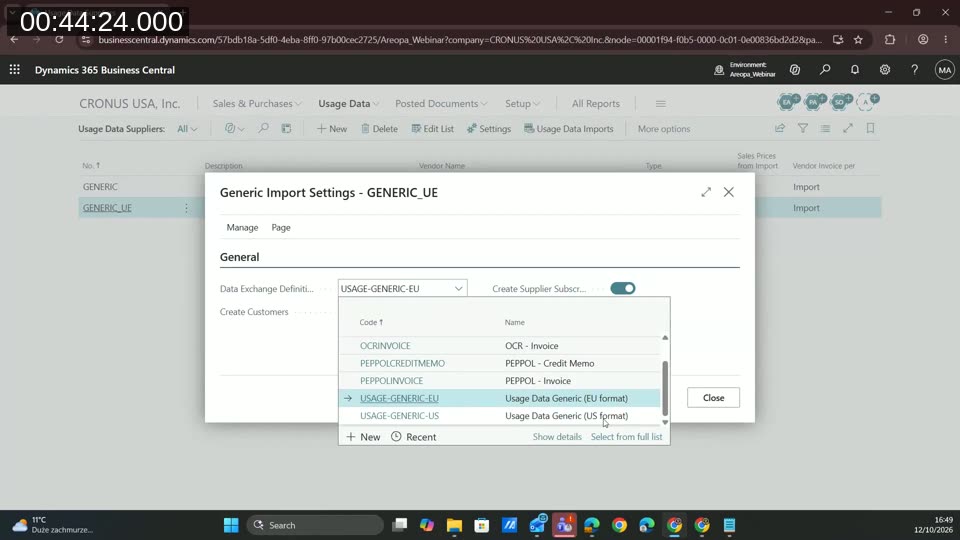
Her tip is to use manual processing under Related, which runs the import step by step and shows errors at each stage. After the import, usage data lines are linked to a customer, a vendor, and an item. If the customer or vendor is missing, the generic import can create it. Then Create Customer Invoices and Create Vendor Invoices produce the documents. Vendor invoices need a vendor invoice number before posting.
The demo repeats this for three months. In month three, the customer’s license count rises from eight to eleven in the middle of the month. The import creates lines for both quantities. The invoice shows one line with the quantity and an adjusted unit price that reflects the part-month.
📖 Docs: Overview of usage-based billing — Microsoft Learn article covering usage data import and price calculation.
Reporting
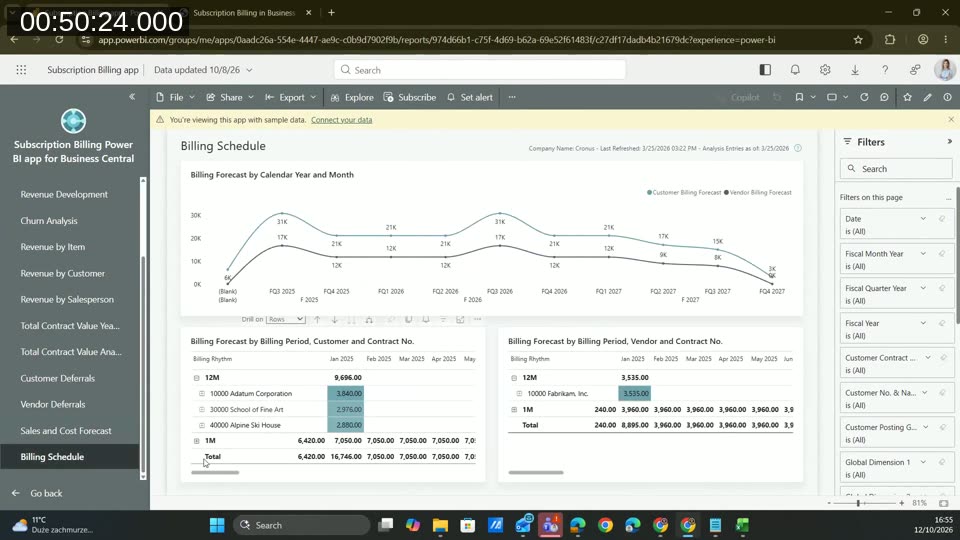
Business Central includes reports for deferrals across multiple customer and vendor contracts. The Subscription Billing Power BI app adds revenue by year, item, and customer, customer and vendor deferrals, a forecast, and a billing schedule showing what will be invoiced in future periods. The demo used sample data, not a connected company.
Summary
Magdalena closes by listing the benefits: predictable revenue per contract, less manual work through the billing proposal, revenue assigned to the correct period through deferrals, and everything available in standard Business Central with Power BI reporting. She offers the slide deck on request, and viewers can reach her on LinkedIn. The deck can be requested by email at webinars@areopa.academy. Sources on her last slide are Microsoft Learn and the 2024 wave 2, 2025 wave 1, and 2026 wave 1 release plans.
This post was drafted with AI assistance based on the webinar transcript and video content.