
For a Business Central professional, Dynamics 365 Finance & Operations can feel like a different world. It shares Microsoft branding and lives under the same Dynamics 365 umbrella, but its history, architecture, and operational model differ in meaningful ways. In this February 2020 Areopa Academy webinar, Ludo Van den Ende and Johan Knops of DevElite provide a structured introduction — covering the product’s origins, its positioning relative to Business Central, and a live tour of key functional areas including workspaces, security, data sharing, financial dimensions, and Lifecycle Services.
Moderator Luc van Vugt facilitated the session, which drew attendees from Europe, the Americas, and Asia.
From Axapta to D365 Finance: A History
The product now known as Dynamics 365 Finance has a longer history than many Business Central practitioners realise. It began in 1998 as Axapta 1.0, developed jointly by IBM and the Danish company Damgaard Data — about a decade after the early NAV/Navision lineage started.
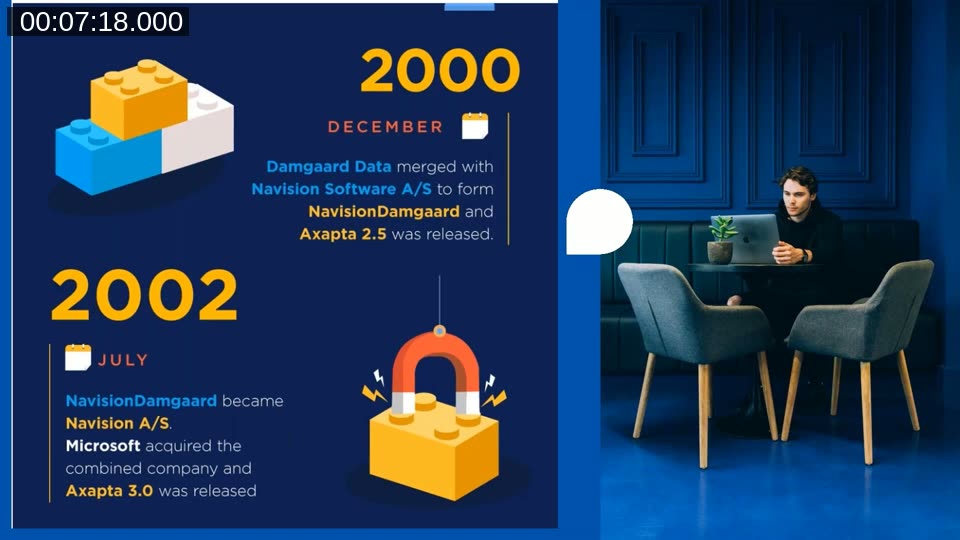
In December 2000, Damgaard Data merged with Navision Software A/S to form NavisionDamgaard, and Axapta 2.5 was released. By July 2002, Microsoft had acquired the combined company. The product continued under Microsoft ownership through several major releases.
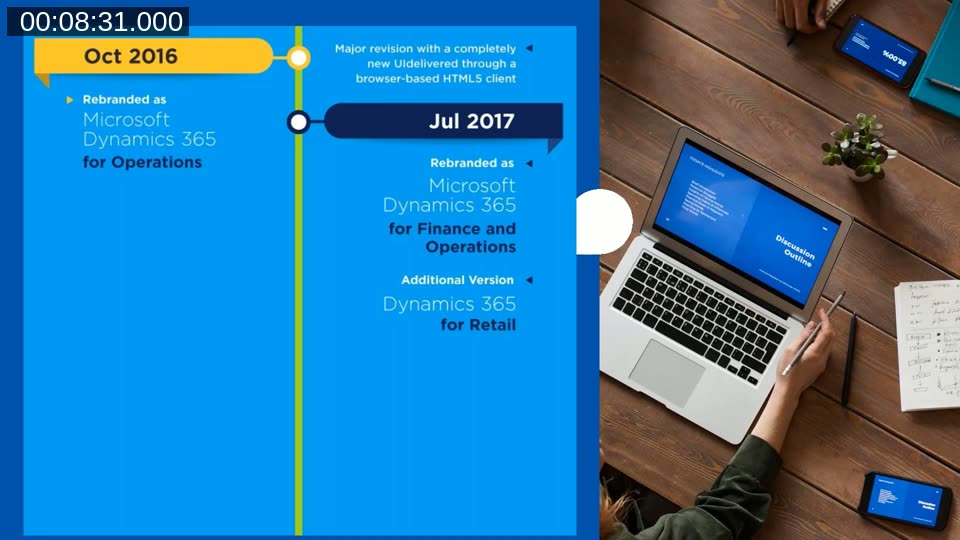
A pivotal release arrived in October 2016, delivering a completely browser-based HTML5 client — an architectural shift that put it ahead of Business Central at the time. In July 2017 the product was rebranded to Microsoft Dynamics 365 for Finance and Operations. It has since been further split into Dynamics 365 Finance and Dynamics 365 Supply Chain Management, though the UI still shows the combined “Finance and Operations” label as of the recording date.
Positioning: Business Central vs. D365 Finance
The two products target different market segments. Business Central is described as an all-in-one business platform, primarily aimed at small to mid-sized companies. D365 Finance is a Tier 1 ERP and a modular solution, targeting mid-sized to large enterprises — placing it in the same competitive space as SAP and Oracle.
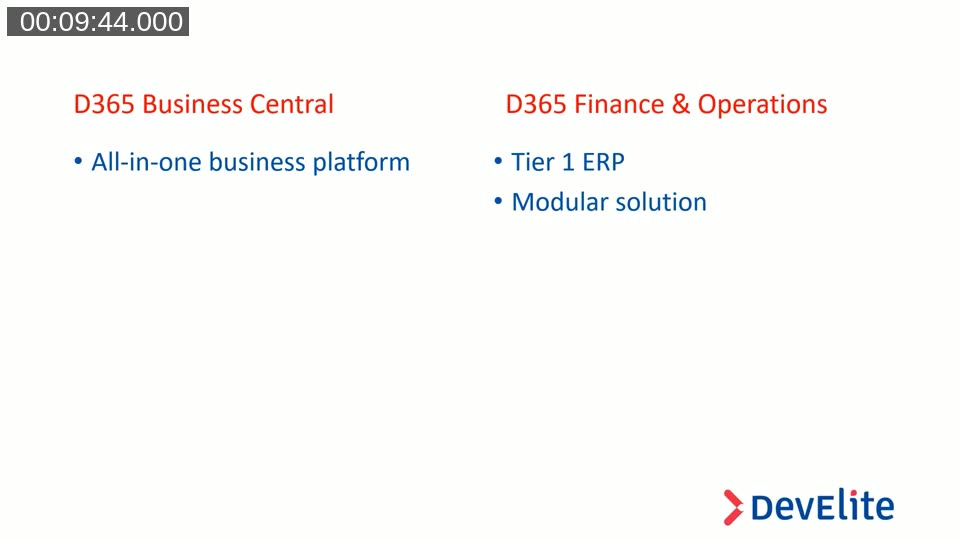
From the start, D365 Finance was built for international deployments: one database, one version, with localizations for a large number of countries and languages built in. Business Central historically delivered per-country localized versions separately. Microsoft requires a minimum of 20 users for D365 Finance. On pricing, the speakers noted approximately €150 per user per month for Finance (or €210 with Supply Chain and Retail), compared to around €80 for Business Central Premium.
General Look and Feel
D365 Finance is module-based. Every module follows an identical layout pattern — master data, transactions, periodic tasks, inquiries, reports, and setup appear in the same order regardless of which module is open. Johan Knops highlighted this consistency as a practical benefit for consultants navigating an unfamiliar area of the system.
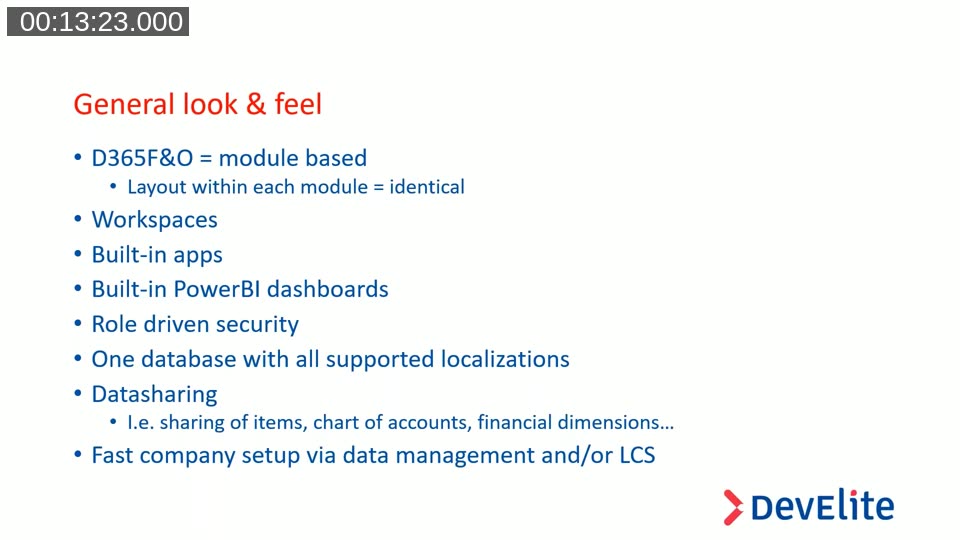
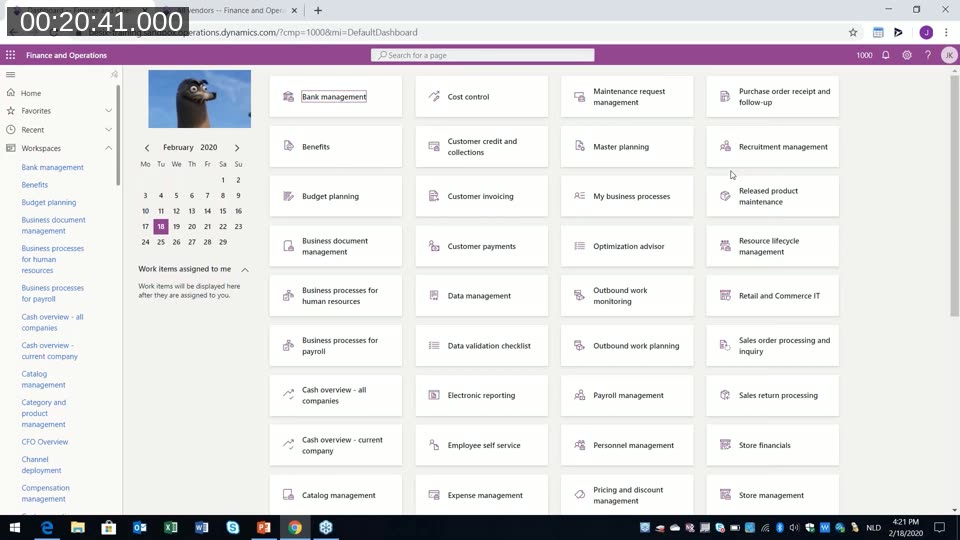
The main feature areas covered in the live demo include:
- Workspaces — role-specific dashboards giving accountants, CFOs, and other personas a tailored starting point
- Built-in apps — standard mobile applications for time entry, expense management, and purchase invoice approval, publishable to users with one click
- Built-in Power BI dashboards — 15–20 BI cubes activated per environment, surfacing financial and operational data directly in the UI without separate licensing
- Role-driven security — fully configurable by functional consultants at the screen, button, and field level
- One database with all localizations — Belgian, Dutch, Middle Eastern, and other localized features activate or hide automatically based on a company’s address
- Data sharing — chart of accounts, financial dimensions, and other master data can be shared across hundreds of legal entities in a single database
- Fast company setup via Data Management and LCS
The live environment shown in the demo was freshly set up on the Saturday before the webinar. Johan noted that D365 Finance relies heavily on caching — a cold system starts slowly and speeds up as queries are executed and results are cached. A pre-warmed environment was shown alongside the fresh one to illustrate the difference.
Financial Period Close Workspace
The financial period close workspace was used as a detailed example. It functions as a structured task list for finance teams, showing each task required to close a period, the responsible person, the target date, the area (general ledger, accounts receivable, taxes, etc.), and completion status per legal entity.
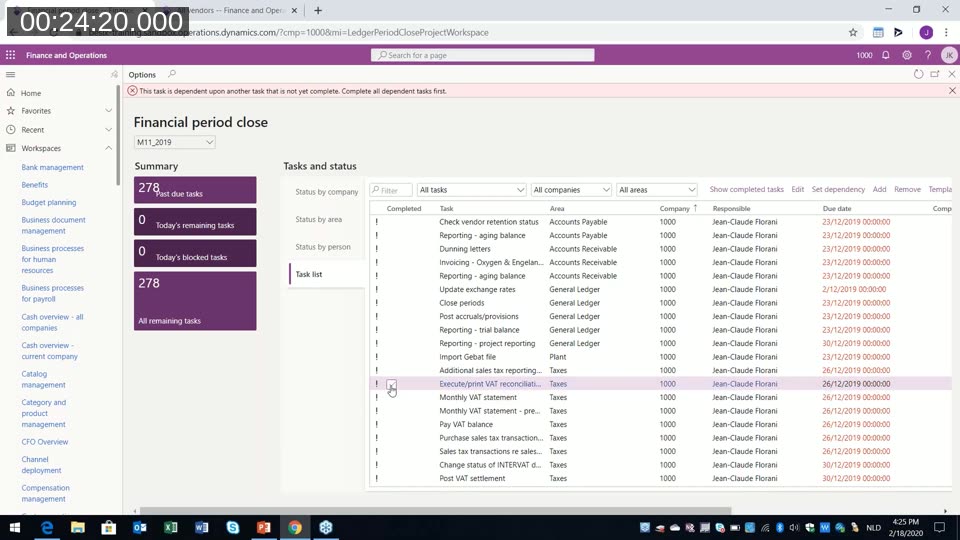
Tasks are clickable — selecting a task navigates directly to the relevant screen in the system, so the accountant can execute the action and mark it complete without leaving the workspace context. Dependencies between tasks can be configured: for example, a VAT declaration task can be blocked until the associated reconciliation reports have been completed. The entire task list is configurable, and templates can be set up per month, quarter, or year.
For CFOs, the workspace provides a real-time view of where open tasks remain across all entities — without needing to ask individual accountants for status updates.
Module Navigation and Security Diagnostics
Johan walked through the complete module list in the left-hand navigation. All modules are listed alphabetically. Depending on the user’s security role, only licensed and authorized modules appear — items that a user cannot access simply do not appear in the menus at all.
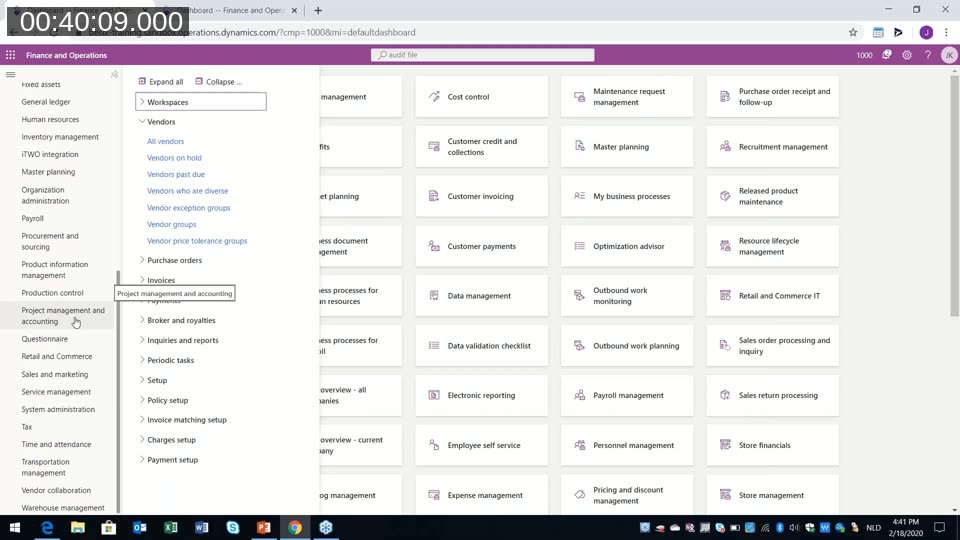
Security in D365 Finance is role-driven and operates at three levels: roles, duties, and privileges. What makes it functionally distinct from older versions — and from earlier NAV/Business Central configurations — is that all security configuration is now done by functional consultants without developer involvement. A consultant can open any screen, click “Security Diagnostics” in the Options menu, and immediately see which roles, duties, and privileges grant access to that screen. From there, roles can be adjusted, buttons or fields hidden, and the changes published immediately.
For custom screens created by ISVs or partners, the same mechanism applies — as long as the developer implements security correctly, custom objects integrate into the same role-based security framework.
Lifecycle Services (LCS)
Lifecycle Services is the management portal through which all D365 Finance environments are provisioned, monitored, and updated. Johan described it as a fundamental operational difference from Business Central.
Key aspects of LCS include:
- Project methodology — LCS structures an implementation through formal phases (analyse, design, develop, test, deploy, operate). Moving to the go-live phase requires completing defined tasks and requesting Microsoft’s approval, which triggers hardware sizing in the background.
- Environment management — development, sandbox, UAT, and production environments are all visible and managed through LCS. Each environment shows its current platform release and available quality updates.
- Business Process Modeller (BPM) — processes can be documented in LCS and attached as interactive help within the D365 Finance UI.
- Performance monitoring — LCS surfaces slow queries and blocking issues. Corrections such as index suggestions can be submitted through the portal.
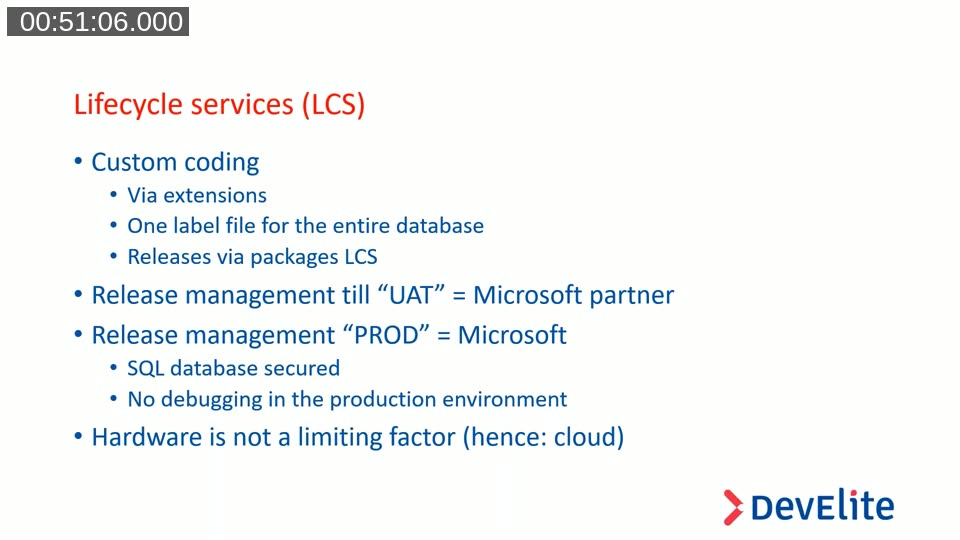
- Custom code releases — code is built as extensions (not overlayers), packaged, and deployed through LCS. Releases to UAT and below can be self-managed; releases to production must be requested through LCS, with Microsoft executing the deployment in a four-to-eight-hour window.
- Production database security — the production SQL database is fully locked. No direct database access, no ad-hoc record edits, no debugging in production. Fixes require a code change packaged and deployed via the standard release process.
This is a significant operational shift for practitioners coming from Business Central or earlier NAV implementations, where direct database access and quick fixes were routine.
Data Sharing and Financial Dimensions
Because D365 Finance uses a single database for all legal entities, sharing of master data across companies is a built-in concept. The chart of accounts, financial dimensions, and certain reference data tables are shared by default — meaning a change to a GL account or dimension value is immediately reflected across all entities using the same shared set.
Additional tables can be configured for cross-entity data sharing through a policy model. The demo showed a financial dimension list shared across more than 100 legal entities, with legal entity overrides used to suspend specific values in individual companies where they are not applicable.
At the database level, a dataAreaId column on each table filters data per legal entity. Shared tables omit this column, making their records visible across all entities. Johan demonstrated this using a browser-based table viewer plugin to show the CustGroup table — the same table, with records for all companies, filtered at query time by dataAreaId.
Localizations in a Single Database
Ludo demonstrated how localizations work in practice. When a legal entity is created, its country/region address determines which localization features are activated. Switching to a Dutch company surfaces the Dutch audit file export; switching to a Belgian company surfaces VAT-specific posting journals and Intervat declarations. Neither feature appears in the other company’s menus. Microsoft maintains localizations for most major markets; for smaller or more complex jurisdictions (Luxembourg was cited as an example), partner-provided localizations fill the gap.
This post was prepared from the Areopa Academy webinar recording published on 18 February 2020. The content reflects the state of Dynamics 365 Finance & Operations at that time. Licensing terms, product names, and feature availability have evolved since the recording. This summary was drafted with the assistance of AI tooling and reviewed for accuracy against the original transcript and slides.