
In this webinar, Olaf Jorritsma, Test Coordinator at Schouw Informatisering, shares how the Foodware 365 team built a structured, organisation-wide testing practice for their Business Central ISV solution. Moderated by Luc van Vugt, the session covers the reasoning behind testing, the process Schouw follows across redesign, development and validation phases, the tools they use, and the lessons learned over one and a half years of putting it into practice.
Foodware 365 is a food-industry ERP solution built on Microsoft Dynamics 365 Business Central. Getting it onto AppSource required passing Microsoft’s technical validation, which includes automated test coverage requirements. Olaf’s team went well beyond compliance — they made testing a permanent, cross-functional discipline.
Why Test?
The immediate driver for many ISV teams is AppSource validation: Microsoft requires automated tests covering at least 90% of an extension’s code before an app can be published. Olaf argues that the 90% threshold is a floor, not a goal. The real reasons to test are quality, credibility, risk reduction, and customer satisfaction — or, as Luc van Vugt puts it: focus on features, not on bugs.
Olaf frames product quality across two dimensions. The technical dimension covers functional suitability, security, compatibility, and maintainability. The user dimension covers efficiency, satisfaction, freedom from risk, and context coverage. Testing addresses both.
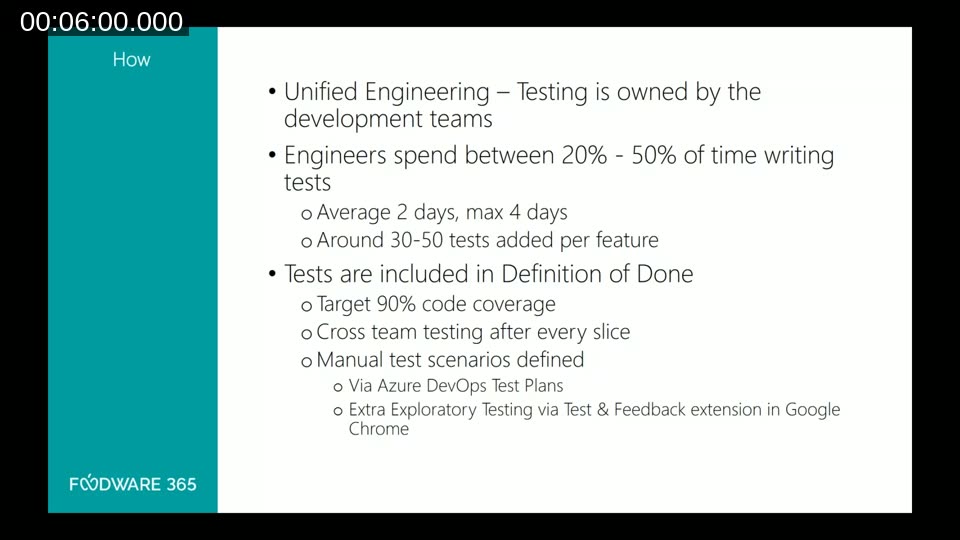
At Schouw, testing is not delegated to a single QA role. They follow a Unified Engineering model: testing is owned by the development team, with product owners, technical writers, and solution architects all involved. Developers spend between 20% and 50% of their time writing tests per feature, typically adding 30 to 50 tests. The Definition of Done explicitly includes the 90% code coverage target, cross-team testing after every delivery slice, and manual test scenarios.
What Makes a Good Test
Olaf defines a good test by four criteria:
- It covers the risk — it tells you the state of the code and tests as close to the risk as possible.
- It is simple to read — someone unfamiliar with the functionality should be able to understand it.
- It tests one thing (multiple asserts are acceptable, but one trigger).
- It is fast to execute.
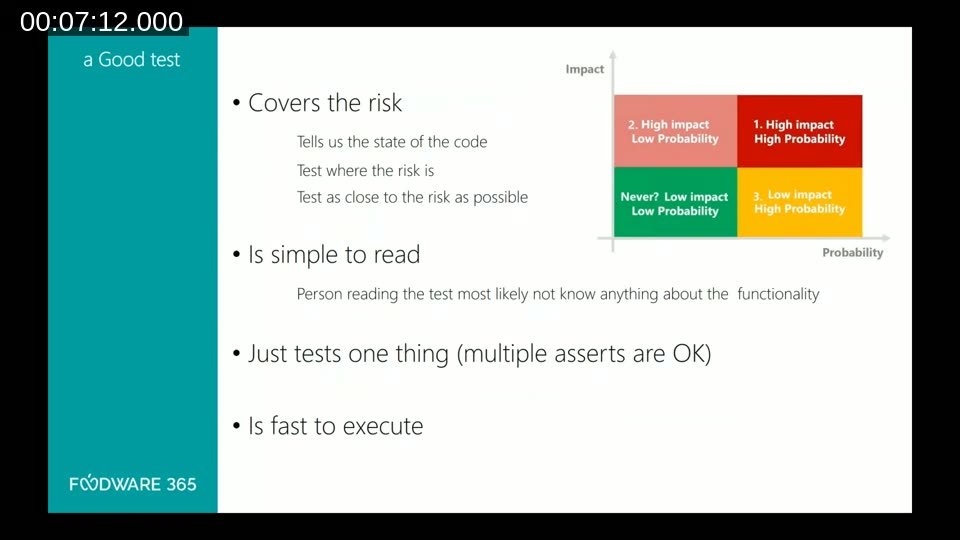
The accompanying slide shows a 2×2 risk matrix (Impact vs. Probability). The highest-priority quadrant — high impact, high probability — is where automated tests must focus. Low-impact, low-probability scenarios may not warrant testing at all.
The Test Process
The Foodware 365 test process maps across three phases: Redesign, Develop, and Validate.
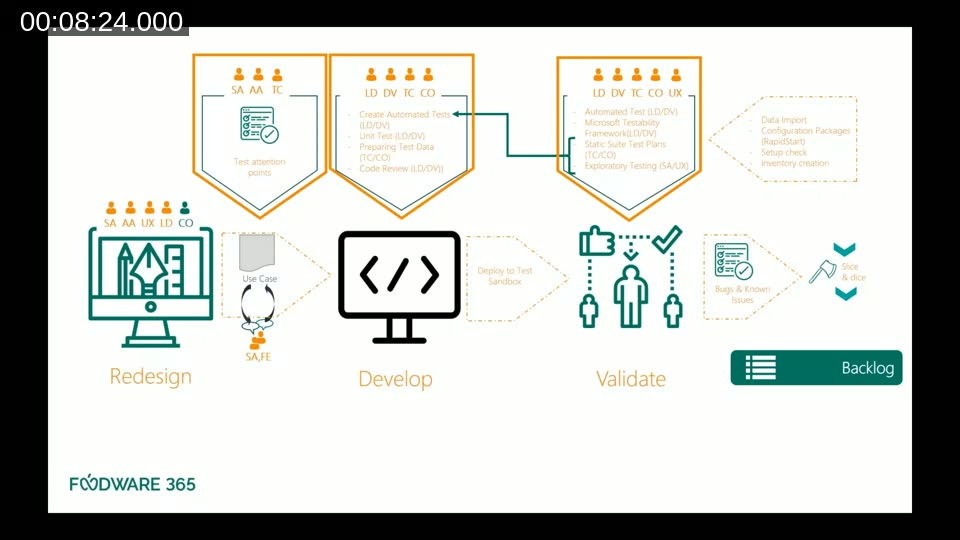
During Redesign, the team identifies test attention points — out-of-scope items, documented variations, and requirements — so that everyone knows what needs testing before a line of code is written.
During Development, developers write automated tests alongside their code. They also prepare test data for manual tests. Lead developers perform code reviews that cover both the production code and the test code. Unit tests are written but are not mandatory — as Olaf puts it: “developers fix their own mess.”
During Validate, the full suite runs: automated tests via the Microsoft Testability Framework, manual test plans executed by the test coordinator and consultants, and exploratory testing by solution architects and UX designers.
At the end of each release, the team documents known issues and known bugs. Olaf draws a clear distinction: a bug is a defect in the intended behaviour; an issue is something observed during testing that is exotic, out of scope, or deferred by design. Both are recorded.
The Approach: Gherkin-Style Tests in AL
The Foodware 365 team uses an acceptance-test-driven development approach. Test scenarios are written in simple English using the Gherkin Given/When/Then structure, so that non-developers can read and understand them.
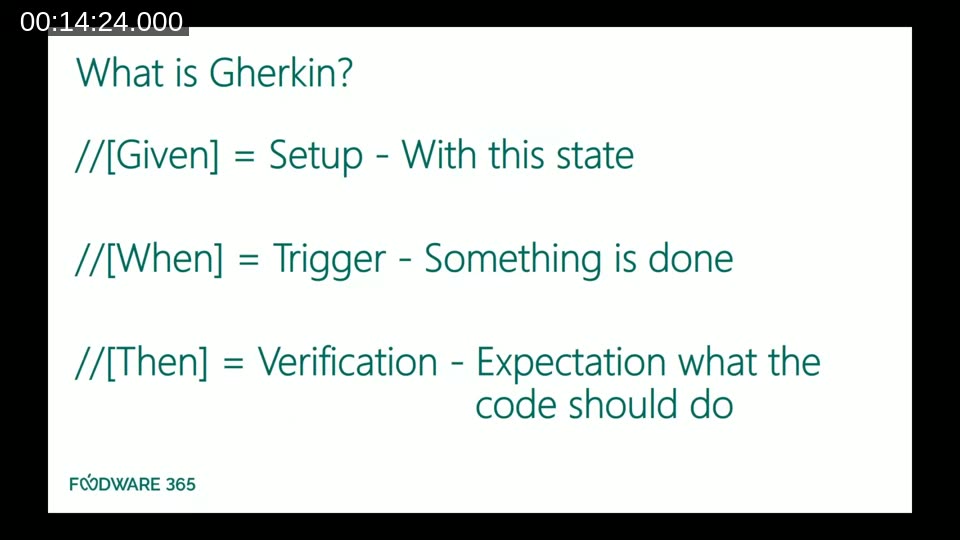
In AL code, the three parts map directly to code comments:
// [GIVEN] Setup — with this state
// [WHEN]  Trigger — something is done
// [THEN]  Verification — expectation of what the code should do
A test can have multiple Given lines (the setup state) and multiple Then lines (the assertions), but it should have only one When — one trigger action. This keeps the test focused on a single behaviour.
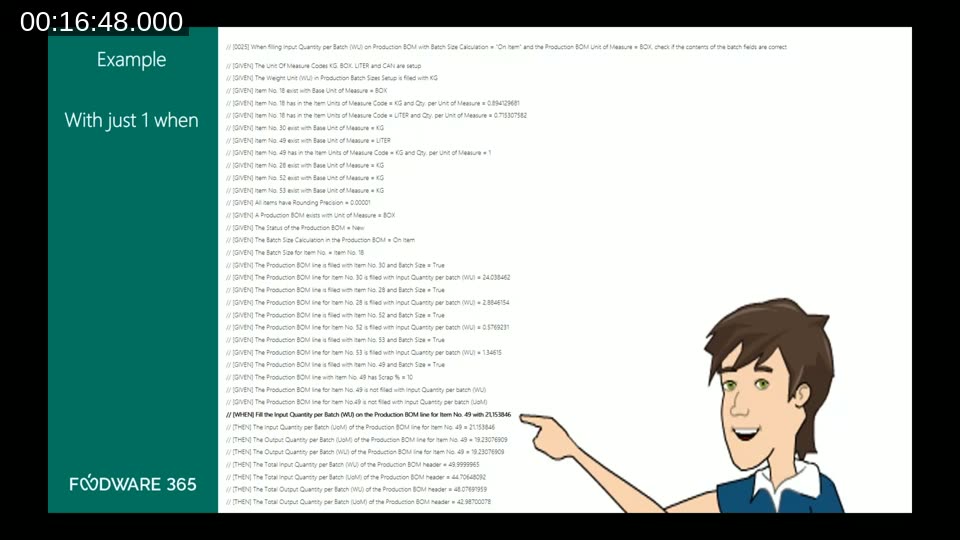
The slide above shows a real test from the Foodware 365 codebase. The scenario validates a production BOM batch size calculation. It has more than twenty Given lines setting up units of measure, items, BOM lines, batch sizes, and scrap percentages — then a single When triggering the calculation — followed by several Then assertions on the resulting quantities. Writing the initial library of helper functions for the Given setup was the most time-consuming part; once it existed, subsequent tests of the same type were much faster to write.
📖 Docs: Testing the Application Overview — Business Central — Microsoft’s reference for writing test codeunits in AL, including the GIVEN-WHEN-THEN comment conventions and the Test Runner framework.
Deciding What to Automate
A common question during the webinar was how the team decides which tests are automated and which are manual. Olaf explains that setup-heavy scenarios are often better handled manually, because automated tests run inside the Cronus environment and cannot easily interact with external systems. Any test that requires data from outside the system, or that sends data outside, defaults to a manual test. The decision is reviewed together by the developer and the functional consultant.
Testers are encouraged to add test cases they discover during execution, even if those cases were not in the original script. If a new manual finding reveals a significant risk, it is escalated to an automated test.
Tool 1: Azure DevOps Test Plans
For manual and parameterised testing, the team uses Azure DevOps Test Plans. The structure mirrors the Gherkin model: a test plan contains test suites, and each test suite contains test cases with step-by-step instructions.
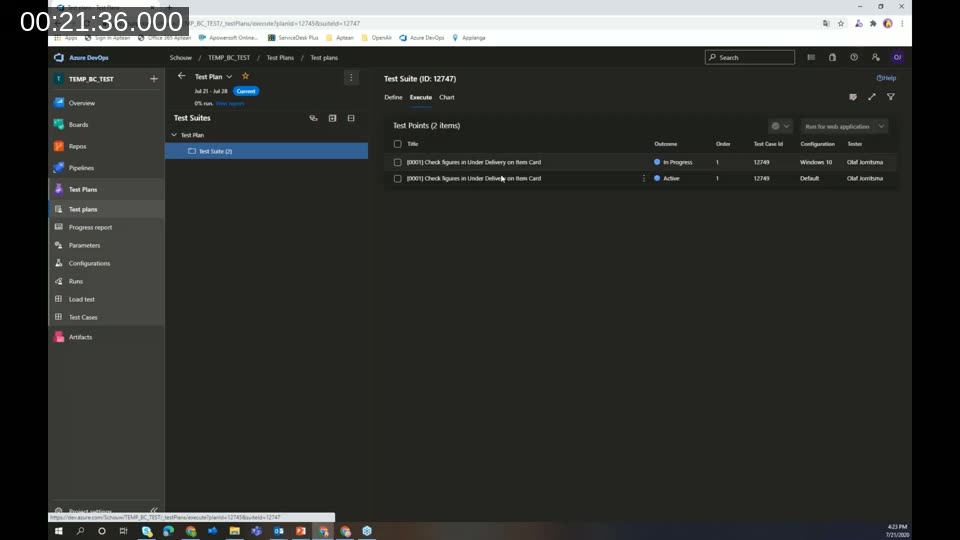
One practical feature Olaf demonstrates is parameterised test cases. A single test case can be given multiple parameter rows — for example, testing the “Under Delivery” field on an item card with values of 10, 0, and -10 — and the system generates separate test points for each combination. Multiple configurations (browsers, environments) can also be added, multiplying the coverage without duplicating the test case.
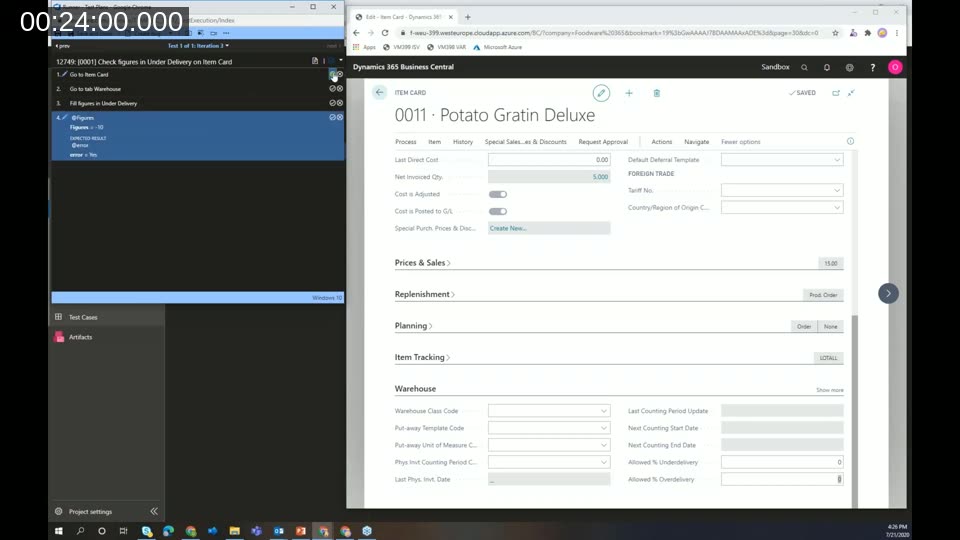
During execution, the tester follows the steps shown on the left panel while working in Business Central on the right. Each step is marked pass or fail. If a step fails, the tester can create a bug directly from the test runner, attach a screenshot, add a screen recording, or write notes — all linked back to the test case in Azure DevOps.
Because the team already uses Azure DevOps for source control, pipelines, and their backlog board, having test plans in the same system reduces context-switching and keeps all work items in one place.
📖 Docs: What is Azure Test Plans? — Overview of manual, exploratory, and automated test tools available in Azure DevOps.
Tool 2: Test & Feedback Extension
For exploratory testing, the team uses the Azure DevOps Test & Feedback browser extension (available for Chrome and Edge). The extension allows testers to capture screenshots, record the screen, add notes, and create bugs or tasks — all without leaving the browser. When connected to Azure DevOps, everything is linked directly to the project.
A key feature is the automatic capture of reproduction steps. When a bug is filed from a recording session, the extension attaches a sequence of annotated screenshots showing every action taken, plus a full screen recording available for replay. This dramatically reduces the time developers spend reproducing issues.
📖 Docs: Test & Feedback — Visual Studio Marketplace — Install the extension for Chrome or Edge to enable exploratory testing connected to Azure DevOps.
Test Strategy and Project Maturity
Olaf presents a four-phase test intensity model mapped to project maturity, referred to by the acronym SADM:
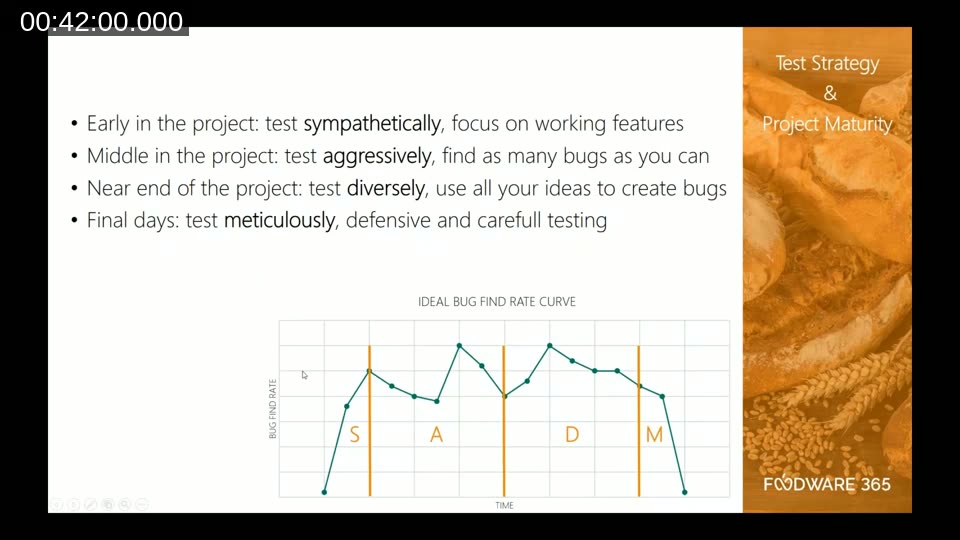
- Sympathetically — early in the project, focus on working features and build confidence.
- Aggressively — mid-project, actively look for as many bugs as possible.
- Diversely — near the end, use all available ideas to probe edge cases and create bugs.
- Meticulously — in the final days before release, test carefully and defensively to avoid introducing chaos.
The accompanying “Ideal Bug Find Rate” curve shows the expected shape: the bug-find rate peaks in the aggressive phase, then decreases progressively. By the time the team reaches the meticulous phase, the automated and manual tests from the earlier phases should already cover all known risks. If a high number of bugs still appear at that point, it is a signal that earlier phases did not cover the scope adequately.
Lessons Learned
After one and a half years of running this practice, both the developers and the functional team accumulated practical insights.
For developers:
- Build a shared library of helper functions for the Given setup early. The first test is the hardest; reuse accelerates everything that follows.
- Keep the code between Given, When, and Then lines minimal. Non-developers need to read these tests.
- Always run tests in a clean environment — an empty database, not Cronus demo data — to ensure the test validates the functionality and not an assumption about existing data.
- When a bug is found in production, write an automated test for it immediately before fixing it.
- Be thorough with external-source scenarios: either mock them or mark them as manual tests.
For functional consultants:
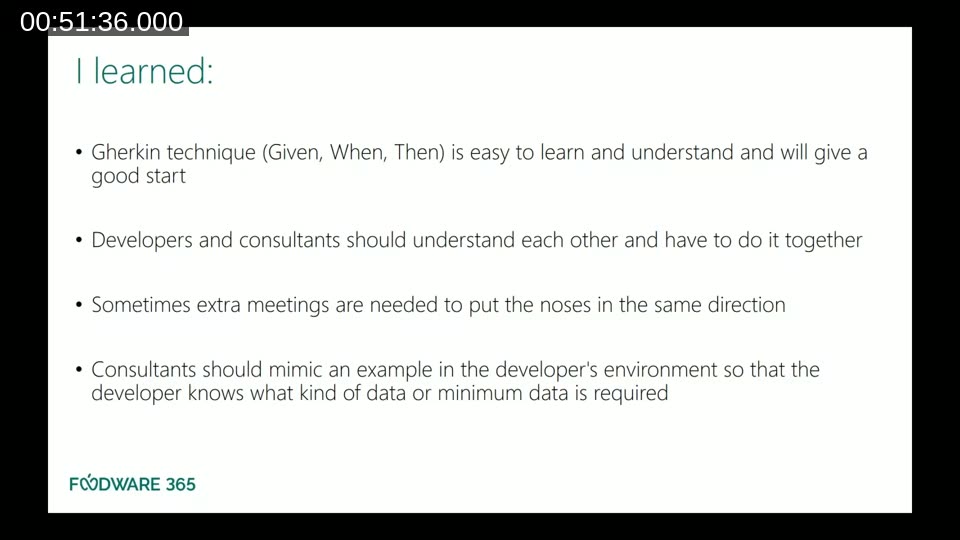
- The Gherkin technique is easy to learn and helps you think about the right scenarios up front.
- Developers and consultants need to sit together to write the first tests. Misalignment between how a consultant describes a scenario and how the developer coded the function is visible immediately.
- Consultants should set up example data in the developer’s environment so the developer understands the minimum data required for the Given section.
On testing as a team: Olaf quotes James Bach — “Testing is evaluating a product by learning about it through exploration and experimentation.” The people dimension matters as much as the tools. Getting consultants and developers to understand each other’s work, learn from each other, and align on what counts as sufficient coverage is an ongoing practice, not a one-time setup.
Looking Ahead
At the time of this webinar, the Foodware 365 team was planning to deepen their testing practice in three areas: continuous improvement of test coverage, formalising a software handover process based on Dutch standard NEN NPR 5325-2017, and moving toward continuous risk management during development aligned with NEN NPR 5326-2019.
This post was drafted with AI assistance based on the webinar transcript and video content.