
In this webinar, Krzysztof Bialowas shares how his ISV team uses the Assisted Setup framework to get customers from install to a working system in minutes rather than days. Luc van Vugt moderates the session. Krzysztof covers why Assisted Setup matters, how it pairs with configuration packages and RapidStart migration, a live AL and demo walkthrough of building a custom setup wizard, and how Checklists — new in Business Central 2021 release wave 1 — give partners a way to guide users beyond what Microsoft ships out of the box.
Why Assisted Setup Matters
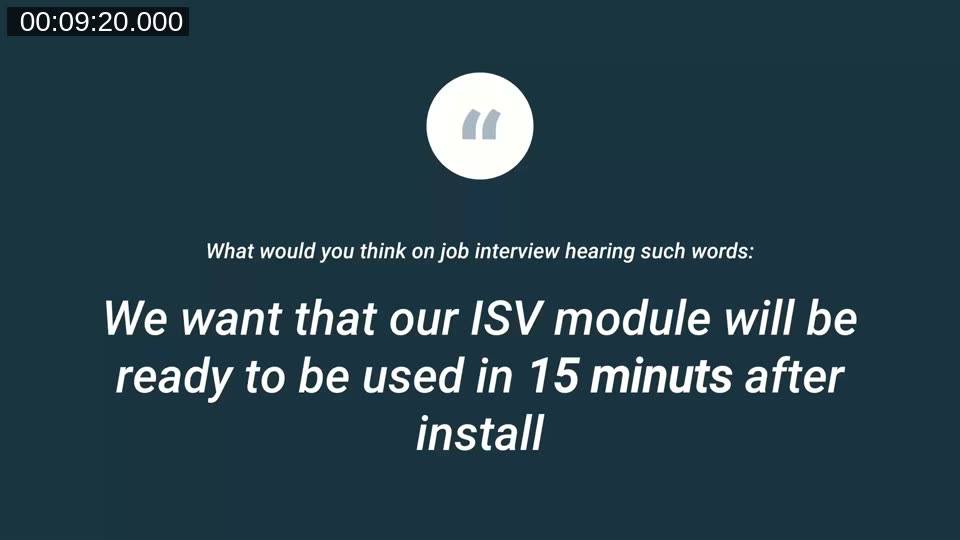
Krzysztof opens with a quote that sets the tone for the session: what would you think in a job interview hearing “we want our ISV module to be ready to use 15 minutes after install”? Having implemented NAV and Business Central for a gold partner and now working on the ISV side at Dynaway, he has seen the onboarding problem from both angles. The talk is aimed primarily at ISVs and app publishers, though he notes that much of it also applies to implementation partners setting up new Business Central environments.
A Naming Change to Know About: Guided Experience
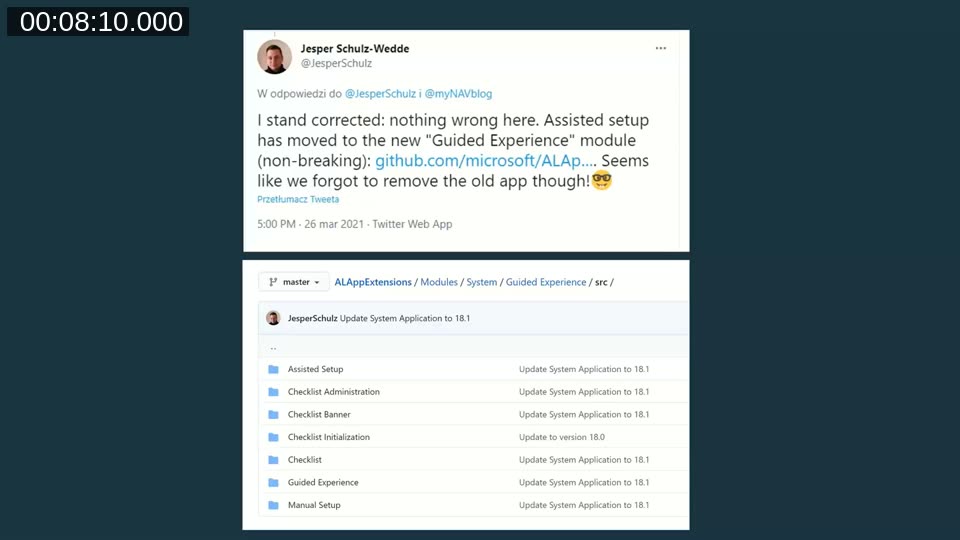
Before getting into the demo, Krzysztof flags a change that catches many developers off guard: as of Business Central version 18, Microsoft removed the standalone “Assisted Setup” module from the System Application on GitHub and folded it into a new module called Guided Experience. The underlying concept is unchanged, but object names and namespaces moved, which can surface breaking changes in extensions that reference the old module directly.
📖 Docs: Guided Experience Item — Microsoft’s current documentation confirms that starting with 2021 release wave 1, the former separate Assisted Setup and Manual Setup tables were merged into a single Guided Experience Item table, exactly the change Krzysztof describes.
Assisted Setup Basics
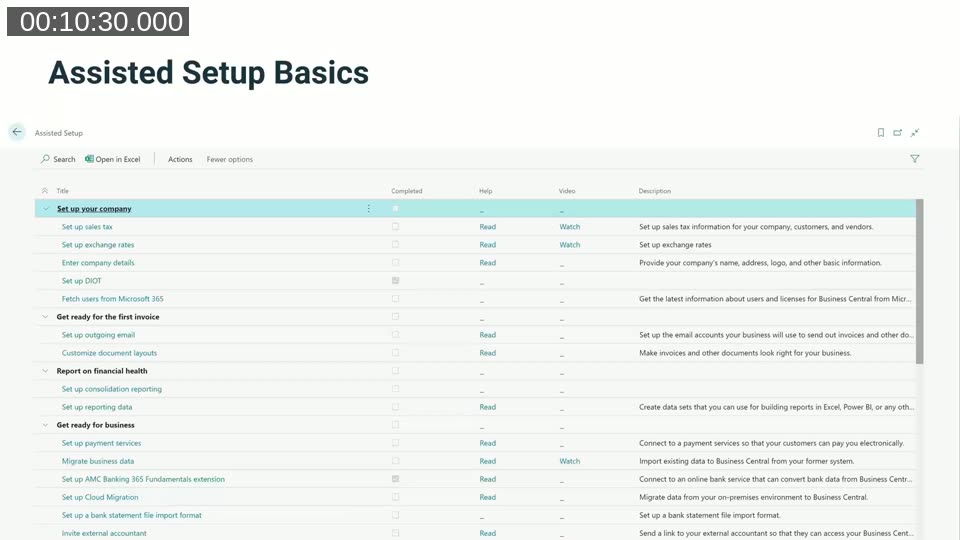
For anyone unfamiliar with the feature, Krzysztof walks through the standard Assisted Setup list: a checklist-style page of setup tasks grouped by topic (for example “Set up your company” or “Get ready for the first invoice”), each with a completion indicator, a help link, and in many cases a linked video. He notes that younger users in particular prefer video guidance over reading documentation. The list also includes data migration guides, though he is clear that no wizard takes you from an empty database to your first posted invoice in one click — Microsoft is working toward that, but it’s not there yet.
How Partners Actually Set Up Customer Data
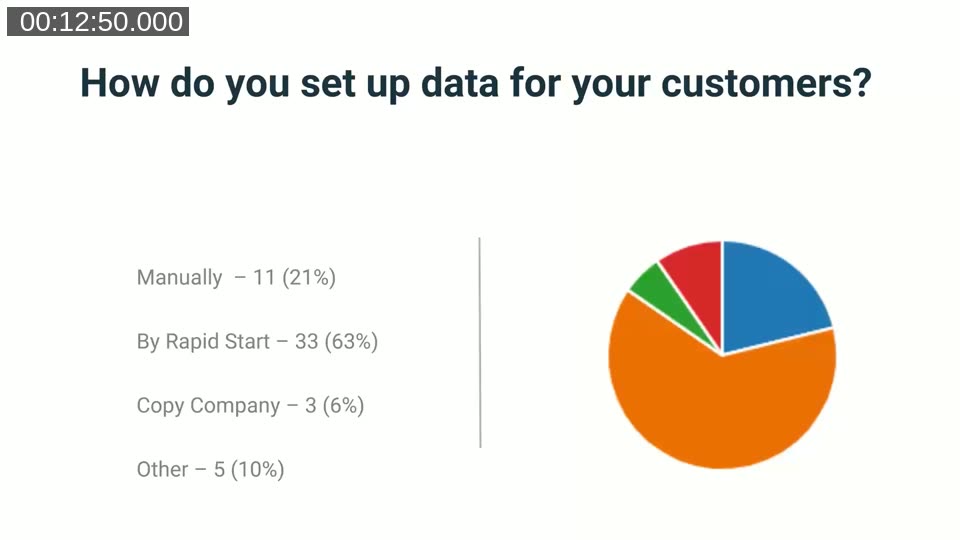
Ahead of the session, Krzysztof ran a poll of the Areopa community on how they set up data for customers. The results: 63% use RapidStart (configuration packages), 21% do it manually, 6% use copy company, and the rest use a mix. He also found that most respondents estimate more than half of their customer data is common across implementations — suggesting significant time could be saved by automating that shared baseline instead of re-entering it project after project. Roughly 60% of respondents said data setup takes under a day, but a meaningful group still reports it taking three to five days or more.
📖 Docs: Use Excel to import data — the current Microsoft documentation on configuration packages (RapidStart), including the 27 tables the default package supports.
Configuration Packages: Loved and Hated
Krzysztof is candid about configuration packages: he likes them as a mechanism — they’re consultant-friendly, and he has imported hundreds of thousands of records with them — but the workflow has rough edges. Packages have to be stored somewhere, imported in the right order, and the process isn’t especially user friendly for the person doing the import. His answer is to automate the delivery and selection of packages rather than eliminate them.
The Architecture: Azure Functions Behind the Assisted Setup
To make packages selectable and swappable without republishing the extension, Krzysztof built two Azure Functions backed by Azure Blob Storage:
- One function returns the list of available configuration packages (read from a small JSON file in blob storage), keyed against the calling extension’s version so in-development packages stay invisible to customers running the published version.
- A second function returns the actual RapidStart package file once a user selects one from the list.
On the AL side, this only requires a table to store package name and package ID, and a codeunit that calls the Azure Function with a simple key. Because the package data lives outside the extension, updating or adding a package doesn’t require an AL code change or a new extension validation pass.
Live Demo: Building the Setup Wizard
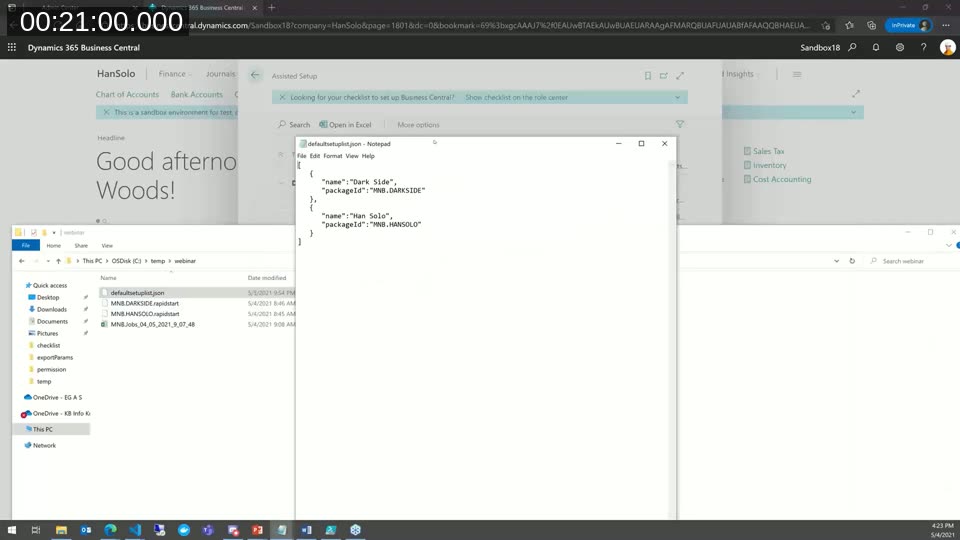
In the demo, Krzysztof shows his own Assisted Setup entry (“MyNAVBlog.com General Setup”) sitting alongside Business Central’s standard ones, offering two sample packages — “Han Solo” and “Dark Side” — to illustrate that a single wizard can offer multiple configuration variants (for example, by industry). Each package is described by a small JSON file with just a name and a package ID.
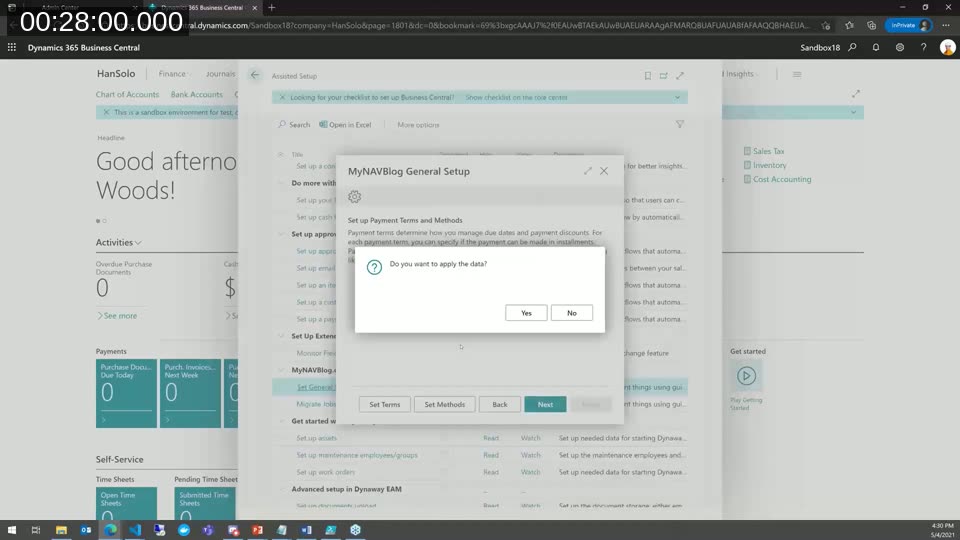
Selecting a package downloads it from blob storage, then the wizard walks the user through applying it step by step: set payment terms and methods, set units of measure, and so on, in an order chosen deliberately (units of measure before work types, since work types depend on them).
The wizard is built with the NavigatePage page type and, as Krzysztof notes, is easy to scaffold using waldo’s AL snippet tooling in VS Code — the remaining work is mostly wiring up steps and instructional text. Each step can open the relevant configuration package screen, where the consultant can review, edit, or delete staged records before applying them. One gap he calls out: you can review and edit staged data, but you cannot add new rows to it from that screen.
Building Configuration Packages on the Fly for Data Migration
For migrating data such as jobs, Krzysztof reuses Microsoft’s own migration wizard pattern: rather than pointing users at a pre-built package, the AL code constructs a configuration package programmatically — inserting the package, the table, and the specific fields to include — then offers a downloadable Excel template built from that package. The user fills in the Excel file and imports it back through the wizard. Because the package is generated in code rather than hand-maintained, adding fields to the template is a code change, but the package itself stays flexible per scenario without manual package management.
Checklists: Microsoft’s New Onboarding Layer
The second half of the session covers Checklists, introduced in Business Central version 18 (2021 release wave 1). Krzysztof quotes Microsoft’s framing directly: checklists exist to help partners, because Microsoft doesn’t know a partner’s specific end-customer business. The standard checklist Microsoft ships is deliberately generic; partners are expected to build their own on top of it. In his poll, 42% of respondents already use checklists and another 25% said “maybe” — which is why he devotes real time to the topic.
He also flags a limitation specific to ISVs: the standard checklist experience is aimed mainly at people setting up a brand-new Business Central environment, not ISVs layering an app onto an existing one, something he’d like to see improved.
Registering Assisted Setup and Checklist Items in AL
Krzysztof walks through the code side of both features. Registering an Assisted Setup entry means subscribing to the OnRegisterAssistedSetup event on the Guided Experience codeunit and calling InsertAssistedSetup, supplying a title, description, target page, an Assisted Setup Group enum value (extensible), and optionally a video URL/category and a help URL. Two practical gotchas he calls out from experience:
- Video links for YouTube or Vimeo must use the embed URL format, not the normal watch/share link, or the video won’t play inside Business Central.
- His team prefers Vimeo over YouTube for this because a Vimeo link can be updated in place, while a YouTube video’s embed URL changes if the video is replaced — forcing a code change.
Multi-language setups also need explicit handling: the code temporarily switches the session’s global language, registers translated setup text, then restores the original language.
📖 Docs: Onboard users to your app — Microsoft’s current guide to theOnRegisterAssistedSetupsubscriber pattern andInsertAssistedSetup, matching the technique shown in the demo.
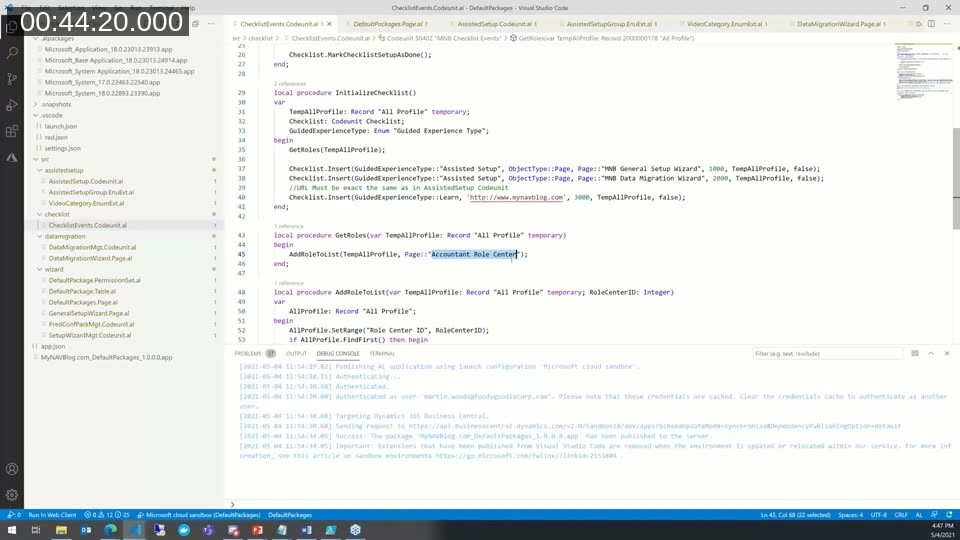
For the checklist itself, Krzysztof’s code subscribes to the checklist initialization event and inserts checklist items that reference the guided experience items already registered (assisted setup, migration wizard, and a “Learn” link), each mapped to a specific role — in his demo, the Business Manager role center, since that’s the only role center where the standard checklist banner appears. He warns that the checklist entry’s reference must match the corresponding Guided Experience item’s title exactly, including case — a mismatch here is a silent failure where the checklist item simply doesn’t show up.
📖 Docs: Get Users Started with the Checklist — covers the Checklist Item data model and the façade functions (InsertManualSetup,InsertAssistedSetup,InsertLearnLink, and others) used to populate it.
The Checklist in Action
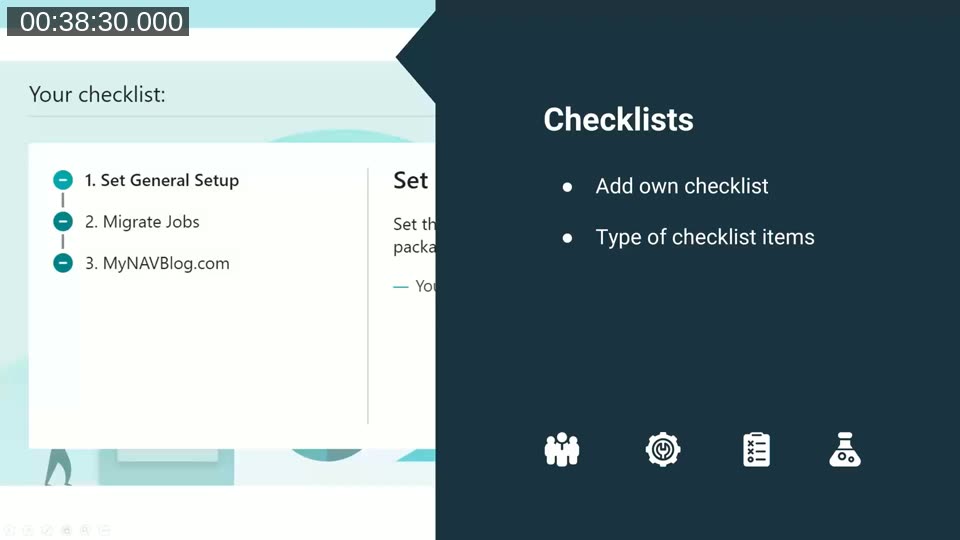
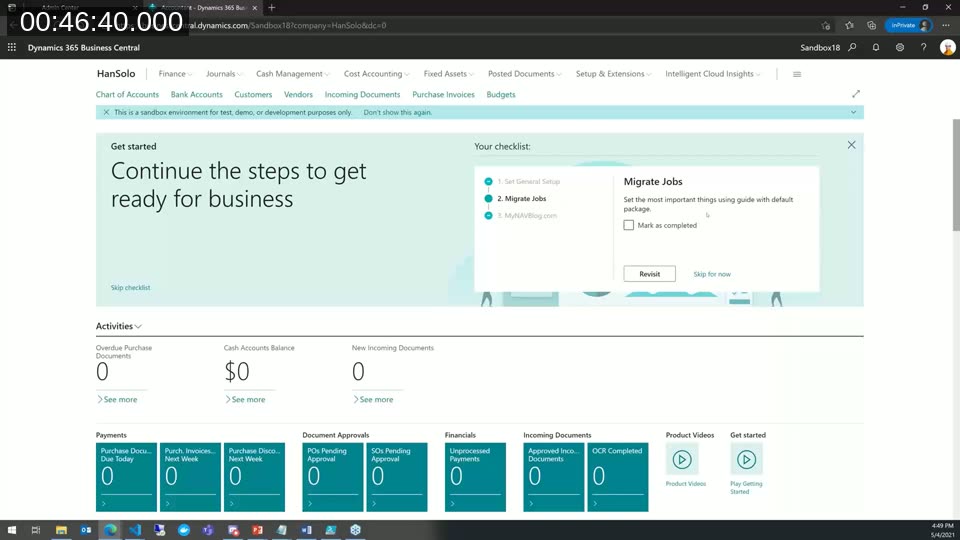
Back in Business Central, the Business Manager role center shows the live checklist banner with the three items registered in code: “Set General Setup,” “Migrate Jobs,” and a “MyNAVBlog.com” learn link. Each item can be marked complete, revisited, or skipped. Krzysztof also points out the Show checklist on the role center option, useful for reopening a checklist a user has dismissed.
Preparing Demo Companies Faster
With time running short, Krzysztof briefly demonstrates a related use case: using the same package-driven approach to spin up a ready-to-show demo company on demand, since customer data in his ISV scenario is too specific to rely on Microsoft’s standard Contoso/Cronus demo data. A single action lets him pick a company type (for example, “Starter”) and populates a demo company with representative data in a few minutes, without keeping a manually maintained copy company around that has to be rebuilt after every update.
Q&A Highlights
Asked about handling translations for migrated master data (for example, payment terms in multiple languages), Krzysztof explains this is handled per package rather than through an external translation tool: a package can be prepared per language (for example, an English and a Polish variant of the same package) and imported into the corresponding translation tables, which are just standard Business Central tables. He hadn’t explored automatic translation but agreed it would be a valuable extension of the approach.
Asked whether the code shown would be shared, Krzysztof said he plans to publish it alongside a written article explaining how to use it, with a link to follow on the webinar’s YouTube page.
This post was drafted with AI assistance based on the webinar transcript and video content.