
In this Areopa Academy webinar, Michael Nielsen, former development manager on the Dynamics NAV team and now with ForNAV, discusses what happens to Business Central code and data once a project ends and the developers move on. Moderated by Luc van Vugt, the session covers the risks of losing access to extension source code, how Microsoft’s ongoing deprecation of AL features can silently break installed extensions, and a tool Nielsen built to mirror both code and data changes into GitHub as an independent, tamper-resistant audit trail.
The problem: code and data that quietly disappear
Nielsen opens by pointing out that source control is common practice during development, with most partners using Azure DevOps or GitHub. The problem he addresses is different: what happens to code and data once it lives in a customer’s production system.
He lists several ways partners and customers can lose access to code or data without realizing it:
- Show My Code set to false. This is the default for per-tenant extensions, meaning only the partner can access the source. If the partner goes out of business or a dispute arises, the customer has no way to retrieve it.
- Feature deprecation. When Microsoft removes or changes features between releases, extensions that rely on them can stop working or fail compliance checks, and get uninstalled automatically.
- Code complexity. Without visibility into code quality, customers have no way to judge whether their extensions are becoming difficult to maintain.
- The open platform itself. Because Business Central is easy to customize, code and data can be changed without anyone noticing — and without a trail, that opens the door to fraud.
Custom report layouts are one concrete example Nielsen gives: they’re stored per company, so deleting a company also deletes its layouts, and restoring them means asking Microsoft for a full backup that includes financial data most customers don’t want backed up either.
Source code management: tracking what’s installed
Nielsen demonstrates a tool he built (referred to on screen as “AL Code Tracker”) that uses Business Central’s public APIs to snapshot extension source code into a GitHub repository whenever an extension is installed, modified, or deleted. Nothing about the approach relies on undocumented interfaces — he notes any partner could build the same thing.
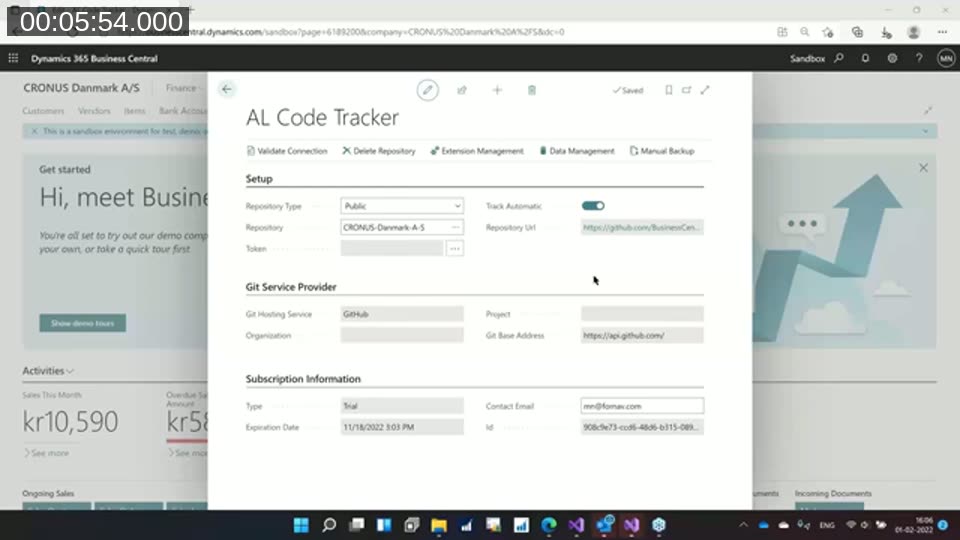
The setup screen lets you choose a public or private repository, pick a Git hosting provider, and turn on automatic tracking so every install, modification, or deletion is captured going forward.
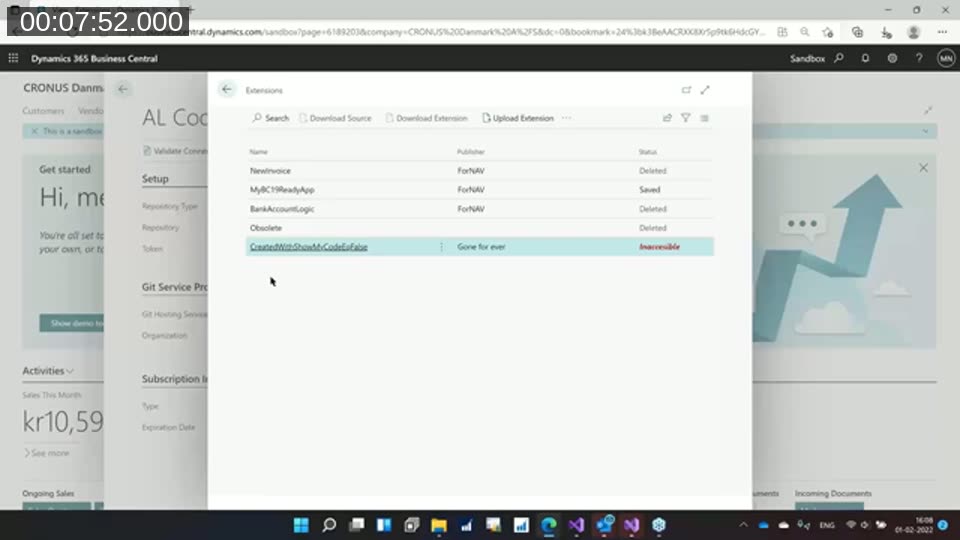
In the extension overview, Nielsen shows several extensions in different states — some deleted, one still saved, and one marked Inaccessible because it was created with Show My Code set to false and has since been uninstalled. Once that happens, there’s no way back in: the code is gone for good.
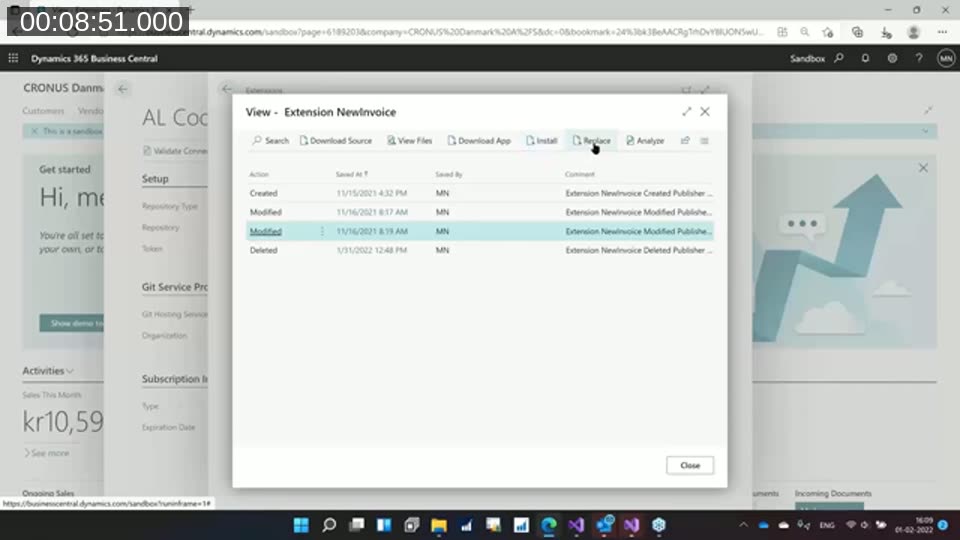
For extensions that were tracked before deletion, the tool keeps a full version history showing every Created, Modified, and Deleted event, who made the change, and when. From here you can download the source as it existed at any point in time, reinstall a previous version, or replace an existing extension with an older one.
📖 Docs: Security and IP protection for extensions — Microsoft’s documentation on the source-visibility setting for per-tenant extensions (the legacyShowMyCodeproperty, now part ofresourceExposurePolicy), which defaults to blocking source download.
Grading code quality before Microsoft flags it
A second part of the demo focuses on evaluating the state of installed code. The tool compiles the extension’s AL source and produces a spreadsheet of metrics intended to catch problems before a customer receives an automatic notice that their extension is out of compliance and about to be uninstalled.
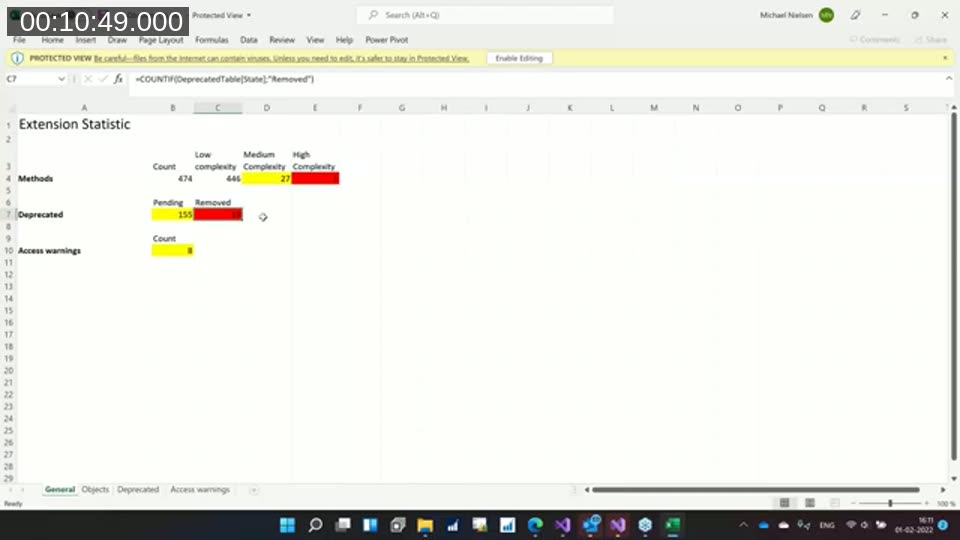
The metrics include:
- Cyclomatic complexity — a measure, borrowed from Java tooling, of the number of branches (if/case statements) in a method. Nielsen buckets AL methods as low (below 10), medium (10–30), or high (above 30) complexity.
- Deprecated feature usage — code that references features Microsoft has removed or is in the process of removing, split into pending and already-removed.
- Access warnings — code that writes directly into sensitive tables such as posting or general ledger tables, outside normal business logic. Nielsen flags this as a common entry point for malicious changes as well as a maintenance risk.
He walks through a demo extension built from an old codeunit 80 (Sales-Post) example, showing how code that compiled cleanly in C/SIDE can end up with dozens of complexity and obsolescence warnings once run through current AL tooling.
📖 Docs: Mark AL objects and symbols as obsolete — Microsoft’s reference for theObsoleteState,ObsoleteReason, andObsoleteTagproperties that flag deprecated code, which is what the spreadsheet’s “deprecated” counts are built from.
Audit trailing: catching changes to data, not just code
The second half of the demo turns to data. Business Central already has a built-in Change Log for tracking field-level changes, but Nielsen points out its limitation: anyone with admin rights can also edit or clear the Change Log itself, so it doesn’t protect against a determined insider. His tool addresses this by writing tracked data changes to GitHub as well, outside the Business Central system entirely.
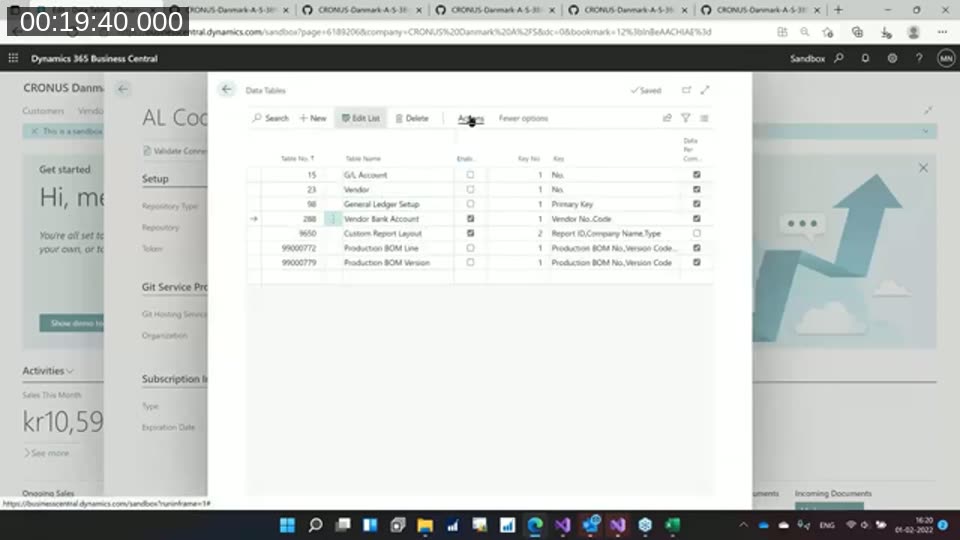
Setup works the same way as BC’s native Change Log: pick the tables and fields to monitor. In the demo, Nielsen tracks the Vendor Bank Account table, among others.
📖 Docs: Auditing changes to data in Business Central — Microsoft’s documentation for the built-in Change Log feature this tool is designed to complement (and independently verify).
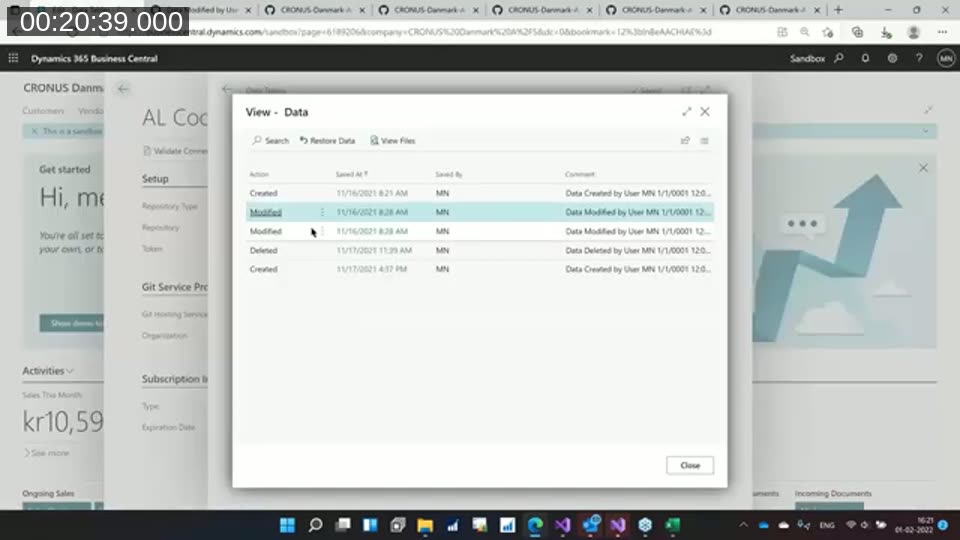
Using a staged example, Nielsen changes a vendor’s bank account number and then changes it back, walking through the resulting history entries — Created, Modified, Modified, Deleted, Created — each stamped with the user and timestamp. Because the trail lives in a separate GitHub repository, altering or deleting it would require access to that repository specifically, not just the Business Central tenant. Nielsen is careful to frame the tool as an auditing layer rather than a replacement for Azure DevOps or GitHub as a development source control system — the goal is visibility into what changed, by whom, and when, not competing with tools developers already use.
Answering audience questions, Nielsen confirms the audit trail writes are atomic, and that installed/uninstalled events can be tracked, though Business Central’s APIs don’t currently expose publish/unpublish state separately — both surface as “deleted.”
Universal Code: the on-premises licensing shift
Prompted by van Vugt, Nielsen spends the second half of the session on an unplanned but related topic: Microsoft’s “Universal Code” initiative, which was introducing a licensing cost for on-premises per-tenant extensions that use DLL interop or direct file system access. Nielsen recalled roughly $225/month to modify the base app and $175/month for DLL usage at the time of the webinar — he noted these numbers casually from memory, so check current Microsoft licensing for exact figures. The change was intended to push on-premises extensions toward the same constraints SaaS already enforces, and it lines up with Microsoft’s broader move of Business Central off .NET Framework and onto .NET Core, which will break many older interop DLLs regardless of licensing.
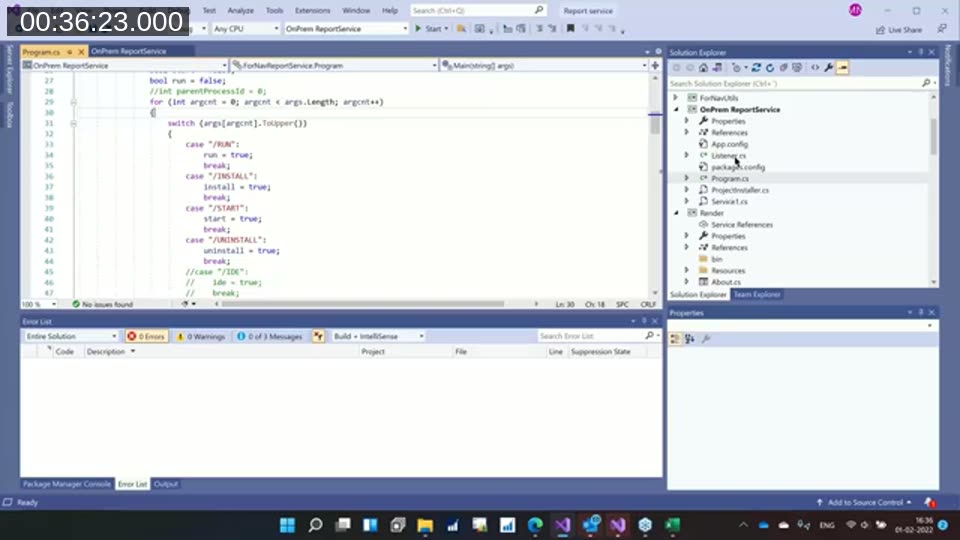
To avoid the DLL tax, Nielsen built a small on-premises Windows service in C# that AL code calls over HTTP instead of loading a DLL directly. The same extension code calls out to an Azure Function in the cloud and to the local service on-premises, switching on a simple runtime check for which environment it’s running in. The service itself is a standard .NET HttpListener with handlers for run, install, start, and uninstall — Nielsen describes it as roughly a weekend’s work, with the Windows installer being the more tedious part.
He offered to share the code with the community after the session, noting there’s nothing proprietary in it — it’s built entirely on public .NET APIs and documented patterns found by searching for HttpListener examples.
📖 Docs: Call .NET Interop APIs from AL — Microsoft’s documentation confirming that .NET interoperability (DLL usage) is on-premises only, and recommending Azure Functions as the cloud-compatible alternative — the restriction driving the on-premises service pattern shown here.
Q&A highlights
During the closing Q&A, Nielsen addressed a few additional points:
- Uninstalling an extension and deleting its data are tracked as separate events, but Business Central’s APIs can’t distinguish “uninstalled with data kept” from “uninstalled with data deleted” — his advice is to never delete extension data, since code can always be reinstalled but deleted data cannot be recovered.
- He doesn’t expect Microsoft to expose full source code access to end customers, since most partners want to keep their IP protected.
- The on-premises service pattern only requires opening a local HTTP endpoint on the same box as Business Central, so it doesn’t introduce new network exposure.
This post was drafted with AI assistance based on the webinar transcript and video content.