
Upgrading from Dynamics NAV to Dynamics 365 Business Central involves far more than a technical migration — licensing decisions, code refactoring strategies, and data preparation all need to happen before the actual upgrade begins. In this Areopa Academy panel webinar from June 2020, Jon Long (Director of Upgrades, ArcherPoint), Saurav Dhyani (Technical Futurist, ArcherPoint), and host Luc van Vugt walk through the key preparatory steps that partners and customers need to take before moving to Business Central.
The session covers Microsoft’s new lifecycle policy, the N-2 licensing rule and its deadline implications, upgrade path options from any NAV version to BC SaaS, and several code-level preparation tasks including prefix/suffix registration, application area tagging, permission sets, profiles, and user personalization. Audience questions from over 80 attendees are woven throughout.
Microsoft’s New Lifecycle Policy
Jon Long opens with a detailed look at how Microsoft’s release and support cadence changed with Business Central. Under the new policy, a new version ships every six months (a “wave”), and each version receives 12 months of support after its release window closes. That gives partners and customers a defined, time-boxed window to act.
Business Central 14 is an important exception: it carries a 48-month support tail, making it the strategic stepping stone for anyone still running C/AL code. BC 14 is the last version where the C/AL development environment and the RTC client are available alongside AL and the web client.
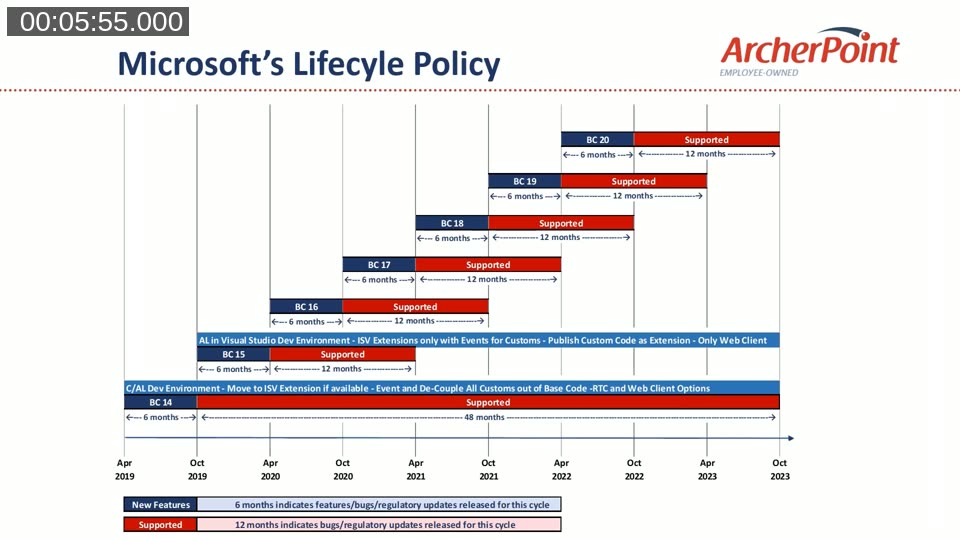
📖 Docs: Microsoft Docs: Business Central lifecycle and update policy — covers release cadence, support windows, and the update schedule for both SaaS and on-premises.
License and Deployment Options
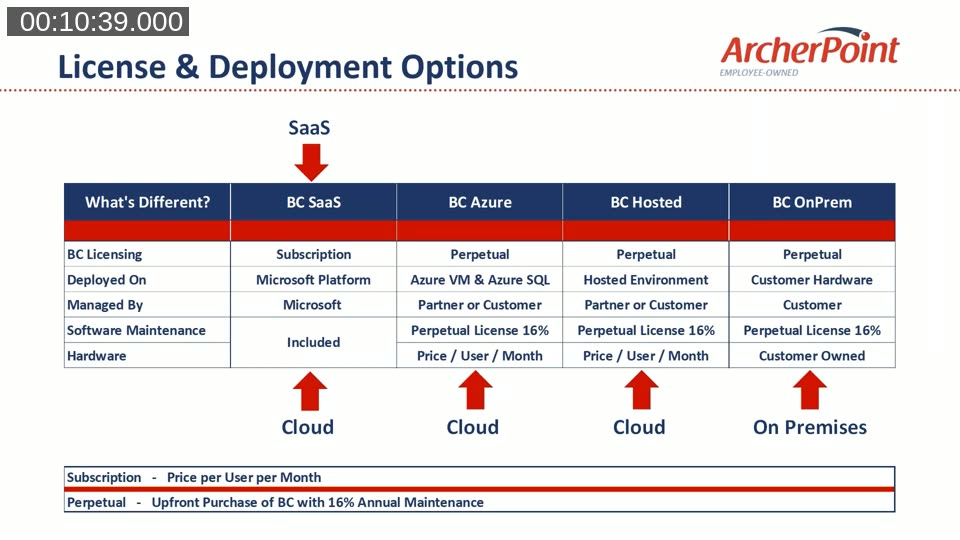
Jon explains the four deployment models — BC SaaS, BC Azure (VM), BC Hosted, and BC OnPrem — and the key differences in licensing model (subscription vs. perpetual), management responsibility, and hardware ownership. Only BC SaaS uses a subscription model managed entirely by Microsoft; the remaining three are all on-premises variants, even if the hardware lives in a data centre.
The N-2 Licensing Rule and Its Deadline
The N-2 policy means that at any given time, the oldest Business Central version for which you can purchase license keys is the current version minus two. When BC 16 was current (at the time of this webinar), BC 14 was the oldest purchasable version. Once BC 17 launched in the autumn of 2020, BC 14 keys would no longer be available for new purchases.
This created a concrete deadline: partners or customers who still needed C/AL access — for example, because an ISV add-on had not yet been converted to an AL extension — had to buy a BC 16 license with BC 14 keys before that window closed. Jon’s slide provides three scenario-based recommendations depending on when an upgrade was planned to start.
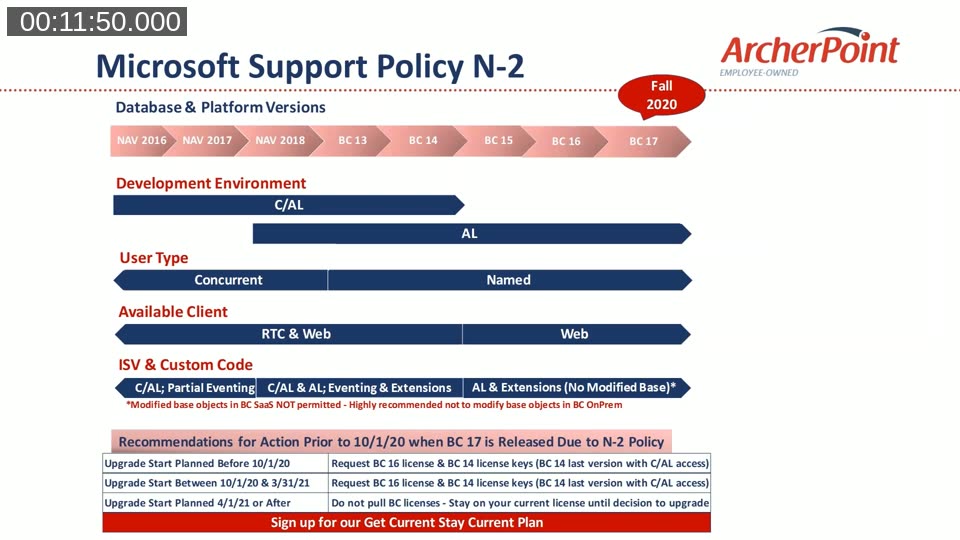
A question from the audience raised the option of buying a SaaS subscription license and adding BC 14 on-prem keys to it as a workaround. Jon confirmed this is possible but noted one important caveat: doing so locks the old NAV license, preventing further object additions to it. Partners need to verify that no additional object purchases are needed before taking that route.
On user conversion, Jon clarified that the long-standing 1-to-3 concurrent-to-named user conversion ratio is not a time-limited offer — it is based on the named user count as of October 1, 2018, regardless of when the actual upgrade occurs.
Upgrade Paths: Any NAV Version to BC SaaS
Saurav Dhyani takes over to map out the supported upgrade paths. The core message is that there is a documented Microsoft path from any Dynamics NAV version — including NAV 2.60 — all the way to Business Central SaaS, though the number of intermediate steps varies by starting version.
- BC 14, 15, or 16 (or BC 13): direct replication to BC SaaS (no C/AL customizations).
- NAV 2016 through BC 13 / NAV 2018: one intermediate step to BC 14, then replicate to SaaS.
- NAV 2013 / 2013 R2: upgrade to NAV 2015 or (recommended) to NAV 2018, then follow the path upward.
- NAV 2009 SP1 / R2: direct Microsoft toolkit path to NAV 2015, then onward.
- NAV 4 through NAV 5 / 3.70: step to NAV 2009, then follow the ladder.
- NAV 2.60: step to NAV 4, then continue up.
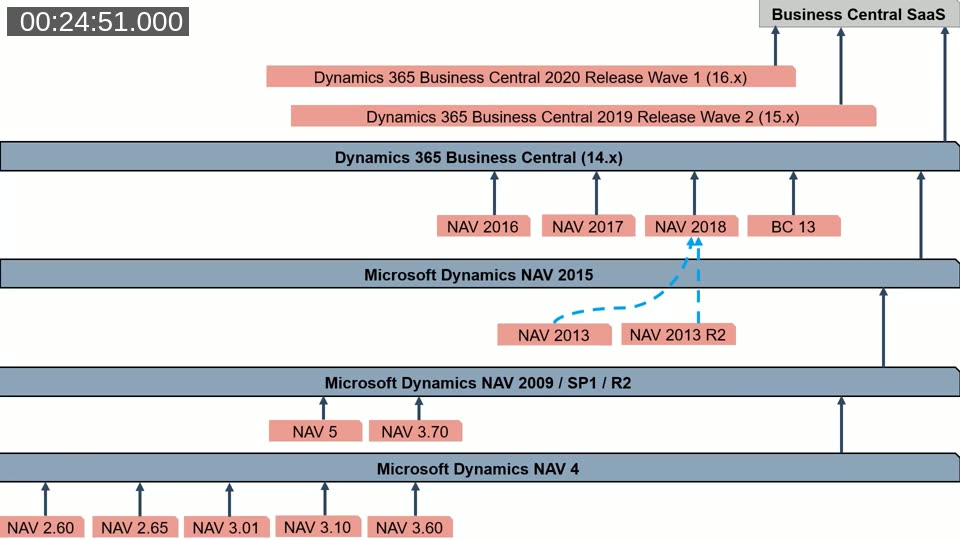
📖 Docs: Microsoft Docs: Upgrading to Business Central — the upgrade overview page for BC 14.x, including toolkit links and multi-version path documentation.
Preparation Step 1 — Prefix and Suffix Registration
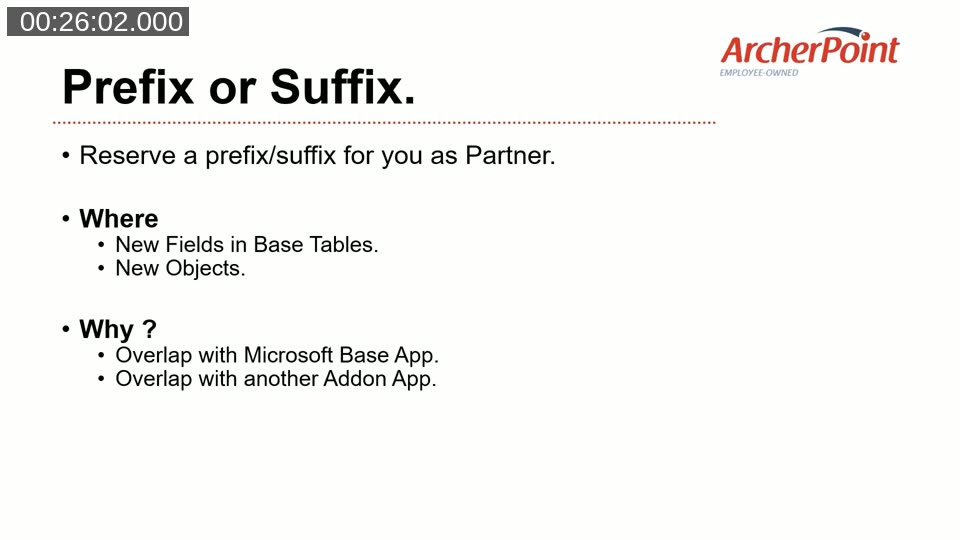
Saurav covers five code-level preparation steps that should be completed before or during the move to BC 14. The first is prefix/suffix registration. Partners must contact Microsoft to reserve a unique prefix or suffix, which then needs to be applied to every new field added to a base table and every new custom object. Without a registered prefix or suffix, a future Microsoft release or another extension could introduce a field with the same name, causing upgrade conflicts — a problem familiar to anyone who lived through NAV version upgrades where custom posting-date fields collided with Microsoft-added ones.
Preparation Step 2 — Application Area Tagging
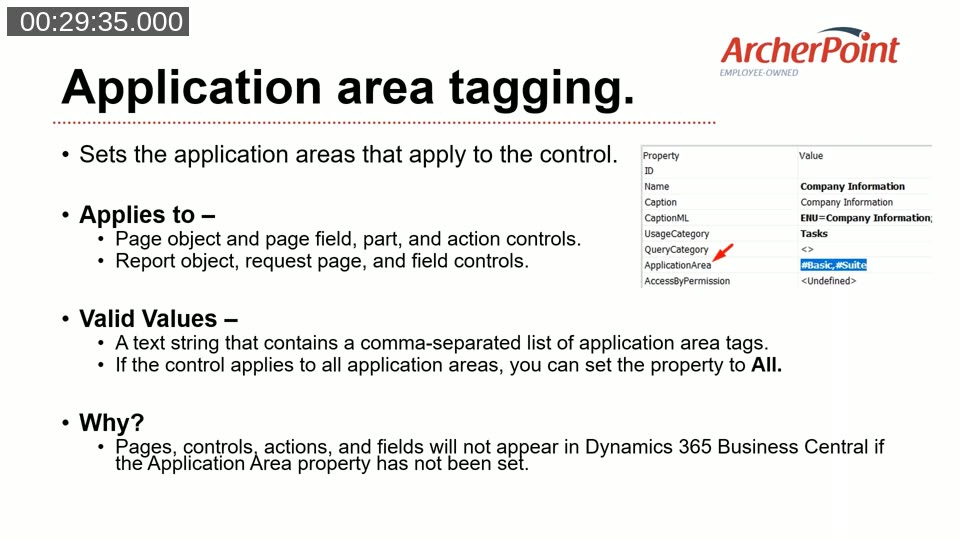
Any page, field, action, or report object that is missing an ApplicationArea property will not be visible in the modern web client. Saurav recommends tagging all custom controls with ApplicationArea = All as the safest default, ensuring the control appears regardless of which application area the tenant has configured. This property can be set in C/AL code today — it does not require a move to AL first.
Preparation Step 3 — Permission Sets and Permissions
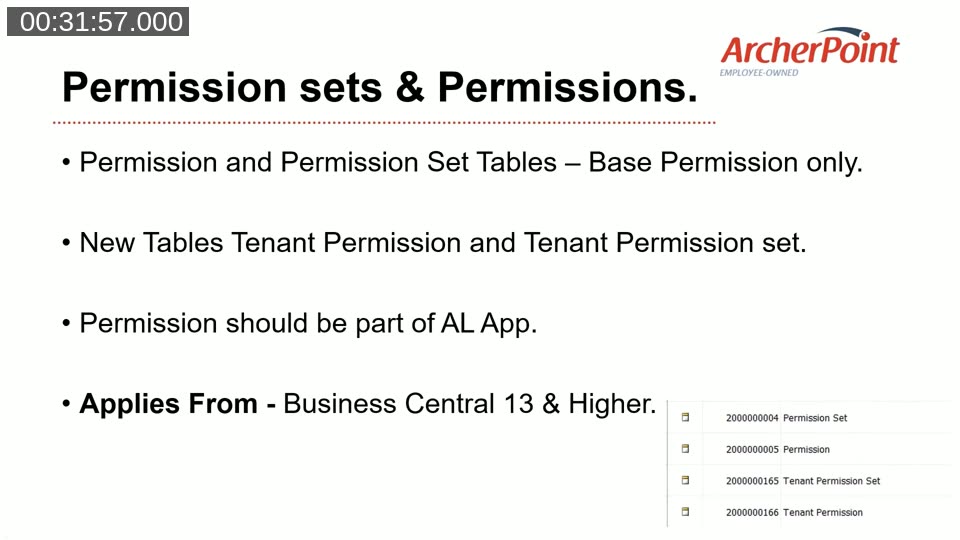
Starting with BC 13, Microsoft introduced two new tables: Tenant Permission Set and Tenant Permission. Custom permissions must be stored in these tenant tables rather than in the base Permission Set and Permission tables. The base tables are not replicated to SaaS (they hold common platform permissions shared across all tenants), whereas the tenant tables travel with an extension and are replicated as part of a deployment.
Preparation Steps 4 and 5 — Profiles and User Personalization
Profiles configured via the Windows client configuration mode cannot be migrated directly to the modern client — the schema is fundamentally different. Saurav recommends recreating profiles as AL page customization extensions rather than using the UI-based designer, because code-based profiles can be deployed across multiple tenants as part of an extension package.
User personalizations stored from the Windows client are flagged as “legacy personalization” in the web client and block further personalization of those pages. They must be deleted and recreated in the modern client. Again, Saurav prefers the Design Mode Extension approach, which saves personalizations as code rather than as XML schema records in the user personalization table.
Moving to BC 14 — Key Technical Considerations
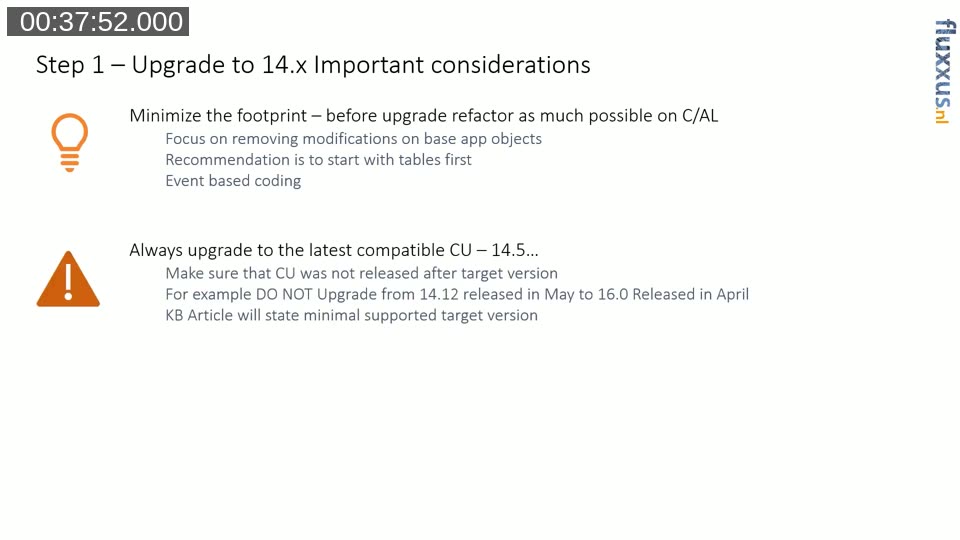
Luc van Vugt adds a set of practical notes for the BC 14 step itself. The goal before upgrading is to minimize the code footprint as much as possible while still on C/AL: remove base object modifications, move to event-based coding, and make only additive changes to the SQL schema (new tables, new fields — never remove standard tables or fields). This makes the subsequent jump from BC 14 to BC 15 or 16 substantially easier.
Luc also highlights a compatibility matrix rule: the cumulative update (CU) version of BC 14 that you are on must not have been released after the target BC 16 RTM date. For example, upgrading from BC 14.12 (released in May) to BC 16.0 (released in April) is not valid; upgrading from BC 14.12 to BC 16.1 is. The relevant KB article for each target version states the minimum supported source CU.
📖 Docs: Microsoft Docs: Technical upgrade from BC 14 to BC 16 — step-by-step technical upgrade guide including CU compatibility requirements and data upgrade codeunit structure.
Audience Q&A Highlights
The panel fielded questions submitted before and during the session. A selection of the most broadly applicable answers:
- Can you still add to an old NAV license after migrating to BC? Yes, but only for 180 days. After that window, the old license is locked from modification.
- What about multi-tenant databases? Microsoft documents the on-prem multi-tenant upgrade path in MSDN. For SaaS, the multi-tenant consolidation process is not publicly documented at the individual tenant level.
- Databases with 500+ companies: The upgrade toolkit is single-company-threaded in BC 14 and earlier, but from BC 15 onward it handles multi-company automatically. ArcherPoint modified the toolkit to loop through companies for a 35-company upgrade on BC 15.
- Large databases (>80 GB) migrating to SaaS: At the time of the webinar, Microsoft had just introduced a per-GB/month SKU with no hard size ceiling.
- Extension upgrade logic: If an extension version bump does not change schema or move data between tables, an upgrade codeunit is not strictly required. When schema changes do exist, the upgrade codeunit runs automatically as part of the Microsoft upgrade process.
- Licensing implications of moving customizations to extensions: On-prem, object licensing still applies as before (table and page extensions require purchased object ranges). On SaaS, objects in the 50,000–99,999 range are free.
- Best practices — do’s and don’ts: Jon’s top recommendation is not to introduce new add-ons during an upgrade project. The upgrade itself represents enough change for the customer; new functionality should wait until before or after the upgrade is complete.
This post was drafted with AI assistance based on the webinar transcript and video content.