
In this 112th Areopa webinar, Jose Miguel Azevedo shares a set of AI prompts he has built up over a year of daily use as a Business Central functional consultant at KPMG London. Moderator Bert Verbeek hosts the session. Jose covers six concrete prompts — each tied to a real consulting task — and closes with a set of bonus ideas and practical takeaways about how to use GenAI responsibly in consulting work.
Why Functional Consultants Should Look at AI Now
Jose opens with a personal framing exercise: listing the tasks he enjoys versus the ones he tries to avoid. Repetitive documentation work, starting from a blank page, and lack of inspiration feature on the “avoid” side. He used that list as his starting point for finding where GenAI could help — focusing first on the things he disliked, rather than the things he was already good at.
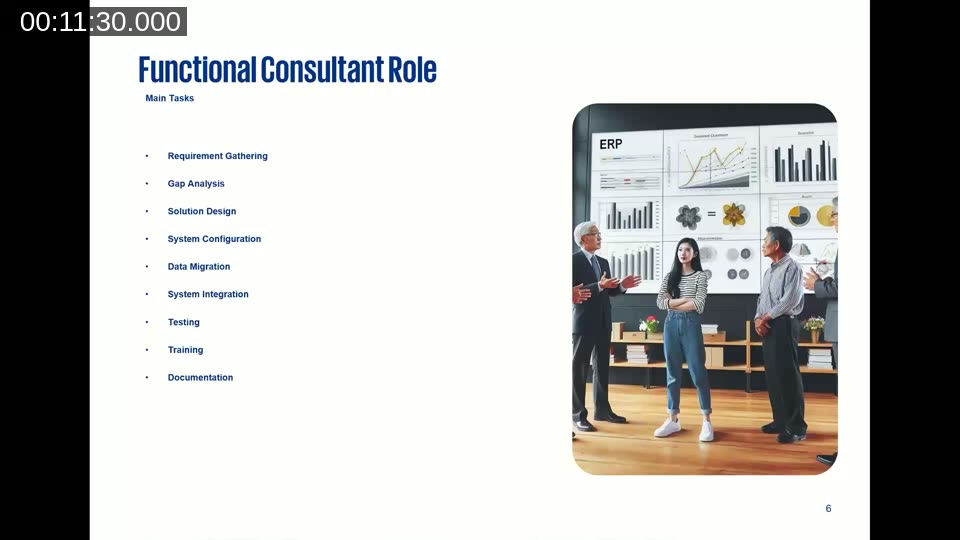
He maps the main functional consultant responsibilities — requirements gathering, gap analysis, solution design, configuration, data migration, integration, testing, training, and documentation — and shows where AI can add value in each area.
Prompt 1 — Requirements Gathering from Meeting Transcripts
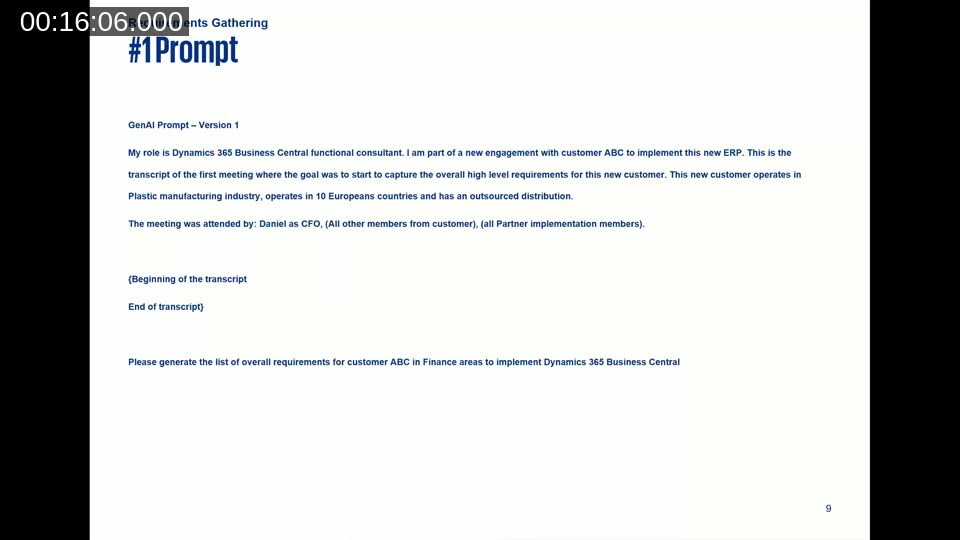
The pre-work matters as much as the prompt itself. Jose’s recommended steps: record the requirements session (Teams does this automatically), copy the transcript to a text file, do a quick manual review to remove contradictions and off-topic sections, and decide on the output format before you write the prompt.
The key difference between a weak and a strong prompt here is context. A bare “generate requirements from this transcript” gives AI nothing to prioritise. Jose’s version includes his role, the customer industry and geography, who attended the meeting and their titles, and whether the output should be a bullet list, Word document, or DevOps backlog item.
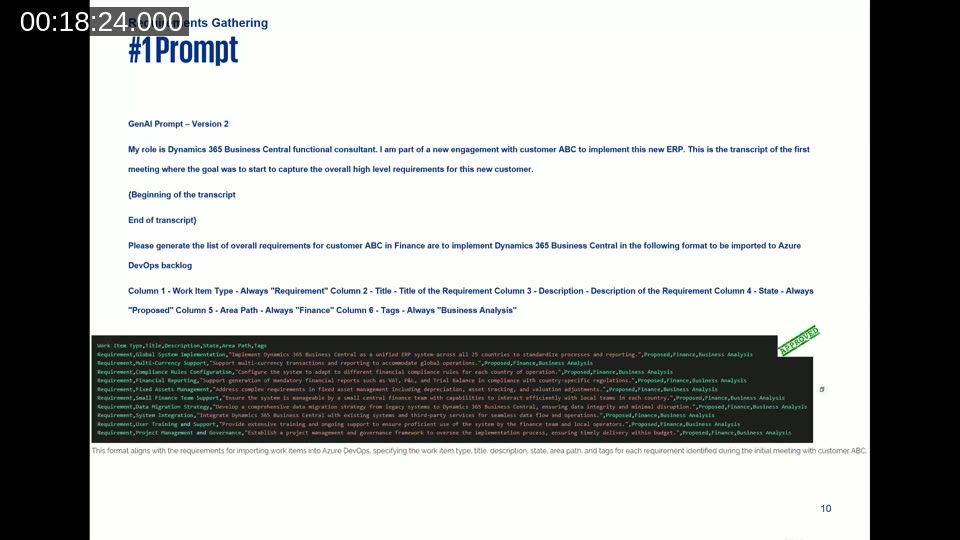
Version 2 of the prompt asks for output formatted directly for Azure DevOps import, specifying columns: Work Item Type (always “Requirement”), Title, Description, State (always “Proposed”), Area Path (always “Finance”), and Tags (always “Business Analysis”). The result is a CSV that can be imported straight into a DevOps backlog without transformation.
📖 Docs: Import work items from CSV — Azure Boards — step-by-step guide to the required columns and how to bulk-import requirements directly into your DevOps backlog.
Prompt 2 — Gap Analysis: Standard or Customisation?
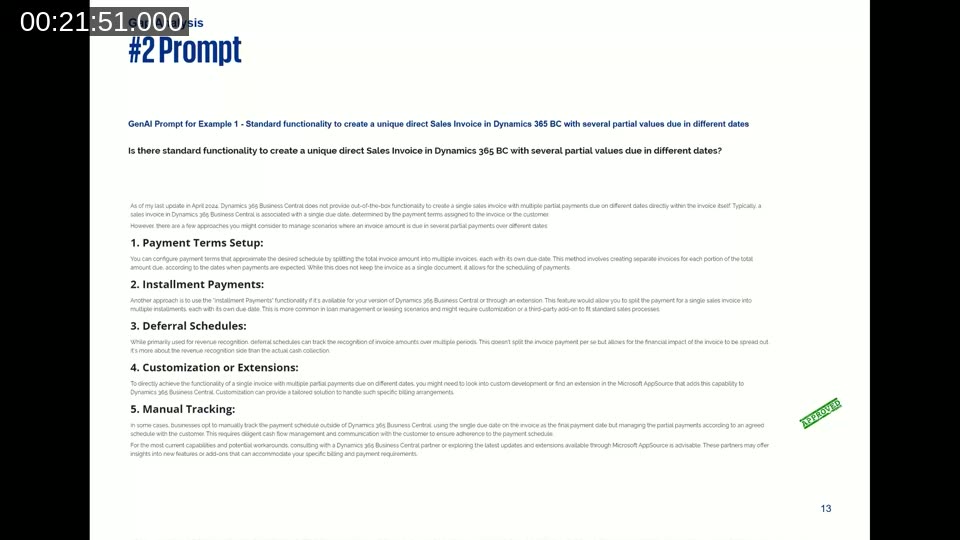
Jose’s gap analysis prompt is deliberately minimal: describe the requirement precisely, and tell the AI what kind of answer you want — yes/no, or a list of options. He shares three real customer examples. Two of them (partial fixed asset disposal, and split invoice payment dates) get accurate, useful answers. The third — depositing a sales invoice to a bank account other than the company default — gets an incorrect answer; AI suggests customisation is required, when a recent Business Central update added that capability natively.
The lesson: use AI as a starting point for gap analysis, not as the final word. Always verify, especially for functionality added in recent release waves.
📖 Docs: About the Business Process Catalog — Dynamics 365 guidance — Microsoft’s catalog of 700+ standard business processes across Dynamics 365 apps, useful for benchmarking customer requirements against leading practice before or alongside an AI gap analysis.
Prompt 3 — Generating Functional Design Documents (FDDs)
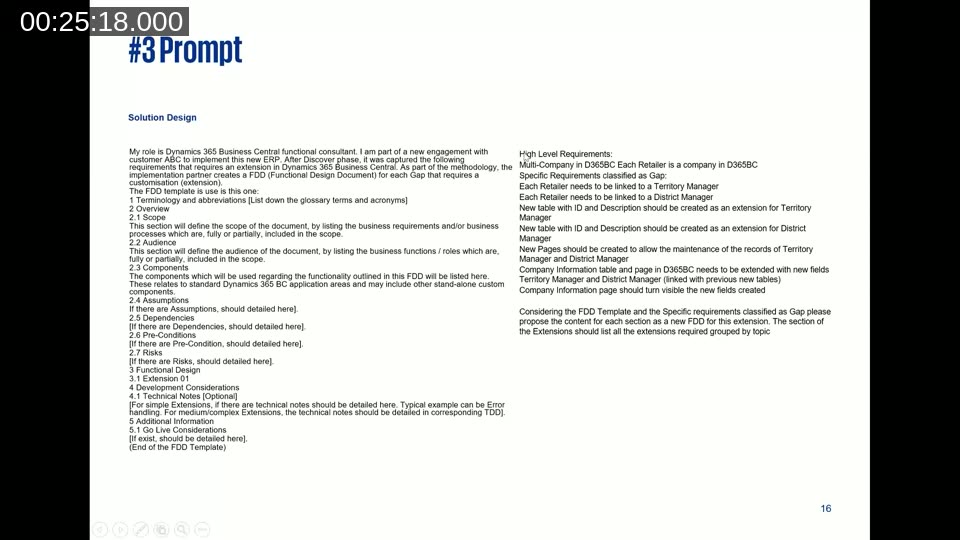
FDDs need to serve multiple audiences at once: the customer for sign-off, developers for build guidance, and testers for test case derivation. Jose’s approach is to provide an agnostic FDD template (all section headings, no content), a clear description of the gap, and a set of high-level requirements as bullet points. The prompt asks AI to populate each section of the template for that specific gap.
In his example — a multi-company extension linking retailers to Territory Manager and District Manager tables — the AI handles abbreviations, scope, audience, assumptions, dependencies, pre-conditions, risks, and the functional design sections well. The one section it handles less well is Components; Jose notes this is an area to review manually.
Prompt 4 — Test Case Generation from an FDD
Once you have a completed FDD, generating test cases is a single follow-up prompt: “Please propose the test cases for the previous FDD in the following format to be imported into Azure DevOps.” The format specifies Test Case Number, Test Case Title, and for each test case: Step Number, Action (text), and Expected Result (text).
Jose observes that few functional consultants enjoy writing test cases. The AI output covers both end-user steps and system validation steps at a level of detail that is immediately usable, reducing one of the most time-consuming documentation tasks in a BC project.
Prompt 5 — Anonymised Test Data for Data Migration
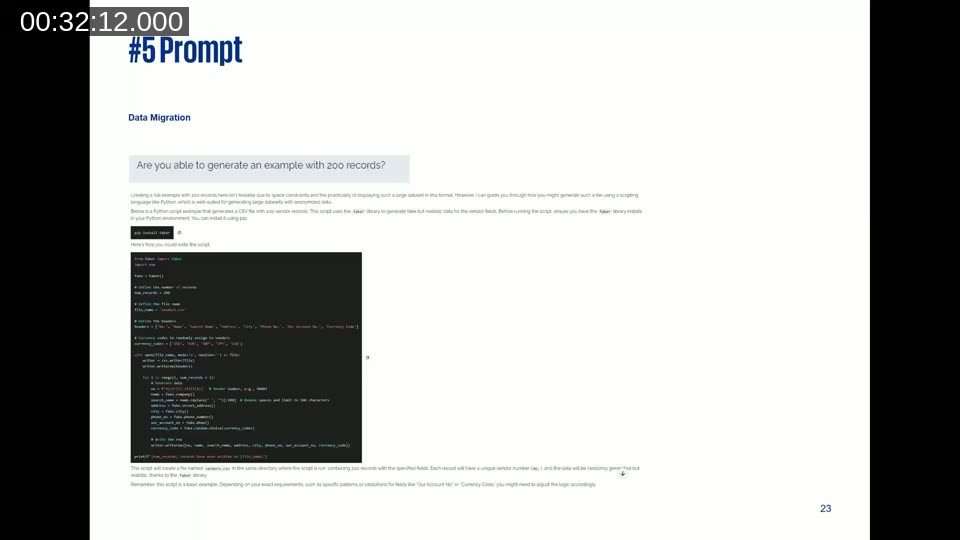
Before a data migration dry run you need test data that matches the configuration package schema without using real customer data. Jose’s prompt asks AI to generate 200 anonymised vendor records with specific columns matching a Business Central configuration package (No., Name, Search Name, Address, City, Phone No., Our Account No., Currency Code).
AI initially declines to produce 200 records in the chat window. After Jose pushes back, it offers a Python script using the Faker library that generates the file programmatically. The script works. Jose’s takeaway: the first answer is not always the best answer — challenge AI when the result falls short.
Prompt 6 — Debugging Production Code Without Technical Skills
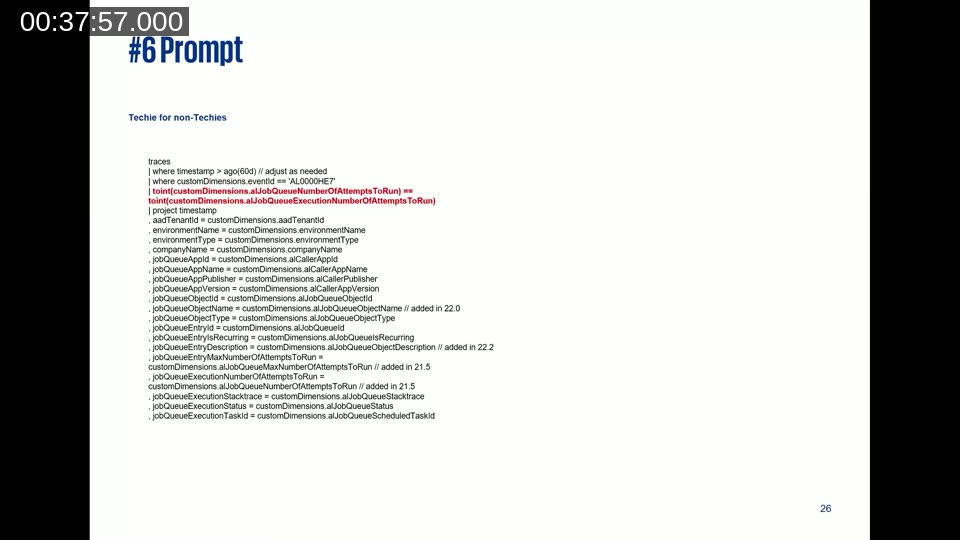
Jose describes a real post-go-live incident at a stock-market-listed group of companies. A low-code monitoring solution using Application Insights, BC Telemetry, Power Automate, and Job Queue was sending false-positive failure emails: the job queue would fail on its first attempt (often a deadlock), succeed on retry, but the alert still fired.
With his technical architect unavailable, Jose identified that the KQL query needed an additional condition — only send an alert when the number of failures equals the total number of allowed attempts — but could not compile the corrected query himself. On the third AI prompt attempt, the AI not only suggested the correct condition but also identified that the variable needed to be cast to integer using toint(), which was the root cause of the compile error.
The solution has been running without issues for three years since. For a functional consultant with no AL or KQL background, AI provided an unblocking option that would otherwise have required waiting for a technical resource.
📖 Docs: Job queue lifecycle telemetry — Business Central — reference for the custom dimensions and KQL fields available when monitoring Job Queue entries via Application Insights.
Bonus Prompts
Jose closes the prompt section with additional ideas he uses but did not have time to demo:
- Reviewing and rewriting important formal emails before sending
- Drafting integration strategy and data migration strategy documents from a baseline template
- Configuring Data Exchange Definitions in Business Central — one of the most tedious standard configuration tasks
- Building a library of test scripts for ISV add-ons, where Microsoft does not ship test cases
- Generating risks, assumptions, and workshop agendas for a specific scenario when starting from a blank page
Key Takeaways
Jose’s five points from experience:
- Be aware of what you share. Every prompt and attachment you send to a GenAI tool is processed by that service. Be compliant with your customer’s data handling requirements before uploading transcripts, templates, or production data.
- More is more. A longer, contextual prompt produces better results than a short, direct one. Include your role, the customer context, the industry, the expected output format — AI cannot infer what is not written.
- Always challenge the output. Treat AI answers the way you would treat an unofficial blog post: useful as a starting point, but verify before presenting to a customer or developer.
- Stay the owner. The functional consultant owns the FDD, the requirements list, and the test cases — regardless of how much of the content AI generated. Do not attribute errors to AI; review and approve what you deliver.
- Define a plan to move up one level. Jose closes with the self-assessment challenge from a Microsoft keynote he attended: rate your current GenAI use (never tried / end user only when required / frequent end user / building own solutions), then make a plan to reach the next level within one year.
Q&A Highlights
One attendee asked what to do when customer processes are undocumented or messy and AI may be working from stale data. Jose recommends using the Microsoft Business Process Catalog as a starting reference — it covers 700+ standard processes across Dynamics 365 and Business Central — and feeding AI the delta between the customer’s actual process and that leading practice. The functional consultant’s job is still to capture and describe the customer’s reality; AI helps once that description exists.
This post was drafted with AI assistance based on the webinar transcript and video content.