
In this January 2020 webinar, Luc van Vugt (MVP, The Learning Network) presents a first-hand investigation into how to upgrade from older Microsoft Dynamics NAV versions to Business Central. Rather than a theoretical overview, the session is grounded in a real project: upgrading a NAV 2018 installation with 22 AL extensions to BC 14 and beyond. Luc walks through upgrade scenarios, the three-phase journey toward the cloud, key technical considerations, and the tooling available to support the process.
Why Upgrade Now — and Why BC 14?
The starting point for the investigation was a practical performance problem. The Learning Network, running NAV 2018 with more than 22 AL extensions, experienced a system under strain during peak load in summer 2019. A technical upgrade to BC 14 was performed to benchmark the difference. The result: running the full test suite of 18,300 tests on BC 14 was consistently 15–18% faster than on NAV 2018.
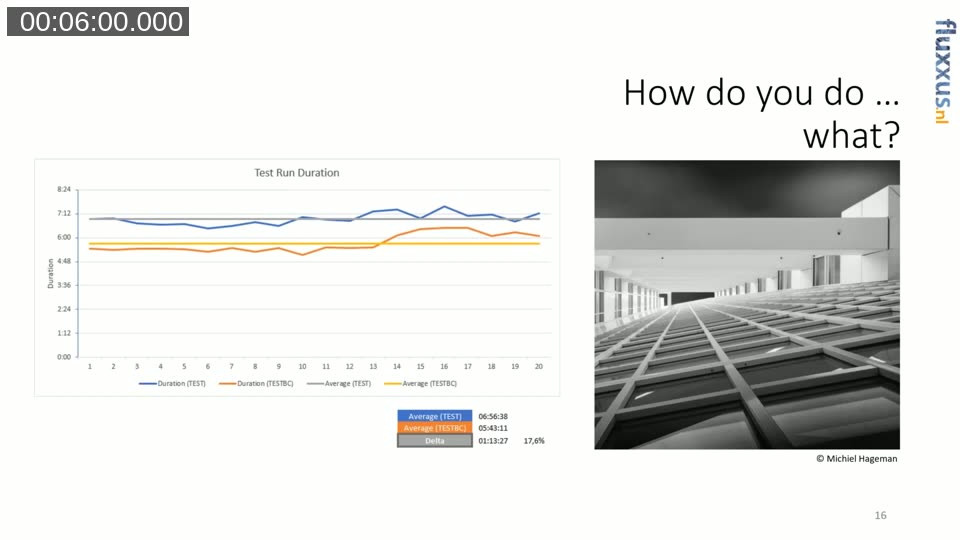
This performance gain, combined with bug fixes and platform improvements, made BC 14 the logical first destination — even before moving further toward BC 15 or the cloud. Luc notes that load testing across multiple concurrent sessions was still ongoing at the time of the webinar, but the test suite measurements were already compelling.
Upgrade Scenarios: Which Path Applies to You?
Before jumping into technical steps, Luc presents an upgrade questionnaire to help attendees identify which scenario applies to their situation. The full decision tree covers five cases: staying on C/AL only, converting existing code to AL extensions on the same version, moving from a pre-BC15 C/AL codebase to BC 15, migrating BC 15 from on-premises to SaaS, and the unsupported reverse direction (SaaS to on-premises).
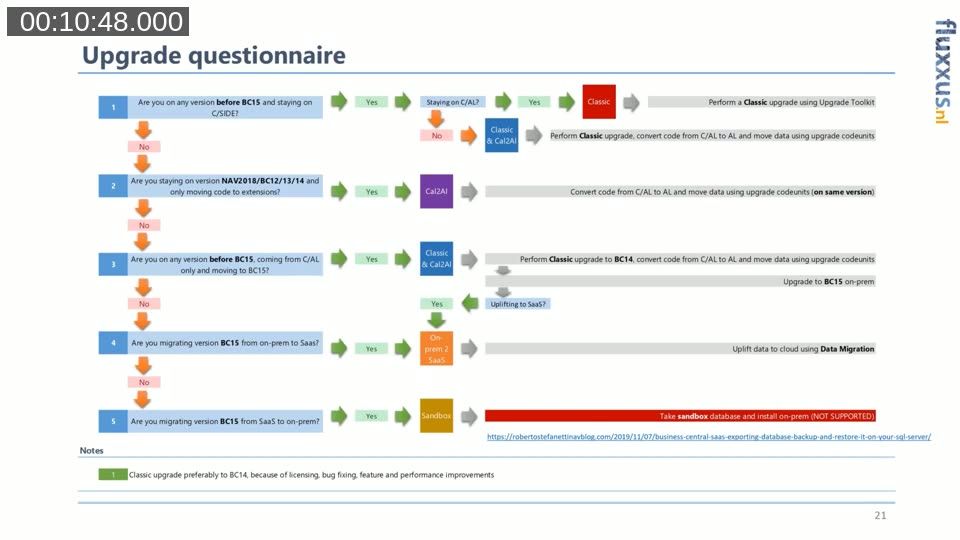
The most common path for the audience is scenario 3: starting from a C/AL-only pre-BC15 installation and working toward BC 15 on-premises — with an eventual option to uplift to the cloud. That multi-step journey is the main subject of the session.
The Destination: BC 15 Architecture in the Cloud
Luc uses a clear diagram to illustrate the target state. In BC 15, Microsoft introduced the System Application as a dedicated base layer — the successor to Codeunit 1 and similar foundational objects. On top of it sits the Microsoft Base App (containing all standard business logic like posting codeunits and master data tables), and next to it are partner apps and tenant-specific customisations. Everything is an extension. This architecture makes the solution composable and upgradeable.
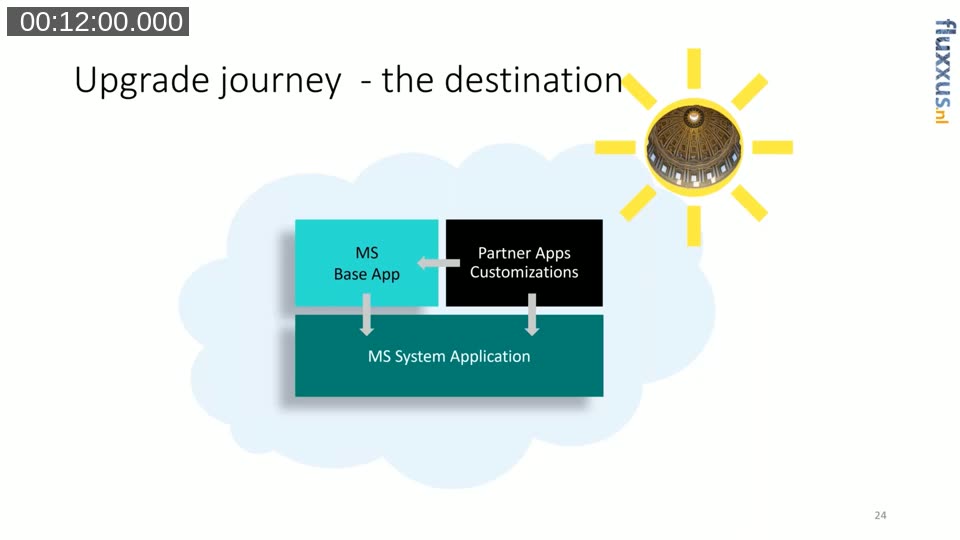
Luc frames this as the “ideal destination” that Microsoft is steering partners and customers toward — not because on-premises will disappear, but because this structure is the prerequisite for cloud deployment and for keeping upgrade cycles manageable over time.
The Three-Step Journey
The upgrade plan is visualised as two mountains separated by water. Step 1 is upgrading to BC 14 (on-premises, C/AL + AL). Step 2 is upgrading to BC 15 (on-premises, AL). Step 3 is uplifting data to the cloud.
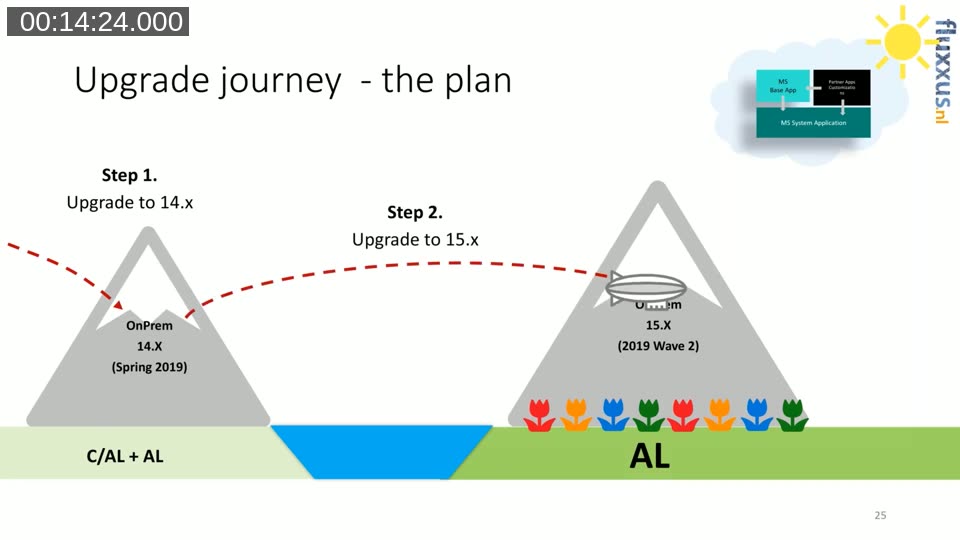
Each step has its own prerequisites and challenges. The “water” between the mountains represents the fundamental shift from C/AL to AL — there is no direct landing place, and the choice made in Step 2 determines whether a cloud path remains open.
Step 1: Getting to BC 14 — What to Do Before You Start
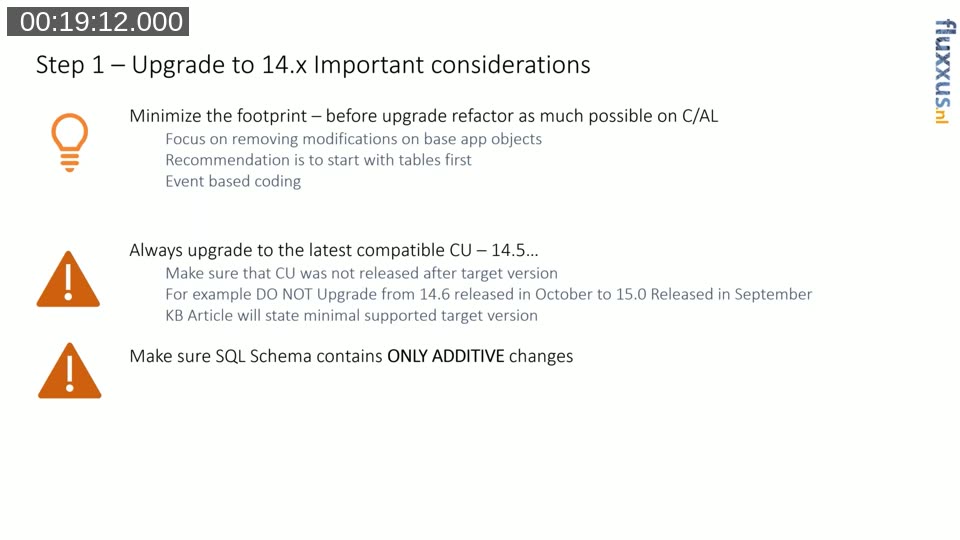
Luc devotes considerable time to the practical preparation needed before a classic upgrade to BC 14. The core advice is to minimise the footprint of customisations in base app objects as much as possible before the upgrade begins. This work can start today — Luc’s team had been doing it for three years already. The key considerations are:
- Minimise footprint — refactor C/AL code to use events and decouple logic from base app objects. Start with tables, since field-level additions to standard tables create SQL schema dependencies that are the hardest to deal with later.
- Use the latest compatible CU — always upgrade to the most recent cumulative update, but verify that its release date is not newer than the target CU on the next version. Each KB article states the minimum supported target version.
- Additive SQL schema changes only — any deleted, renamed, or type-changed standard field or table must be reverted before the upgrade. The AL extension model does not permit breaking SQL changes, and the upgrade platform relies on this invariant.
Luc also covers renaming and renumbering. If a custom table in the 50,000 range will eventually move to an AppSource-ready ID range, the rename and renumber should happen in C/AL before the upgrade. The platform can then automatically carry the table — including its data — into an AL extension, provided the name and ID match exactly.
The official upgrade documentation covers the supported paths, required cumulative update versions, and data upgrade procedures.
docs.microsoft.com — Upgrade Overview (Business Central)
Step 2: Getting to BC 15 — Three Architecture Choices
Moving from BC 14 (C/AL + AL) to BC 15 (AL only) requires choosing one of three architecture approaches. Luc ranks them clearly:
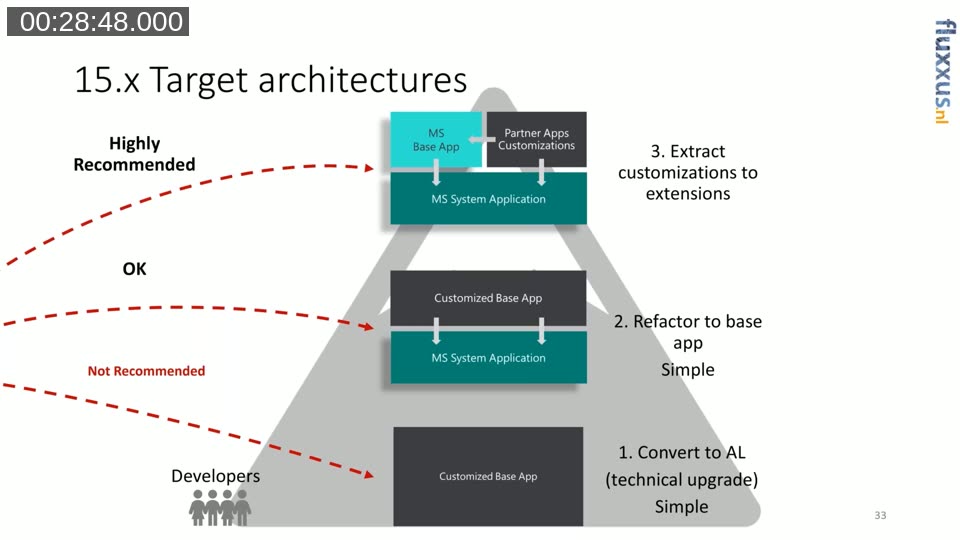
Option 1 — Convert to AL (technical upgrade): Convert all existing C/AL code into a single monolithic AL “Customized Base App” without using the System Application. This is the quickest shortcut, and Luc calls it exactly that — a shortcut, but also a dead end. The result is an on-premises installation that cannot be uplifted to the cloud and will require the same decoupling work again later. Not recommended.
Option 2 — Refactor to base app: Merge and upgrade the C/AL codebase to BC 15, then perform a three-way merge between the old C/AL, new C/AL (BC 15 standard), and the AL base app. The customised code sits on top of the System Application but is not yet separated into extensions. This is rated “OK” — it is a reasonable intermediate step and still allows a future path to cloud deployment for large vertical solutions.
Option 3 — Extract customisations to extensions (Highly Recommended): The ideal path. All custom code is separated into its own AL extensions, sitting alongside — not inside — the Microsoft Base App, on top of the System Application. This is the architecture Microsoft fully supports for cloud deployment and keeps ongoing upgrades manageable. It is also the hardest to achieve, particularly if footprint minimisation was not done in advance.
A community-maintained PowerPoint deck with detailed upgrade guidance, code examples, and step-by-step procedures. Referenced throughout the session as the primary resource.
aka.ms/bcupgradedeck
Moving Tables and Fields: What the Platform Does (and Doesn’t) Do
A substantial portion of the session focuses on the mechanics of moving custom tables and fields into extensions — a topic that trips up many teams. Luc breaks it down into two cases:
Full custom tables (e.g. a “Shoe Size Mapping” table in the 50,000 range): if the table name and ID in AL match the C/AL table, the platform automatically moves the data when syncing the extension. The table acquires a GUID suffix on SQL Server, and the platform handles the metadata transition. No upgrade code is required. This only works for a C/AL-to-AL move — not for extension-to-extension moves.
Custom fields added to standard tables (e.g. a custom field on Table 18 Customer): the platform cannot do this automatically. The field must be obsoleted in C/AL, a new field introduced in a table extension, and upgrade code written to copy the data from the old column to the new one. This code must be guarded to run only once. It is a significant coding investment, and Luc acknowledges it is not trivial at scale.
The alternative — the “Hybrid AL” approach — is to move all custom code into extensions except for the field definitions, which are left in the standard tables temporarily. Microsoft was working on platform support to automatically move those fields later. Luc notes this was his team’s preferred approach at the time, given they have a single-tenant installation and do not distribute extensions to other customers.
Detailed post covering the CAL-to-AL Hybrid approach demonstrated at NAV Tech Days 2019, including Docker-based scripts and the three-way merge process.
freddysblog.com — Upgrading to 15.x from 14.x C/AL
Upgrade Codeunits: How They Execute
Luc explains the execution model for upgrade codeunits in the extension world. Unlike the classic upgrade toolkit, upgrade logic is now distributed across extensions — each system app and the base app ship their own upgrade codeunits in source. When an upgrade runs across multiple extensions (Base, Extension A, Extension B, etc.), the platform executes in three sequential layers across all extensions: first all precondition checks, then all upgrade logic, then all validations. If any precondition check fails, no upgrade code runs — avoiding partial upgrades that would require rollback.
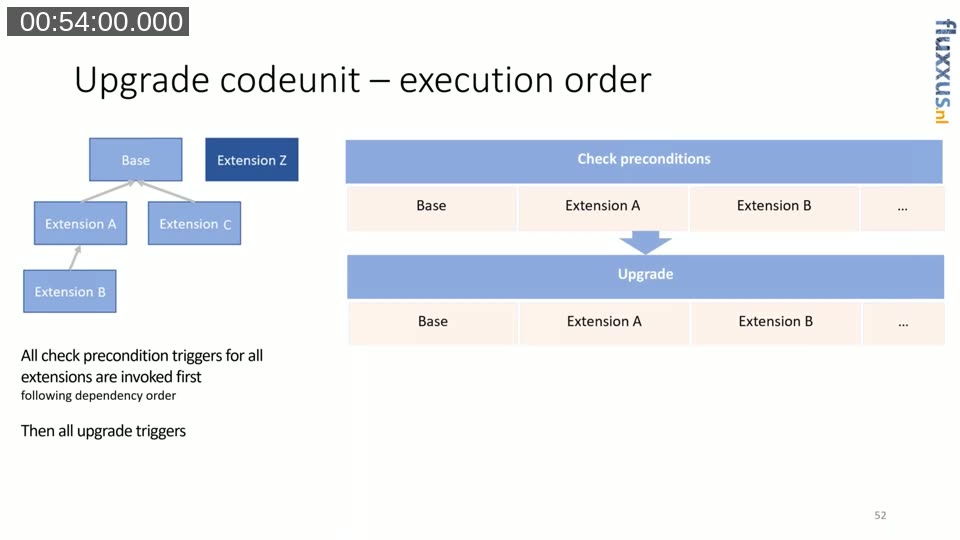
This is also the pattern partners need to follow for their own upgrade codeunits when moving custom fields out of standard tables into table extensions.
Tools Overview
Luc briefly covers the main tools in use at the time of the session: txt2AL (Microsoft’s tool for converting text exports to AL, used in Freddy’s scripts), the Upgrade Toolkit (now distributed as part of each system app’s source on GitHub), Docker with Freddy’s BcContainerHelper cmdlets (strongly recommended for its reproducibility), PowerShell, Idyn’s OMA (Object Manager Advanced, with CAL-to-AL conversion including trigger-to-subscriber rewrites), and ForNAV’s converter (which includes a command-line interface useful for build pipelines).
Licensing Notes
Luc closes with a few licensing points that were relevant at the time. BC 14 end-user licenses were available until October 2020 (potentially extended). Business Central uses named users rather than concurrent seats — a shift from the NAV seat model. Licenses acquired before 1 April 2019 converted at a 1:3 ratio (one concurrent seat to three named users). Partners planning an upgrade needed to verify that their end-user license count translated correctly before committing to the upgrade timeline.
This post was produced with AI assistance based on the recorded webinar. The content reflects the state of Business Central upgrade tooling and platform capabilities as of January 2020. Some details — particularly around platform support for field moves, licensing deadlines, and cloud deployment restrictions — have changed in subsequent releases.