
In this November 2019 Areopa webinar, Arend-Jan Kauffmann walks through the full landscape of API’s in Business Central — from the structural differences with page-based web services, through OData fundamentals, live REST demos, custom API development, and a pair of lesser-known tips. The session covers both the standard Microsoft API’s and the approach to building your own.
APIs vs. Page-Based Web Services
Kauffmann opens by placing API’s in context alongside the older page-based web services that Dynamics NAV and Business Central have long supported. The differences matter in practice.
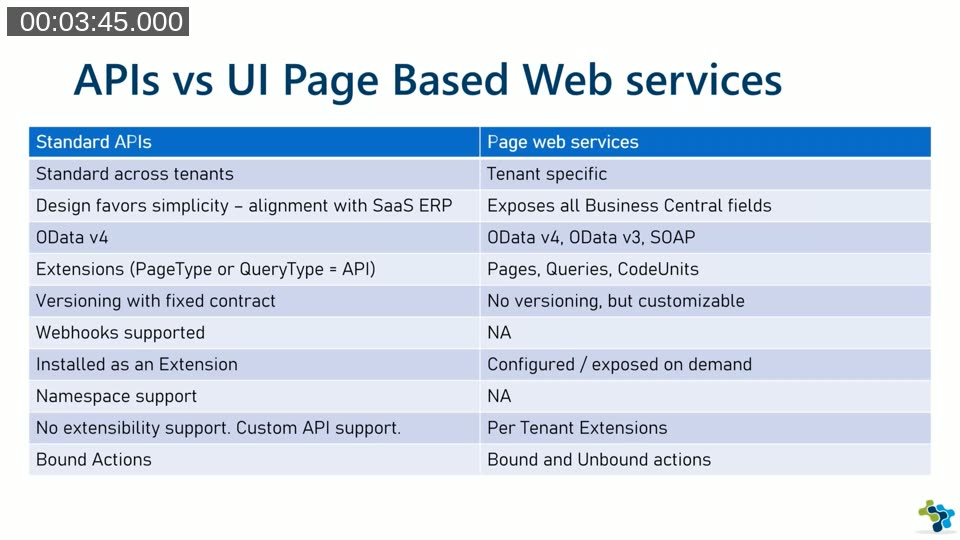
Standard API’s are consistent across all tenants and installed as extensions — Microsoft controls their shape and they cannot be modified per tenant. Page-based web services are tenant-specific: they can be exposed, disabled, extended, or customised freely. API’s return OData v4 exclusively, support webhooks and namespace isolation, and carry a fixed versioned contract. Page-based services can deliver OData v3 or SOAP and have no versioning mechanism. API’s are the right direction for new integrations.
The API URL Structure
Every Business Central cloud API starts from the same base hostname. The first version number in the URL refers to the endpoint, not the API content:
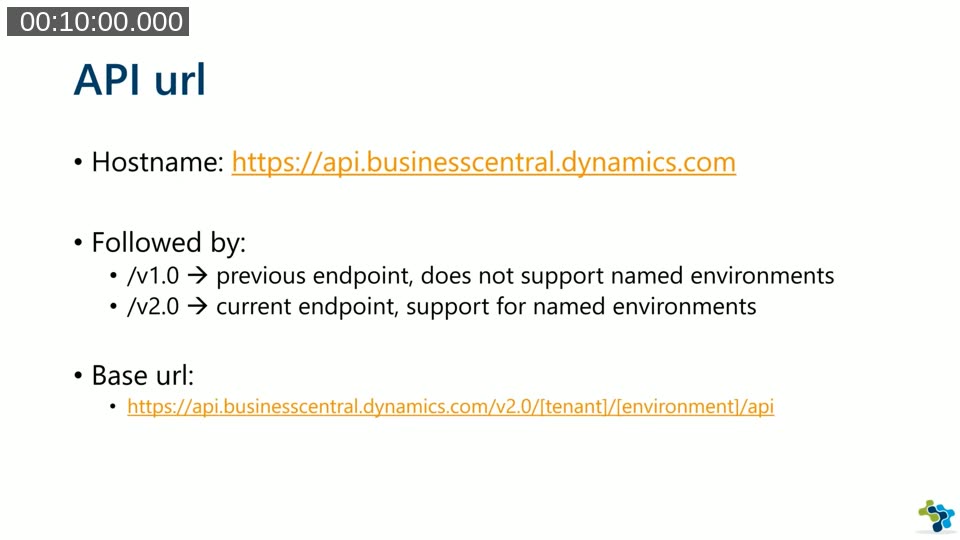
- /v1.0 — the previous endpoint. It does not support named environments and is expected to be deprecated.
- /v2.0 — the current endpoint. It supports named production and sandbox environments by name.
After the endpoint version comes the tenant identifier (typically the AAD domain, such as kauffmann.nl), then the environment name, then /api. A second version appears after /api — either /beta or /v1.0 — which refers to the version of the API content itself. The beta version lives in the base application and has no version property on its pages; the v1.0 version is installed as a hidden extension that can be retrieved via PowerShell or a sandbox container.
The tenant name can be omitted entirely when authenticating as an Azure AD user — the system identifies the tenant from the token.
TIP 1 — The 7 Basic Operations
Business Central API’s follow the OData specification. Kauffmann summarises the seven operations every developer should know before writing a single request.
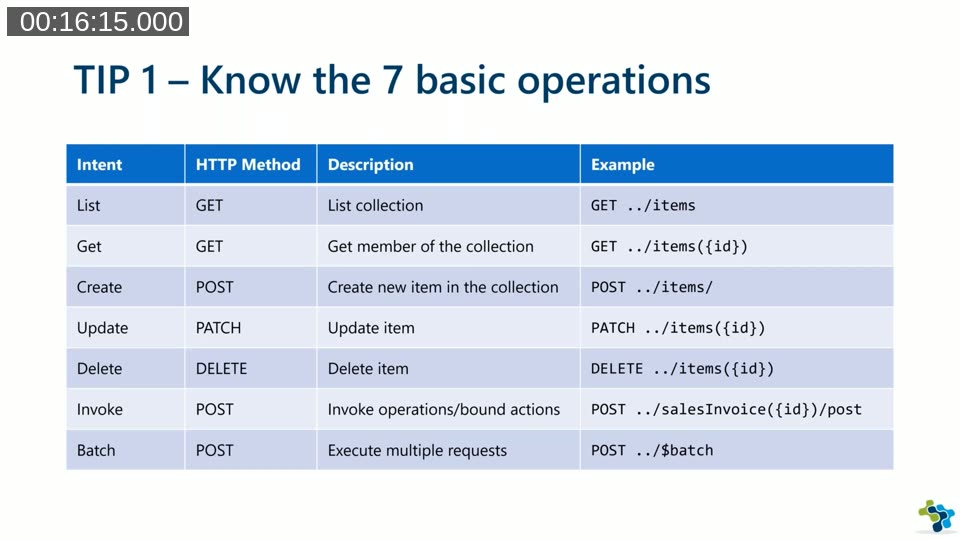
GET retrieves a full collection or a single record by ID. POST creates a new record in the collection. PATCH updates an existing record — and requires the If-Match header containing the record’s @odata.etag value to handle concurrency. DELETE removes a single record. POST is also used to invoke bound actions (operations tied to a specific record). The $batch endpoint allows multiple requests to be bundled into a single call, reducing round-trips and network overhead.
Concurrency note: When updating a record with PATCH, the API enforces optimistic concurrency. The If-Match header must contain the @odata.etag value returned when the record was read. Using a wildcard (*) bypasses this check when concurrent modification is not a concern.
TIP 2 — The 7 Query Parameters
OData query parameters let callers control exactly what data comes back. Used well, they reduce payload size and eliminate unnecessary follow-up calls.
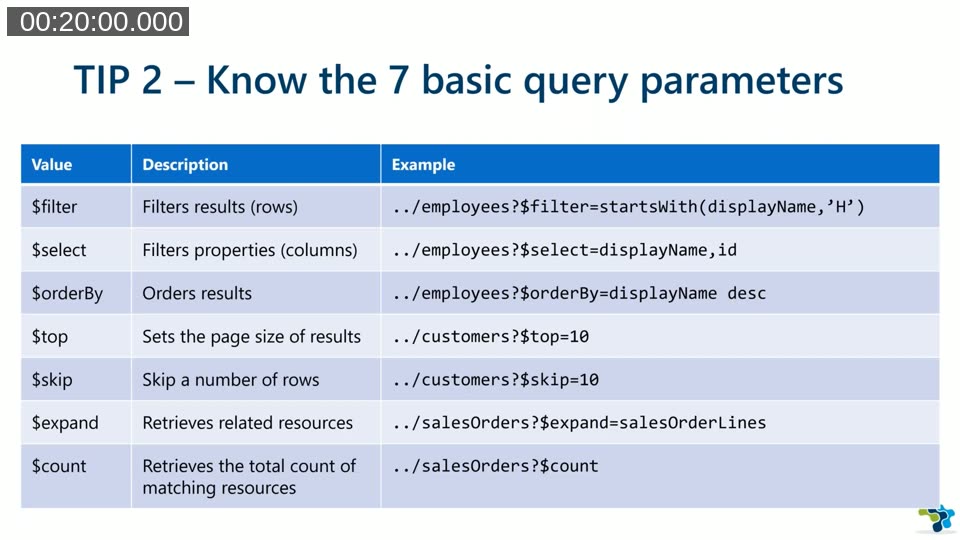
$filter applies row-level filtering following OData syntax. $select limits the fields returned — useful when only a few properties are needed. $orderBy sorts the result set. $top and $skip work together for paging: request a page size with $top and advance through results with $skip. $expand fetches related sub-resources in one call — for example, adding $expand=salesOrderLines to a sales orders request returns header and lines together. $count returns only the number of matching records rather than the full collection. Appending a property name to a record URL returns just that field’s value; adding /$value returns the raw value as plain text.
Demo — Standard APIs in VS Code REST Client
Kauffmann demonstrates using the REST Client extension for Visual Studio Code rather than Postman. The extension reads .http files, supports environment variables defined in settings.json, and can display both the outgoing request and the full response when the preview option is set to exchange. Variables stored in settings allow switching between a local Docker sandbox and a cloud environment by changing a single setting rather than editing every URL.
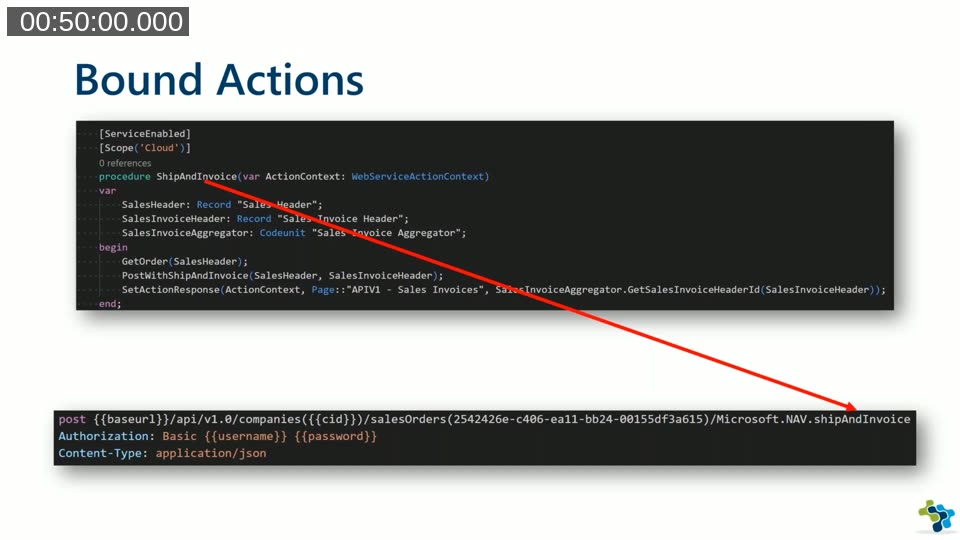
The demo covers: listing the available API endpoints, retrieving the company ID and storing it as a variable, listing items, applying $select and $filter, reading a single field value, patching an inventory field, expanding default dimensions on employees, creating a new employee with POST, and invoking the Microsoft.NAV.shipAndInvoice bound action on a sales order. The bound action returns HTTP 204 No Content on success — a 2xx response, not an error.
Company context is mandatory: Every endpoint below /api/v1.0/ requires a company ID. Attempting to call /employees directly without the company path returns an error. Always retrieve company IDs first and include them in subsequent URLs.
Custom APIs
Any partner can create custom API’s. They are included in extension apps, exposed at endpoints the developer defines, and straightforward to build using PageType = API or QueryType = API.
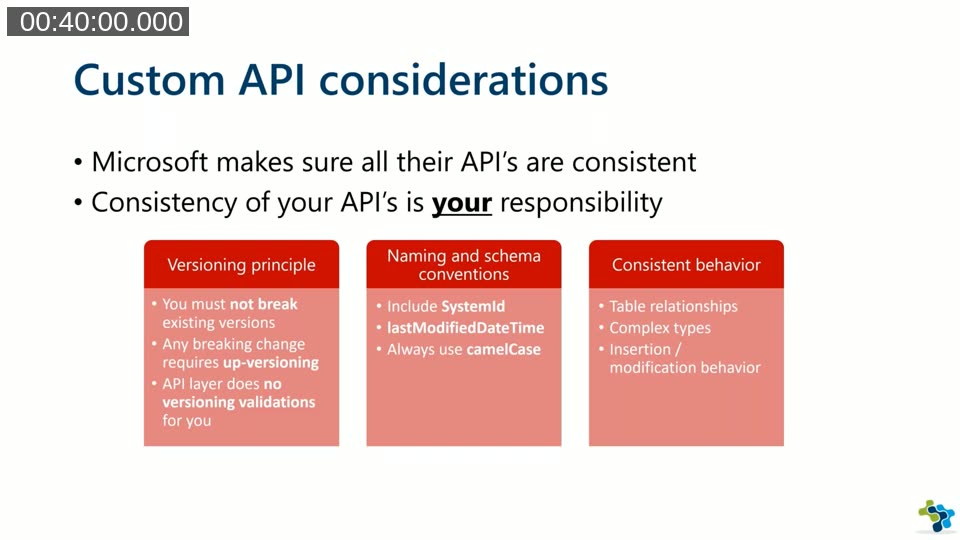
Microsoft enforces consistency in its own API’s — that responsibility falls to the developer for custom ones. Three areas require deliberate attention:
- Versioning — never modify an existing published version. Any breaking change requires a new version. An unchanged API page can be made available under multiple version numbers simply by adding the new version; only pages that actually change need to be copied and updated.
- Naming conventions — always include
SystemId, includelastModifiedDateTime, and use camelCase for all field names in the API page. - Consistent behavior — table relationships, complex types, and insert/modify logic should behave predictably across all pages in the API set.
API Definition Properties
Three properties form the namespace portion of the URL: APIPublisher, APIGroup, and APIVersion. These are case-insensitive. Two further properties define the entity: EntitySetName (the plural form, used in the URL) and EntityName (the singular form). These are case-sensitive.
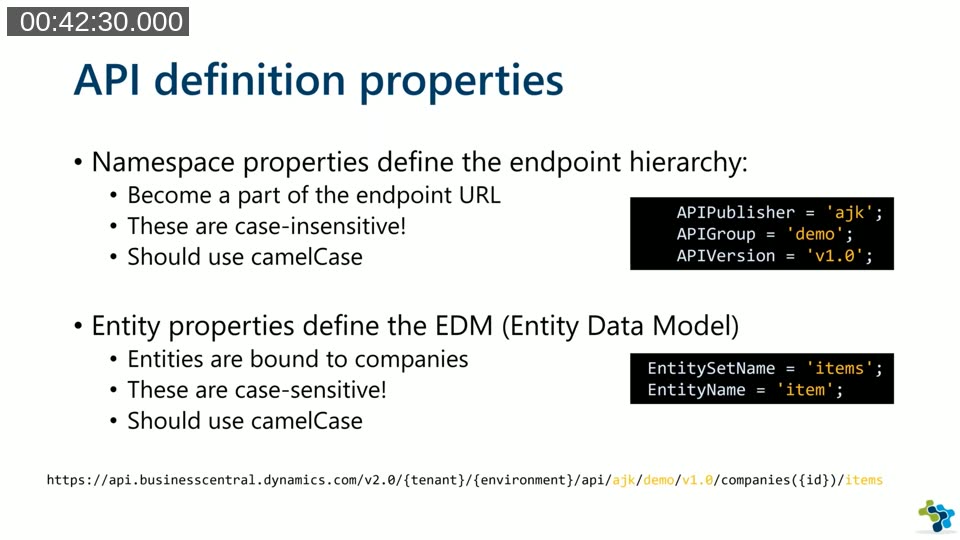
The full endpoint URL takes the form: /api/{publisher}/{group}/{version}/companies({id})/{entitySetName}. The company segment is always required — it is automatically added even for custom API’s. ODataKeyFields should be set to SystemId, and the first field in the repeater should map id to the system ID field. Primary key fields can be renamed via a PATCH call, but only if the AL code explicitly handles the rename — the API layer does not do this automatically.
Bound Actions and Query-Type APIs
A bound action is a procedure decorated with [ServiceEnabled] on an API page. It becomes a POST endpoint on a specific record: ../entities({id})/Publisher.ActionName. The first character of the action name is automatically lowercased when published — using a capital letter in the URL will produce an error that can be difficult to diagnose. Bound actions can accept input parameters, unlike the Microsoft standard example which takes none.
A Query-type API produces a flat dataset rather than a nested one. Where a Page-type API may nest related records (like sales order lines inside a sales order), a Query-type API returns repeating rows — similar to a spreadsheet view. This can be more convenient for consumers that prefer tabular data over hierarchical JSON.
Tip — List Available Environments
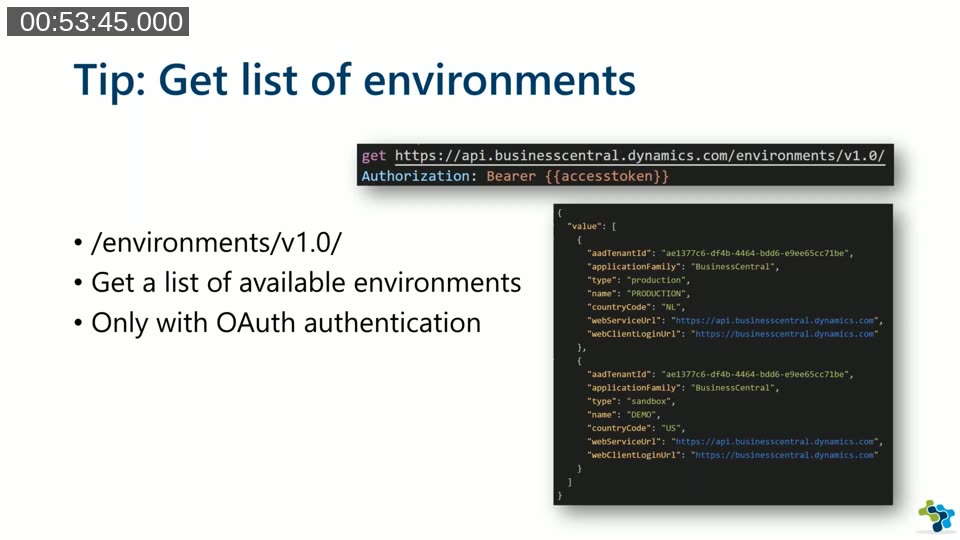
To retrieve all environments for a tenant, call GET https://api.businesscentral.dynamics.com/environments/v1.0/. This endpoint returns production and sandbox environments with their names, types, country codes, and web service URLs. It requires OAuth authentication — username/password authentication is bound to a single environment and cannot be used here. The endpoint was not yet officially documented at the time of the webinar but was already stable in practice.
Tip — Unbound Actions via Codeunit Web Services
A codeunit published as a web service normally shows only a SOAP URL in the Web Services list. However, it can also be called via a REST URL using the OData v4 path: /ODataV4/NAV.{WebServiceName}_{FunctionName}. This approach is not officially supported, but it is used by Power Automate (Flow) approval templates — making it unlikely to be removed. It allows calling non-record-bound logic (such as company creation or utility functions) over REST without needing a formal API page. A company context can be injected via a custom Company HTTP header when needed.
Custom connectors for Power Platform: Custom API’s can be consumed from Power Apps and Power Automate, but require a custom connector. The standard Business Central connector only exposes a whitelisted set of endpoints; a custom connector gives full control over which endpoints to expose and how to authenticate.
This post was prepared with AI assistance from a recording of the Areopa Academy webinar held on 26 November 2019. The content reflects the session as delivered; some API details may have changed in subsequent Business Central releases.